
In the vast landscape of our digital lives, few devices are as crucial yet as overlooked as the humble router. Often relegated to a dusty corner, tucked behind a screen, or hidden in a media cabinet, its physical appearance might seem like an afterthought. Yet, understanding “what does my router look like” goes far beyond mere aesthetics; it’s about recognizing the gateway to your digital world, a critical piece of technology that dictates your internet speed, security, and ultimately, your productivity and connectivity.
For many, a router is simply the box their internet service provider (ISP) delivered – an unassuming plastic rectangle, perhaps with a few blinking lights. But peel back that generic façade, and you’ll discover a world of diverse designs, engineering choices, and brand identities, all designed to deliver a seamless, secure, and fast internet experience. This exploration isn’t just about identifying your specific model; it’s about appreciating the blend of form and function that underpins our modern tech infrastructure, touching upon aspects of technology, brand strategy, and even the financial wisdom of investing in your digital backbone.
Beyond the Box: Unpacking Router Aesthetics and Design Principles
At first glance, many routers seem to embody a utilitarian, almost anonymous design. However, a closer look reveals a deliberate evolution in how these essential devices are presented, driven by a combination of technological necessity and brand differentiation.
Common Forms and Functions: From Bland to Bold
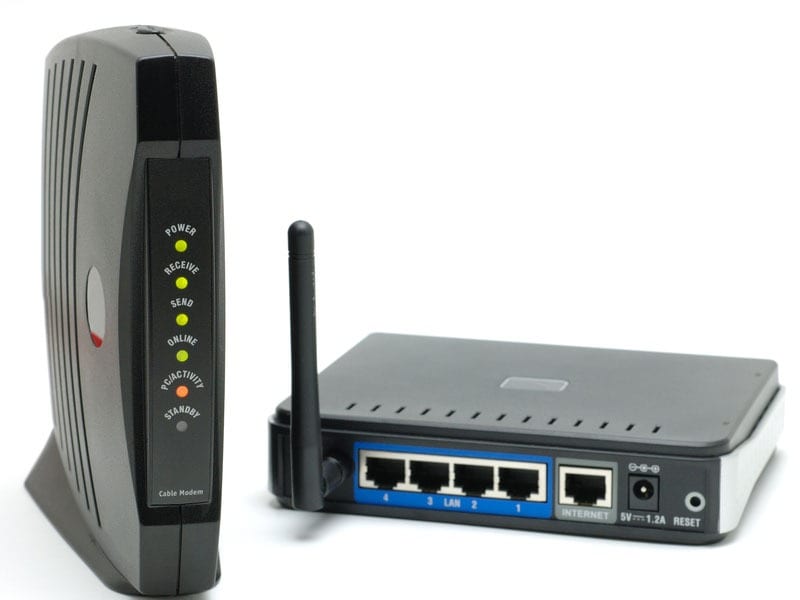
Historically, routers were often simple, rectangular boxes, typically white or black, with external antennas that might give them the appearance of a startled insect. This “generic” look was largely dictated by cost-effectiveness and the priority of function over form. The internal components, such as circuit boards, processors, and Wi-Fi transceivers, dictated the general size and shape, with ventilation slots being a key design element to prevent overheating.
Today, while the classic rectangular block with antennas persists, the market has seen a significant diversification. We now encounter sleek, cylindrical towers designed for better omnidirectional signal dispersion, stealthy flat panels meant to blend into modern decor, and even futuristic-looking devices with multiple, articulate antennas resembling a sci-fi gadget. Some manufacturers are experimenting with textured finishes, metallic accents, or even subtle LED lighting elements that indicate status without being obtrusive. This shift reflects a growing understanding that home electronics are no longer just functional tools but also part of a living space’s aesthetic.
The design choices aren’t purely cosmetic. Cylindrical designs, for instance, often house internal antennas arranged for 360-degree coverage, potentially improving signal strength in multi-story homes. Larger footprints can accommodate more powerful internal components and better heat dissipation, leading to more stable performance under heavy load. The “bold” designs, often seen in high-performance gaming routers, use aggressive angles and prominent antennas not just for aesthetics but to signal their advanced capabilities and powerful internal hardware.
The Material Story: Durability, Aesthetics, and Heat Dissipation
The materials used in a router’s construction are chosen for a delicate balance of cost, durability, and thermal management. The vast majority of routers are encased in plastic, primarily ABS (Acrylonitrile Butadiene Styrene). ABS is cost-effective, easy to mold into various shapes, and lightweight. It’s also non-conductive, which is important for electrical safety. However, plastic can retain heat, necessitating strategically placed vents.
Higher-end routers, or those designed for a more premium aesthetic, might incorporate touches of metal, often aluminum, for both looks and improved heat dissipation. Metal chassis or heat sinks can help draw heat away from sensitive internal components, leading to greater stability and longevity, especially for devices under constant heavy load. Ventilation, regardless of the material, remains a crucial design aspect. Grilles, vents, and even internal fans (in very high-performance or enterprise-grade routers) are strategically placed to ensure adequate airflow, preventing the degradation of performance or lifespan due to overheating.
The choice of material also subtly influences the router’s perceived quality and brand identity. A router with a matte, textured finish and solid feel might convey reliability and sophistication, aligning with a brand’s strategy to position itself as a premium provider of networking gadgets.
Brand Identity in Hardware: The ISP vs. Aftermarket Experience
The appearance of your router can often tell a story about its origin and the brand behind it. There’s a distinct difference in design philosophy between routers provided by Internet Service Providers (ISPs) and those purchased independently from aftermarket brands.
ISP-provided routers, while functional, often prioritize cost-efficiency and brand consistency. They typically feature the ISP’s logo prominently, a design that might be intentionally understated to avoid clashing with diverse home decors, or sometimes a generic, unobtrusive box. The goal here is primarily to provide a serviceable connection and maintain the ISP’s corporate identity through branded equipment, rather than to make a statement with cutting-edge design. They are part of the overall “service” package, not standalone “gadgets” meant to be admired.
In contrast, aftermarket router brands like Netgear, Asus, Linksys, TP-Link, and Google Wi-Fi invest heavily in differentiating their products through design and features. For these brands, their routers are their product. Their brand strategy involves creating distinctive visual identities that reflect their technological prowess, target audience (e.g., gamers, smart home enthusiasts, budget-conscious users), and overall corporate identity. For example, gaming routers from Asus ROG or Netgear Nighthawk often sport aggressive, angular designs with numerous external antennas and perhaps even customizable RGB lighting, signaling high performance and a focus on serious users. Mesh Wi-Fi systems like Google Nest Wi-Fi or Eero prioritize minimalist, aesthetically pleasing designs that blend seamlessly into modern homes, reflecting a brand promise of simplicity and elegance. This direct focus on design as a differentiator is a key marketing strategy to capture market share in a competitive tech landscape.
The Anatomy of Connectivity: Inside and Out
Beyond the superficial aesthetics, a router’s appearance is rich with functional cues. Understanding these physical features is key to diagnosing problems, setting up your network, and maximizing your internet experience.
Ports and Indicators: Reading Your Router’s Language
Every router, regardless of its design, comes equipped with a set of ports and LED indicators that act as its communication interface.
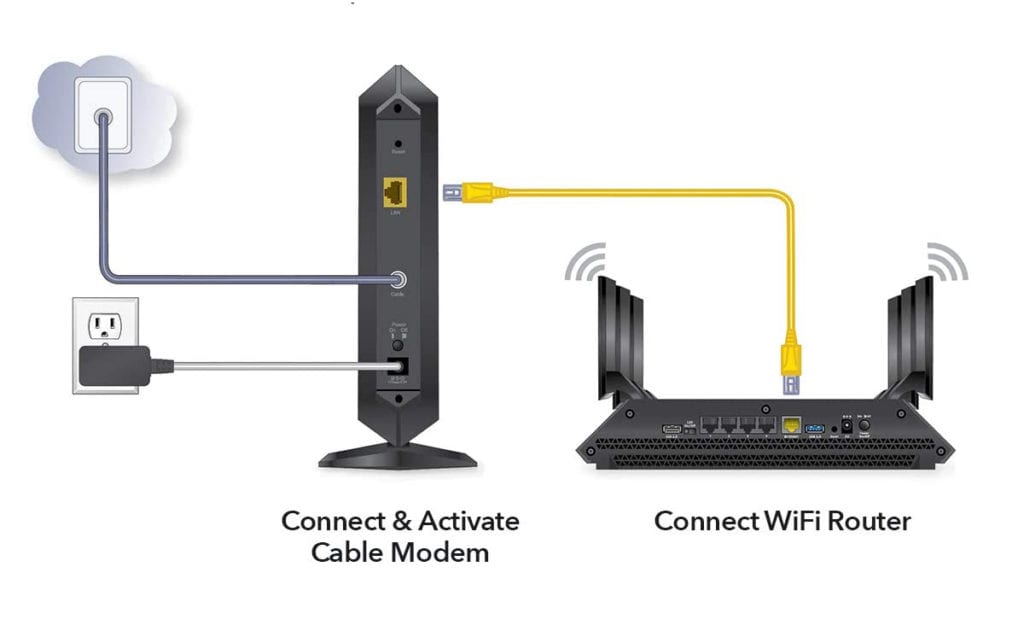
- WAN Port (Wide Area Network): This is usually a single, distinctively colored (often blue or yellow) Ethernet port, labeled “WAN” or “Internet.” This is where the cable from your modem connects, bringing the internet signal into your home network.
- LAN Ports (Local Area Network): Typically multiple (2-8), these Ethernet ports (often yellow or black) are labeled “LAN” or numbered. These are used to connect devices directly to your router via Ethernet cables, providing a wired, often more stable and faster connection for devices like desktop PCs, gaming consoles, or smart TVs.
- USB Ports: Many modern routers include one or more USB ports (USB 2.0 or 3.0). These can be incredibly versatile, allowing you to connect external hard drives to create a network-attached storage (NAS) device, share printers across your network, or even connect a 4G/5G dongle as a backup internet connection. This enhances productivity by centralizing storage and peripheral sharing.
- Power Port: The circular port where the power adapter connects, essential for turning on the device.
- Reset Button: Often a tiny, recessed button that requires a paperclip to press. Holding this button for several seconds typically restores the router to its factory default settings, a critical troubleshooting step.
- LED Indicator Lights: These small lights on the front or top of the router are vital for understanding its status.
- Power Light: Usually solid green, indicating the router is on. Blinking might suggest a startup sequence or an issue.
- Internet/WAN Light: Solid green or blue usually means a successful internet connection. Blinking indicates data activity. Red or amber often signals a problem with the internet connection from your ISP, a crucial ‘tutorial’ for self-diagnosis.
- Wi-Fi Light: Indicates the wireless network is active. Separate lights for 2.4GHz and 5GHz bands are common.
- LAN Lights: Often next to each LAN port, these light up when a device is connected via Ethernet and blink with data activity.
- USB Light: If present, indicates a device is connected to the USB port.
Understanding these lights is a fundamental part of digital security and network management, allowing users to quickly identify if their internet is down, if a wired device is connected, or if something unusual is happening on their network.
Antennae: Visible Signals of Wireless Strength
Antennas are perhaps the most recognizable feature of many routers, and their presence (or absence) says a lot about the device’s capabilities.
- External Antennas: Many routers feature two, three, or even more external, adjustable antennas. These are designed to broadcast and receive Wi-Fi signals. More antennas often mean better signal coverage, especially with technologies like MIMO (Multiple-Input, Multiple-Output) or MU-MIMO (Multi-User MIMO), which allow the router to communicate with multiple devices simultaneously on different spatial streams. Their adjustability allows users to optimize signal direction, a useful ‘tutorial’ for improving home Wi-Fi.
- Internal Antennas: Some modern, sleek routers, particularly mesh Wi-Fi systems, appear to have no antennas. These devices house their antennas internally, often strategically placed within the chassis to achieve omnidirectional coverage or a more compact, aesthetically pleasing form factor. This design choice speaks to technology trends favoring minimalist gadgets.
Regardless of whether they are internal or external, the quality and arrangement of antennas are paramount to a router’s ability to provide strong, stable Wi-Fi across your home.
Internal Components and Their Impact: Processors, RAM, and Wi-Fi Standards
While not visible from the outside, the internal components are the true engine of your router, directly impacting its performance and capabilities.
- Processor (CPU): Like a computer, a router has a CPU that handles data routing, network management, and security protocols. More powerful multi-core processors can handle more concurrent connections, higher data throughput, and advanced features like Quality of Service (QoS) and VPNs without slowing down. This is critical for productivity in a household with many connected gadgets.
- RAM (Random Access Memory): RAM stores temporary data and routing tables, allowing the router to quickly process network traffic. Sufficient RAM is essential for maintaining performance under heavy load and supporting a large number of connected devices.
- Flash Memory: This stores the router’s firmware (its operating system) and settings.
- Wi-Fi Standards: The router’s internal wireless radios support specific Wi-Fi standards (e.g., Wi-Fi 5/802.11ac, Wi-Fi 6/802.11ax, Wi-Fi 7/802.11be). These standards dictate the maximum theoretical speed, efficiency, and features of your wireless network. Upgrading to a router with the latest Wi-Fi standard is a direct investment in faster speeds and improved network performance, impacting everything from streaming 4K video to online gaming and remote work. Dual-band (2.4GHz and 5GHz) and tri-band routers offer more wireless channels and reduce congestion, catering to diverse network demands. Understanding these specs is key for tech reviews and making informed purchasing decisions.
Router as an Investment: Merging Performance, Security, and Value
Thinking of a router merely as a utility device misses its profound impact on your digital life. It’s an investment that significantly influences your personal finance, online income potential, and the robustness of your digital security.
Choosing the Right Router: Balancing Cost, Features, and Future-Proofing
The router market offers a vast spectrum of devices, from budget-friendly options under $50 to high-performance beasts costing several hundred dollars. Choosing the “right” router requires a careful balance between cost, the features you need, and a degree of future-proofing.
- Cost vs. Performance: Cheaper routers might suffice for basic browsing and email in small apartments. However, for larger homes, multiple users, streaming, gaming, or smart home ecosystems, investing more in a mid-range or high-end router is often a wise financial decision. Features like robust QoS (Quality of Service) prioritization, strong parental controls, and support for the latest Wi-Fi standards (like Wi-Fi 6 or 7) add significant value.
- Mesh Systems: For larger homes or those with dead zones, a mesh Wi-Fi system, while a larger initial investment, can provide seamless whole-home coverage and eliminate frustrating connectivity issues. This directly impacts productivity by ensuring reliable internet access in every corner of your property.
- Future-Proofing: While technology evolves rapidly, investing in a router with Wi-Fi 6/6E or even Wi-Fi 7 support, combined with a powerful processor and ample RAM, can ensure your network remains relevant and performant for several years. This avoids the cost and hassle of frequent upgrades, aligning with smart personal finance and investing principles.
A good router isn’t just an expense; it’s an investment in your digital infrastructure, yielding returns in reliability, speed, and security.
Digital Security Starts at the Router: A Gateway to Protection
Your router isn’t just a signal broadcaster; it’s the first line of defense for your entire home network against external threats. Its security features are paramount for protecting your personal data, smart home devices, and overall digital reputation.
- Built-in Firewalls: Most routers come with a basic firewall that filters incoming and outgoing network traffic, blocking unauthorized access attempts.
- WPA3 Encryption: Ensure your router supports WPA3 (Wi-Fi Protected Access 3), the latest and most secure encryption standard for wireless networks. This makes it significantly harder for unauthorized individuals to intercept your Wi-Fi traffic. Older standards like WPA2 are still common, but WPA3 offers superior protection against brute-force attacks.
- VPN Capabilities: Many advanced routers offer built-in VPN client functionality, allowing you to route all your network traffic through a VPN service. This provides an extra layer of privacy and security for every device connected to your network, protecting your online activities and potentially enhancing your digital security posture.
- Guest Networks: The ability to set up a separate guest Wi-Fi network isolates visitors from your main network, preventing them from accessing your private devices or sensitive data.
- Firmware Updates: Regularly updating your router’s firmware is crucial for digital security. Manufacturers frequently release updates to patch vulnerabilities, improve performance, and add new features. Ignoring these updates leaves your network exposed to known threats.
A secure router is the foundation of a safe digital life, safeguarding your privacy and preventing potential financial losses or reputational damage from data breaches.
Boosting Productivity and Online Income: The Unseen ROI
The connection between your router and your productivity or online income might not be immediately obvious, but it’s incredibly strong. A stable, fast, and reliable network is not a luxury; it’s a necessity for modern work and life.
- Remote Work and Productivity: For those working from home or engaging in side hustles, a reliable router is non-negotiable. Lagging video calls, slow file transfers, or dropped connections can severely hamper productivity, leading to missed deadlines and frustration. A high-performance router ensures consistent connectivity, allowing you to work efficiently and without interruption.
- Online Income and Side Hustles: Whether you’re a freelancer, run an e-commerce store, engage in online trading, or participate in content creation, your internet connection is your lifeline. A robust router ensures smooth operations, faster uploads/downloads, and a professional online presence. Any downtime or performance bottleneck directly translates to lost income or missed opportunities.
- Learning and Development: For students or lifelong learners, a stable network is vital for online courses, research, and accessing educational resources.
- Entertainment and Quality of Life: Beyond work, a good router enhances your quality of life, enabling seamless streaming of 4K content, smooth online gaming, and reliable connectivity for all your smart home gadgets. This contributes to overall well-being and reduces digital frustrations.
The Return on Investment (ROI) of a quality router might not be directly quantifiable in a spreadsheet, but its impact on your daily productivity, professional output, and personal satisfaction is undeniable.
The Evolving Landscape: Smart Routers and AI Integration
The router is far from static. As technology trends accelerate, our digital gateways are becoming smarter, more integrated, and increasingly intuitive, driven by innovations in AI and mesh networking.
Mesh Networks and Whole-Home Coverage: Design Meets Seamless Connectivity
One of the most significant advancements in router technology in recent years is the widespread adoption of mesh Wi-Fi systems. These systems replace a single, powerful router with multiple interconnected “nodes” or “satellites” strategically placed throughout a home.
- Seamless Connectivity: Mesh networks create a single, unified Wi-Fi network, allowing devices to seamlessly roam from one node to another without dropping the connection. This eliminates dead zones and provides consistent, strong coverage in every room, a stark contrast to traditional routers that often struggle with large homes or complex layouts.
- Aesthetic Integration: Many mesh systems prioritize minimalist, unobtrusive designs. Devices like Google Nest Wi-Fi, Eero, or Netgear Orbi often feature sleek, cylindrical, or spherical shapes with no external antennas, designed to blend into home decor rather than stand out. This reflects a trend in gadget design where technology becomes an integrated, almost invisible part of the living environment.
- Simplified Setup: Mesh systems are typically designed for easy setup via a mobile app, aligning with current software and app trends for user-friendly interfaces and intuitive control.
Mesh networks represent a convergence of design elegance, advanced networking technology, and enhanced user experience, delivering on the promise of true whole-home connectivity.
AI-Powered Performance: Intelligent Networks for the Future
The integration of AI tools into routers is revolutionizing how networks are managed and optimized. AI is transforming routers from passive signal broadcasters into intelligent network managers.
- Traffic Optimization: AI algorithms can analyze network traffic patterns, prioritize bandwidth for critical applications (e.g., video conferencing, gaming), and dynamically adjust Wi-Fi channels to avoid interference. This ensures a smoother, more responsive user experience for all connected devices.
- Threat Detection and Security: AI-powered security features can proactively detect and block malicious websites, identify unusual network activity indicative of intrusions, and quarantine infected devices. This adds a crucial layer to digital security, moving beyond traditional firewalls to intelligent threat prevention.
- Self-Healing Networks: Some advanced routers can use AI to monitor network health, diagnose issues, and even self-correct problems (e.g., automatically rebooting, adjusting settings) to maintain optimal performance without user intervention.
- Voice Control: Integration with AI assistants like Alexa or Google Assistant allows for voice commands to manage network settings, enabling new levels of convenience and productivity.
These AI tools are transforming routers into smart, adaptive components of our digital infrastructure, making networks more efficient, secure, and user-friendly.
The Router’s Place in the Smart Home Ecosystem
As our homes become smarter, the router’s role is evolving beyond just internet access. It is increasingly becoming the central hub for the entire smart home ecosystem.
- Central Hub Functionality: Many modern routers and mesh nodes incorporate smart home protocols like Zigbee or Z-Wave, allowing them to directly connect and control smart lights, thermostats, locks, and sensors without requiring a separate smart home hub. This simplifies setup and centralizes management through a single device.
- IoT Security: With an ever-growing number of IoT gadgets in our homes, the router’s ability to segment and secure these devices is critical. Smart routers can isolate IoT devices onto a separate network, preventing potential vulnerabilities in one gadget from compromising the entire home network.
- Integration with Apps: Router management apps not only control network settings but also integrate with smart home apps, providing a unified dashboard for managing both connectivity and smart devices. This convergence aligns with the trend of integrated digital tools for productivity and convenience.
The router is no longer just a box for Wi-Fi; it’s an intelligent, interconnected gateway that powers and protects our increasingly smart, digital lives.

Conclusion
So, “what does my router look like?” It’s far more than just a piece of plastic with blinking lights. Your router is the unsung hero of your digital existence, a complex blend of engineering and design that sits at the intersection of technology, brand identity, and financial wisdom.
From its external form factor, which can range from generic utility to futuristic aesthetics, to its internal components that dictate speed and efficiency, every aspect of a router is carefully considered. Its ports and indicator lights offer a diagnostic language, while its antennas signal its wireless reach. Understanding these elements empowers you to not only identify your router but to truly comprehend its critical function.
More importantly, recognizing the router as an investment highlights its profound impact on your personal finance, productivity, and digital security. A well-chosen router is a gateway to seamless online income, robust digital protection against ever-evolving threats, and a stable foundation for remote work and learning.
As technology continues to advance, the router is evolving into an even smarter, AI-driven, and seamlessly integrated component of our smart homes. It’s a testament to continuous innovation, ensuring that our digital future remains fast, secure, and effortlessly connected. So, next time you glance at that unassuming box, remember its multifaceted significance – it’s the cornerstone of your connected world, deserving of far more than just a passing glance.
aViewFromTheCave is a participant in the Amazon Services LLC Associates Program, an affiliate advertising program designed to provide a means for sites to earn advertising fees by advertising and linking to Amazon.com. Amazon, the Amazon logo, AmazonSupply, and the AmazonSupply logo are trademarks of Amazon.com, Inc. or its affiliates. As an Amazon Associate we earn affiliate commissions from qualifying purchases.