
In the fast-paced world of online gaming, lag, disconnections, and an inability to connect with friends can be incredibly frustrating. While many factors can contribute to these issues, one often overlooked culprit is your Network Address Translation (NAT) type. For gamers, encountering a “Moderate” NAT type can feel like a roadblock, hindering smooth gameplay and online interactions. But what exactly does a moderate NAT type signify, and how does it impact your digital experience?
This article will delve into the technical intricacies of NAT, focusing specifically on the implications of a “Moderate” setting. We’ll explore its meaning, why it’s often encountered, and how it compares to other NAT types. Crucially, we’ll also examine how a moderate NAT type can affect your online activities, particularly in the realm of gaming, and offer actionable advice on how to potentially improve it. While our primary focus will be on gaming, the principles of NAT extend to other online applications and services, making this understanding valuable for a broader tech-savvy audience.
Understanding the Basics: What is NAT?
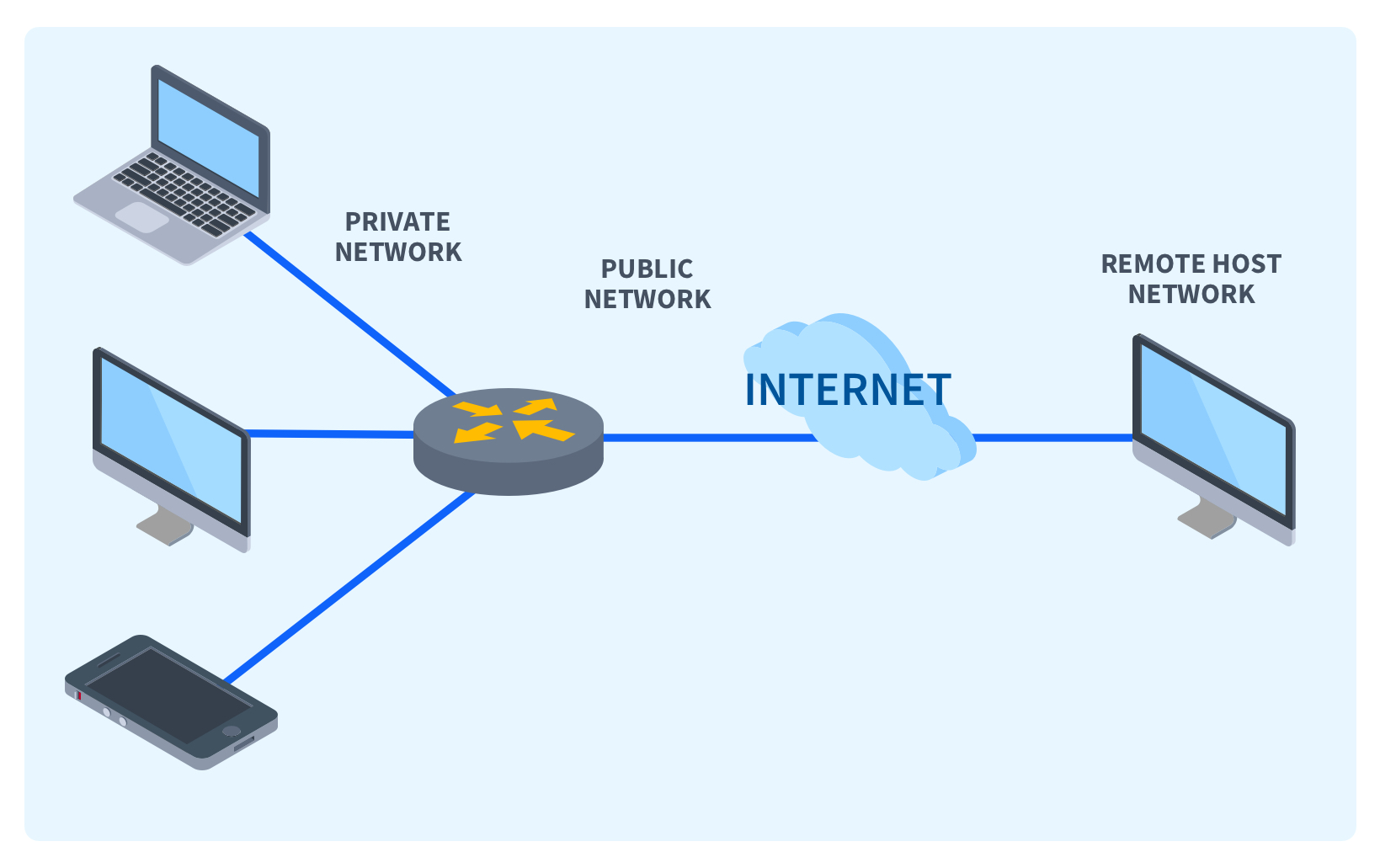
Before we dissect the “Moderate” aspect, it’s essential to grasp the fundamental concept of Network Address Translation (NAT). Imagine your home network as a private island. Each device connected to your Wi-Fi – your smartphone, laptop, gaming console, smart TV – has its own unique private IP address, like a house number on that island. However, when these devices want to communicate with the vast, public internet, they need a public IP address, which is like a single, official postal address for your entire island.
NAT acts as the translator or intermediary between your private network and the public internet. When a device on your network sends data to the internet, your router, equipped with NAT capabilities, replaces the device’s private IP address with its own public IP address. It also keeps a record of which private IP address sent the request. When the response from the internet comes back to the public IP address, the router consults its records and forwards the data to the correct device on your private network.
This process is crucial for several reasons:
- IP Address Conservation: The internet has a limited number of public IPv4 addresses. NAT allows multiple devices in a private network to share a single public IP address, effectively conserving these valuable resources.
- Enhanced Security: By hiding the private IP addresses of devices on your network, NAT provides a layer of security. External devices on the internet can only see your router’s public IP address, making it more difficult for them to directly target individual devices within your network.
- Network Flexibility: NAT simplifies network management by allowing you to assign private IP addresses to devices on your local network without needing to coordinate with your Internet Service Provider (ISP) for each new device.
How NAT Types Work: Open, Moderate, and Strict
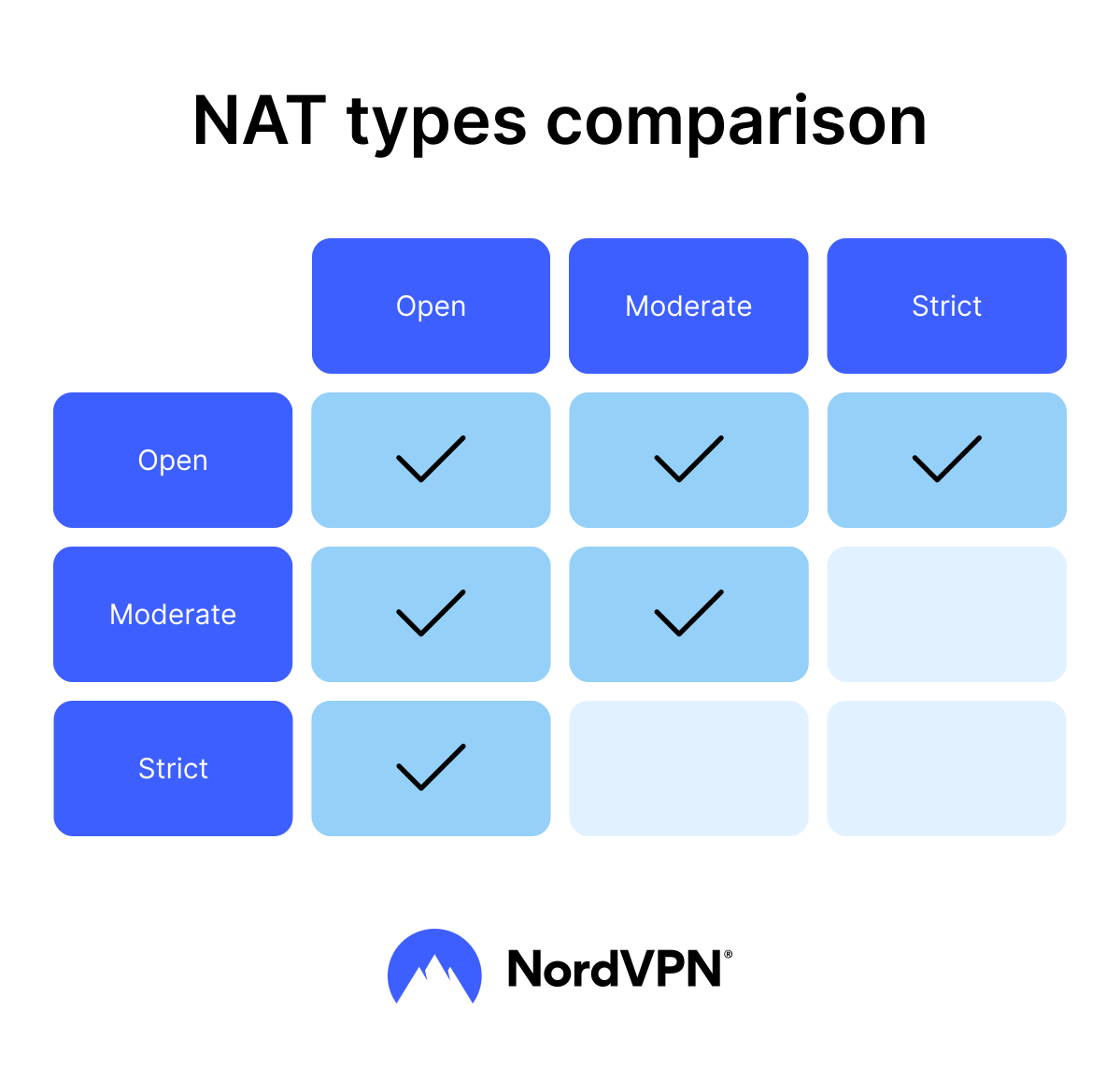
Network Address Translation isn’t a single, monolithic process. It can operate in different ways, leading to distinct “NAT types” that impact how your devices can connect and communicate with others online. These types are generally categorized into three main levels: Open, Moderate, and Strict. The classification often depends on how your router handles incoming connection requests from devices outside your local network.
Open NAT Type: The Unrestricted Gateway
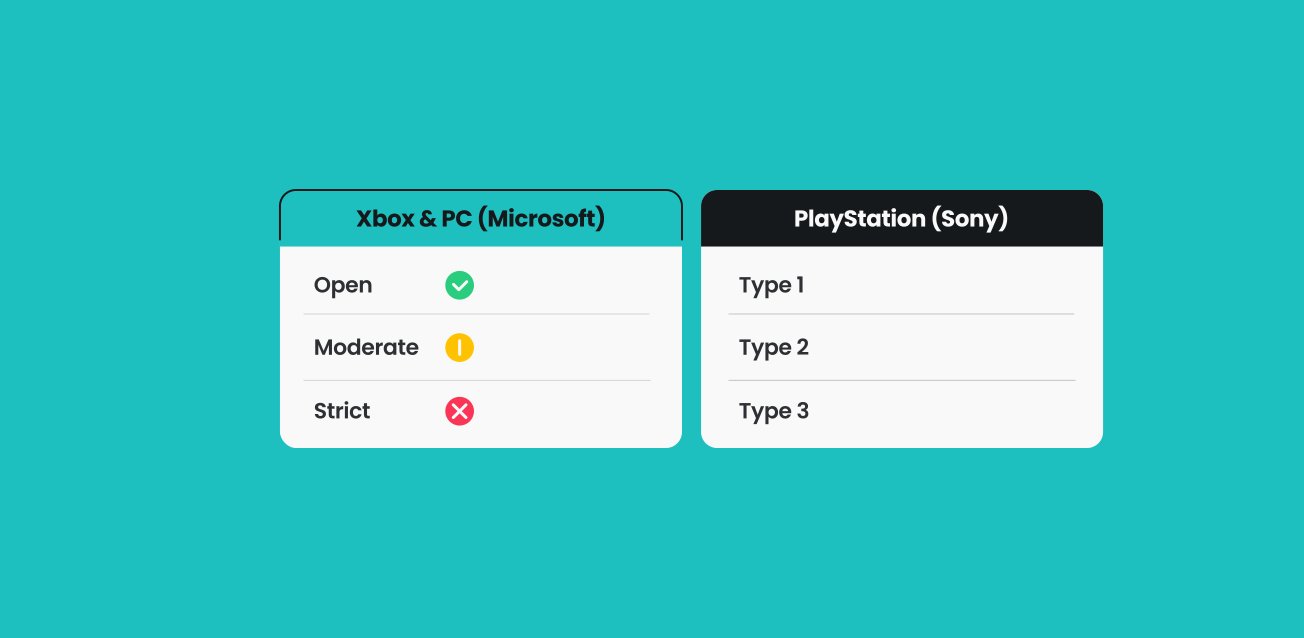
An “Open” NAT type, often referred to as NAT Type 1 or sometimes as “Direct Connection,” is the most desirable for online activities, especially gaming. In an Open NAT scenario, your device can initiate connections with any other device on the internet, regardless of their NAT type. Crucially, external devices can also initiate connections directly to your device without any significant restrictions. This is because your router is configured to allow incoming connections to reach your gaming console or PC.
Think of it like having a direct, unobstructed phone line to anyone you want to call, and anyone can call you back. This level of connectivity allows for seamless peer-to-peer connections, which are vital for features like hosting game lobbies, voice chat, and direct invitations to join games.
Strict NAT Type: The Fortified Fortress
Conversely, a “Strict” NAT type (NAT Type 3) is the most restrictive. With a Strict NAT, your device can only initiate connections with other devices that have an Open NAT. Importantly, other devices on the internet cannot initiate connections with your device. This means you might have trouble joining games hosted by friends, or even connecting to certain online servers.
This is like having a highly secured building where you can only initiate calls, but no one can call you back directly. Incoming connection requests are generally blocked unless your device specifically initiated the outward communication. This can lead to significant limitations in online multiplayer experiences.
Moderate NAT Type: The Middle Ground
This is where our focus lies. A “Moderate” NAT type (often NAT Type 2) represents a middle ground between Open and Strict. With a Moderate NAT, your device can initiate connections with other devices on the internet, and crucially, can initiate connections with devices that have an Open NAT. However, you may have difficulty connecting to or receiving connections from devices that have a Strict NAT.
Essentially, a Moderate NAT allows you to participate in most online activities but with some limitations. You can likely join games and connect to servers, but you might not be able to host certain types of game sessions, or you might experience issues with direct peer-to-peer connections. It’s like having a phone line where you can call anyone, but you can only receive calls back from people who have a direct line to you.
The “Moderate” designation implies that your router is allowing outgoing connections and is able to receive incoming responses to those initiated connections. However, it might be blocking unsolicited incoming connections from the internet that haven’t been initiated by a device on your local network.
The Impact of Moderate NAT Type on Your Online Experience
The primary area where NAT type significantly impacts users is online gaming. However, the principles can extend to other applications that rely on direct peer-to-peer communication.
Gaming: The Most Common Pain Point
In the context of online gaming, a Moderate NAT type can manifest in several ways:
- Difficulty Joining Games: You might find yourself unable to join game lobbies hosted by friends who have a stricter NAT type or are experiencing similar limitations. This is because your moderate NAT might not be able to establish a direct peer-to-peer connection with their potentially less permissive network.
- Limited Hosting Capabilities: Hosting game sessions, especially those that rely on direct connections between players, can be problematic. Your Moderate NAT might prevent other players from directly connecting to your hosted game, leading to a smaller player pool or an inability to host altogether.
- Voice Chat Issues: While many modern voice chat services use server-based communication that can bypass NAT limitations, some older or more direct systems might struggle. You might experience dropped calls or an inability to communicate with certain players.
- Potential for Lag and Disconnects: While not a direct cause of lag, a moderate NAT can sometimes contribute to less stable connections. If your router is having to perform more complex translations for incoming data, or if there are intermittent blocks, it can lead to a less reliable connection, which in turn can exacerbate perceived lag.
- Inability to Connect with Certain Players: The most frustrating aspect of a Moderate NAT is the inability to connect with players who have a Strict NAT. This can limit your gaming circle and prevent you from playing with specific friends or joining specific communities.
Beyond Gaming: Broader Implications
While gaming is the most prominent example, other applications can also be affected:
- Peer-to-Peer File Sharing: If you use P2P applications for file sharing, a Moderate NAT can limit your ability to connect to peers and download or upload files efficiently.
- Remote Desktop Access: Some remote desktop solutions rely on direct connections, which can be hampered by a Moderate NAT.
- Some Video Conferencing Tools: While most popular services are server-based, older or less robust video conferencing tools might encounter issues if they attempt direct peer-to-peer connections.
It’s important to note that not all online activities are equally sensitive to NAT types. Applications that primarily communicate with dedicated servers and don’t rely on direct peer-to-peer connections are generally less affected by NAT configurations.
Why You Might Have a Moderate NAT Type
Several factors can contribute to your network being assigned a Moderate NAT type. Understanding these can help you identify potential solutions.
Router Configuration and Firmware
Your router’s internal settings are the primary determinant of your NAT type.
- Default Settings: Many routers come with default NAT settings that are not optimized for direct peer-to-peer connections, defaulting to a more secure, though restrictive, state.
- Firmware Issues: Outdated or buggy router firmware can sometimes lead to NAT configuration problems. Manufacturers release updates to fix bugs and improve performance, including network connectivity.
Port Forwarding and UPnP
These are two common mechanisms used to manage how incoming traffic is handled by your router.
- Universal Plug and Play (UPnP): UPnP is a protocol that allows devices on your network to automatically configure your router to allow necessary incoming connections for specific applications. If UPnP is disabled on your router or the application doesn’t support it, it can lead to a Moderate or Strict NAT.
- Port Forwarding: This is a more manual process where you specifically tell your router to direct incoming traffic on certain ports to a particular device on your network. If the necessary ports for your gaming console or application are not forwarded, you’ll likely end up with a Moderate NAT.
ISP Restrictions and Network Setup
Your Internet Service Provider (ISP) can also play a role.
- CGNAT (Carrier-Grade Network Address Translation): Some ISPs use CGNAT, which means you are sharing a public IP address with multiple other customers. In this scenario, your router’s NAT is effectively nested behind your ISP’s NAT. This can make it very difficult or impossible to achieve an Open NAT, and often results in a Moderate or Strict NAT for individual users.
- Firewall Settings: Beyond your router, your ISP might have its own network firewalls that could be impacting incoming connection attempts.
Double NAT
This occurs when you have two devices performing NAT on your network. A common scenario is having your ISP’s modem/router combination also connected to your own Wi-Fi router. Your devices connect to your Wi-Fi router, which performs NAT. Then, your Wi-Fi router connects to the ISP’s modem/router, which performs another layer of NAT. This “double NAT” situation can significantly complicate port forwarding and often leads to a Moderate or Strict NAT.
Improving Your NAT Type: Towards an Open Connection
The good news is that a Moderate NAT type is often resolvable. While achieving a truly “Open” NAT might not always be possible depending on your ISP setup, you can usually improve it to a point where it no longer hinders your online experience significantly.
1. Check and Enable UPnP
The simplest first step is to ensure UPnP is enabled on your router.
- Access Router Settings: You’ll typically do this by typing your router’s IP address (often 192.168.1.1 or 192.168.0.1) into a web browser. Consult your router’s manual if you’re unsure.
- Locate UPnP Settings: Look for settings related to UPnP, NAT, or Advanced Network Configuration.
- Enable UPnP: Ensure the option is checked and save your changes.
- Restart Devices: After enabling UPnP, restart your router and your gaming console/PC.
If UPnP is already enabled and you still have a Moderate NAT, it might not be functioning correctly for your specific device or application, or your ISP might be interfering.
2. Manual Port Forwarding
This is a more technical but often more reliable method if UPnP isn’t sufficient.
- Identify Required Ports: Most gaming consoles and online games have a list of specific ports that need to be open for optimal connectivity. You can find this information on the game developer’s or console manufacturer’s support websites.
- Assign a Static IP Address: To ensure that port forwarding always directs traffic to the correct device, it’s best to assign a static IP address to your gaming console or PC within your local network. This is usually done within your router’s DHCP settings.
- Configure Port Forwarding Rules: In your router’s settings, navigate to the Port Forwarding section. For each required port, you’ll need to create a rule that specifies the external port number, the internal port number (often the same), the protocol (TCP or UDP, or both), and the static IP address of your gaming device.
- Save and Test: Save your port forwarding rules and restart your router and gaming device. Then, test your NAT type again.
3. DMZ (Demilitarized Zone) – Use with Caution
The DMZ setting on a router essentially opens up all ports for a specific device on your network, bypassing much of the router’s firewall protection for that device.
- How it Works: You select a device (e.g., your gaming console) to be placed in the DMZ. This allows any incoming connection attempt to reach that device directly.
- Risks: This is a less secure option. While it can often resolve NAT issues, it exposes the selected device to the internet without the usual firewall protections. Only use this as a last resort if other methods fail and you understand the security implications.
- Configuration: Find the DMZ settings in your router’s interface, enter the static IP address of your gaming device, and enable it.
4. Contact Your ISP
If you’ve tried the above steps and are still struggling with a Moderate NAT, it’s time to contact your ISP.
- Inquire about CGNAT: Ask your ISP if you are behind Carrier-Grade NAT. If so, you might be able to request a dedicated public IP address, though this may incur an additional fee.
- Router Limitations: Your ISP might have limitations imposed by their own network infrastructure or the type of modem/router they’ve provided. They may be able to adjust settings on their end or advise on compatible router configurations.
5. Consider Your Network Setup (Double NAT)
If you suspect you have a Double NAT situation:
- Bridge Mode: If you have two routers, try putting your ISP’s modem/router into “bridge mode.” This effectively turns the ISP device into a simple modem, allowing your own router to handle all the NAT and networking for your home. Consult your ISP for instructions on how to do this.
- Direct Connection: If possible, connect your gaming console or PC directly to your ISP’s modem/router (if it has sufficient Ethernet ports) and see if that improves your NAT type.
Conclusion: Navigating Your Network for Better Online Performance
Understanding your NAT type is a crucial step in optimizing your online experience, especially for gamers. A “Moderate” NAT type signifies a network configuration that allows outgoing connections and some incoming traffic but restricts direct peer-to-peer communication with certain other network configurations. While it might not render your online activities unusable, it can lead to frustrating limitations, particularly in multiplayer gaming.
By familiarizing yourself with the concepts of NAT, UPnP, port forwarding, and potential ISP-related issues like CGNAT, you empower yourself to troubleshoot and improve your network’s connectivity. While the technical jargon might seem daunting, the benefits of achieving a more open NAT type – smoother gameplay, more reliable connections, and the ability to connect with a wider range of players – are well worth the effort. For tech enthusiasts, delving into these network settings also provides valuable insight into how the internet and local networks interact, further enhancing your digital literacy.
aViewFromTheCave is a participant in the Amazon Services LLC Associates Program, an affiliate advertising program designed to provide a means for sites to earn advertising fees by advertising and linking to Amazon.com. Amazon, the Amazon logo, AmazonSupply, and the AmazonSupply logo are trademarks of Amazon.com, Inc. or its affiliates. As an Amazon Associate we earn affiliate commissions from qualifying purchases.