
In today’s increasingly digital communication landscape, the ability to process and understand information efficiently is paramount. For professionals, students, and anyone who relies on email for daily operations, wading through lengthy messages, complex jargon, or even just overwhelming volumes of text can be a significant hurdle. This is where Microsoft’s Immersive Reader, a powerful accessibility and focus tool, steps in, offering a transformative way to engage with your Outlook emails. While often lauded for its presence in OneNote and Word, its integration into Outlook provides a crucial advantage for email comprehension and digital well-being.
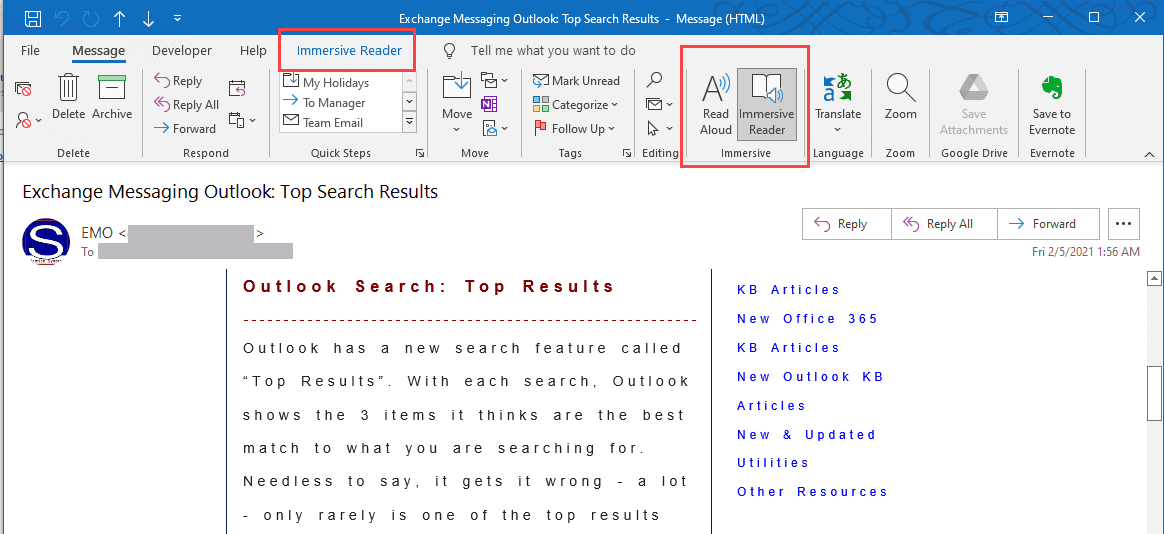
Immersive Reader in Outlook isn’t just another feature; it’s a carefully designed intervention aimed at reducing cognitive load, enhancing readability, and ultimately, making your email experience more productive and less stressful. It leverages sophisticated text-to-speech and visual adjustment technologies to create a distraction-free environment tailored to your individual needs. Whether you’re struggling with dyslexia, a second language, visual impairments, or simply find yourself easily distracted, Immersive Reader offers a personalized oasis for focused email consumption.
This article delves into the multifaceted capabilities of Immersive Reader within Outlook, exploring its core functionalities, the underlying technological principles, and the practical benefits it offers to a wide range of users. We will dissect how it transforms the traditional email reading experience into something more accessible, digestible, and empowering, ultimately showcasing its value as an indispensable tool in the modern professional’s digital toolkit.
Understanding the Core Functionality of Immersive Reader
At its heart, Immersive Reader in Outlook is a suite of tools designed to strip away distractions and present email content in a way that maximizes comprehension and minimizes cognitive effort. It achieves this through a combination of advanced text processing and user-configurable visual aids, transforming a static block of text into an interactive and adaptable reading experience.
Text-to-Speech Capabilities for Enhanced Comprehension
One of the most impactful features of Immersive Reader is its robust text-to-speech functionality. This goes beyond a simple playback of text; it offers a natural-sounding voice that reads the email aloud, synchronized with the highlighting of words as they are spoken. This feature is invaluable for several reasons:
- Auditory Learning Support: For individuals who learn best by listening, or those who struggle with decoding written text, the spoken word can significantly improve comprehension. It allows users to absorb information while multitasking or when prolonged visual focus is challenging.
- Accent and Language Familiarity: Immersive Reader offers a selection of voices and languages, allowing users to choose the accent and pronunciation that is most familiar and easiest to understand. This is particularly beneficial for non-native English speakers or those working in international environments.
- Information Retention: Hearing information can often aid in memory retention. For complex or lengthy emails, listening to them being read aloud can help solidify key points and details.
- Accessibility for Visual Impairments: For users with low vision or other visual impairments, the text-to-speech function provides a primary means of accessing and understanding email content, making Outlook a more inclusive platform.
Visual Adjustments for Improved Focus and Readability
Beyond auditory enhancements, Immersive Reader excels in its ability to visually tailor the email display to suit individual needs. These adjustments directly address common challenges associated with reading digital text, such as eye strain, distraction, and difficulty with word recognition.
- Line Focus: This feature allows users to highlight one, three, or five lines of text at a time. By narrowing the field of vision, it significantly reduces distractions from surrounding text and helps maintain focus on the current sentence or paragraph. This is akin to using a physical ruler or bookmark to guide your reading, but implemented digitally and seamlessly.
- Column Width: Overly wide columns of text can be difficult to track, forcing the eyes to jump back and forth unnecessarily. Immersive Reader allows users to adjust the column width to a more comfortable reading length, improving eye movement and reducing fatigue.
- Text Spacing and Font Size: The ability to increase or decrease the spacing between words, letters, and lines can dramatically improve readability. For individuals with visual processing difficulties or dyslexia, increased spacing can make it easier to distinguish individual characters and words. Similarly, the ability to adjust font size ensures that text is comfortably legible for all users, regardless of their visual acuity.
- Reading Color and Themes: The contrast between text and background plays a crucial role in readability and eye comfort. Immersive Reader offers a range of color themes, including high-contrast options, light and dark modes, and customizable background colors. This allows users to select a combination that minimizes glare and visual strain, making prolonged reading sessions more comfortable.
- Syllable Breaking and Parts of Speech Highlighting: These advanced features are particularly beneficial for language learners and individuals with reading challenges. Syllable breaking visually divides words into their component syllables, aiding in pronunciation and word decoding. Highlighting parts of speech (nouns, verbs, adjectives, etc.) can help users better understand sentence structure and the grammatical role of words, further enhancing comprehension, especially for those learning a new language or working with complex technical documentation.
The Technological Underpinnings and Accessibility Benefits
The effectiveness of Immersive Reader in Outlook stems from its sophisticated integration of natural language processing (NLP), speech synthesis, and user interface design principles. These technologies work in concert to create an accessible and highly functional reading environment, bridging gaps that traditional email interfaces often leave unaddressed.
Leveraging Natural Language Processing and Speech Synthesis
At its core, Immersive Reader relies on Microsoft’s advanced NLP algorithms to understand and process the text within an email. This allows it to perform tasks like:
- Accurate Text Segmentation: The system can accurately identify sentences, paragraphs, and individual words, ensuring that the text-to-speech and visual highlighting functions are precisely aligned.
- Linguistic Analysis for Features: For features like syllable breaking and parts of speech identification, NLP is critical. It analyzes the phonetic structure of words and their grammatical context to provide accurate breakdowns.
- Natural Language Generation (NLG) for Voice: The speech synthesis component utilizes NLG to generate human-like speech. This involves not just pronouncing words correctly but also incorporating appropriate intonation, rhythm, and pauses to make the reading experience sound natural and engaging, rather than robotic.

The continuous development in AI and machine learning within Microsoft is constantly refining these underlying technologies, leading to more accurate, natural, and versatile Immersive Reader experiences.
Bridging the Digital Divide: Immersive Reader as an Accessibility Tool
The true power of Immersive Reader in Outlook lies in its profound impact on digital accessibility. It actively works to democratize access to information, ensuring that the inability to read traditional text formats does not become a barrier to effective communication and information retrieval.
- Support for Dyslexia and Learning Disabilities: For individuals with dyslexia or other learning disabilities that affect reading, Immersive Reader offers a lifeline. The combination of auditory support, visual adjustments like line focus and spacing, and syllable breaking can significantly reduce the effort required to read, making emails comprehensible and less daunting.
- Assistance for English Language Learners (ELLs): For those learning English, the text-to-speech feature, coupled with syllable breaking and parts of speech highlighting, provides invaluable support. It allows learners to hear correct pronunciation, break down unfamiliar words, and understand grammatical structures, accelerating their language acquisition and improving their ability to engage with English-language emails.
- Benefiting Users with Visual Impairments: While not a replacement for dedicated screen readers, Immersive Reader offers a supplementary layer of support for users with mild to moderate visual impairments. The ability to increase font size, adjust contrast, and utilize line focus can make reading emails a more comfortable and less strenuous experience.
- Reducing Cognitive Load for All Users: Even for individuals without diagnosed learning differences, Immersive Reader can significantly reduce cognitive load. In an era of information overload, the ability to simplify and focus on email content frees up mental resources, allowing for more efficient processing and better decision-making.
By integrating these advanced technological capabilities with a user-centric design, Immersive Reader transforms Outlook from a passive email client into an active partner in comprehension and learning.
Practical Applications and Use Cases in Outlook
The theoretical benefits of Immersive Reader in Outlook translate into tangible improvements in daily workflows for a diverse range of users. Its versatility allows it to be applied in numerous scenarios, enhancing productivity, reducing errors, and fostering a more inclusive communication environment.
Enhancing Professional Productivity and Focus
In the fast-paced professional world, time is a critical resource, and misinterpreting an email can lead to costly mistakes. Immersive Reader offers several ways to boost efficiency and focus:
- Streamlining Information Consumption: Imagine receiving a lengthy project update or a complex proposal. Instead of scanning through dense paragraphs, you can activate Immersive Reader, choose a comfortable reading speed, and listen as the key information is read aloud. This allows for quicker assimilation of details, especially when multitasking.
- Reducing Email Fatigue: The constant barrage of emails can lead to mental fatigue. Immersive Reader’s ability to simplify the visual presentation and offer auditory support can make engaging with email less taxing, allowing professionals to maintain focus for longer periods.
- Improving Comprehension of Technical Jargon: For individuals encountering emails filled with specialized terminology or technical language, Immersive Reader can aid understanding. By breaking down complex sentences and allowing users to focus on specific sections, it facilitates a deeper grasp of the content.
- Supporting Remote and Hybrid Workflows: In environments where communication might be more asynchronous or require more independent comprehension, Immersive Reader empowers individuals to engage with emails effectively regardless of their immediate surroundings or personal preferences.
Supporting Educational and Learning Environments
The educational sector stands to gain significantly from Immersive Reader’s capabilities, making digital learning materials and communication more accessible to students of all backgrounds and abilities.
- Assisting Students with Learning Disabilities: As previously mentioned, Immersive Reader is a game-changer for students with dyslexia, ADHD, or other learning differences. It provides them with the tools they need to access and understand information that might otherwise be a significant barrier, promoting academic inclusion.
- Facilitating Language Acquisition: For students learning English as a second language, Immersive Reader is an invaluable asset. The text-to-speech feature helps with pronunciation, while the visual aids can assist in understanding sentence structure and vocabulary, making it easier to comprehend classroom announcements and assignments sent via email.
- Improving Focus for All Students: In today’s digitally saturated learning environments, distractions are abundant. Immersive Reader’s line focus and distraction-free interface can help students of all abilities concentrate better on the content of important communications from instructors or administrators.
- Empowering Educators: Educators can use Immersive Reader to understand the needs of their students better. By experiencing how different students might interact with digital text, they can tailor their communication and assignments for greater accessibility.

Enhancing Personal and Everyday Communication
Beyond professional and academic settings, Immersive Reader can also enrich personal communication, making it easier to stay connected and informed.
- Making Personal Correspondence More Accessible: Whether it’s a lengthy email from a family member or an important update from a service provider, Immersive Reader can make these communications more manageable and less intimidating.
- Supporting Individuals with Age-Related Vision Changes: As individuals age, reading small print or dealing with glare can become more challenging. Immersive Reader’s adjustable font sizes, color themes, and contrast options can make digital communication more comfortable.
- Providing a Calm Reading Experience: In a world of constant notifications and pop-ups, Immersive Reader offers a sanctuary for focused reading, allowing individuals to engage with their emails in a more relaxed and deliberate manner.
The integration of Immersive Reader into Outlook represents a significant step forward in making digital communication more equitable, efficient, and user-friendly. Its diverse applications underscore its value as a tool that benefits not just specific user groups but anyone seeking a more focused and accessible way to interact with their email.
aViewFromTheCave is a participant in the Amazon Services LLC Associates Program, an affiliate advertising program designed to provide a means for sites to earn advertising fees by advertising and linking to Amazon.com. Amazon, the Amazon logo, AmazonSupply, and the AmazonSupply logo are trademarks of Amazon.com, Inc. or its affiliates. As an Amazon Associate we earn affiliate commissions from qualifying purchases.