
JavaScript, as the ubiquitous language of the web, is constantly evolving. Understanding its core features is paramount for any developer, from novice to seasoned professional. Among these fundamental concepts, the keyword const plays a crucial role in defining how variables behave within your code. This article delves deep into the nature of const in JavaScript, exploring its declaration, scope, implications for immutability, and best practices, all within the realm of Tech.
Declaring Variables with const
In modern JavaScript, you have three primary keywords for declaring variables: var, let, and const. While var has largely been superseded by let and const due to its hoisting and function-scoping behavior, let and const offer block-scoping and clear intent, respectively. The const keyword stands out because it signifies that a variable’s binding is immutable.

Understanding Immutable Bindings
The key to understanding const lies in the term “binding.” When you declare a variable using const, you are essentially creating a constant reference to a value. This means that once a variable declared with const is assigned a value, that assignment cannot be changed. You cannot reassign a new value to a const variable.
Consider this simple example:
const PI = 3.14159;
// PI = 3.14; // This would cause a TypeError
In this snippet, PI is declared and assigned the value 3.14159. If we attempt to reassign PI to a different number, JavaScript will throw a TypeError, indicating that the assignment to a constant variable is forbidden. This strictness is a core feature of const and is designed to prevent accidental modifications to values that should remain unchanged throughout the execution of a program.
The Distinction from True Immutability
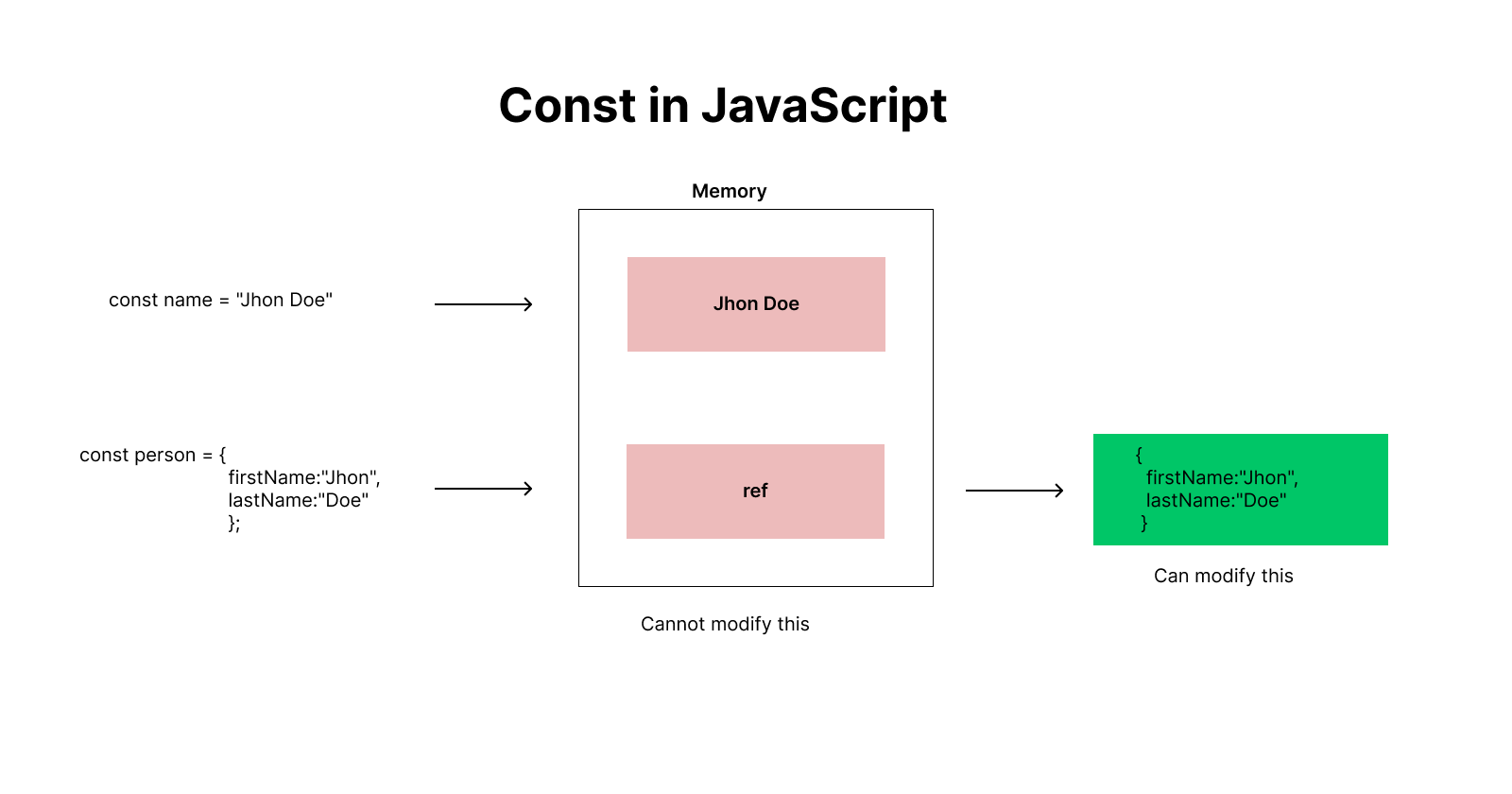
It’s crucial to distinguish between an immutable binding and an immutable value. While const guarantees that the binding cannot be changed, it does not necessarily mean the value itself is immutable, especially when dealing with complex data types like objects and arrays.
Let’s illustrate this with an object:
const user = {
  name: "Alice",
  age: 30
};

// This is allowed: Modifying properties of the object
user.age = 31;
console.log(user.age); // Output: 31

// This is NOT allowed: Reassigning the entire object
// user = { name: "Bob", age: 25 }; // This would cause a TypeError
In this case, user is declared as a constant object. We can successfully modify its properties (like age) because we are not changing the reference to the object itself. We are still pointing to the same object in memory. However, attempting to reassign the user variable to a completely new object will result in a TypeError. The binding between the user variable and its initial object reference remains constant.
Similarly, for arrays:
const numbers = [1, 2, 3];

// This is allowed: Modifying the array's contents
numbers.push(4);
console.log(numbers); // Output: [1, 2, 3, 4]

// This is NOT allowed: Reassigning the entire array
// numbers = [5, 6, 7]; // This would cause a TypeError
Again, we can add elements to the numbers array using methods like push(). The const declaration prevents us from assigning a brand new array to the numbers variable.
This nuanced understanding of immutable bindings is critical for writing predictable and maintainable JavaScript code.
Scope and const
Like let, variables declared with const are block-scoped. This means their visibility and accessibility are limited to the block of code in which they are declared. A block is typically defined by curly braces {}. This includes if statements, for loops, while loops, and even standalone blocks.
Block-Scoping in Action
Block-scoping provides a more predictable and less error-prone way to manage variable lifetimes compared to the function-scoping of var. When a variable is declared with const inside a block, it ceases to exist outside that block.
Consider this example:
function greetUser() {
  const message = "Hello!";
  if (true) {
    const userGreeting = message + " Welcome!";
    console.log(userGreeting); // "Hello! Welcome!"
  }
  // console.log(userGreeting); // This would cause a ReferenceError: userGreeting is not defined
}

greetUser();
In this function, message is declared within the greetUser function scope. Then, userGreeting is declared within the if block. After the if block finishes executing, userGreeting is no longer accessible. Attempting to access it outside its scope will result in a ReferenceError. This is a fundamental aspect of modern JavaScript development, helping to prevent naming collisions and making code easier to reason about.
Temporal Dead Zone (TDZ)
Another important concept related to the scope of const (and let) is the Temporal Dead Zone (TDZ). The TDZ refers to the period between the start of a block and the actual declaration of a const variable within that block. During the TDZ, the const variable exists but cannot be accessed. Trying to access it will throw a ReferenceError.
function demonstrateTDZ() {
  // console.log(myConstant); // This would throw a ReferenceError due to TDZ
  const myConstant = "I am here!";
  console.log(myConstant); // "I am here!"
}

demonstrateTDZ();
In demonstrateTDZ, if we uncomment the first console.log statement, we will encounter a ReferenceError. This is because myConstant has been declared with const but has not yet been initialized. The JavaScript engine reserves the name myConstant within its scope, but it’s not available for use until the const myConstant = "I am here!"; line is executed. This feature ensures that const variables are always initialized before they are used, reinforcing the immutability principle.
Why Use const?
The decision to use const over let is more than just a stylistic preference; it’s a deliberate choice that communicates intent and enhances code quality. By using const whenever possible, you signal to yourself and other developers that a variable’s reference should not change.
Enhancing Readability and Intent
When you see a variable declared with const, you immediately understand that its value is intended to be stable. This reduces the cognitive load required to understand the code. You don’t have to constantly scan for potential reassigments of that variable, making it easier to follow the flow of data and logic.
For example, imagine you’re working with configuration settings or mathematical constants. These are prime candidates for const.
const API_KEY = "your_super_secret_key";
const MAX_RETRIES = 5;
const GRAVITY = 9.81;

// ... later in the code ...

function fetchData() {
  // Uses API_KEY, MAX_RETRIES, GRAVITY without worrying about them changing
  // ...
}
Using const for these values makes their purpose clear: they are fixed and should not be altered during the program’s execution.
Preventing Accidental Reassignments
One of the most significant benefits of const is its ability to prevent accidental reassignments. In larger codebases or when collaborating with others, it’s easy for a variable that was intended to be constant to be mistakenly reassigned later in the code. const acts as a safeguard, throwing an error at runtime if such an attempt is made. This early detection of errors can save considerable debugging time.
Consider a scenario where a variable is used in multiple parts of a complex function. If it’s declared with let and accidentally reassigned in one branch of logic, it could lead to unexpected behavior in another part of the function that relies on its original value. const eliminates this possibility.
Optimizations (Potential but Not Guaranteed)
While not a primary reason for using const, JavaScript engines may be able to perform certain optimizations when they encounter const declarations. Since the engine knows the binding won’t change, it might be able to make assumptions about memory allocation or variable access that could lead to minor performance improvements. However, these optimizations are implementation-dependent and should not be the sole driving factor for adopting const. The primary benefits are improved code clarity and reduced bug potential.
When Not to Use const
While the preference should lean towards const, there are specific scenarios where let is the appropriate choice. Recognizing these scenarios is as important as knowing when to use const.
Variables That Need to Be Reassigned
The most straightforward reason to use let is when you know a variable’s value will need to change during the execution of your code. This is common in loops, counters, or variables that accumulate values.
let count = 0;
for (let i = 0; i < 10; i++) {
  count += i; // count is reassigned in each iteration
}
console.log(count); // Output: 45

let total = 0;
function addNumbers(num1, num2) {
  total = num1 + num2; // total is reassigned
  return total;
}
In these examples, count and total are intentionally reassigned. Using const here would lead to TypeErrors.
Variables Within Loops that Need to be Reassigned
When iterating and managing state that changes within the loop, let is essential. For instance, accumulating a sum or updating a status flag.
let sum = 0;
const prices = [10, 20, 30];
for (const price of prices) {
  sum += price; // sum needs to be reassigned
}
console.log(sum); // Output: 60
Here, sum is declared with let because it’s modified within the loop. The price variable, however, is correctly declared with const as it gets a new value from the prices array in each iteration, but its binding within that single iteration remains constant.
Conditional Variable Assignments
If a variable’s value is determined by different conditions and might be reassigned based on those conditions, let is the way to go.
let userName;
const isLoggedIn = true; // Or false

if (isLoggedIn) {
  userName = "Admin";
} else {
  userName = "Guest";
}
console.log(userName);
In this scenario, userName is declared with let because its assignment happens conditionally.
Best Practices and Conclusion
Adopting const as your default variable declaration is a highly recommended best practice in modern JavaScript development. It leads to more robust, readable, and maintainable code.
Embrace const by Default
The general guideline should be to declare all variables with const first. If you later find that the variable needs to be reassigned, refactor it to let. This “fail-fast” approach, where you start with the strictest option and loosen it only when necessary, helps prevent bugs and promotes clear thinking about variable mutability.
Team Consistency
In a team environment, establishing and enforcing coding standards that favor const is crucial. Consistent usage of const across the codebase makes it easier for all team members to understand and contribute to the project.

Understanding the Nuances of Objects and Arrays
Always remember the distinction between an immutable binding and an immutable value. If you need to ensure that an object or array cannot be mutated at all, you’ll need to implement deep immutability patterns, potentially using libraries or custom functions, in addition to using const. const itself only guards against reassignment of the variable.
In conclusion, const is a powerful keyword in JavaScript that signifies immutable bindings. By understanding its scope, its implications for object and array manipulation, and when to use it judiciously, developers can write more predictable, readable, and less error-prone code. Embracing const by default is a cornerstone of modern JavaScript best practices, contributing significantly to the overall quality and maintainability of software projects.