
In the vast and ever-expanding digital universe, our web browser serves as our primary spaceship, navigating us through the cosmos of information, entertainment, and connection. While many of us intuitively open an icon on our desktop or phone screen to access the internet, few pause to consider the significance of one particular setting: the “default” web browser. Far from being a mere technicality, understanding what a default web browser means illuminates crucial aspects of our digital security, productivity, online experience, and even the subtle influence of major tech brands on our daily lives.
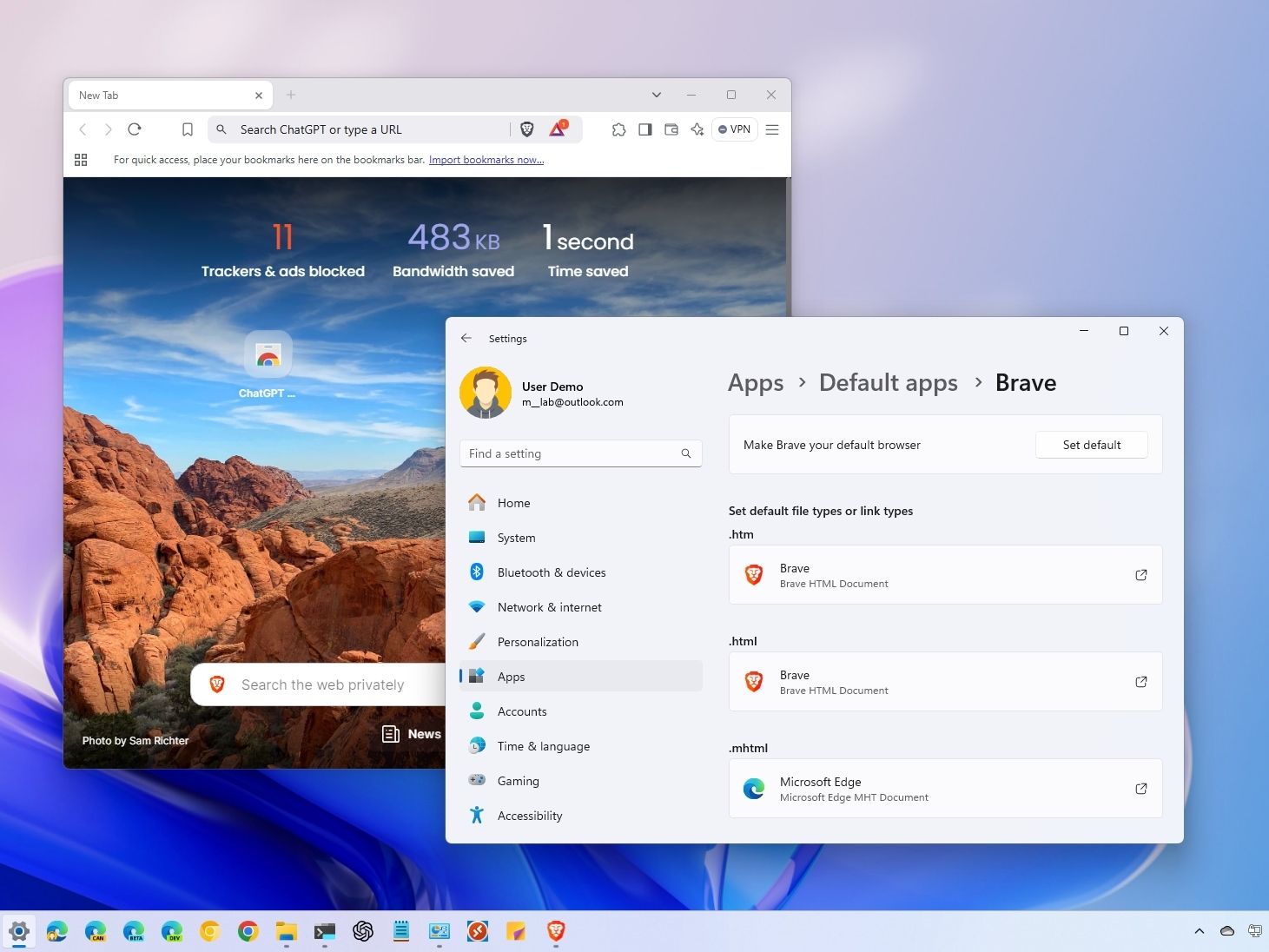
At its core, your default web browser is the application your operating system automatically uses whenever you click a web link, open an HTML file, or attempt to access internet content from another application. Imagine clicking a link in an email, a document, or a chat message. Without a designated default, your system wouldn’t know which of your installed browsers (Chrome, Firefox, Edge, Safari, Brave, Opera, etc.) to use. It’s the gatekeeper, the pre-selected champion, the primary tool for all things web-related unless you explicitly tell it otherwise. This seemingly simple choice carries profound implications across technology, branding, and even your personal finances.
The Technical Core: Understanding Default Settings and Mechanisms
To truly grasp the concept of a default web browser, it’s essential to dive into the underlying technical mechanisms that govern its function. It’s not just a preference; it’s an integrated system command that streamlines your digital interactions.
What “Default” Truly Implies
When an operating system (like Windows, macOS, Android, or iOS) designates an application as “default” for a certain file type or protocol, it’s essentially establishing a rule: “Whenever you encounter a URL (Uniform Resource Locator) or an HTML file, use this specific browser to open it.” This eliminates the need for you to manually select a browser every single time you click a link, saving countless clicks and enhancing workflow. Think of it as the system automatically knowing that if you want to write a document, you probably want to use Word or Google Docs, or if you want to view a PDF, you use Adobe Acrobat or a similar reader. For web content, that default app is your browser.
This automated action extends to various scenarios: a link in a word processor document, an advertisement in a free app, a URL shared via a messaging platform, or even an external hard drive containing saved web pages. The default browser is always ready, waiting to launch and present the content as intended, ensuring a seamless and immediate gateway to the internet.
How to Change Your Default Browser
Despite the system’s pre-selection, you are always in control. Changing your default browser is a fundamental user customization that can significantly alter your online experience. The process varies slightly across operating systems, but the principle remains the same: navigate to system settings, locate application preferences, and make your choice.
- On Windows: Go to “Settings” > “Apps” > “Default apps.” Here, you can select “Web browser” and choose from your installed options.
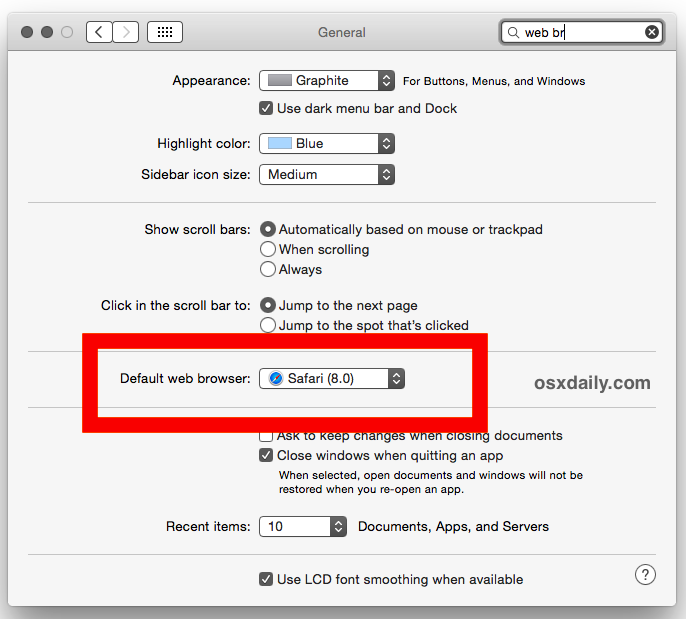
- On macOS: Open “System Settings” (or “System Preferences” on older versions) > “Desktop & Dock” (or “General”) > look for “Default web browser” dropdown menu.
- On Android: Often found in “Settings” > “Apps” > “Default apps” > “Browser app.”
- On iOS: As of recent updates, you can change the default browser by going to “Settings,” scrolling down to the browser app you prefer (e.g., Chrome, Firefox), tapping it, and then selecting “Default Browser App.”
Making this change is a crucial step for users who wish to align their digital environment with their specific needs for speed, security, privacy, or functionality, rather than simply accepting the manufacturer’s pre-installed option.
Behind the Scenes: Browser Engines and Standards
While we interact with the user interface of our chosen browser, a complex “engine” works tirelessly beneath the surface to render web pages. These rendering engines (like Blink, used by Chrome and Edge; Gecko, used by Firefox; and WebKit, used by Safari) are responsible for interpreting the raw code (HTML, CSS, JavaScript) of a website and displaying it visually on your screen.
The performance, compatibility, and even security of your browsing experience are heavily influenced by the sophistication and adherence to web standards of these engines. A default browser that utilizes a robust, regularly updated engine ensures that websites load correctly, run smoothly, and offer the intended interactive features. Choosing a browser from a developer committed to evolving web standards means you’re less likely to encounter broken layouts or slow-loading content, directly impacting your overall productivity and satisfaction.
Beyond the Basics: Why Your Default Browser Matters for Tech and Productivity
The choice of your default browser extends far beyond mere convenience. It’s a strategic decision that profoundly impacts your daily interactions with technology and your overall digital productivity. From raw speed to robust security, each browser offers a unique blend of features that can either enhance or hinder your online experience.
Performance and Speed
In our fast-paced world, every second counts. The speed at which your browser loads websites, executes scripts, and handles multiple tabs directly affects your productivity. Different browsers optimize resource usage differently. Some are notorious for consuming significant amounts of RAM and CPU, potentially slowing down your entire system, especially if you have an older computer or tend to keep many tabs open.
A well-optimized default browser can make a tangible difference. Features like pre-rendering, efficient JavaScript engines, and optimized caching mechanisms can lead to significantly faster page loads. This means less waiting and more doing, whether you’re researching for work, managing online finances, or simply enjoying multimedia content. Choosing a lightweight, fast browser as your default can provide an immediate and noticeable boost to your overall computing experience, freeing up system resources for other demanding applications.
Security and Privacy
Perhaps one of the most critical aspects of your default browser choice is its impact on your digital security and privacy. The internet is a minefield of threats, from phishing scams and malware to sophisticated tracking mechanisms designed to harvest your personal data. Your browser is the first line of defense.
Modern browsers come equipped with a suite of security features:
- Phishing and Malware Protection: Many browsers automatically flag or block access to known malicious websites.
- Sandboxing: Isolates web pages from your operating system, preventing malicious code from affecting your computer.
- Secure Connection Indicators: Visually alert you when a website uses HTTPS (a secure connection) versus an unencrypted HTTP.
- Tracking Prevention: Blocks third-party cookies and other methods advertisers use to track your online behavior across sites.
- Built-in VPNs (in some browsers): Offer an added layer of anonymity and security.
Privacy features are equally important. Browsers like Firefox, Brave, and DuckDuckGo Privacy Browser explicitly brand themselves around enhanced privacy, offering robust ad blockers, fingerprinting protection, and clear policies on data collection. For users concerned about their digital footprint and the vast amounts of data collected by tech giants, making an informed default browser choice is paramount. This choice directly influences how much of your online activity is monitored, stored, and potentially used.
Customization and Extensions (Productivity Focus)
The true power of a modern web browser often lies in its extensibility. Extensions, add-ons, and themes allow users to tailor their browsing environment to their specific needs, turning a generic tool into a highly personalized productivity powerhouse.
Consider the following productivity enhancements available through extensions:
- Password Managers: Securely store and auto-fill login credentials, saving time and improving security (e.g., LastPass, 1Password).
- Note-Taking Tools: Integrate directly into your browser for quick clipping and saving of web content (e.g., Evernote Web Clipper, OneNote Web Clipper).
- Ad Blockers: Beyond privacy, these can speed up page loads and remove visual clutter, allowing you to focus on content.
- Grammar Checkers: Provide real-time spelling and grammar corrections in web forms (e.g., Grammarly).
- Specialized Tools: Extensions for SEO analysis, developer tools, social media management, or project management platforms can streamline professional workflows.

The ecosystem of extensions varies significantly between browsers. Chrome boasts the largest library, but Firefox, Edge, and others also offer extensive options. Your default browser choice can dictate the range of tools available to enhance your efficiency, making it easier to manage tasks, gather information, and interact with web-based applications.
Syncing Across Devices
In an increasingly multi-device world, the ability to seamlessly transition your browsing experience from a desktop to a laptop, tablet, or smartphone is invaluable. Most major browsers offer syncing capabilities, linking your bookmarks, browsing history, saved passwords, open tabs, and even extensions across all your devices when you log in with a single account.
This continuity is a massive boost to productivity. You can start reading an article on your phone during a commute and instantly pick up where you left off on your computer at work. Saved passwords mean no more re-entering credentials on every device. Synchronized bookmarks ensure your most visited sites are always accessible. For businesses and individuals managing complex digital lives, a default browser with robust and reliable syncing is a cornerstone of an efficient, integrated digital workflow.
The Brand Battle: Marketing, Identity, and User Loyalty
Beyond the technical merits, the concept of a default web browser is deeply intertwined with brand strategy, corporate identity, and the fierce competition among tech giants. The browser is a crucial touchpoint for user engagement and ecosystem lock-in.
The Strategic Push for Defaults
For companies like Google, Apple, and Microsoft, controlling the default browser slot is a strategic imperative. A default browser means guaranteed user exposure to their services and ecosystems.
- Google Chrome: Predominantly default on Android devices and often promoted heavily on Windows, Chrome serves as a direct pipeline to Google Search, Gmail, YouTube, and its vast advertising network. Its market dominance provides Google with invaluable aggregate data on web usage trends, helping them refine their products and services.
- Apple Safari: The exclusive default on iOS and macOS, Safari is a cornerstone of Apple’s walled garden. It integrates seamlessly with Apple’s iCloud, Apple Pay, and other services, reinforcing user loyalty within the Apple ecosystem and highlighting the brand’s commitment to privacy (often presented in contrast to Google).
- Microsoft Edge: Microsoft aggressively pushes Edge as the default on Windows. While initially struggling, the Chromium-based Edge has improved significantly, offering deep integration with Windows features, Microsoft 365, and its Bing search engine, aiming to reclaim a piece of the browsing pie.
The battle for default status is a struggle for market share, user attention, and, ultimately, the data and revenue streams that flow from these interactions. Companies invest heavily in making their browsers robust, attractive, and deeply integrated into their hardware and software offerings, knowing that the “default” status is a powerful lever for user acquisition and retention.
Browser Identity and User Experience
Each browser cultivates a distinct brand identity, reflected in its design, features, and marketing message. This identity is crucial for fostering user loyalty and differentiation in a crowded market.
- Firefox (Mozilla): Often branded as the privacy-conscious, open-source alternative, appealing to users who value control, transparency, and community-driven development over corporate interests.
- Brave: Markets itself on privacy, speed (due to aggressive ad-blocking), and its unique Basic Attention Token (BAT) cryptocurrency model, allowing users to earn tokens for viewing privacy-respecting ads or tip content creators. This appeals to a tech-savvy, privacy-focused, and crypto-aware demographic.
- Opera: Known for its innovative features like a built-in VPN, ad blocker, and social media integration, targeting users looking for a feature-rich, all-in-one browsing solution.
The user experience (UX) is a direct extension of this branding. The visual design (UI), ease of navigation, customizability options, and even the tone of help messages all contribute to how a user perceives and connects with a browser. A positive UX builds trust and fosters a sense of personal connection, turning a utilitarian tool into a preferred digital companion.
The Open Source vs. Proprietary Divide
The branding battle also plays out along the lines of open-source versus proprietary software.
- Open Source (e.g., Firefox, Chromium): Brands built on open source emphasize transparency, community contributions, and often, a commitment to user privacy that isn’t beholden to shareholder profits. This can be a strong selling point for users wary of corporate data practices. Many browsers, including Chrome and Edge, are built on the open-source Chromium project, but then add proprietary features and services.
- Proprietary (e.g., Safari): These browsers leverage their tight integration with specific hardware and OS platforms, offering optimized performance and exclusive features that reinforce the parent company’s ecosystem. Their brand message often focuses on seamless integration, security through control, and a premium user experience.
Understanding this dynamic helps users not just choose a browser, but align with a broader philosophy of technology and digital citizenship.
The Financial Angle: Browsers and Your Money
While not immediately obvious, your default web browser has tangible implications for your personal finance, online income, and business activities. It acts as a gatekeeper for financial transactions and influences your exposure to revenue-generating mechanisms.
Impact on Online Income and Business
For content creators, online businesses, and anyone relying on the internet for income, the choice of default browser, and by extension, their audience’s browser choices, can have an impact.
- Website Compatibility: Ensuring a website functions flawlessly across all major browsers is crucial for reaching a broad audience. Business owners need to optimize their sites for the dominant default browsers to avoid losing potential customers due to rendering issues or broken features.
- Ad Blocking and Revenue: For websites that rely on advertising for revenue, widespread use of default browsers with aggressive ad-blocking capabilities (like Brave or those with installed ad-blocker extensions) can directly impact ad impressions and, consequently, income. This creates a tension between user privacy/speed and content monetization models.
- Secure Transactions: For e-commerce businesses and customers, a default browser with robust security features is non-negotiable for secure online banking, credit card transactions, and protecting sensitive financial information. Any perceived vulnerability can deter customers and damage a brand’s reputation.
Data Monetization and User Value
Many “free” browsers operate within an ecosystem where user data, directly or indirectly, becomes a valuable asset.
- Search Engine Defaults: Google, through Chrome, leverages its browser dominance to ensure Google Search remains the default search engine for the majority of users, generating significant advertising revenue. Other browsers like Firefox often receive substantial payments from search engines like Google or Yahoo to make them the default.
- Targeted Advertising: User browsing habits, collected (often anonymously and in aggregate) through default browsers, can be used to inform targeted advertising strategies, making ads more relevant and profitable.
- Direct Monetary Incentives: Browsers like Brave have introduced models where users can opt-in to privacy-respecting ads and earn cryptocurrency (BAT), which can then be used to tip content creators or exchanged for other currencies. This represents a direct financial interaction tied to browser usage.
Users must consider the trade-off: is the convenience of a “free” browser worth the potential for data collection and targeted advertising, or is a browser with strong privacy features, even if it might alter the ad ecosystem, a better financial choice in the long run by protecting personal data?
Digital Security as Financial Security
Ultimately, a secure default web browser is a critical component of your overall financial security strategy. A compromised browser can lead to:
- Phishing Attacks: Giving up banking credentials or credit card information.
- Malware Infections: Keyloggers that capture passwords, ransomware that locks financial files, or spyware that monitors financial transactions.
- Identity Theft: Access to personal information that can be used to open fraudulent accounts or compromise existing ones.
The “cost” of using an insecure browser as your default can be immense, far outweighing any perceived convenience. It underscores the importance of choosing a browser that is regularly updated, offers strong security features, and is backed by a developer committed to protecting its users. Your browser choice is, therefore, an investment in safeguarding your financial well-being in the digital realm.
Conclusion
The humble default web browser, often an afterthought for many, is a central pillar of our digital existence. It is not merely an application but a powerful interface that shapes our technological experience, influences our perception of brands, and profoundly impacts our financial security. From the efficiency of a lightning-fast browsing session to the peace of mind offered by robust privacy controls, the choice of your default browser reverberates through every aspect of your online life.
Understanding “what default web browser means” empowers you to move beyond passive acceptance of pre-installed software. It encourages a proactive decision-making process rooted in your personal needs for security, productivity, and digital freedom. By considering the technical underpinnings, the brand narratives at play, and the tangible financial implications, you can select a digital gateway that truly serves your best interests, transforming your online journey from a generic path to a personalized, secure, and highly efficient expedition. Make an informed choice, for your default browser truly is your most critical tool in the digital age.
aViewFromTheCave is a participant in the Amazon Services LLC Associates Program, an affiliate advertising program designed to provide a means for sites to earn advertising fees by advertising and linking to Amazon.com. Amazon, the Amazon logo, AmazonSupply, and the AmazonSupply logo are trademarks of Amazon.com, Inc. or its affiliates. As an Amazon Associate we earn affiliate commissions from qualifying purchases.