
In today’s interconnected world, the smooth and efficient flow of data is paramount for businesses of all sizes. At the heart of this intricate digital ecosystem lies the network switch, a critical piece of hardware responsible for directing traffic within a local area network (LAN). While unmanaged switches offer basic connectivity, it’s the managed network switch that provides the intelligence, control, and flexibility necessary to optimize network performance, enhance security, and troubleshoot issues proactively.
Unlike their unmanaged counterparts, which operate on a plug-and-play basis with no user intervention, managed switches empower network administrators with granular control over network operations. This article will delve deep into the world of managed network switches, exploring their fundamental role, key features, benefits, and the considerations for selecting the right one for your specific technological needs.
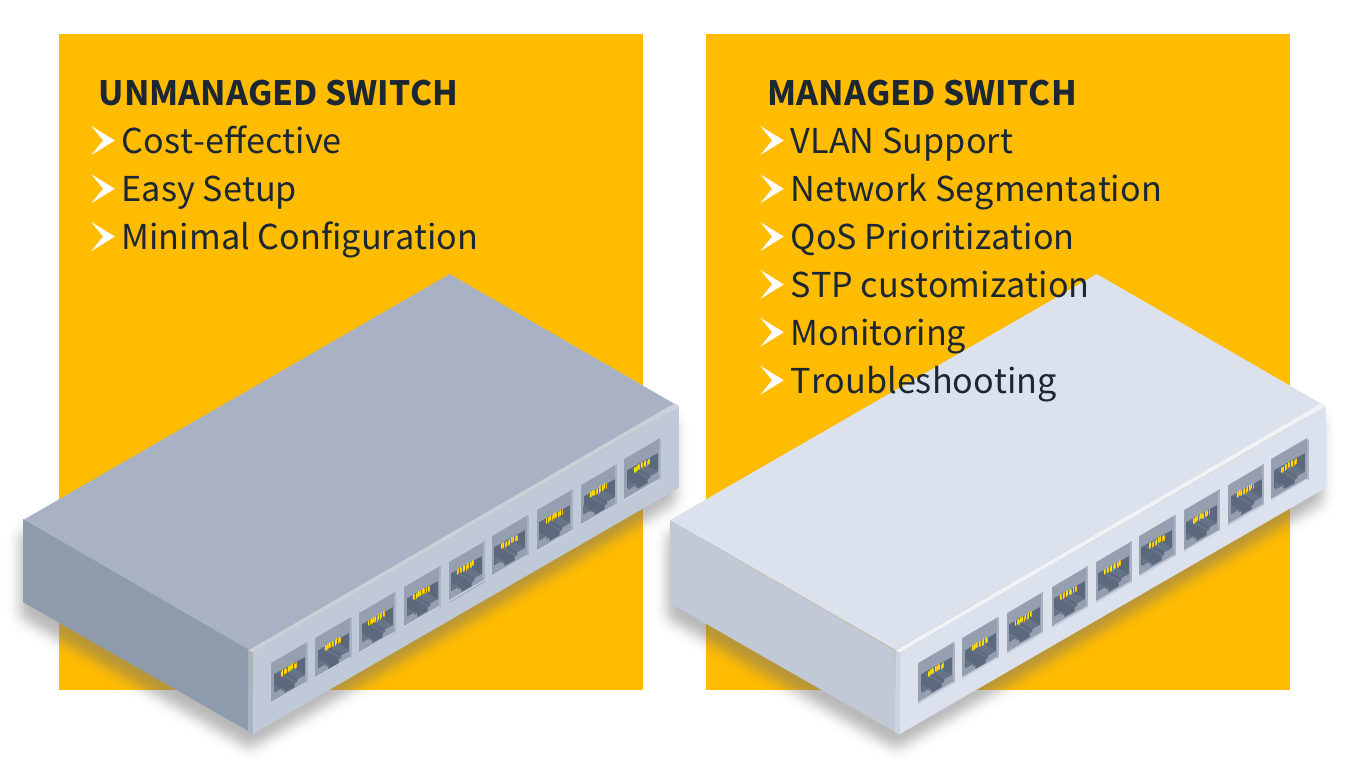
The Core Functionality of a Managed Network Switch
At its most basic, a network switch connects multiple devices within a network, allowing them to communicate with each other. Imagine a busy intersection in a city; the switch acts as the traffic controller, directing data packets – the digital equivalent of vehicles – to their intended destinations. Without a switch, devices would have to broadcast data to every other device on the network, leading to congestion and inefficiency.
Packet Switching and MAC Addresses
The fundamental operation of a switch relies on packet switching. When a device sends data, it’s broken down into smaller units called packets. Each packet contains the data itself, along with crucial header information, including the source and destination Media Access Control (MAC) addresses. The MAC address is a unique hardware identifier assigned to each network interface card (NIC) in a device.
A managed switch builds and maintains a MAC address table. When a packet arrives at a port, the switch examines the source MAC address and learns which device is connected to that port. It then checks the destination MAC address of the packet. If the destination MAC address is already in its table, the switch forwards the packet only to the specific port associated with that destination device. If the destination MAC address is unknown, the switch will initially flood the packet to all ports (except the incoming one) to discover the device. Once the destination device responds, the switch updates its MAC address table and subsequent traffic to that device will be efficiently directed.
VLANs: Segmenting Your Network for Efficiency and Security
One of the most powerful features of a managed switch is its support for Virtual Local Area Networks (VLANs). VLANs allow network administrators to logically segment a physical network into multiple smaller, independent broadcast domains. This is akin to creating virtual walls within a single physical office space, allowing different departments or user groups to operate as if they were on separate networks.
Benefits of VLAN Segmentation
- Enhanced Security: By isolating traffic between different VLANs, you prevent unauthorized access between segments. For example, guest Wi-Fi traffic can be placed on a separate VLAN, preventing it from accessing sensitive internal servers.
- Improved Performance: Reducing broadcast traffic within each VLAN minimizes network congestion. Devices only receive broadcast messages relevant to their own segment, leading to faster communication.
- Simplified Administration: VLANs make it easier to manage user groups and their network access. Adding or removing users to a specific VLAN is a simple configuration change.
- Cost Savings: By segmenting a large physical network into smaller logical ones, you can often reduce the need for multiple physical switches and routers.
For instance, a business might create separate VLANs for the sales department, the engineering department, and the guest network. This ensures that sales data isn’t inadvertently broadcast to engineering, and guest devices can’t interfere with internal operations.
Quality of Service (QoS): Prioritizing Critical Traffic
In any network, not all data is created equal. Some applications, like Voice over IP (VoIP) calls or video conferencing, are highly sensitive to delay and packet loss. If this critical traffic gets stuck behind less important data, the user experience can be severely degraded, leading to dropped calls or pixelated video. This is where Quality of Service (QoS) comes into play.
Managed switches allow administrators to prioritize specific types of traffic. Through various QoS mechanisms, such as classification, marking, queuing, and shaping, the switch can ensure that high-priority data packets are given preferential treatment, guaranteeing a smoother and more reliable experience for latency-sensitive applications.
QoS Mechanisms in Action
- Classification: Identifying different types of traffic based on criteria like IP address, port number, or protocol.
- Marking: Assigning priority levels to packets.
- Queuing: Holding packets in different queues based on their priority.
- Shaping: Controlling the rate of traffic flow to prevent congestion.
Implementing QoS effectively means that during peak network usage, your critical business communications will still function optimally, even if other, less time-sensitive traffic is experiencing some minor delays.
Key Features and Capabilities of Managed Switches
Beyond their core packet-switching and traffic management capabilities, managed switches offer a rich set of features that provide advanced control and visibility into network operations.
Network Monitoring and Diagnostics
One of the most significant advantages of managed switches is their ability to provide detailed insights into network activity. This is crucial for identifying performance bottlenecks, troubleshooting issues, and ensuring overall network health.
SNMP and Port Mirroring
- Simple Network Management Protocol (SNMP): Managed switches support SNMP, a standard protocol that allows network management software to monitor the status and performance of network devices. Administrators can use SNMP to collect data on port utilization, error rates, device temperature, and more, providing a comprehensive view of network health.
- Port Mirroring (SPAN): This feature allows administrators to mirror traffic from one or more ports to a designated monitoring port. This is invaluable for network analysis tools, intrusion detection systems, and troubleshooting, as it enables them to capture and inspect all traffic flowing through specific parts of the network without disrupting normal operations.
Link Aggregation (LAG) and Port Trunking
To increase bandwidth and provide redundancy, managed switches support Link Aggregation (LAG), also known as port trunking or etherchannel. This feature allows multiple physical network ports to be combined into a single logical link.
Benefits of Link Aggregation
- Increased Bandwidth: By aggregating multiple links, the total available bandwidth between devices or between switches is effectively multiplied. For example, combining two 1 Gbps ports into a LAG creates a logical 2 Gbps link.
- Redundancy and Fault Tolerance: If one of the physical links in the LAG fails, the remaining links continue to carry traffic, ensuring continuous connectivity and preventing a single point of failure.
- Load Balancing: Traffic can be distributed across the aggregated links, preventing any single link from becoming a bottleneck.
LAG is essential for high-traffic connections, such as links between core switches or between a server and the network, where maximizing throughput and ensuring uptime are critical.
Security Features
Managed switches offer a robust suite of security features that help protect the network from various threats.
Access Control Lists (ACLs) and Port Security
- Access Control Lists (ACLs): ACLs are sets of rules that define which traffic is allowed or denied to enter or leave specific ports or VLANs. Administrators can create granular ACLs to block unwanted protocols, restrict access to specific IP addresses, or permit only authorized communication. This is a powerful tool for enforcing network security policies.
- Port Security: This feature allows administrators to control which MAC addresses are allowed to connect to a specific switch port. If an unauthorized device attempts to connect, the port can be configured to shut down, restrict traffic, or send an alert. This prevents unauthorized devices from gaining access to the network.
Other security features often found on managed switches include 802.1X port-based authentication, which requires devices to authenticate before gaining network access, and DHCP snooping, which prevents rogue DHCP servers from distributing false IP address information.

The Benefits of Implementing Managed Network Switches
The decision to invest in managed network switches over simpler unmanaged alternatives brings a wealth of tangible benefits to an organization’s IT infrastructure. These advantages directly translate into improved operational efficiency, enhanced security posture, and greater overall network resilience.
Enhanced Network Performance and Optimization
The ability to fine-tune network traffic flow is a cornerstone benefit of managed switches. By implementing features like VLANs and QoS, administrators can create a network that is not only faster but also more reliable.
Proactive Bottleneck Identification and Resolution
With the detailed monitoring capabilities offered by managed switches, potential performance bottlenecks can be identified before they significantly impact users. Analyzing port utilization statistics, error rates, and traffic patterns allows for proactive adjustments. For example, if a particular server uplink is consistently showing high utilization, an administrator can investigate the cause, perhaps by aggregating more ports or upgrading the link, rather than waiting for users to report slow access.
Improved Network Security and Compliance
In today’s threat landscape, robust network security is non-negotiable. Managed switches provide the tools necessary to build a more secure network environment and meet stringent compliance requirements.
Granular Control Over Access and Traffic
The granular control afforded by ACLs and port security empowers administrators to define precisely who and what can access the network and its resources. This significantly reduces the attack surface. For example, sensitive financial data can be isolated on a specific VLAN with strict ACLs, preventing any unauthorized access from other network segments. This level of control is vital for organizations handling sensitive information or subject to regulatory compliance mandates.
Simplified Network Management and Troubleshooting
While the initial configuration of a managed switch might require more expertise than an unmanaged one, the long-term benefits in terms of management and troubleshooting are substantial.
Centralized Control and Remote Management
Managed switches often come with intuitive web-based interfaces or command-line interfaces (CLIs) that allow administrators to manage the entire network from a central location. Many advanced managed switches also support remote management protocols, enabling administrators to monitor and configure devices from anywhere, reducing the need for on-site visits and speeding up issue resolution. The ability to remotely diagnose problems and make configuration changes can drastically reduce downtime.
Scalability and Future-Proofing
As businesses grow, their network needs evolve. Managed switches offer the flexibility and scalability required to adapt to these changes.
Adapting to Evolving Business Needs
The ability to easily reconfigure VLANs, add new security policies, or upgrade bandwidth through link aggregation ensures that the network can keep pace with business growth. Whether it’s onboarding new employees, introducing new applications that require higher bandwidth, or expanding to new locations, a managed network infrastructure provides the foundation to support these changes without requiring a complete overhaul of hardware.
Choosing the Right Managed Switch for Your Needs
The market offers a diverse range of managed switches, each with varying feature sets, performance capabilities, and price points. Selecting the appropriate switch requires a careful assessment of your organization’s specific requirements.
Understanding Your Network’s Demands
Before diving into product specifications, it’s crucial to understand the current and future demands of your network.
Assessing Bandwidth Requirements
Consider the number of devices that will connect to the switch, the types of applications they will run, and the expected data traffic volume. For networks with high-demand applications like video streaming, large file transfers, or VoIP, switches with higher port speeds (e.g., Gigabit Ethernet or 10 Gigabit Ethernet) and sufficient backplane capacity are essential.
Port Density and Type
Determine the number of ports you need, both now and in the foreseeable future. Also, consider the types of devices you will connect. Most switches offer a mix of standard RJ45 Ethernet ports, while some may also include Small Form-Factor Pluggable (SFP) or SFP+ ports for fiber optic connections, which offer longer distances and higher bandwidth.
Key Considerations When Evaluating Managed Switches
When comparing different managed switch models, pay close attention to the following technical specifications and features.
Layer 2 vs. Layer 3 Managed Switches
- Layer 2 Managed Switches: These switches operate at the data link layer of the OSI model and are primarily responsible for forwarding traffic within a single LAN segment based on MAC addresses. They offer VLANs, QoS, and basic security features.
- Layer 3 Managed Switches: These switches operate at the network layer and can perform routing functions in addition to Layer 2 switching. They can route traffic between different IP subnets, making them ideal for larger networks or for connecting multiple LAN segments.
The choice between Layer 2 and Layer 3 depends on the complexity of your network design and your routing needs. For most small to medium-sized businesses with a single network segment, a Layer 2 managed switch is sufficient. Larger or more complex networks may benefit from the routing capabilities of a Layer 3 switch.
Power over Ethernet (PoE) Capabilities
Power over Ethernet (PoE) is a technology that allows an Ethernet cable to deliver both data and electrical power to devices such as IP cameras, wireless access points, and VoIP phones. If your network includes such devices, choosing a managed switch with PoE support can significantly simplify installation and reduce cabling complexity. Ensure the switch provides sufficient power budget (wattage) to support all connected PoE devices.
Management Interface and Ease of Use
Evaluate the management interface. A user-friendly web GUI can make configuration and monitoring more accessible for less experienced administrators. For highly skilled network engineers, a robust CLI might be preferred for its power and scripting capabilities. Compatibility with existing network management software is also an important factor.
In conclusion, a managed network switch is an indispensable component of any modern, high-performing, and secure network infrastructure. It moves beyond simple connectivity, offering administrators the intelligence and control necessary to optimize data flow, fortify security, and ensure the reliable operation of critical business applications. By understanding the core functionalities, key features, and the benefits they provide, organizations can make informed decisions when selecting the managed switch that best aligns with their technological goals and empowers their digital operations.
aViewFromTheCave is a participant in the Amazon Services LLC Associates Program, an affiliate advertising program designed to provide a means for sites to earn advertising fees by advertising and linking to Amazon.com. Amazon, the Amazon logo, AmazonSupply, and the AmazonSupply logo are trademarks of Amazon.com, Inc. or its affiliates. As an Amazon Associate we earn affiliate commissions from qualifying purchases.