
The command line interface (CLI) is the beating heart of the Linux operating system. For many, the journey into Linux begins with a curiosity about its commands, and few are as immediately perplexing to newcomers as ./. This seemingly simple sequence of characters, often encountered when trying to run a program, unlocks a fundamental aspect of how Linux manages files and executes them. Understanding ./ isn’t just about deciphering a cryptic symbol; it’s about grasping how Linux navigates its file system and grants permission for you to interact with its powerful tools.
As a cornerstone of technology, Linux is more than just an operating system; it’s a vast ecosystem powering everything from supercomputers to your smartphone. Within this ecosystem, the ability to execute programs efficiently and securely is paramount. The ./ notation plays a vital role in this, directly impacting how developers, system administrators, and even everyday users can launch applications and scripts. This article will delve into the meaning and significance of ./ in Linux, connecting its technical function to broader themes within technology, brand perception, and even financial implications.
The Dot-Slash: Decoding the Current Directory
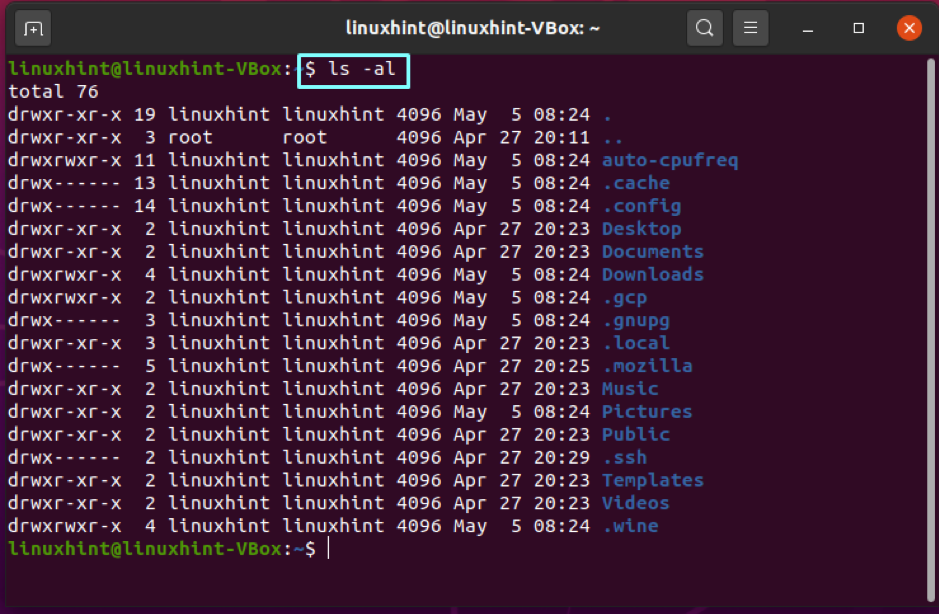
At its core, the ./ signifies the current directory. When you open a terminal in Linux, you are positioned within a specific location in the file system hierarchy, much like a folder on your desktop. The dot (.) represents this current directory. The slash (/) acts as a separator, indicating that you are specifying a path within that current directory.
Think of it like this: if you’re standing in your home, and you want to tell someone to go to your living room, you might say, “Go to the living room.” In this analogy, “home” is your current directory, and “living room” is a file or program located within it. The ./ in Linux does precisely this. When you type ./my_program, you are instructing the shell to look for an executable file named my_program in the directory where you are currently located.
Why the Explicit Path? The Security Imperative
You might wonder why Linux doesn’t automatically look for executables in your current directory, like some other operating systems might. This is a deliberate security feature. Linux, by design, separates different parts of its file system to maintain stability and prevent unauthorized actions.
One of the most critical aspects of this security is the PATH environment variable. This variable is a list of directories that your shell searches automatically when you type a command without specifying its full path. For example, commands like ls (list directory contents) or cd (change directory) are found in directories like /bin or /usr/bin, which are typically included in your PATH. When you type ls, the shell iterates through the directories in your PATH until it finds the ls executable and runs it.
However, your current directory is intentionally not included in the default PATH. This is a crucial safeguard against malicious programs. Imagine if every directory you landed in automatically had its executables run. A compromised directory could silently install malware or steal your data without you explicitly choosing to run anything. By requiring ./ for executables in the current directory, Linux forces you to make a conscious decision to run something from that location, thus enhancing your digital security. This principle of explicit action for potentially sensitive operations is a fundamental tenet of robust cybersecurity practices.
Executing Scripts and Custom Programs
The most common scenario where you’ll encounter ./ is when running shell scripts or custom-compiled programs that you’ve downloaded or created. For instance, if you download a Python script named setup.py and want to execute it using the Python interpreter, you might navigate to the directory where setup.py is saved and then run:
python ./setup.py
Similarly, if you compile a C program into an executable file named my_app in your current directory, you would run it with:
./my_app
Without the ./, if . (your current directory) isn’t in your PATH, the shell wouldn’t know where to find my_app, and you’d receive a “command not found” error.
Beyond the Command Line: ./ in the Broader Tech Landscape
The concept behind ./ – specifying an exact location for an action – resonates deeply within various facets of technology, influencing how we perceive and interact with digital systems.
Software Development and Deployment
In software development, the precise location of code and executables is critical. When developers build applications, they often need to specify paths to libraries, configuration files, and the compiled binaries themselves. The ./ principle, of explicitly referencing an item within a given context, is mirrored in how development environments are structured and how deployment scripts are written. For example, a build script might look for source files in ./src and output executables to ./bin. This meticulous organization enhances reproducibility and makes debugging more manageable.
Furthermore, the understanding of paths and execution contexts is vital for DevOps practices. Containerization technologies like Docker rely heavily on defining file paths and execution commands within a controlled environment. While not directly using ./ in the same command-line context, the underlying principle of specifying exact locations for resources and commands remains paramount for successful software deployment and management.
Artificial Intelligence and Data Science
In the realm of AI and data science, where vast datasets and complex models are manipulated, file organization and access are crucial. AI tools and libraries often operate on data stored in specific directories. When a Python script using TensorFlow or PyTorch needs to load a dataset or a pre-trained model, it will reference these files using paths. A script might be designed to look for data in a subdirectory named ./data or models in ./models. This structured approach ensures that the AI algorithms can reliably find and process the necessary information, directly impacting the efficiency and accuracy of the AI tools.
The development of new AI tools often involves providing clear instructions on how to set up and run them. Tutorials for these tools will frequently guide users to download files to a specific directory and then execute them using commands that include ./, reinforcing the importance of understanding file system navigation.
Digital Security and User Permissions
As mentioned earlier, the ./ notation is a cornerstone of Linux’s security model. This extends beyond just preventing accidental execution of malicious code. It’s also about user permissions. In Linux, each file has permissions that determine who can read, write, or execute it. When you download a script or compile a program, it might not automatically have execute permissions. You would need to grant these permissions using commands like chmod +x ./my_script.sh.

This explicit control over execution reinforces the idea of digital stewardship. Users are empowered to decide precisely what actions their system can take. This granular control is a stark contrast to more opaque operating systems, where the potential for unintended consequences can be higher. For users concerned about productivity and data integrity, understanding these permission structures and how they interact with execution commands like ./ is vital for maintaining a secure and efficient digital environment.
Brand Perception and User Experience
While ./ is a technical detail, its implications can indirectly affect brand perception and user experience, particularly in the tech industry.
Open Source and Community
Linux itself is a prime example of a successful brand built on open-source principles. The transparency and control offered by Linux, including its command-line interface, attract a dedicated community of users and developers. For those who embrace the CLI, the ability to understand and wield commands like ./ is empowering. It signifies a deeper engagement with the operating system, fostering a sense of mastery and ownership.
When companies release software or tools for Linux, they often cater to this CLI-savvy audience. Documentation and tutorials will assume a certain level of familiarity with commands like ./, positioning their products within this ecosystem. A well-documented process for running an application using ./ can contribute to a positive brand experience for technically inclined users.
User-Friendly Interfaces vs. Technical Prowess
The prevalence of graphical user interfaces (GUIs) has made computing more accessible to a broader audience. However, for many sophisticated applications and advanced users, the CLI remains indispensable. The decision of whether to abstract away commands like ./ or to expose them depends on the target audience.
For productivity apps and general-use software, the trend is often towards simplifying the user experience, minimizing the need for direct command-line interaction. However, for specialized tools, developer utilities, or system administration software, the CLI, with its explicit commands like ./, remains the preferred and often most efficient interface. The brand promise in these cases is often one of power, flexibility, and control.
Marketing and Communication
Even in marketing, the concept of precise targeting and direct engagement is akin to the ./ command. A marketing campaign that directly addresses a specific niche audience, using tailored messaging and channels, is more effective than a broad, unfocused approach. Similarly, a company that provides clear, step-by-step instructions for running their software, including the correct use of ./, demonstrates a commitment to user success and a respect for their audience’s technical capabilities.
Financial Implications of Understanding ./
The seemingly arcane command ./ can, surprisingly, have tangible financial implications for individuals and businesses.
Cost-Effective Solutions and Side Hustles
Many powerful software tools, especially in the open-source world, are free to use. Linux itself is a testament to this. When individuals learn to leverage these tools effectively through the command line, they can save significant amounts of money on software licenses. For aspiring developers or entrepreneurs looking to start side hustles, mastering Linux commands, including the execution of scripts and programs with ./, can be a cost-effective way to build and deploy applications.
For example, setting up a web server, automating tasks, or even building custom software for clients can be accomplished using free Linux tools. The ability to run custom scripts downloaded from the internet or written yourself, using ./, is a fundamental skill that can open up numerous avenues for generating online income.
Business Efficiency and IT Costs
For businesses, understanding and utilizing Linux effectively can lead to significant cost savings. Many enterprise-level applications and infrastructure components are built on Linux. Efficient management of these systems, often done through the CLI, can reduce the need for expensive proprietary software and specialized IT support.
When a company’s IT department is proficient in Linux administration, they can deploy and manage applications more quickly and with fewer resources. This includes the ability to run custom scripts for automation, system monitoring, and deployment, all of which can contribute to increased operational efficiency and a lower total cost of ownership for their IT infrastructure. The clarity provided by commands like ./ in ensuring the correct execution of these critical tasks directly impacts a business’s bottom line.
Investing in Skills and Career Advancement
The demand for individuals with strong Linux skills continues to be high across various industries. Understanding the nuances of the Linux command line, including how to execute programs and scripts, is a valuable asset in the job market. This can lead to better job opportunities, higher salaries, and increased career mobility.
For those looking to invest in their professional development, learning Linux commands and concepts is a worthwhile endeavor. The ability to confidently navigate the CLI and perform essential tasks, such as running applications with ./, can set candidates apart in technical interviews and make them more valuable employees. This investment in skill development directly translates into financial returns through career advancement and increased earning potential.

Conclusion
The ./ in Linux is far more than just a cryptic symbol; it’s a fundamental directive that unlocks the power of the command line and underscores key principles of digital security, user control, and operational efficiency. By explicitly referencing the current directory for executable files, it forces a conscious decision from the user, a cornerstone of robust cybersecurity.
This seemingly small detail has far-reaching implications. In the realm of Technology, it’s essential for developers deploying software, data scientists managing datasets, and anyone seeking to harness the full potential of open-source tools. It shapes how we perceive the Brand of software, influencing user experience and the perceived technical prowess of a product. Financially, understanding and utilizing ./ can lead to cost savings, enable profitable Side Hustles, and drive career advancement.
For anyone venturing into the world of Linux, or seeking to deepen their technical understanding, mastering the meaning and application of ./ is a crucial step. It’s a gateway to efficient execution, secure operation, and a more profound engagement with the digital world. So, the next time you see ./ in a Linux command, remember that it represents not just a file path, but a deliberate action, a secure practice, and a fundamental aspect of how powerful technology is brought to life.