
In the rapidly evolving world of cryptocurrency, security is not just a feature; it’s the bedrock upon which trust, functionality, and the very concept of digital ownership are built. As one of the largest and most widely used cryptocurrency exchanges globally, Coinbase handles billions in assets, making it a prime target for malicious actors. While Coinbase employs robust internal security measures, the first and most critical line of defense for individual users lies in their own hands: Two-Factor Authentication (2FA). This article delves into the specifics of what authenticator apps Coinbase supports, why they are essential, and how users can leverage them to safeguard their digital wealth, aligning perfectly with themes of Tech, Brand, and Money in the digital age.
Coinbase, rather than using a single proprietary authenticator app, wisely integrates with and recommends several industry-standard Time-Based One-Time Password (TOTP) authenticator applications. This approach provides users with flexibility and leverages established, secure technologies, reinforcing the platform’s commitment to user-centric security. Understanding these options, their benefits, and proper implementation is paramount for anyone looking to secure their crypto investments on the platform.
Understanding Two-Factor Authentication (2FA) for Coinbase
Two-Factor Authentication (2FA), sometimes referred to as Multi-Factor Authentication (MFA), adds a crucial layer of security beyond just a password. Instead of simply relying on “something you know” (your password), 2FA requires “something you have” (like a code from your phone) or “something you are” (like a fingerprint or face scan) to verify your identity. For cryptocurrency exchanges like Coinbase, this extra step is not merely a recommendation; it’s a fundamental necessity to protect your financial assets.
Why 2FA is Non-Negotiable in Crypto
The digital nature of cryptocurrency makes it incredibly vulnerable to online threats. Unlike traditional bank accounts, which often have chargebacks and fraud protection mechanisms, crypto transactions are typically irreversible. If an unauthorized person gains access to your Coinbase account and withdraws your funds, recovering them can be exceedingly difficult, if not impossible. This high-stakes environment means that the security of your account directly translates to the security of your money.
Without 2FA, a compromised password – perhaps through a phishing scam, a data breach on another website where you reused the password, or even a simple keylogger – is all an attacker needs to gain full control of your Coinbase account. The financial implications can be devastating. By implementing 2FA, even if an attacker manages to steal your password, they would still need access to your authenticator app or device to complete the login, dramatically increasing the difficulty of unauthorized access. This isn’t just about protecting your money; it’s about protecting your financial future and peace of mind in a volatile market.
How 2FA Works with Time-Based One-Time Passwords (TOTP)
The most common and secure form of 2FA used with authenticator apps relies on the Time-Based One-Time Password (TOTP) algorithm. Here’s a simplified breakdown of how it functions:
- Shared Secret: When you enable 2FA on Coinbase and link an authenticator app, a unique “secret key” is exchanged between Coinbase’s servers and your authenticator app. This key is often presented as a QR code for easy scanning or a long string of characters for manual entry.
- Time Synchronization: Both Coinbase’s servers and your authenticator app are synchronized with an agreed-upon time.
- Algorithmic Generation: Using the shared secret key and the current time as inputs, both Coinbase and your authenticator app independently run the same cryptographic algorithm.
- One-Time Code: Every 30 or 60 seconds (depending on the app and service), your authenticator app generates a new 6-8 digit code. Since the algorithm uses time as a variable, this code is constantly changing.
- Verification: When you attempt to log into Coinbase, after entering your password, Coinbase will prompt you for the current TOTP code from your authenticator app. Coinbase then independently generates what it expects the code to be using its shared secret and current time. If your entered code matches Coinbase’s expected code, access is granted.
This system is highly secure because the codes are time-sensitive and generated offline on your device, making them impervious to online phishing attempts that only capture static passwords. While SMS-based 2FA (codes sent via text message) is an option for some services, it’s generally considered less secure due to vulnerabilities like SIM-swapping attacks. Coinbase encourages and prioritizes authenticator app-based 2FA for superior protection.
The Leading Authenticator Apps Coinbase Recommends and Supports
Coinbase provides users with the flexibility to choose from several reputable authenticator applications that implement the TOTP standard. Each offers a slightly different user experience or set of features, but all provide a robust second layer of security. The choice often comes down to personal preference for features, ease of use, and device compatibility.
Google Authenticator: The Ubiquitous Choice
Google Authenticator is perhaps the most widely recognized and used TOTP authenticator app. Developed by Google, it’s known for its simplicity, reliability, and broad compatibility across numerous online services, including Coinbase.
- Pros: It’s straightforward to use, has a clean interface, and requires no account creation or internet connection to generate codes once set up. It’s free and available on both Android and iOS. Its widespread adoption means many users are already familiar with it.
- Cons: The primary drawback of Google Authenticator is its lack of a built-in backup or cloud synchronization feature. If you lose your phone, factory reset it, or it breaks, recovering your authenticator codes can be a significant challenge, potentially locking you out of your accounts (unless you’ve meticulously backed up your secret keys, which many users neglect). This requires users to either transfer their accounts manually to a new device or use the recovery codes provided by services like Coinbase during setup.
Authy: Enhanced Features for Crypto Enthusiasts
Authy, developed by Twilio, is a strong contender, particularly popular among users managing multiple sensitive accounts, including cryptocurrency exchanges. It offers several features that address the limitations of simpler authenticator apps.
- Pros: Authy stands out with its encrypted cloud backup feature, allowing users to restore their authenticator tokens across multiple devices (e.g., phone, tablet, desktop app) simply by logging into their Authy account. This significantly mitigates the risk of losing access to your accounts if your primary device is lost or damaged. It also supports multi-device synchronization, meaning codes generated on one device are accessible on another. Authy allows users to protect their tokens with a master password, adding another layer of security.
- Cons: While the cloud backup is a major convenience, some security purists prefer a completely offline solution, even with Authy’s robust encryption. Additionally, it requires an account creation and phone number verification, which some users might find slightly less private than Google Authenticator’s completely self-contained approach.
Microsoft Authenticator: Enterprise-Grade Security for Everyone
Microsoft Authenticator, like its Google counterpart, provides TOTP code generation but also integrates well with Microsoft accounts and services, offering additional security features beyond just codes.

- Pros: Beyond TOTP, Microsoft Authenticator can also provide push notifications for sign-in approvals, allowing you to simply tap “Approve” on your phone to confirm a login attempt without manually entering a code. It supports cloud backup for recovery (linked to your Microsoft account) and is user-friendly. For those deeply entrenched in the Microsoft ecosystem, it offers seamless integration.
- Cons: Similar to Authy, the cloud backup feature ties into a specific ecosystem (Microsoft account), which might not appeal to all users. Its primary focus on Microsoft services means some of its advanced features might be less relevant for non-Microsoft account users, though its TOTP functionality remains universal.
Other Compatible Options: FreeOTP, Duo Mobile, and Hardware Keys (FIDO/YubiKey)
Coinbase’s adherence to the TOTP standard means it is generally compatible with any authenticator app that supports this protocol.
- FreeOTP: An open-source alternative developed by Red Hat, FreeOTP offers a minimalist and highly secure option for users who prioritize open-source solutions and want full control without cloud integration. It’s an excellent choice for those who are technically inclined and prefer to avoid proprietary systems.
- Duo Mobile: While known for its enterprise-level security solutions, Duo Mobile also provides a reliable TOTP authenticator app for individual use, featuring a clean interface and push notification options for services that support them.
- Hardware Keys (FIDO/YubiKey): For the ultimate level of security, particularly for those with substantial crypto holdings, Coinbase also supports physical security keys like those based on the FIDO (Fast Identity Online) standard, such as YubiKey. These are small physical devices that you plug into your computer or tap against your phone (NFC) to authenticate. They are phishing-resistant and considered the gold standard for security, as they require physical possession and interaction, making remote attacks virtually impossible. While more expensive and requiring physical management, they offer unparalleled protection for your digital assets, effectively turning “something you have” into a tangible, uncloneable object.
Setting Up Your Authenticator App with Coinbase (A Step-by-Step Guide)
Implementing an authenticator app for your Coinbase account is a straightforward process, but it requires careful attention to detail, particularly regarding backup. This crucial step significantly enhances your account’s digital security, protecting your financial interests.
The Initial Setup Process
- Log into Your Coinbase Account: Access your account via a web browser on a computer or through the Coinbase mobile app.
- Navigate to Security Settings:
- On the website: Click on your profile icon (often in the top right corner) and select “Settings.” Then, navigate to the “Security” tab.
- On the mobile app: Tap the three lines (menu icon) or your profile picture, then select “Profile & Settings,” and then “Security.”
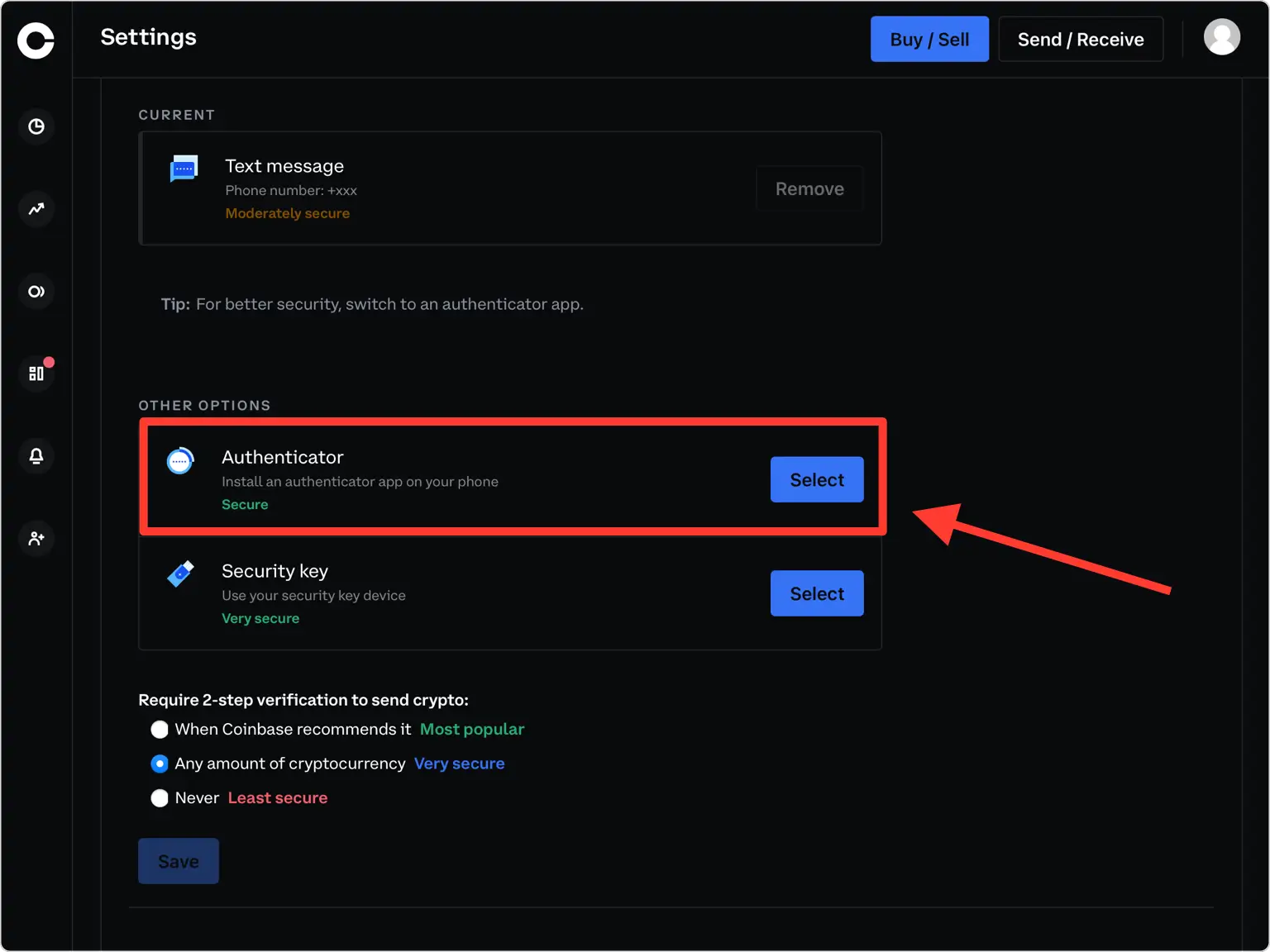
- Enable 2-Step Verification (2FA): Look for the “2-Step Verification” or “Authenticator App” option. If you’re currently using SMS 2FA, you’ll want to switch to the authenticator app method. Select the option to set up an authenticator app.
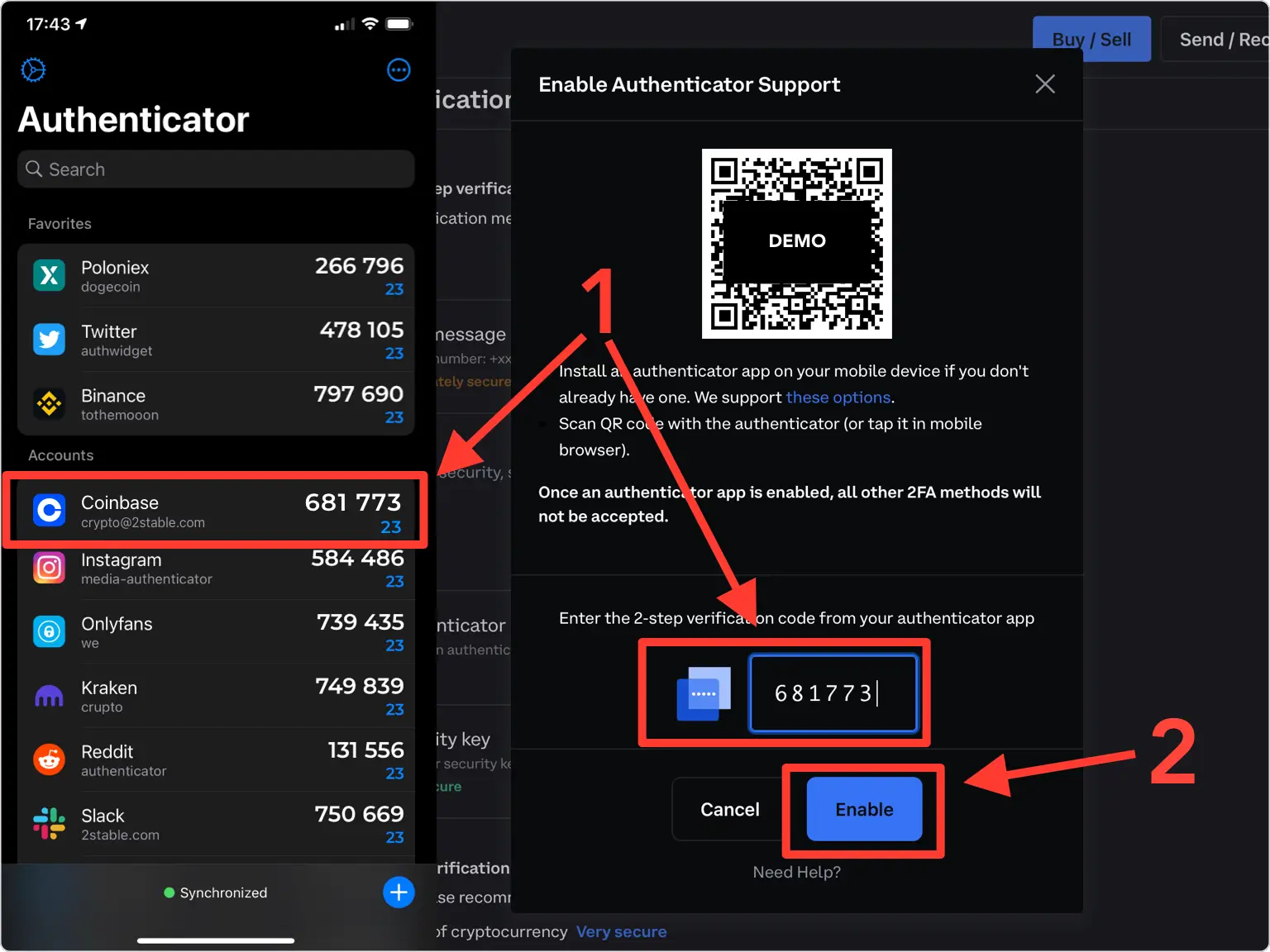
- Scan the QR Code: Coinbase will display a QR code (and often a manual setup key/secret) on your screen.
- Open your chosen authenticator app (e.g., Google Authenticator, Authy, Microsoft Authenticator) on your smartphone.
- Look for an option to “Add Account” or “Scan QR code” (often represented by a “+” or camera icon).
- Use your phone’s camera to scan the QR code displayed on your Coinbase screen. If scanning isn’t possible, manually enter the provided secret key into your authenticator app.
- Enter the Verification Code: Once scanned, your authenticator app will immediately generate a 6-8 digit code for Coinbase.
- Enter this code into the designated field on the Coinbase setup screen.
- Crucial Step: Back Up Your Recovery Key/Seed Phrase! After successful verification, Coinbase will almost certainly provide you with a “backup code,” “recovery key,” or “seed phrase.” THIS IS EXTREMELY IMPORTANT.
- Write this code down on paper. Do not save it digitally on your computer or phone, as this defeats the purpose of offline security.
- Store this physical copy in a secure, private location (e.g., a locked safe, a fireproof box).
- This recovery key is your ONLY way to regain access to your account if you lose your phone, your authenticator app stops working, or you need to transfer your 2FA to a new device without Authy’s cloud backup. Failing to back this up could lead to permanent loss of access to your funds.
- Confirm and Finish: Complete the setup process. Your Coinbase account is now secured with authenticator app 2FA.
Best Practices for Authenticator App Management
- Never Share Codes: Your authenticator codes are unique to you and your account. No legitimate service will ever ask you to provide these codes via email, text message, or phone call.
- Secure Your Phone: Your phone is now a critical part of your security infrastructure. Ensure it has a strong passcode, biometric authentication (fingerprint/face ID), and that it’s regularly updated with the latest security patches.
- Regularly Review Security Settings: Periodically log into your Coinbase security settings to ensure 2FA is still active and that no unauthorized devices or recovery methods have been added.
- Consider Multiple Apps or Hardware Keys: For significant crypto holdings, using a hardware key (like a YubiKey) in conjunction with or instead of a software authenticator app provides the highest level of security. Some users might even use different authenticator apps for different, highly sensitive accounts.
- Migrate Carefully: When upgrading to a new phone, ensure you properly migrate your authenticator accounts. For apps like Google Authenticator, this involves using the “Transfer accounts” feature. For Authy, it’s typically a login process. Always use your backup recovery codes as a last resort.
Beyond Authenticator Apps: A Holistic Approach to Coinbase Security
While authenticator apps are a cornerstone of securing your Coinbase account, they are part of a broader security ecosystem. A truly robust digital security posture involves multiple layers of defense, extending beyond just 2FA to your overall online habits and the security of your devices.
Strong Passwords and Unique Credentials
Your password remains the first line of defense. It’s imperative to use a strong, unique password for your Coinbase account – one that is not reused on any other website.
- Password Managers: Employing a reputable password manager (e.g., LastPass, 1Password, Bitwarden) is highly recommended. These tools generate complex, unique passwords for each of your online accounts and store them securely, requiring you to remember only one master password.
- Avoid Predictable Patterns: Steer clear of common phrases, personal information, or easily guessable sequences. Aim for a mix of uppercase and lowercase letters, numbers, and symbols.
Email and Device Security
Your email account often serves as the recovery point for many online services, including Coinbase. If your email is compromised, attackers might be able to reset your Coinbase password and bypass some security measures.
- Secure Your Email: Enable 2FA on your primary email account (ideally with an authenticator app, not SMS). Use a strong, unique password for your email.
- Keep Software Updated: Regularly update your operating system (Windows, macOS, iOS, Android) and all applications. Software updates often include critical security patches that protect against newly discovered vulnerabilities.
- Use Antivirus/Antimalware: Install and maintain reputable antivirus and antimalware software on your computer and mobile devices. Regularly scan for threats.
- Beware of Phishing: Be extremely cautious of suspicious emails, text messages, or websites that claim to be from Coinbase. Always verify the sender and the URL before clicking links or entering your credentials. Coinbase will never ask for your password or 2FA codes via email or phone.
Understanding Coinbase’s Internal Security Measures (Brand Trust)
It’s reassuring to know that Coinbase, as a major financial institution in the crypto space, invests heavily in its own security infrastructure. While user-side security is paramount, Coinbase’s efforts contribute significantly to the overall trust and brand reputation of the platform.
- Cold Storage: A significant portion of customer funds is held in “cold storage” (offline storage), which is impervious to online hacking attempts.
- Insurance: Coinbase maintains a commercial insurance policy that protects a portion of funds held online against certain types of breaches, though this typically covers Coinbase’s systems, not individual account compromises due to user negligence.
- Regulatory Compliance: As a regulated entity in many jurisdictions, Coinbase adheres to stringent security and operational standards, undergoing regular audits and compliance checks.
- Proactive Threat Detection: Coinbase employs teams of security experts and advanced technologies to monitor for threats, detect suspicious activity, and respond to potential breaches.
These internal measures provide a strong foundation, but they are not a substitute for robust personal security practices. The synergy between Coinbase’s institutional security and your diligent application of personal security protocols, particularly 2FA, is what truly safeguards your digital assets.
Conclusion
Securing your Coinbase account with an authenticator app is one of the most critical steps you can take to protect your cryptocurrency investments. While Coinbase doesn’t mandate a single app, it fully supports leading industry-standard options like Google Authenticator, Authy, and Microsoft Authenticator, providing users with flexibility and choice. These applications leverage Time-Based One-Time Passwords (TOTP) to add an essential second layer of verification, making it significantly harder for unauthorized individuals to access your funds, even if they manage to compromise your primary password.
The continuous evolution of digital threats necessitates a proactive and multi-faceted approach to security. By understanding how these authenticator apps work, which ones are recommended, and how to implement them correctly – especially the vital step of backing up your recovery key – you empower yourself against cyberattacks. Beyond 2FA, maintaining strong, unique passwords, securing your email, keeping your devices updated, and remaining vigilant against phishing scams collectively form a robust defense strategy for your valuable digital assets.
In the realm of cryptocurrency, where the lines between technology, finance, and personal brand reputation blur, taking ownership of your digital security isn’t just a best practice; it’s an absolute imperative. Choose an authenticator app, set it up diligently, safeguard your recovery keys, and integrate these practices into your daily digital routine. Your financial security in the crypto world depends on it.
aViewFromTheCave is a participant in the Amazon Services LLC Associates Program, an affiliate advertising program designed to provide a means for sites to earn advertising fees by advertising and linking to Amazon.com. Amazon, the Amazon logo, AmazonSupply, and the AmazonSupply logo are trademarks of Amazon.com, Inc. or its affiliates. As an Amazon Associate we earn affiliate commissions from qualifying purchases.