
In the intricate tapestry of modern software development, where applications grow ever more complex and user expectations soar, developers rely on an indispensable set of tools to build, innovate, and scale. Among the most fundamental of these tools are programming libraries. Far from being mere collections of code, libraries represent a cornerstone of efficiency, reliability, and progress in the tech world. They are the silent workhorses that enable everything from the seamless functionality of your favorite mobile app to the sophisticated algorithms powering cutting-edge AI.
Imagine embarking on the construction of a house. You wouldn’t forge every nail, mill every plank, or mix every bag of concrete from scratch. Instead, you’d procure pre-made materials, specialized tools, and even pre-fabricated components to expedite the process and ensure quality. Programming libraries serve an analogous role in software development. They are curated collections of pre-written, pre-tested code that developers can seamlessly integrate into their projects, allowing them to focus on the unique logic and innovative features of their applications rather than reinventing fundamental functionalities.

This article delves deep into the world of programming libraries, exploring their definition, the profound benefits they offer, the diverse types that populate the software ecosystem, and best practices for their effective utilization. Whether you’re an aspiring developer, a seasoned tech enthusiast, or simply curious about the mechanics behind the digital innovations shaping our world, understanding programming libraries is key to grasping the essence of modern software engineering and its rapid evolution.
The Fundamental Building Blocks of Modern Software
The sheer scale and complexity of today’s digital landscape demand intelligent solutions that foster speed, accuracy, and collaboration. Programming libraries answer this call, acting as modular, reusable components that abstract away intricate details and provide clean interfaces for developers to leverage.
Defining Programming Libraries: Your Digital Toolboxes
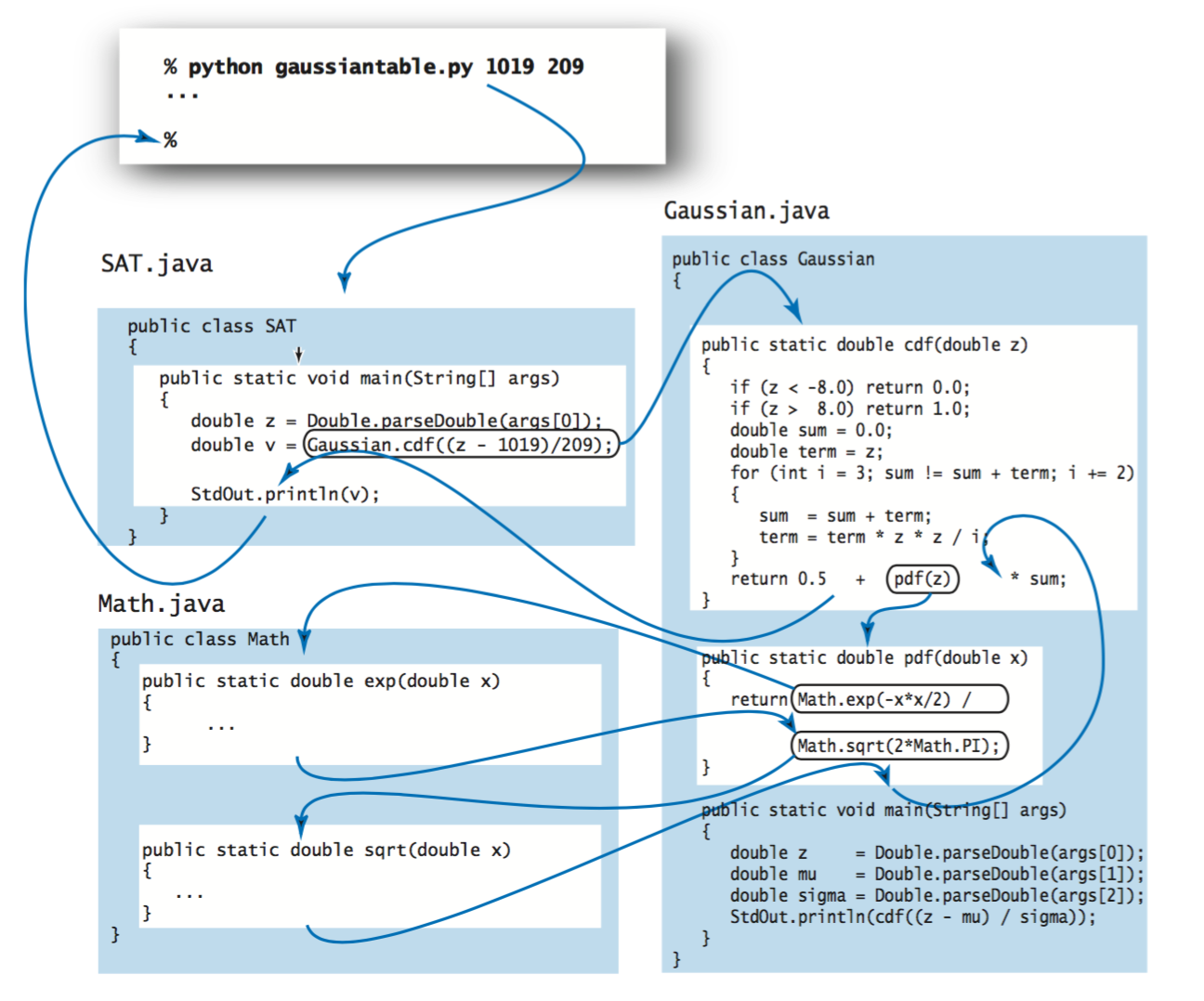
At its core, a programming library is a collection of pre-compiled or pre-written code, along with data, documentation, and configuration files, designed to help developers perform common tasks without having to write the code from scratch. Think of it as a specialized toolbox filled with implements for specific jobs. Instead of crafting a custom wrench every time you need to turn a bolt, you simply reach for the appropriate tool.
These “tools” in a library typically come in the form of functions, classes, modules, or entire packages that encapsulate specific functionalities. For instance, a library might contain code for:
- Performing complex mathematical calculations (e.g., statistical analysis, linear algebra).
- Interacting with web servers (e.g., sending HTTP requests, parsing JSON data).
- Manipulating images (e.g., resizing, applying filters).
- Creating graphical user interfaces (GUIs) (e.g., buttons, text fields, windows).
- Connecting to databases (e.g., executing queries, managing connections).
When a developer “uses” a library, they are essentially importing these pre-built components into their own program. This allows their application to call upon the library’s functions to perform tasks, saving immense amounts of development time and effort. Libraries are distinct from frameworks, although the terms are sometimes used interchangeably. A framework often dictates the overall architecture and flow of an application, providing a scaffold upon which to build, whereas a library is a collection of tools that can be plugged into any part of a project, offering more flexibility in how and where they are used.
The Analogy: Libraries as Pre-Built Solutions
To further clarify, consider the analogy of a chef preparing a meal. A chef could, in theory, mill their own flour, churn their own butter, and grow their own herbs for every single dish. However, this would be an incredibly time-consuming and inefficient process. Instead, they rely on pre-processed ingredients (like flour, butter, and spices) and specialized kitchen tools (blenders, ovens, knives).
In this scenario:
- The Meal (the entire dish) is like the complete software application.
- The Raw Ingredients (flour, butter, herbs) are like the fundamental programming language syntax and basic data structures.
- The Pre-processed Ingredients (sauces, spice blends, pre-cut vegetables) are like programming libraries. They’re ready-to-use components that solve specific culinary sub-problems.
- The Kitchen Appliances (blender, oven) could be likened to development environments or frameworks, providing the overall structure within which ingredients are prepared.
By utilizing these “pre-built solutions,” the chef (developer) can focus their creativity and effort on combining ingredients in innovative ways to create unique flavors and presentations (application features), rather than getting bogged down in the basic preparation of every single component. This analogy perfectly illustrates how libraries empower developers to accelerate development and concentrate on higher-level problem-solving.
Why Developers Can’t Live Without Libraries: Unpacking the Benefits
The ubiquitous adoption of programming libraries across all domains of software development is not merely a trend; it’s a testament to the profound and multifaceted advantages they offer. These benefits extend beyond mere convenience, impacting productivity, quality, innovation, and even the financial aspects of software projects.
Boosting Productivity and Accelerating Development
Perhaps the most immediately apparent benefit of using libraries is the dramatic increase in developer productivity. Imagine having to write the code for cryptographic hashing, image processing, or database connectivity from scratch for every new project. This would be a Herculean task, consuming countless hours and delaying project timelines significantly.
Libraries eliminate this redundant effort. By providing readily available, tested implementations of common functionalities, they allow developers to:
- “Stand on the shoulders of giants”: Leverage the expertise and work of countless other developers.
- Avoid “reinventing the wheel”: Focus on the unique logic of their application rather than common, solved problems.
- Reduce development time: What might take days or weeks to code manually can be integrated in minutes with a well-chosen library.
This acceleration is crucial in today’s fast-paced tech environment, where time-to-market can be a decisive factor in a product’s success, directly impacting a company’s ability to stay competitive and relevant (“Tech Trends”).
Ensuring Code Quality and Reliability
Another critical advantage of using established programming libraries is the inherent improvement in code quality and reliability. Libraries, especially popular open-source ones, are often:
- Rigorously Tested: They undergo extensive unit testing, integration testing, and real-world usage across numerous projects.
- Peer-Reviewed: Their codebases are scrutinized by communities of developers, identifying and rectifying bugs and vulnerabilities.
- Well-Maintained: Active libraries receive regular updates, bug fixes, and performance improvements from dedicated maintainers or large communities.
This means that when a developer incorporates a library, they are often integrating code that is more robust, secure, and performant than what they might be able to produce in-house, particularly for specialized functionalities outside their primary expertise. This reduces the likelihood of bugs, security flaws, and performance bottlenecks in the final application, contributing to a more stable and trustworthy product.
Fostering Innovation and Specialization
Libraries are powerful catalysts for innovation. By abstracting away complex, low-level details, they free developers to concentrate on higher-level problems and creative solutions. Instead of spending time on HTTP request parsing, a developer can focus on designing a revolutionary new user experience. Instead of implementing matrix multiplications, an AI engineer can focus on refining neural network architectures (“AI Tools”).
This specialization allows developers to:
- Focus on core competencies: Dedicate their talent to the unique value proposition of their application.
- Experiment more readily: Rapidly prototype new ideas by quickly integrating various functionalities.
- Push boundaries: Leverage advanced algorithms and techniques without needing to understand every single underlying mechanism.
In essence, libraries democratize access to advanced technologies, empowering smaller teams and individual developers to build sophisticated applications that would otherwise require massive resources and specialized knowledge.
Cost-Effectiveness and Resource Optimization
From a business perspective, the benefits of programming libraries translate directly into significant cost savings and optimized resource allocation, touching upon the “Money” aspect of the website’s topics.
- Reduced Development Costs: Fewer developer hours spent on common tasks means lower salaries paid over the project lifecycle.
- Faster Time-to-Market: Getting products to users sooner can lead to earlier revenue generation and a stronger competitive edge.
- Lower Maintenance Costs: Using well-tested libraries often results in fewer bugs post-launch, reducing the need for expensive hotfixes and patches.
- Optimal Resource Allocation: Companies can deploy their specialized talent to high-impact, proprietary features rather than generic utility functions. This can even reduce the need to hire specialists for every niche area if a robust library already exists.

By leveraging existing, high-quality code, businesses can maximize their return on investment in software development, making libraries an economically sound choice for any tech-driven enterprise.
A Panorama of Programming Libraries: Types and Applications
The world of programming libraries is vast and incredibly diverse, spanning virtually every programming language and domain imaginable. Their utility is defined by the specific problems they aim to solve, from making web pages interactive to powering intelligent machines.
From Web Development to Artificial Intelligence: Diverse Applications
Libraries are categorized primarily by the functionality they offer and the programming language they are written for. Here’s a glimpse into some major categories and examples:
- Web Development Libraries: These are crucial for building dynamic and responsive web applications.
- Frontend UI/UX: Libraries like React (JavaScript) and Vue.js (JavaScript) enable developers to build interactive user interfaces by providing components and tools for managing UI state efficiently. They focus on the “view” layer of web applications.
- Backend Utilities: Libraries like Requests (Python) simplify making HTTP requests to interact with web services and APIs. For Node.js, Express.js is often considered a minimal and flexible web application framework, but its middleware and routing capabilities are frequently extended with numerous libraries.
- Data Science and Artificial Intelligence (AI) Libraries: These libraries are foundational for data analysis, machine learning, and deep learning, making complex computational tasks accessible (“AI Tools”).
- Numerical Computing: NumPy (Python) provides powerful N-dimensional array objects and sophisticated functions for numerical operations.
- Data Manipulation: Pandas (Python) offers data structures and tools for efficient data analysis, such as DataFrames, which are perfect for tabular data.
- Machine Learning: Scikit-learn (Python) is a comprehensive library for various machine learning algorithms, including classification, regression, clustering, and dimensionality reduction.
- Deep Learning: TensorFlow (Python, C++) and PyTorch (Python) are industry-standard libraries for building and training neural networks, enabling the development of sophisticated AI models for image recognition, natural language processing, and more.
- Graphics and Multimedia Libraries: Essential for games, visual applications, and media processing.
- 3D Graphics: OpenGL (C, C++) and DirectX (C++) are powerful APIs for rendering 2D and 3D graphics, used extensively in video games and scientific visualization.
- Image Processing: Libraries like OpenCV (C++, Python) provide functions for real-time computer vision, image analysis, and manipulation.
- Database Interaction Libraries: These simplify connecting to and managing databases.
- SQLAlchemy (Python) is an Object Relational Mapper (ORM) that allows developers to interact with relational databases using Python objects instead of raw SQL queries.
- JDBC (Java Database Connectivity) provides a standard API for Java applications to connect to various databases.
- Utility Libraries: These offer a collection of general-purpose functions that simplify common programming tasks.
- Lodash (JavaScript) provides utility functions for common programming tasks using JavaScript, such as array manipulation, object operations, and function decorators.
- Apache Commons (Java) is a project providing reusable Java components across various domains, like I/O utilities, mathematical functions, and logging.
Open-Source vs. Proprietary Libraries: A Key Distinction
When choosing a library, developers and organizations often face a fundamental decision: whether to opt for an open-source or a proprietary solution.
-
Open-Source Libraries:
- Nature: The source code is freely available, often under licenses like MIT, Apache, or GPL. Anyone can view, modify, and distribute the code.
- Pros: Free to use, large community support, transparency (you can inspect the code for bugs or security flaws), flexibility for customization, rapid innovation through community contributions. Examples include nearly all the Python libraries mentioned above (NumPy, Pandas, TensorFlow, React, Vue.js, etc.).
- Cons: No guaranteed dedicated support (reliance on community forums), potential for less consistent documentation, varied quality of contributions, licensing complexities if not understood.
- Impact on Brand/Tech: Fosters collaboration and innovation. Businesses can build strong tech brands by contributing to or maintaining open-source projects, demonstrating thought leadership and attracting talent.
-
Proprietary Libraries (Commercial Libraries):
- Nature: Developed and owned by a company, requiring licenses or subscriptions for use. The source code is typically not available to the public.
- Pros: Dedicated commercial support (SLA-backed), professional documentation, often higher quality control and stability due to a single vendor, specific feature sets tailored for enterprise needs, less burden for security patching (handled by vendor). Examples include certain specialized SDKs, enterprise-grade UI components, or security libraries.
- Cons: Costly (licensing fees, subscriptions), vendor lock-in, less flexibility for customization, dependency on the vendor’s roadmap and longevity.
- Impact on Money/Brand: Often seen as an investment for guaranteed reliability and support, which can be critical for enterprise-level applications where uptime and security are paramount. Can enhance a company’s “brand” by ensuring robustness in mission-critical systems.
The choice between open-source and proprietary often depends on project requirements, budget, risk tolerance, and the availability of suitable options. Both play vital roles in the ecosystem.
Integrating Libraries into Your Projects: A Practical Guide
Understanding what libraries are and why they are beneficial is one thing; knowing how to incorporate them effectively into your software projects is another. The process involves specific tools and practices that ensure seamless integration and long-term maintainability.
The Mechanics of Library Inclusion
The primary way libraries are added to a project is through package managers. These are tools that automate the process of installing, updating, and managing software libraries and their dependencies for a particular programming language or ecosystem.
Common package managers include:
- npm (Node Package Manager) for JavaScript and Node.js projects.
- pip (Pip Installs Packages) for Python projects.
- Maven and Gradle for Java projects.
- NuGet for .NET projects.
- Composer for PHP projects.
- Cargo for Rust projects.
The typical workflow involves:
- Declaring Dependencies: In a project configuration file (e.g.,
package.jsonfor npm,requirements.txtfor pip,pom.xmlfor Maven), developers list the libraries their project needs, often specifying desired version ranges. - Installing: The package manager reads this configuration file and automatically downloads the specified libraries (and any libraries they depend on, known as transitive dependencies) from a central repository. These files are typically placed in a dedicated directory within the project (e.g.,
node_modules,venv,target). - Importing/Including: Within the actual source code, developers use language-specific
importorincludestatements to make the library’s functions and classes available for use.
This automated process drastically simplifies what would otherwise be a manual, error-prone task of tracking down and placing numerous files.
Navigating Dependencies and Version Control
One of the biggest challenges in managing libraries is dealing with dependencies and versioning.
- Dependency Hell: A common problem where different libraries within the same project require conflicting versions of a shared underlying library. For example, Library A might need
common-lib@1.0, while Library B needscommon-lib@2.0. Package managers, virtual environments (like Python’svenv), and dependency resolution algorithms are designed to mitigate this, but careful management is still required. - Version Control: Specifying library versions carefully is crucial.
- Semantic Versioning (SemVer): Many libraries follow SemVer (MAJOR.MINOR.PATCH).
PATCHupdates (e.g.,1.0.1to1.0.2) are for bug fixes and are backward-compatible.MINORupdates (e.g.,1.0.0to1.1.0) add new features but are still backward-compatible.MAJORupdates (e.g.,1.0.0to2.0.0) introduce breaking changes and are not backward-compatible.
- Developers often specify version ranges (e.g.,
^1.0.0means compatible with1.x.x, but not2.0.0) to allow for automatic updates that don’t break their code, while also freezing exact versions in production environments to ensure stability.
- Semantic Versioning (SemVer): Many libraries follow SemVer (MAJOR.MINOR.PATCH).
Careful dependency management and strict version control are essential practices to ensure the long-term stability, security, and maintainability of any software project relying on external libraries.
Strategic Library Use and Future Outlook
While libraries offer immense benefits, their effective use requires strategic planning and ongoing vigilance. Mismanagement can lead to bloated applications, security vulnerabilities, or “dependency hell.” Looking forward, the landscape of library development continues to evolve, shaped by new technologies and paradigms.
Best Practices for Selection and Management
Choosing and managing libraries wisely is a critical skill for any developer or organization.
- Strategic Selection:
- Evaluate Necessity: Is a library truly needed, or can the functionality be easily implemented in-house with minimal code? Avoid “analysis paralysis” but also “library fatigue.”
- Check Popularity & Community: For open-source libraries, a large, active community, frequent updates, and numerous contributors are good indicators of reliability and long-term support.
- Review Documentation & Examples: Comprehensive, clear documentation and practical examples significantly reduce the learning curve.
- Inspect License: Understand the legal implications of the library’s license (e.g., MIT, GPL, Apache) for your project, especially if it’s commercial.
- Assess Performance & Security: Look for benchmarks or known security issues. Use static analysis tools to audit library code where possible.
- Proactive Management:
- Regular Updates: Keep libraries updated to benefit from bug fixes, performance improvements, and crucial security patches. Automate this process where possible.
- Dependency Auditing: Regularly audit your project’s dependencies for known security vulnerabilities using tools like Snyk, Dependabot, or npm audit.
- Minimize Dependencies: Use only the libraries you truly need. Each additional dependency adds overhead and potential risk.
- Understand Transitive Dependencies: Be aware of the libraries your libraries depend on, as these can also introduce issues.
- Isolate Environments: Use virtual environments (e.g., Python’s
venv, Node.jsnvm) to isolate project dependencies and avoid conflicts across different projects.
Adhering to these best practices safeguards against common pitfalls, ensuring that libraries remain assets rather than liabilities.
The Evolving Landscape: AI-Assisted Development and Beyond
The future of programming libraries is intertwined with the broader evolution of technology. We can anticipate several key trends:
- AI-Assisted Development: AI tools like GitHub Copilot and Google’s Codey are already capable of suggesting code snippets, completing functions, and even writing entire functions based on natural language prompts. This extends to suggesting appropriate libraries, generating boilerplate code for library integration, and even helping debug library-related issues. This will make library discovery and usage even more efficient.
- Micro-Libraries and Modularity: The trend towards smaller, single-purpose libraries continues, facilitating greater flexibility and reducing application bloat. Serverless architectures also encourage this, as functions are often designed to do one thing very well, potentially leveraging micro-libraries.
- Enhanced Security Focus: With increasing cyber threats, there will be a greater emphasis on “secure by design” libraries, automated vulnerability scanning in package managers, and better ways to track the security posture of the entire dependency tree.
- Cross-Platform and Language Interoperability: Efforts to make libraries more accessible across different programming languages and platforms will likely grow, bridging ecosystems and further enhancing reusability.
- Domain-Specific Libraries: As new tech domains emerge (e.g., quantum computing, advanced bioinformatics), we’ll see the proliferation of highly specialized libraries tailored to these unique challenges.
Programming libraries are more than just a convenience; they are the bedrock of modern software development, driving productivity, quality, and innovation across the entire tech spectrum. From the bustling world of web applications to the complex algorithms of artificial intelligence, libraries empower developers to build sophisticated solutions at an unprecedented pace. By understanding their purpose, leveraging their benefits, and applying best practices for their management, we can continue to harness their power to shape the digital future, making our technology more robust, creative, and accessible for everyone.
aViewFromTheCave is a participant in the Amazon Services LLC Associates Program, an affiliate advertising program designed to provide a means for sites to earn advertising fees by advertising and linking to Amazon.com. Amazon, the Amazon logo, AmazonSupply, and the AmazonSupply logo are trademarks of Amazon.com, Inc. or its affiliates. As an Amazon Associate we earn affiliate commissions from qualifying purchases.