
In today’s hyper-connected world, where streaming, remote work, and cloud-based applications are integral to our daily lives, the concept of bandwidth has become a crucial, though often invisible, determinant of our digital experience. When we encounter sluggish internet speeds, buffering videos, or dropped video calls, the culprit is frequently a lack of sufficient bandwidth. Understanding what low bandwidth means is not just a technical curiosity; it’s essential for diagnosing and resolving digital frustrations, optimizing our online activities, and making informed decisions about our internet service.
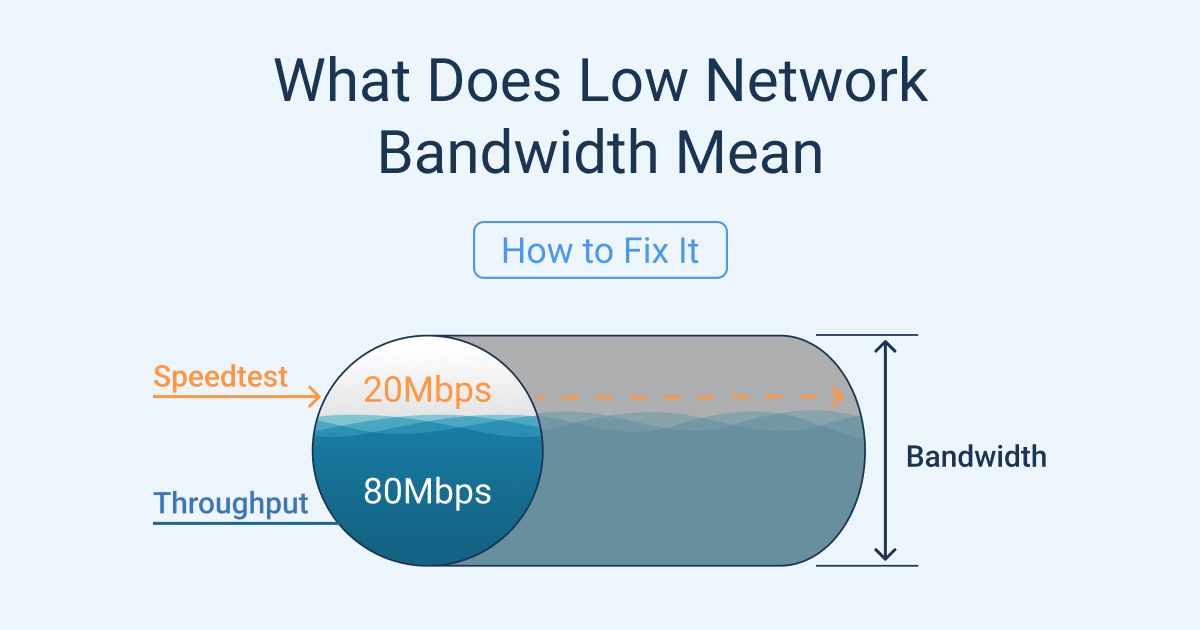
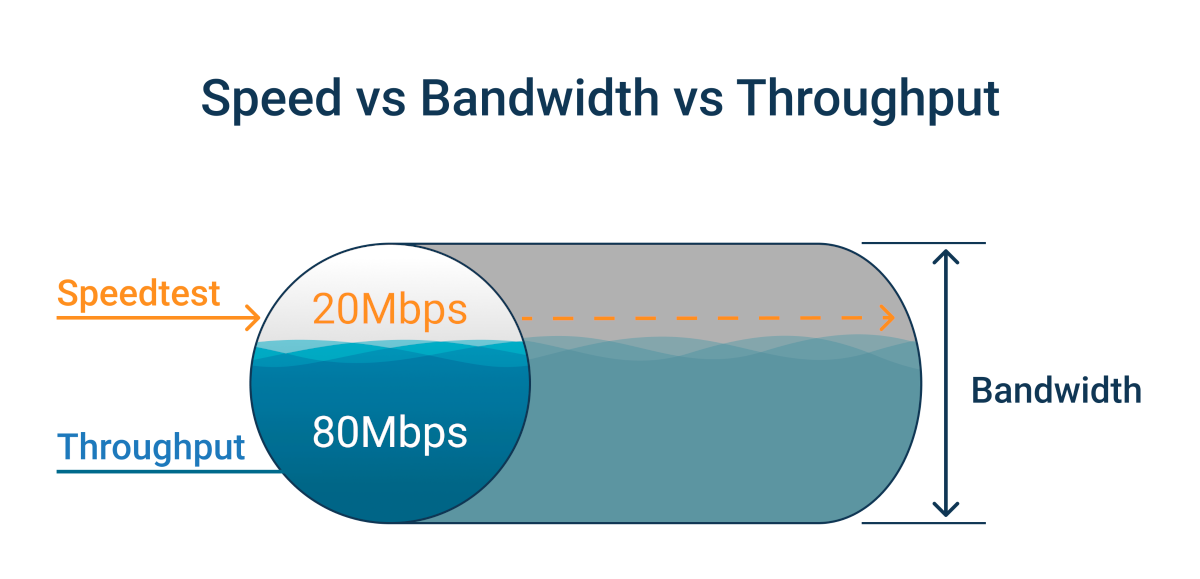
Bandwidth, in its simplest technical definition, refers to the maximum rate of data transfer across a given path. Think of it as the width of a pipe that carries water; a wider pipe can carry more water simultaneously. In the context of the internet, bandwidth dictates how much data can be transmitted from your device to the internet and vice-versa within a specific timeframe, typically measured in megabits per second (Mbps) or gigabits per second (Gbps). Low bandwidth, therefore, means that this “pipe” is narrow, restricting the volume of data that can flow. This limitation has a tangible, often frustrating, impact on nearly every aspect of our online engagement.
The ramifications of low bandwidth extend beyond mere inconvenience. For businesses, it can translate to lost productivity, hindered collaboration, and a compromised customer experience. For individuals, it can mean missed opportunities, increased stress, and a diminished ability to fully participate in the digital economy. This article will delve into the core meaning of low bandwidth, explore its various manifestations, and discuss its significant implications within the technological landscape.
The Mechanics of Bandwidth: More Than Just Speed
While often used interchangeably with “internet speed,” bandwidth is a more nuanced concept. Speed, in the context of internet service, is a combination of bandwidth and latency. Latency refers to the delay in data transmission – the time it takes for a packet of data to travel from its source to its destination. Imagine the pipe analogy again: bandwidth is the width of the pipe, while latency is how quickly the water starts flowing once the tap is turned on and how long it takes to reach its destination. You can have a very wide pipe (high bandwidth), but if the water takes a long time to travel through it (high latency), your overall experience might still feel slow.
Data Transfer Rates and Measurement Units
The most common way to quantify bandwidth is through data transfer rates. These are typically measured in bits per second.
- Kilobits per second (Kbps): An older unit of measurement, often associated with dial-up internet. Even basic web browsing today struggles with Kbps speeds.
- Megabits per second (Mbps): This is the most common unit used for residential internet plans. 1 Mbps equals 1,000 Kbps. For example, a plan offering 100 Mbps can theoretically transfer 100 million bits of data every second.
- Gigabits per second (Gbps): This is a much higher rate, with 1 Gbps equaling 1,000 Mbps. Gbps speeds are increasingly becoming available for homes and are standard in enterprise environments.
Understanding these units is crucial when evaluating internet plans. A plan advertised as “high speed” might have high bandwidth but also suffer from high latency, leading to a suboptimal experience. Conversely, a plan with lower bandwidth but excellent latency might feel more responsive for certain applications.
Factors Influencing Available Bandwidth
Several factors determine the actual bandwidth available to you at any given moment, beyond what your internet service provider (ISP) advertises.
- ISP Throttling: ISPs may intentionally limit your bandwidth after you exceed a certain data usage threshold, a practice known as throttling. This is often outlined in the fine print of your service agreement.
- Network Congestion: Similar to rush hour traffic on a highway, internet traffic experiences congestion. During peak usage times (evenings, weekends), when many users are online simultaneously, the shared bandwidth can become strained, leading to slower speeds for everyone.
- Your Internet Plan: The most fundamental factor is the bandwidth allocated by your ISP for your specific plan. Higher-tier plans offer more bandwidth, allowing for more simultaneous users and demanding applications.
- Router and Modem Performance: Older or lower-quality routers and modems can act as bottlenecks, limiting the bandwidth that can be utilized even if your ISP plan offers more.
- Wi-Fi Signal Strength and Interference: Wireless connections are susceptible to signal degradation. Obstacles like walls, distance from the router, and interference from other electronic devices (microwaves, cordless phones) can significantly reduce your effective bandwidth.
- Number of Connected Devices and Simultaneous Activities: Every device connected to your network, from smartphones and smart TVs to laptops and gaming consoles, consumes bandwidth. The more devices actively using the internet and the more data-intensive their activities, the less bandwidth is available for each individual device.
- Website and Server Limitations: Even with ample bandwidth on your end, the website or server you are trying to access might have its own bandwidth limitations, slowing down your connection to that specific resource.
The Tangible Effects of Low Bandwidth on Digital Activities
The abstract concept of data transfer rates becomes painfully evident when it fails to meet the demands of our digital lives. Low bandwidth manifests itself in a variety of frustrating ways, impacting everything from entertainment to productivity.
Impact on Streaming and Multimedia Consumption
High-definition video streaming (e.g., Netflix, YouTube, Hulu) and online gaming are among the most bandwidth-intensive activities.
- Buffering and Stuttering: The most common symptom of low bandwidth is constant buffering. When your connection cannot download data fast enough to keep pace with playback, the video pauses to allow the buffer to fill, resulting in a choppy and interrupted viewing experience. For live streams, this can mean falling far behind the live event.
- Reduced Video Quality: To compensate for limited bandwidth, streaming services often automatically reduce the video resolution. You might find yourself watching content in standard definition (SD) instead of high definition (HD) or 4K, leading to a pixelated and less immersive visual experience.
- Longer Download Times: Downloading large files, such as movies, software updates, or large documents, can take an agonizingly long time on a low bandwidth connection. What might take minutes on a fast connection could stretch into hours.
- Unplayable Online Games: Online multiplayer games require a constant, stable stream of data to synchronize player actions and game states. Low bandwidth, especially coupled with high latency, can lead to significant lag, making games unplayable and causing frustration for the player and their teammates.
Challenges for Remote Work and Communication
The rise of remote work has underscored the critical role of adequate bandwidth in maintaining productivity and professional communication.
- Disrupted Video Conferencing: Low bandwidth is a primary cause of frozen video feeds, choppy audio, and dropped calls during video conferences (e.g., Zoom, Microsoft Teams, Google Meet). This hinders effective communication, makes participants appear unprofessional, and can disrupt crucial meetings.
- Slow File Uploads and Downloads: Collaborating on projects often involves sharing large files. Low bandwidth makes uploading completed work or downloading necessary documents a slow and inefficient process, impacting project timelines.
- Unresponsive Cloud-Based Applications: Many modern workplaces rely on cloud-based productivity suites (e.g., Google Workspace, Microsoft 365), CRM systems, and project management tools. Low bandwidth can make these applications sluggish and unresponsive, diminishing their utility and slowing down workflows.
- Limited Ability to Multitask: When your bandwidth is constrained, attempting to perform multiple online tasks simultaneously – like participating in a video call while also accessing a cloud document – becomes a struggle, forcing you to prioritize and serialize tasks, which is inefficient.
Everyday Internet Usage Frustrations
Even for seemingly simple online tasks, low bandwidth can create a frustrating experience.
- Slow Website Loading: Websites with rich media, large images, or complex scripts can take a long time to load on a low bandwidth connection. This can lead to users abandoning the site before they even see the content.
- Delayed Email Delivery and Downloads: While email itself is not as bandwidth-intensive as video, large attachments can still take a significant time to download or send.
- Issues with Smart Home Devices: Many smart home devices, such as smart speakers, security cameras, and thermostats, rely on a stable internet connection to function correctly. Low bandwidth can lead to these devices becoming unresponsive or malfunctioning.
- Limited Support for Multiple Users: If multiple people in a household are trying to use the internet concurrently for different activities, low bandwidth quickly becomes a point of contention, with each user experiencing degraded performance.
Diagnosing and Addressing Low Bandwidth Issues
Identifying that you are experiencing low bandwidth is the first step towards resolving the issue. Several straightforward methods can help you diagnose the problem and take appropriate action.
Speed Tests and Performance Monitoring
The most direct way to assess your internet speed is by performing a speed test.
- How to Conduct a Speed Test: Numerous free online services, such as Speedtest.net by Ookla, Fast.com (by Netflix), or Google’s built-in speed test, allow you to measure your current download and upload speeds, as well as your ping (latency). For the most accurate results, perform these tests when your network is not heavily utilized and ideally via a wired Ethernet connection to your router, as Wi-Fi can introduce variables.
- Interpreting the Results: Compare the results of your speed test to the advertised speeds in your internet plan. Significant discrepancies, especially consistent underperformance, indicate a potential issue. Also, consider the latency (ping). High ping times can make even a high bandwidth connection feel sluggish for interactive applications like gaming.
- Regular Monitoring: It’s advisable to run speed tests periodically, especially if you suspect a problem or are experiencing new connectivity issues. This helps in tracking performance over time and identifying trends.
Troubleshooting Common Bandwidth Bottlenecks
Once you’ve confirmed low bandwidth, you can begin troubleshooting by addressing common bottlenecks.
- Restart Your Modem and Router: A simple reboot can often resolve temporary glitches that might be affecting your bandwidth. Unplug both devices, wait for about 30 seconds, and then plug them back in, starting with the modem.
- Optimize Your Wi-Fi Network:
- Router Placement: Position your router in a central, open location, away from obstructions and other electronic devices that can cause interference.
- Update Router Firmware: Ensure your router’s firmware is up to date. Manufacturers regularly release updates that can improve performance and security.
- Consider a Wi-Fi Extender or Mesh System: For larger homes or areas with poor signal, Wi-Fi extenders or mesh network systems can help boost coverage and improve speeds in dead zones.
- Change Wi-Fi Channel: If you live in a densely populated area, your Wi-Fi signal might be interfering with your neighbors’. Access your router’s settings to try different Wi-Fi channels.
- Reduce Network Congestion:
- Limit Simultaneous Users and Devices: If possible, reduce the number of devices actively using the internet, especially for bandwidth-intensive activities.
- Schedule Bandwidth-Heavy Tasks: If you need to download large files or perform updates, try to do so during off-peak hours.
- Prioritize Devices (QoS): Many modern routers offer Quality of Service (QoS) settings that allow you to prioritize bandwidth for specific devices or applications (e.g., giving your work laptop priority over a smart TV).
- Check Your Equipment:
- Upgrade Your Router/Modem: If your equipment is several years old, it might not be capable of supporting the bandwidth your ISP provides or the demands of modern internet usage. Consider upgrading to a newer model.
- Use Wired Connections: For devices that require the most stable and fastest connection (e.g., gaming consoles, desktop computers used for work), use an Ethernet cable to connect directly to the router.
When to Contact Your Internet Service Provider (ISP)
If you have performed the troubleshooting steps above and are still experiencing consistently low bandwidth, it’s time to contact your ISP.
Escalating the Issue to Your Provider
- Document Your Findings: Before contacting your ISP, gather information from your speed tests, the troubleshooting steps you’ve taken, and the specific issues you are experiencing (e.g., which applications are affected, when the problems occur).
- Understand Your Plan: Be clear about the bandwidth speeds advertised for your current internet plan.
- Be Specific About the Problems: Clearly articulate the symptoms of your low bandwidth. For example, “My video calls are constantly dropping,” or “Downloads are taking over 5 hours for a 1GB file.”
- ISP Diagnostics: Your ISP can remotely run diagnostics on your line and equipment to identify potential issues on their end. They may also be able to detect problems with the infrastructure in your area.
- Potential Solutions from ISP: The ISP might identify a problem with your modem, the line coming into your home, or congestion in their network. They may offer to send a technician to inspect your connection, upgrade your equipment, or, in some cases, suggest upgrading to a higher bandwidth plan if your current needs exceed its capabilities.

Considering an Internet Plan Upgrade
In some instances, low bandwidth is not a technical fault but a limitation of your current internet plan.
- Assess Your Usage Needs: Honestly evaluate how many devices are connected to your network and what those devices are used for. If you have multiple people streaming 4K video, working from home with frequent video calls, and online gaming, a basic internet plan will likely be insufficient.
- Compare Plan Offerings: Research the different internet plans available from your ISP and competing providers in your area. Look at the advertised bandwidth speeds and data caps.
- Calculate the Cost-Benefit: While higher bandwidth plans are more expensive, they can offer significant improvements in user experience and productivity. Weigh the increased monthly cost against the benefits of smoother streaming, more efficient work, and less frustration.
- Beware of Data Caps: Some plans, especially those with lower advertised prices, come with data caps. Exceeding these caps can result in throttling or additional charges, effectively negating any perceived savings.
In conclusion, understanding what low bandwidth means is paramount in navigating our increasingly digital world. It’s a fundamental constraint that impacts our ability to stream, work, communicate, and even enjoy simple online activities. By understanding the mechanics of bandwidth, recognizing its tangible effects, and employing systematic troubleshooting methods, individuals and businesses can effectively diagnose and address low bandwidth issues, ensuring a smoother, more productive, and enjoyable digital experience.
aViewFromTheCave is a participant in the Amazon Services LLC Associates Program, an affiliate advertising program designed to provide a means for sites to earn advertising fees by advertising and linking to Amazon.com. Amazon, the Amazon logo, AmazonSupply, and the AmazonSupply logo are trademarks of Amazon.com, Inc. or its affiliates. As an Amazon Associate we earn affiliate commissions from qualifying purchases.