
In today’s hyper-connected world, our reliance on seamless network access is undeniable. From streaming our favorite shows and collaborating with colleagues across continents to managing our finances and keeping up with the latest tech trends, a stable internet connection is the bedrock of our digital lives. But have you ever stopped to consider what makes this constant flow of data possible? It’s not magic; it’s the intricate interplay of hardware, software, and the often-overlooked but utterly crucial component: network drivers.
Think of your computer or device as a bustling city. The network card (or Wi-Fi adapter) is like the city’s main port or airport, the entry and exit point for all incoming and outgoing traffic. The operating system (like Windows, macOS, or Linux) is the city’s government, responsible for managing everything. But for these two to communicate effectively, for data packets to be understood, routed, and delivered, you need a translator, a specialized liaison officer. That, in essence, is a network driver.
Understanding the Role of Network Drivers in Your Tech Ecosystem
Network drivers are software programs that act as intermediaries between your network hardware and your operating system. They are the essential bridge that allows your computer to “talk” to your network interface controller (NIC) – whether it’s an Ethernet port on your desktop or a Wi-Fi chip in your laptop. Without these drivers, your operating system wouldn’t know how to send or receive data through your network hardware, leaving you digitally isolated.
The Foundation of Connectivity: How Network Drivers Work
At its core, a network driver translates the general commands from your operating system into specific instructions that your network hardware can understand and execute. When you initiate an action that requires network access, such as visiting a website, sending an email, or downloading a file, your operating system sends a request. This request is then passed to the relevant network driver.
The driver takes this abstract request and breaks it down into a series of low-level commands tailored to the specific model and manufacturer of your network adapter. These commands instruct the hardware to:
- Packetize data: Break down the information you want to send into smaller, manageable units called data packets.
- Address packets: Add the necessary destination and source addresses to each packet so they can be routed correctly across the network.
- Transmit packets: Send these packets out through the physical network connection (Ethernet cable or wireless signal).
- Receive packets: Monitor the network for incoming packets.
- De-packetize data: Reassemble incoming packets into meaningful data that your operating system can understand.
- Handle errors: Detect and manage any errors that occur during data transmission or reception.
Essentially, the driver acts as a sophisticated interpreter, ensuring that both the software (your OS and applications) and the hardware (your network card) are speaking the same language.
Types of Network Drivers: Ethernet, Wi-Fi, and Beyond
Network drivers are typically specific to the type of network hardware they control. The most common categories include:
Ethernet Drivers
These drivers manage the functionality of wired network connections. If you plug an Ethernet cable into your computer, the Ethernet driver is the software that enables that connection to your router or network switch. They are responsible for handling data transmission over the physical Ethernet cable, ensuring reliable and fast wired internet access.
Wi-Fi Drivers
Wi-Fi drivers are essential for wireless networking. They enable your device to connect to wireless networks, communicate with routers and access points, and manage wireless signal strength and security protocols. Without the correct Wi-Fi driver, your laptop or smartphone wouldn’t be able to find or join your home Wi-Fi network or any other available wireless hotspot.
Other Network Drivers
While Ethernet and Wi-Fi are the most prevalent, network drivers also exist for other networking technologies, including:
- Bluetooth Drivers: For short-range wireless communication between devices.
- Modem Drivers: For older dial-up or DSL connections.
- Virtual Network Adapters: Drivers that create virtual network interfaces, often used in virtual machines or for VPN connections.
The Critical Impact of Network Drivers on Your Digital Experience
The performance and stability of your network connection are directly influenced by the health and configuration of your network drivers. Issues with these drivers can manifest in a frustrating array of problems, impacting everything from your productivity to your ability to enjoy your digital life.
Troubleshooting Network Issues: When Drivers Go Rogue
When your internet is slow, constantly dropping, or not working at all, your network drivers are often prime suspects. Common symptoms of faulty or outdated network drivers include:
- Intermittent connectivity: Your internet connection works sporadically, cutting in and out without apparent reason.
- Slow download/upload speeds: You’re experiencing significantly slower data transfer rates than you should be.
- Inability to connect to Wi-Fi or Ethernet: Your device simply refuses to recognize or connect to available networks.
- “No Internet Access” errors: Your device shows it’s connected to a network but has no actual internet access.
- Network hardware not detected: Your operating system doesn’t even see your network card or Wi-Fi adapter.
- System instability or crashes: In some cases, severely corrupted drivers can lead to broader system performance issues or even crashes.
The Importance of Keeping Your Network Drivers Updated
Manufacturers regularly release updated versions of their network drivers. These updates are not just minor tweaks; they are crucial for several reasons:
Performance Enhancements
New driver versions often include optimizations that can improve the speed and efficiency of your network connection. This could mean faster download and upload speeds, reduced latency for online gaming, and smoother streaming experiences.
Bug Fixes
Drivers, like any software, can contain bugs. Updates frequently address these bugs, resolving connectivity issues and improving overall stability.
Security Patches
Network drivers, like other system components, can have security vulnerabilities. Manufacturers release updates to patch these holes, protecting your devices and network from potential threats. Keeping your drivers up-to-date is a vital aspect of your overall digital security strategy.
Compatibility with New Hardware and Software
As new operating system versions are released or when you upgrade your network hardware, updated drivers are often necessary to ensure compatibility. Without them, your new hardware might not function correctly with your current OS, or vice versa.
Managing and Updating Your Network Drivers: A Practical Guide
Fortunately, managing and updating your network drivers is a straightforward process that can significantly improve your online experience.
Identifying Your Network Hardware and Drivers
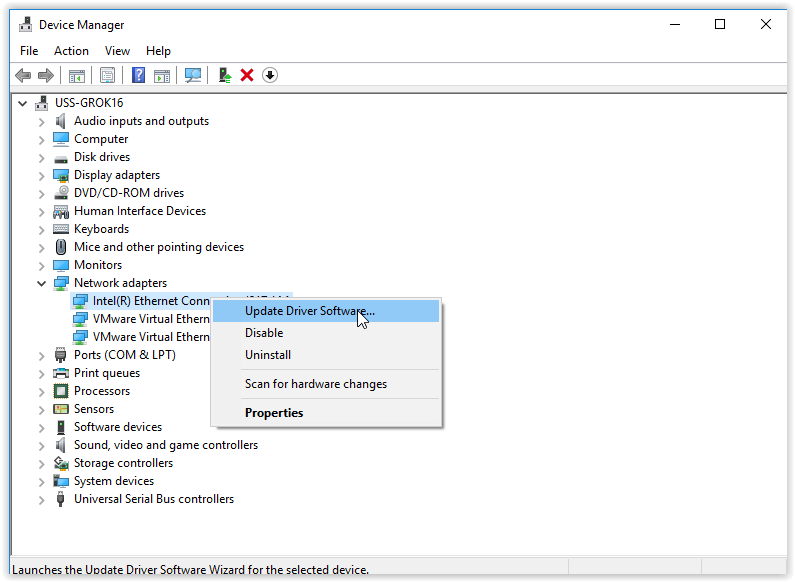
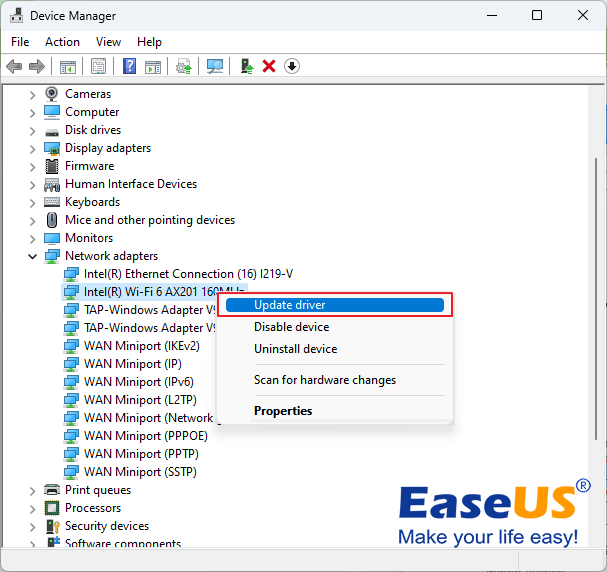
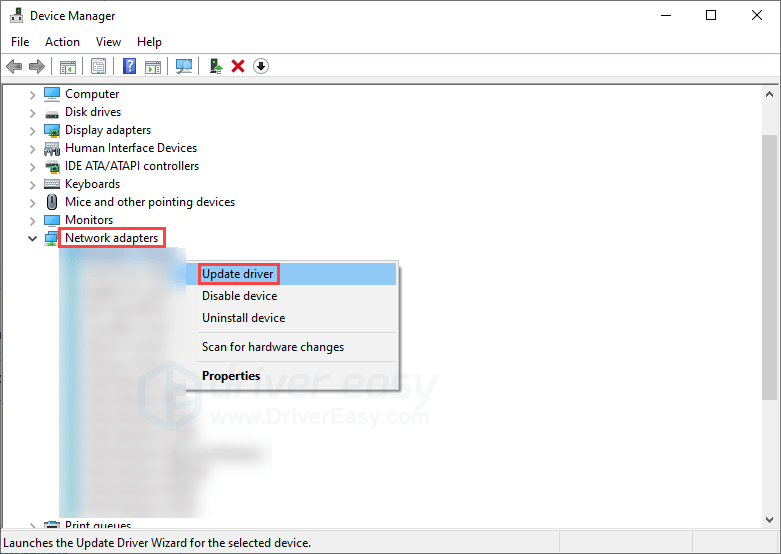
The first step is to identify the specific network hardware in your device. This is usually done through your operating system’s Device Manager.
- On Windows: Right-click the Start button, select “Device Manager,” then expand “Network adapters.” You’ll see a list of your network hardware (e.g., “Intel(R) Wi-Fi 6 AX201,” “Realtek PCIe GbE Family Controller”).
- On macOS: Click the Apple menu, select “About This Mac,” then click “System Report.” Under “Network,” you’ll find details about your Wi-Fi and Ethernet hardware.
Once you know the hardware model, you can search for its drivers on the manufacturer’s website (e.g., Intel, Realtek, Broadcom for network cards; Apple for macOS).
Methods for Updating Network Drivers
There are a few primary ways to update your network drivers:
Automatic Updates Through Your Operating System
Windows Update and macOS’s Software Update often include driver updates as part of their regular system updates. This is the easiest method, as it’s handled automatically. However, sometimes these updates might lag behind the very latest releases directly from the hardware manufacturer.
Manual Driver Downloads from Manufacturer Websites
This is generally the most reliable method for ensuring you have the latest and most optimized drivers.
- Identify your network hardware: Use Device Manager or System Information as described above.
- Visit the manufacturer’s website: Navigate to the support or downloads section of the hardware manufacturer’s official website.
- Search for your specific model: Enter your hardware model number or name into the search bar.
- Download the latest driver: Select the correct operating system for your device and download the latest available driver package.
- Install the driver: Run the downloaded installer. It will typically guide you through the installation process, which may involve a system restart.
Using Third-Party Driver Update Utilities (with Caution)
Various third-party software applications claim to automatically scan your system for outdated drivers and update them. While these can be convenient, it’s essential to use them with extreme caution. Stick to reputable and well-reviewed applications, and always create a system restore point before proceeding with any driver updates from these tools, as they can sometimes install incorrect or problematic drivers.
The Brand and Money Connection: Why Driver Health Matters Beyond Tech
While the technical aspects of network drivers are paramount, their impact extends into the realms of Brand and Money.
From a Brand perspective, a consistently slow or unreliable internet connection can damage a personal brand or a corporate identity. Imagine trying to conduct an important video conference for a client, only to be repeatedly disconnected. This can lead to missed opportunities, a perception of unprofessionalism, and ultimately, a tarnished reputation. For businesses, consistent network issues can translate into lost productivity, frustrated employees, and unhappy customers, all of which negatively impact brand perception and loyalty.
In terms of Money, the implications are equally significant. For individuals, poor network performance can hinder online income streams, whether it’s through freelance work, online trading, or managing e-commerce ventures. Slow downloads mean wasted time, which is money lost for professionals. For businesses, network downtime or inefficiency can lead to lost sales, reduced operational capacity, and increased costs for IT support to resolve recurring issues. Even a slight improvement in network speed and stability, facilitated by well-functioning drivers, can translate into tangible financial gains through increased efficiency and reduced downtime. Investing a little time in ensuring your network drivers are up-to-date is a small step that can yield significant returns in both productivity and financial well-being.
In conclusion, network drivers are the invisible architects of our digital connections. They are the critical software components that enable our hardware to communicate with the wider world. By understanding what they are, how they function, and the importance of keeping them updated, you empower yourself to maintain a robust, secure, and efficient online experience, safeguarding both your technological infrastructure and your broader personal and financial goals.
aViewFromTheCave is a participant in the Amazon Services LLC Associates Program, an affiliate advertising program designed to provide a means for sites to earn advertising fees by advertising and linking to Amazon.com. Amazon, the Amazon logo, AmazonSupply, and the AmazonSupply logo are trademarks of Amazon.com, Inc. or its affiliates. As an Amazon Associate we earn affiliate commissions from qualifying purchases.