
In our hyper-connected world, digital messages are the lifeblood of communication, from personal chats to critical business transactions. While the convenience is undeniable, the seemingly simple status updates attached to our messages can often leave us wondering about their true meaning. The “Delivered” status, in particular, is a common sight, but its implications are far more complex than a mere indication of arrival. Understanding what “Delivered” truly signifies is crucial for effective digital communication, troubleshooting potential issues, and maintaining robust security practices. This article delves deep into the technological underpinnings and user experience implications of the “Delivered” status, exploring its various interpretations across different platforms and contexts.

The Technical Genesis of “Delivered”: Beyond the User Interface
The “Delivered” status is not a magical pronouncement but a culmination of several technological processes designed to confirm the successful transfer of data from one device or server to another. Understanding this underlying infrastructure is key to appreciating the limitations and nuances of the status itself.
Message Routing and Server Handshakes
When you send a message, it embarks on a journey through a complex network. For platforms like SMS (Short Message Service), the message is routed through your mobile carrier’s Short Message Service Center (SMSC). The SMSC acts as a central hub, responsible for storing and forwarding messages to the intended recipient’s device. The “Delivered” status, in this context, typically signifies that the SMSC has successfully transmitted the message to the recipient’s mobile network, and the network has acknowledged its receipt and queued it for delivery to the specific handset.
For over-the-top (OTT) messaging apps like WhatsApp, Telegram, or Signal, the process involves different server architectures. Your message is first sent to the app’s central servers, which then manage the routing and delivery to the recipient’s device through their respective app installations. The “Delivered” status here means that the app’s server has successfully pushed the message to the recipient’s device, indicating that the data has reached the device’s operating system. This often involves a handshake protocol between the sender’s client, the app’s server, and the recipient’s client.
Network Dependencies and Acknowledgement Protocols
The “Delivered” status hinges on successful network connectivity and the implementation of acknowledgment protocols. For SMS, the carrier network provides an acknowledgment back to the sender’s SMSC, which in turn relays this information, often implicitly, to the sending device or platform. This acknowledgment confirms that the message has reached the recipient’s mobile network’s infrastructure.
In the realm of OTT apps, the servers maintain connections with the client applications. When a message is successfully received by the recipient’s device, the recipient’s app sends an acknowledgment back to the sender’s app server. This confirmation triggers the “Delivered” status on the sender’s end. However, it’s important to note that the network through which this acknowledgment travels is also a factor. A temporary network blip on the recipient’s end, even if the message was technically sent to their device, could prevent the acknowledgment from reaching the sender, leading to a potential misinterpretation of the “Delivered” status.
Carrier vs. App-Specific Interpretations
It’s crucial to distinguish between carrier-level delivery and app-level delivery. For SMS, the “Delivered” status is primarily managed by mobile carriers. This means the message has reached the recipient’s SIM card or the associated network. However, it doesn’t guarantee that the recipient has seen the message or that their phone is even turned on.
For OTT messaging apps, the “Delivered” status is a proprietary indicator managed by the app provider. While generally more granular than SMS, it still signifies that the message has reached the recipient’s device and its app. The interpretation can vary slightly between apps. For instance, some apps might consider a message “Delivered” once it’s downloaded by the app on the recipient’s device, while others might wait for a more explicit acknowledgment that the app has processed it. This subtle difference can be significant in understanding the exact point of confirmation.
Beyond Delivery: The Distinction Between “Delivered” and “Read”
Perhaps the most common point of confusion surrounding message status lies in the distinction between “Delivered” and “Read.” While both indicate progress in the communication chain, they represent fundamentally different stages of interaction. Understanding this divergence is key to managing expectations and avoiding misinterpretations.
The “Delivered” Threshold: Arrival, Not Engagement
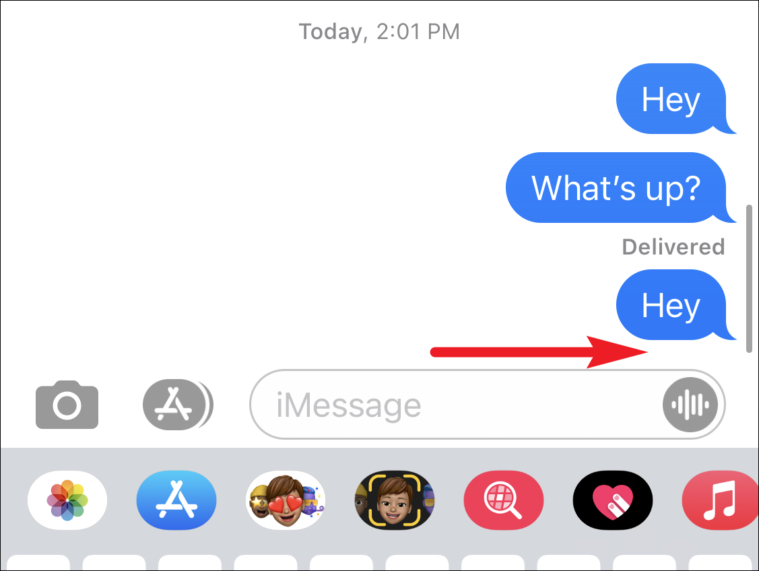
The “Delivered” status signifies that the message has successfully reached its intended destination. Think of it as a package being placed on your doorstep. It’s there, it has arrived, but you haven’t necessarily opened it or interacted with it. In the digital realm, this means the message data has been transmitted from the sender’s device, through various servers and networks, and has landed on the recipient’s device.
For SMS, a “Delivered” status means the message has been received by the recipient’s mobile network and is available for their phone to download. For OTT apps, it means the message has been successfully pushed to the recipient’s device and the app has registered its arrival. At this stage, the recipient may be offline, their phone may be off, or they may simply not have opened the messaging app to see the new communication.
The “Read” Indicator: User Interaction and Confirmation
The “Read” status, on the other hand, implies active user engagement. This is equivalent to the package being opened and its contents examined. For a message to be marked as “Read,” the recipient must typically open the messaging app and view the specific conversation containing the message. Upon doing so, their device sends an acknowledgment back to the sender’s device or server, triggering the “Read” status.
The implementation of “Read” receipts can vary. Some apps allow users to disable them for privacy reasons, meaning a message might be read but never marked as such. Others might have specific conditions for a “Read” receipt, such as the message being visible on the screen for a certain duration. This variability underscores the importance of understanding the specific settings and functionalities of the messaging platform in use.
Implications for Expectations and Communication Flow
The difference between “Delivered” and “Read” has significant implications for managing expectations in digital communication. A “Delivered” message doesn’t guarantee immediate attention or a response. It simply confirms that the message has been sent and received by the intended device. This can be particularly important in professional settings where timely responses are expected. If a message is “Delivered” but not “Read” after a significant period, it might indicate a need for a follow-up communication through a different channel or a potential issue with the recipient’s engagement with the platform. Conversely, in personal communication, a “Delivered” status might be sufficient to know your message is on its way, alleviating anxiety about potential delivery failures.

Troubleshooting and Understanding Delivery Failures
While “Delivered” is generally a positive indicator, its absence or the presence of an error message can be a source of frustration. Understanding common reasons for delivery failures is essential for effective digital communication and for ensuring your messages reach their intended audience.
Network Connectivity Issues: The Foundation of Delivery
The most common culprit behind message delivery failures, or delayed deliveries, is poor or absent network connectivity. For SMS, this can manifest as a weak cellular signal, or the recipient’s phone being in an area with no service. Even if the message is sent from your end, it cannot be transmitted by the network to the recipient’s device if their device cannot connect to the network.
For OTT apps, Wi-Fi or mobile data is crucial. If the recipient is offline, or experiencing unstable internet connections, messages will not be delivered. This can also affect the timely delivery of acknowledgments, leading to delays or outright failures. Sometimes, the sender might also experience connectivity issues, preventing them from even initiating the message sending process, though this is usually evident immediately.
Device and Application-Specific Glitches
Beyond network issues, problems can arise at the device or application level. On the recipient’s end, their device might be out of storage space, preventing new messages from being downloaded. The messaging app itself could be experiencing a temporary glitch or bug, hindering its ability to receive or process incoming messages. In rare cases, the recipient’s device settings might be configured to block messages from unknown senders or from specific apps.
Similarly, the sender’s device or app can also be a source of problems. An outdated version of the messaging app might not be compatible with the server, leading to delivery issues. Corrupted app data or temporary cache issues on the sender’s device could also prevent messages from being sent correctly. For SMS, an issue with the SIM card or the phone’s messaging software can also be the cause.
Platform Limitations and Sender Restrictions
Different messaging platforms have their own inherent limitations and security measures that can impact delivery. For instance, some platforms might have message size limits, and messages exceeding these limits might fail to send or be truncated. Spam filters, both at the carrier level for SMS and within OTT app servers, can flag and block messages deemed suspicious, even if they are legitimate.
Furthermore, sender restrictions can come into play. If a sender has been blocked by the recipient, their messages will not be delivered. For some business-oriented messaging services, there might be account-specific limitations or restrictions based on usage patterns or verification status. Understanding these platform-specific nuances is vital for diagnosing delivery problems.
Ensuring Successful Delivery: Best Practices and Proactive Measures
While some delivery issues are outside of our control, adopting certain best practices can significantly increase the likelihood of your messages reaching their intended recipients and can help you interpret the “Delivered” status with greater confidence.
Verifying Recipient Information and Status
The simplest yet often overlooked step is ensuring the accuracy of the recipient’s contact information. A typo in a phone number for SMS or an incorrect username for an app can lead to outright delivery failures. For critical communications, consider employing dual confirmation methods, such as asking the recipient to confirm receipt of the message through a different channel or by requesting a specific acknowledgment.
While you cannot directly see if the recipient’s phone is on or if they have a stable connection, understanding the general connectivity of the region or network can be helpful. For business communications, establishing clear expectations regarding response times after a “Delivered” status can manage potential delays.
Leveraging Platform-Specific Features and Settings
Familiarize yourself with the delivery and read receipt features of the platforms you use most frequently. Understand how to enable or disable them, and what their specific indications mean within that app. For example, some apps offer advanced delivery reports or statuses that provide more granular information than a simple “Delivered” or “Read” tag.
If you are using a business communication tool, explore its reporting and analytics features. These often provide valuable insights into message delivery rates and potential bottlenecks. Keeping your apps and operating systems updated is also a crucial proactive measure, as updates often include bug fixes that can resolve delivery-related issues.
Utilizing Alternative Communication Channels and Follow-Ups
When dealing with urgent or important messages, and if a “Delivered” status is followed by a prolonged lack of response, it’s wise to have a backup communication strategy. This might involve a follow-up phone call, an email, or even a message on a different platform. This ensures that your message is not lost due to a transient technical issue or the recipient’s temporary unavailability on a specific channel.
For business applications, consider using a combination of messaging platforms or integrating them with other communication tools to create a more robust and reliable communication flow. Proactive communication about potential delays or issues can also go a long way in maintaining effective relationships and ensuring that important information is conveyed.
In conclusion, the “Delivered” status in digital messaging is a powerful, yet nuanced, indicator. It represents a technical achievement in data transmission but does not guarantee immediate awareness or engagement from the recipient. By understanding the underlying technology, differentiating it from the “Read” status, and proactively addressing potential delivery failures, users can navigate the complexities of digital communication with greater clarity and confidence, ensuring their messages are not just sent, but truly received and understood.
aViewFromTheCave is a participant in the Amazon Services LLC Associates Program, an affiliate advertising program designed to provide a means for sites to earn advertising fees by advertising and linking to Amazon.com. Amazon, the Amazon logo, AmazonSupply, and the AmazonSupply logo are trademarks of Amazon.com, Inc. or its affiliates. As an Amazon Associate we earn affiliate commissions from qualifying purchases.