
In an increasingly interconnected digital world, where every interaction leaves a trace, the question of privacy on social media platforms like Instagram has become paramount. What was once a casual scroll and a double-tap can now carry significant weight, impacting everything from personal branding to professional opportunities. The desire to control one’s digital footprint, specifically the visibility of one’s “likes” on Instagram, stems from a variety of legitimate concerns. Whether it’s maintaining a professional image, safeguarding personal interests from public scrutiny, or simply exercising a preference for privacy, understanding how to manage your Instagram activity is a crucial aspect of modern digital literacy.
This article delves into the intricacies of Instagram’s privacy settings concerning likes, offering practical advice rooted in technology, personal branding, and digital security. While Instagram’s platform design prioritizes public engagement, there are distinct strategies and features that users can leverage to control what is seen, and by whom. We’ll explore the direct options available, as well as broader strategic approaches to ensure your online presence aligns with your privacy preferences and personal objectives.
Understanding Instagram’s Like Visibility and the Evolving Privacy Landscape
Instagram, like many social media giants, has continuously iterated its features, often in response to user feedback and evolving societal norms around online privacy. The way “likes” are displayed and perceived has undergone significant changes, yet the core desire for control remains.
The Evolving Nature of Instagram Likes
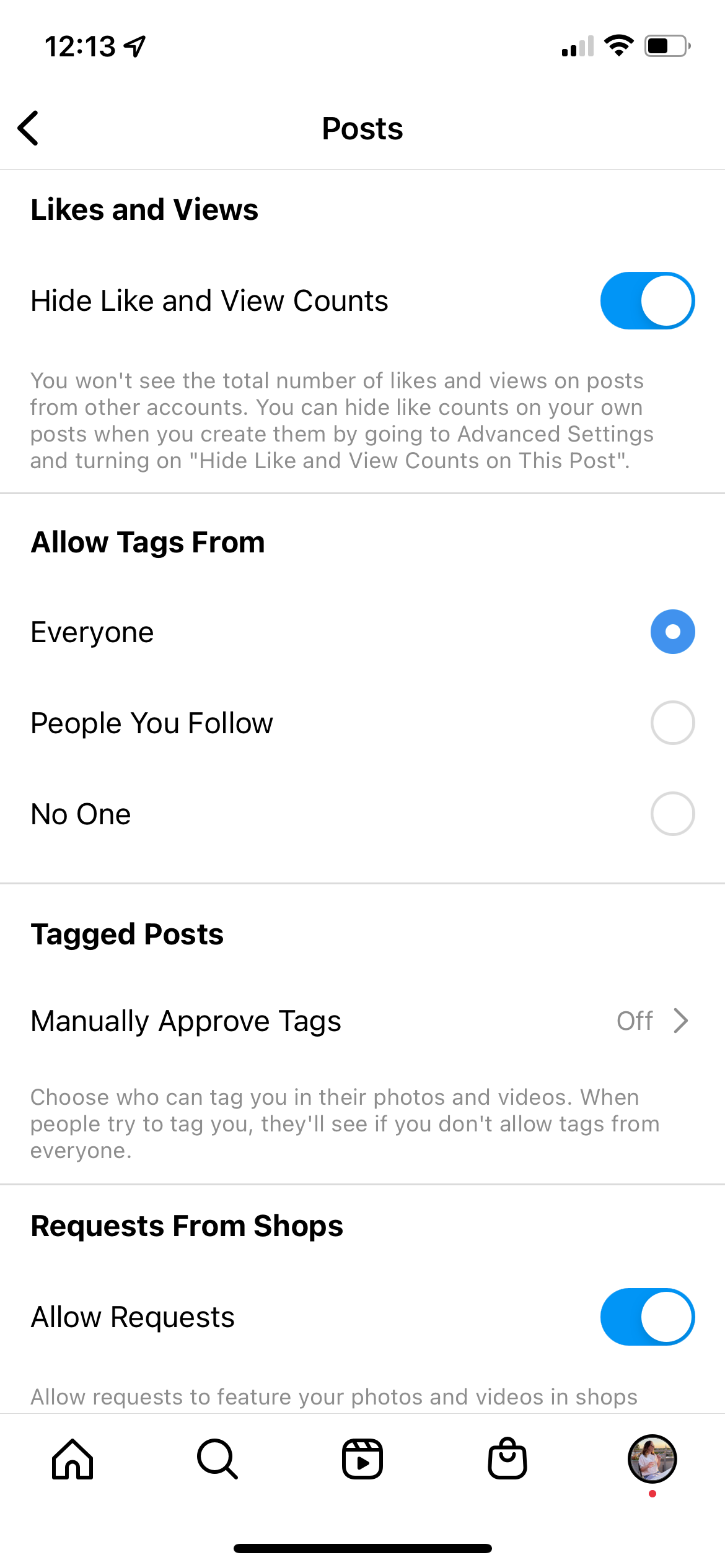
For many years, the total count of likes on an Instagram post was a prominent metric, often dictating a post’s perceived popularity and influence. However, Instagram recognized the potential negative impacts of this public metric, such as fostering comparison, anxiety, and a “popularity contest” mentality. In a significant shift, Instagram introduced the option to hide public like counts, allowing users to focus more on the content itself rather than the numbers. This means that while a post’s owner can still see the total number of likes it receives, others viewing the post might only see “liked by [one user] and others,” without an exact numerical count.
It’s crucial to understand that this feature primarily addresses the count of likes on your own posts. It doesn’t, however, directly address the visibility of your likes on other people’s posts. When you like a photo or video posted by another user, that like is generally visible to anyone who can see the original post. The post owner can, of course, see everyone who has liked their content. This distinction is fundamental to understanding the challenge of “hiding what I like.”
Why Your Likes Matter (More Than You Think)
In today’s digital age, our online activity—including what we like—forms a significant part of our digital identity. For individuals, visible likes can inadvertently reveal personal interests, political leanings, or even connections that one might prefer to keep private. For those involved in personal branding, professional networking, or even online income generation, the implications are even greater.
Consider a professional using Instagram for business networking or brand promotion. Likes on controversial, off-brand, or overtly personal content could potentially undermine a meticulously crafted professional image. Similarly, a job seeker might be unknowingly exposing preferences that conflict with a potential employer’s values. Even for casual users, the cumulative effect of likes can paint a surprisingly detailed picture of their habits and beliefs, which might be accessed by data brokers, marketers, or even malicious actors. Therefore, managing your like visibility isn’t just about superficial preferences; it’s an integral part of digital security and reputation management. It connects directly to the core tenets of personal branding and responsible tech usage.
Direct Methods to Manage and Conceal Your Instagram Likes
While Instagram doesn’t offer a single “hide all my likes from everyone” button without significant trade-offs, there are several direct actions you can take to manage your like activity and its visibility. Understanding these mechanisms is key to exercising control over your digital footprint.
Hiding Your Own Like Count on Posts
As mentioned, Instagram provides a feature that allows you to hide the number of likes on your own posts from others. This is distinct from hiding your likes on other people’s posts, but it’s a step towards managing public perception of engagement with your content.
To do this:
- For a new post: When you’re creating a new post, after selecting your filters and editing, proceed to the “New Post” screen. Scroll down and tap on “Advanced Settings.” Here, you’ll find a toggle option: “Hide Like and View Counts on This Post.” Turn it on.
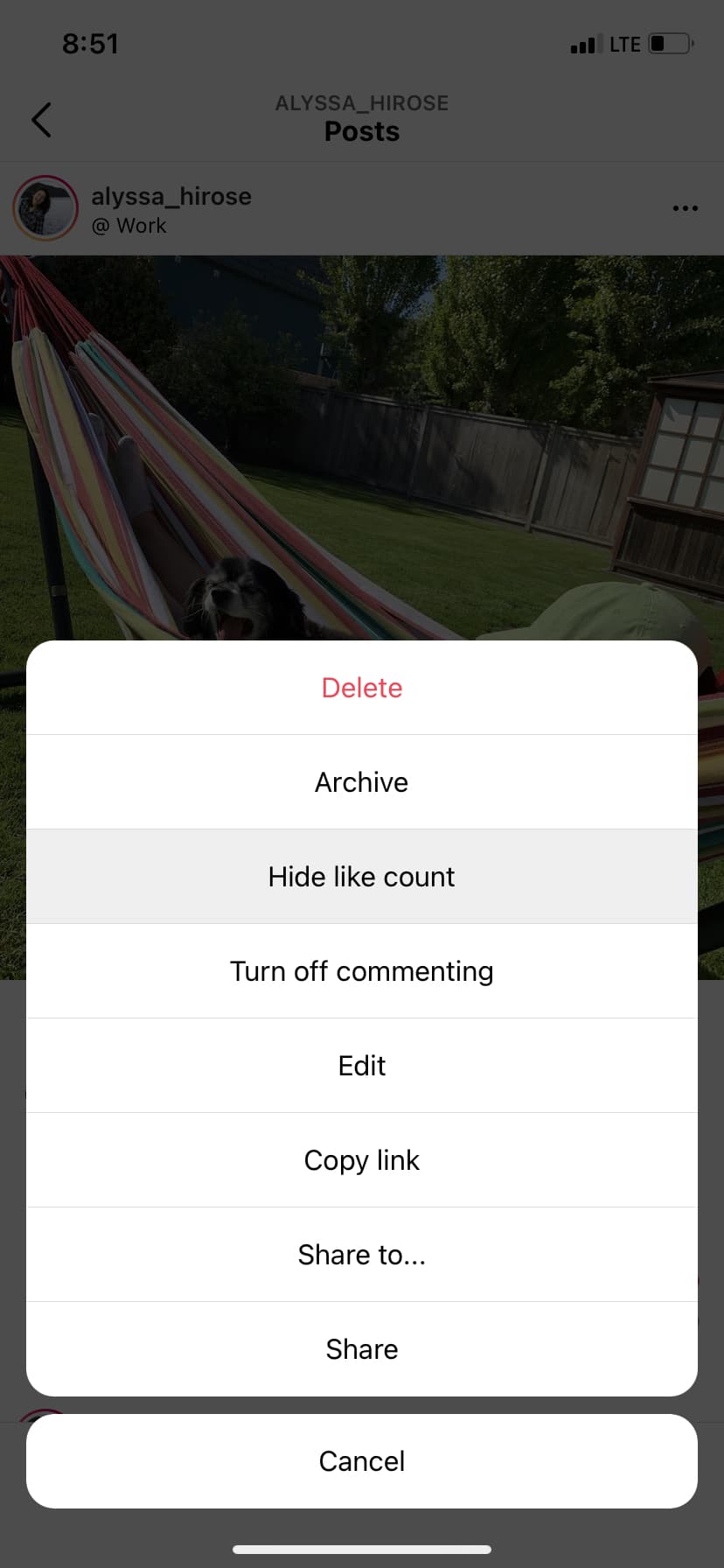
- For an existing post: Go to the post you want to adjust. Tap the three dots (ellipsis) icon in the top right corner of the post. From the options, select “Hide Like Count.” You can reverse this at any time by selecting “Unhide Like Count.”
This feature, while useful for mitigating the pressure of performance metrics, doesn’t address the core question of preventing others from seeing what you like.
Preventing Others from Seeing What You Like
This is the central challenge. Instagram, by design, makes your likes on public posts visible to anyone who can also see that public post. If the post you like is from a private account, only followers of that private account who can see the post will see your like (provided they also follow you, or if the post is from a public account and you’re private, it’s more nuanced). There isn’t a direct setting to selectively hide your likes on other people’s content from specific individuals or the general public while keeping your account public.
However, there are indirect methods and workarounds:
-
Making Your Account Private: This is the most comprehensive solution for controlling who sees any of your activity, including your likes. When your Instagram account is set to private, only approved followers can see your posts, stories, and crucially, your likes on other posts. If you like a post from a public account, only your approved followers will see that you’ve liked it in their activity feed (if they’re following that public account too). Non-followers will not see your likes, nor will they be able to find your profile or see your content.
- Pros: Maximum privacy control.
- Cons: Significantly limits reach and engagement, which can be detrimental for personal branding, professional accounts, or those seeking to build an audience or generate online income. It requires manually approving every follower request.
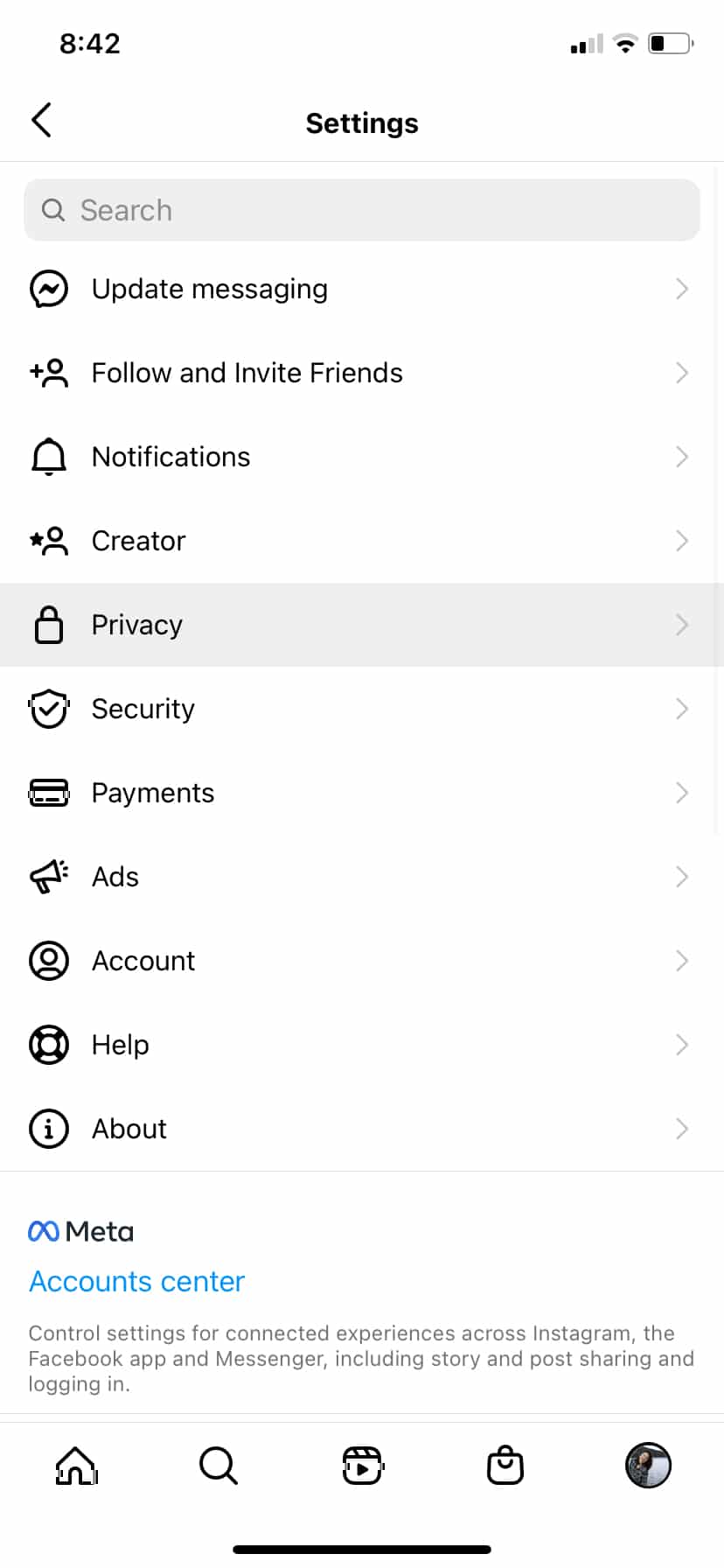
- How to do it: Go to your profile > Tap the three lines (hamburger menu) in the top right > Settings and privacy > Account privacy > Toggle “Private Account” on.
-
Unliking Posts: This is a retrospective and manual method. If you’ve liked a post and later decide you don’t want that like to be visible, you can simply “unlike” it. The like will be removed, and your association with that post will disappear.
- Pros: Direct and immediate solution for specific unwanted likes.
- Cons: Incredibly tedious for managing numerous likes. It doesn’t prevent future likes from being seen.
-
Blocking or Restricting Users: If you want to hide your likes from a specific person without making your entire account private, blocking them is an option. If you block someone, they will not be able to see your profile, posts, or any of your activity, including your likes.
- Pros: Targeted solution for individual privacy concerns.
- Cons: The blocked person will be aware they are blocked (they won’t be able to find you). It’s a strong measure and not scalable for many people. Restricting an account is a softer option that limits their interactions with you, but they can still see your likes if your account is public.
-
Think Before You Like: The most proactive and often overlooked method is simply to be mindful of your liking activity. Before double-tapping, consider if you’re comfortable with that particular like being associated with your profile, especially in a public context. This approach aligns perfectly with personal branding strategies and conscious digital living.
It is crucial to reiterate: Instagram does not provide a setting to hide your likes on other people’s posts from everyone except the post owner while your account remains public. The visibility of your likes on public posts is a feature of the platform’s engagement model.
Strategic Approaches to Curating Your Digital Footprint on Instagram
Beyond direct privacy settings, a more holistic approach to managing your Instagram presence involves strategic thinking about how your activity, including likes, contributes to your overall digital footprint. This is particularly relevant for those leveraging Instagram for professional purposes, personal branding, or even as a source of online income.
The Role of Personal Branding in Liking Behavior
Your Instagram profile is often an extension of your personal brand, whether you consciously manage it or not. Every post, comment, share, and crucially, every like, contributes to the narrative you project to the world. For individuals building a personal brand—be it as an influencer, a thought leader, or a professional in any field—the content they engage with is just as important as the content they create.
Mindful liking involves:
- Alignment with Brand Values: Does liking a particular type of content align with the values and image you want to project?
- Audience Perception: How might your followers, potential employers, or clients interpret your likes?
- Consistency: Is there a consistent theme to your engagement that reinforces your brand message?
By treating your likes as conscious endorsements, you can ensure they contribute positively to your personal brand, rather than inadvertently detracting from it. This proactive approach minimizes the need to “hide” likes later.
Maintaining Professionalism and Privacy
For many, Instagram serves dual purposes: personal connection and professional advancement. Balancing these can be tricky, especially when privacy is a concern.
- Separate Personal and Professional Accounts: This is perhaps the most effective strategy for compartmentalizing your online life. Maintain a public, professionally curated account for branding, networking, or business, and a separate, private account for personal connections and uninhibited liking. This clear demarcation allows for privacy in one realm while maintaining visibility in another, mitigating the need to hide likes on a professional profile.
- Develop a “Liking Policy”: For your professional account, consider having an internal “liking policy.” Only like content that directly supports your professional goals, aligns with your industry, or resonates with your brand values. Avoid liking content that is controversial, overly personal, or off-topic.
- Regularly Review Your Activity: Periodically review your liked posts (you can find these in your “Your Activity” section under “Interactions” then “Likes”). This allows you to audit your engagement and unlike any posts that no longer align with your desired public image.
These practices are not just about privacy; they are about reputation management, a key component of brand strategy in the digital age. They are also vital for those who use Instagram for online income, as a damaged reputation can directly impact business opportunities and trust.
Leveraging Other Instagram Privacy Features
While not directly related to hiding likes, other privacy features on Instagram contribute to your overall digital security and control, which can indirectly impact how your activity is perceived.
- Controlling Who Can Tag You: You can approve tags manually or prevent others from tagging you without your review. This ensures unwanted associations don’t appear on your profile. (Settings and privacy > Tags and mentions > Manually approve tags).
- Managing Comments: You can restrict who can comment on your posts, or filter out specific words or phrases. This controls the dialogue around your content.
- Activity Status: You can hide your activity status, so others don’t see when you’re active on the app. (Settings and privacy > Messages and story replies > Show activity status).
- Blocking and Restricting Accounts: Beyond hiding likes, these tools are powerful for managing direct interactions with specific users, ensuring a safer and more private experience.
Utilizing these features creates a more secure and controlled environment, reinforcing your efforts to manage your public image effectively.
Beyond Likes: A Holistic View of Instagram Privacy and Digital Security
Managing likes is one facet of a broader conversation about digital privacy and security on platforms like Instagram. A comprehensive approach considers data integrity, third-party interactions, and the overarching implications for your online presence.
Data Security and Third-Party Apps
The digital landscape is rife with apps and services promising enhanced features for social media platforms. When it comes to privacy, extreme caution is advised. Avoid using third-party applications that claim to offer functionalities like “hiding all your likes” or “seeing who viewed your profile” that are not natively supported by Instagram. These apps often require access to your Instagram login credentials, posing significant security risks. They can compromise your account, steal your data, or even be used for malicious activities. Always stick to Instagram’s official app and settings for managing your privacy and security. This is a critical component of digital security in the tech sphere.
The Broader Implications for Your Online Presence
Your Instagram activity doesn’t exist in a vacuum. It contributes to your overall online identity, which is increasingly scrutinized by employers, business partners, and even financial institutions. What you like, share, and post on Instagram can reflect on your professional competence, personal judgment, and reliability. Therefore, a thoughtful approach to Instagram privacy extends to a broader strategy of reputation management across all your digital platforms. Consistent privacy settings, mindful engagement, and a clear understanding of each platform’s data policies are essential for building and maintaining a positive online reputation. For those leveraging online income or side hustles, this can directly impact their financial viability and trust with clients or audiences.
Balancing Engagement and Anonymity
Ultimately, the desire to hide likes often clashes with the inherent nature of social media platforms, which are designed for engagement and sharing. For many, especially those pursuing online income or personal branding, engagement is the currency of success. Hiding all activity by making an account private might offer maximum anonymity but comes at the cost of reach and interaction.
The challenge, therefore, is to find a balance. This involves conscious decision-making:
- What level of privacy is truly necessary for your goals?
- Are there specific types of content or interactions you need to shield, or is it a general preference for anonymity?
- Can you achieve your privacy goals through thoughtful engagement and strategic use of existing features, rather than seeking absolute concealment?
By carefully considering these questions, users can navigate Instagram effectively, enjoying its benefits while maintaining control over their digital footprint and safeguarding their personal and professional interests.
In conclusion, while Instagram does not offer a direct “hide what I like from everyone” button without making your entire account private, users possess significant control over their digital presence. Through a combination of understanding existing privacy features, making strategic decisions about account settings, practicing mindful engagement, and adhering to sound digital security principles, you can effectively manage the visibility of your likes and cultivate an Instagram experience that aligns with your personal and professional privacy requirements. The key lies in proactive management and a continuous awareness of how your actions shape your online identity.
aViewFromTheCave is a participant in the Amazon Services LLC Associates Program, an affiliate advertising program designed to provide a means for sites to earn advertising fees by advertising and linking to Amazon.com. Amazon, the Amazon logo, AmazonSupply, and the AmazonSupply logo are trademarks of Amazon.com, Inc. or its affiliates. As an Amazon Associate we earn affiliate commissions from qualifying purchases.