
A Network Interface Card (NIC), also known as a network adapter or LAN adapter, is a fundamental piece of hardware that empowers a computer or other network-enabled device to connect to a network. It acts as the gateway, translating the digital information processed by your device into a format that can be transmitted over a network medium, and vice versa. Without a NIC, your computer would be an isolated island, unable to communicate with other devices, access the internet, or participate in the vast digital ecosystem that defines modern computing. Understanding its function is crucial for anyone looking to grasp the inner workings of networking and the technologies that underpin our connected world.
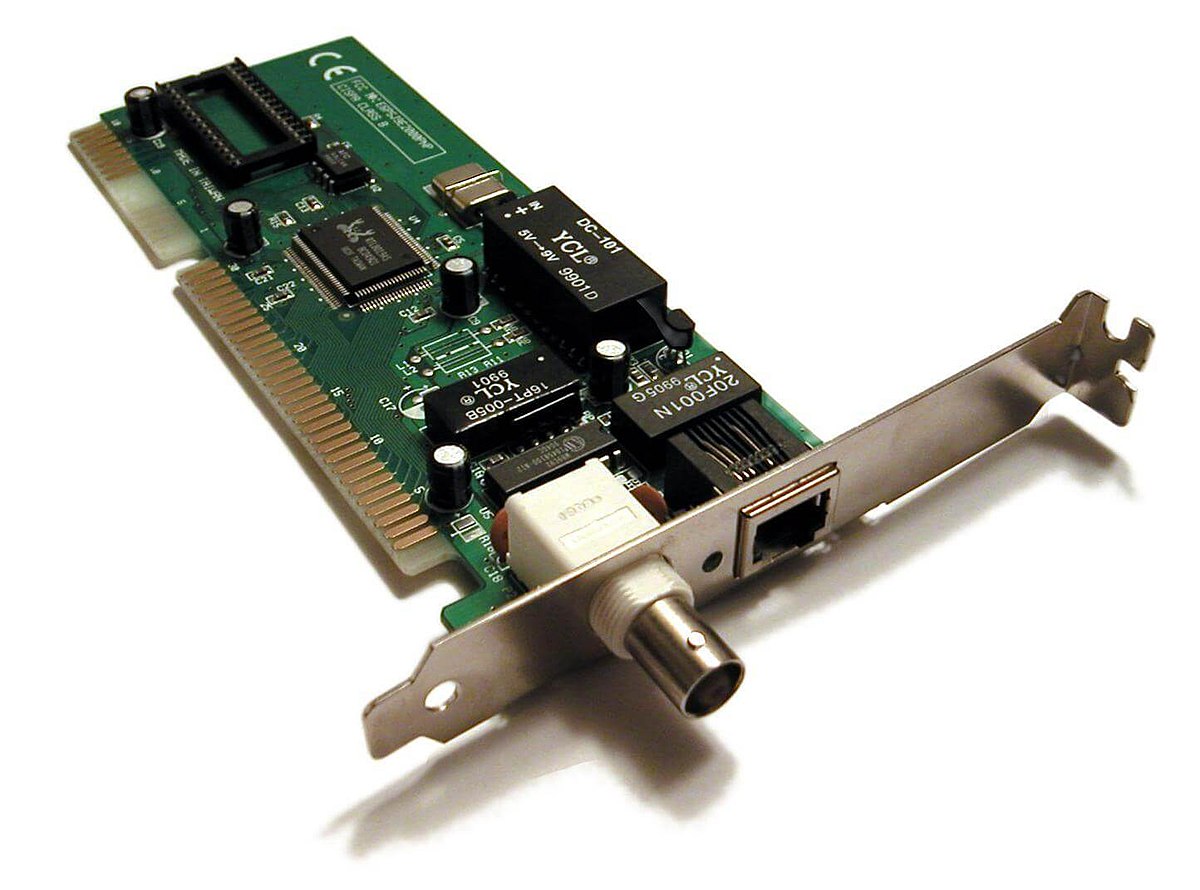
The Essential Role of the NIC in Network Connectivity
At its core, a NIC is the physical bridge between a device’s internal processing system and the external network. It’s responsible for both sending and receiving data packets, ensuring that information is correctly formatted and addressed for transmission and reception. This seemingly simple task involves a complex interplay of hardware and software, orchestrated to facilitate seamless communication.
Translating Digital Signals for Transmission
Computers operate on a language of binary digits – ones and zeros. However, network cables, whether wired (like Ethernet) or wireless (like Wi-Fi), transmit data in analog or modulated signals. The NIC’s primary role is to act as a translator. When your computer wants to send data, the NIC takes these binary signals and converts them into the electrical or radio wave pulses that can travel across the network medium. This translation process involves encoding the data in a way that is compatible with the specific network technology being used. For example, an Ethernet NIC will encode data differently than a Wi-Fi NIC.
Receiving and Decoding Incoming Data
Conversely, when data arrives from the network, the NIC receives these electrical or radio wave signals. It then decodes these signals back into the binary language that the computer’s operating system and applications can understand. This decoding process involves interpreting the signal patterns and reconstructing the original data packets. The accuracy of this translation is paramount; any misinterpretation could lead to data corruption or failed communication.
Addressing and Identification: The MAC Address
Every NIC has a unique identifier embedded in its hardware, known as the Media Access Control (MAC) address. This address is like a physical serial number for the network interface, ensuring that data packets can be routed to the correct destination on a local network. When data is sent, the NIC attaches the source MAC address (its own) and the destination MAC address to the packet. This allows other devices on the network to identify the sender and receiver, preventing data from being sent to the wrong place. Unlike IP addresses, which can change and are assigned at a higher network layer, MAC addresses are generally permanent and operate at the hardware level.
The Hardware Components and Functionality of a NIC
A NIC is not a monolithic component; it comprises several key hardware elements, each contributing to its overall functionality. These components work in concert to manage the flow of data between the device and the network.
The Controller Chip: The Brain of the Operation
At the heart of every NIC is a controller chip. This integrated circuit is responsible for managing all the data transfer operations. It handles tasks such as framing data packets, error checking, and controlling the flow of data to and from the network medium. The sophistication of the controller chip significantly influences the performance and capabilities of the NIC, including its speed and support for various networking protocols. Modern controller chips are highly advanced, capable of handling complex tasks with minimal intervention from the host CPU.
The Transceiver: Sending and Receiving Signals
The transceiver (transmitter-receiver) is the component responsible for interfacing with the physical network medium. In wired NICs, this typically involves converting digital signals into electrical pulses suitable for transmission over Ethernet cables and vice versa. For wireless NICs, the transceiver is responsible for modulating digital data onto radio waves for transmission and demodulating incoming radio waves back into digital data. This component dictates the type of network connection the NIC supports, such as RJ45 for Ethernet or antennas for Wi-Fi.
The Bus Interface: Connecting to the Host System
The bus interface is the mechanism by which the NIC communicates with the host computer’s motherboard and its central processing unit (CPU). This connection allows the NIC to receive data to be sent and to transmit received data to the CPU for processing. Historically, various bus standards like ISA, PCI, and AGP were used. Today, the PCI Express (PCIe) bus is the dominant standard, offering high bandwidth and low latency, which is essential for modern high-speed networking. The efficiency of the bus interface directly impacts how quickly the NIC can access system memory and transfer data.
Memory Buffers: Temporary Data Storage
NICs often incorporate small amounts of onboard memory, known as buffers. These buffers serve as temporary holding areas for data packets that are either waiting to be transmitted or have just been received. Buffering is crucial for managing variations in network traffic speed and preventing data loss. When the network is busy, incoming packets can be stored in the receive buffer until the host system is ready to process them. Similarly, outgoing packets are stored in the transmit buffer before being sent out. The size and efficiency of these buffers can impact the NIC’s ability to handle bursts of traffic and maintain smooth data flow.
Types of Network Interface Cards and Their Applications
The evolution of networking has led to a diverse range of NICs, each designed to cater to specific connectivity needs and performance requirements. These variations are largely distinguished by the network technology they support and their intended use case.
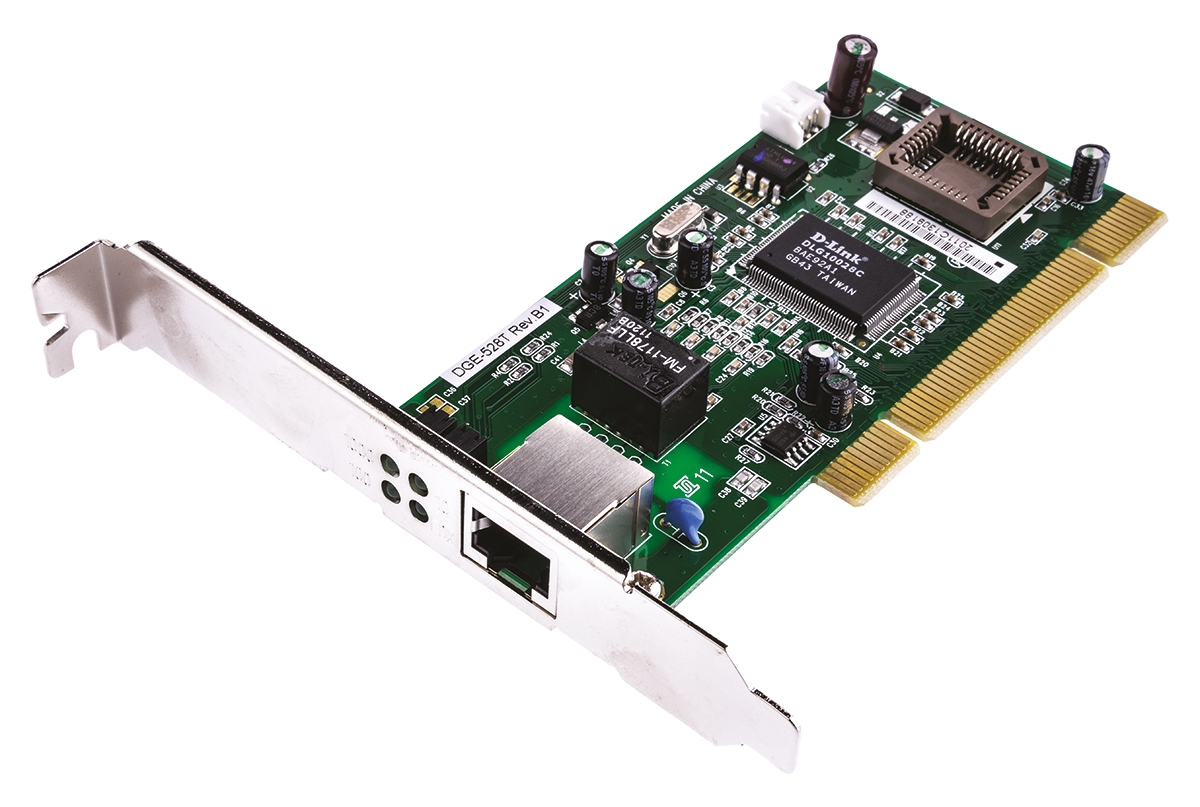
Wired Ethernet NICs: The Backbone of Local Networks
Wired Ethernet NICs are ubiquitous in modern computing environments, forming the backbone of most Local Area Networks (LANs). They connect devices to routers and switches using physical Ethernet cables. These NICs come in various speed ratings, such as 10/100 Mbps (Fast Ethernet), 1 Gbps (Gigabit Ethernet), 10 Gbps, and even higher for enterprise-level applications. Gigabit Ethernet is the most common standard today, offering a balance of speed and affordability for home and office use. The reliability and consistent performance of wired connections make Ethernet NICs the preferred choice for desktops, servers, and high-bandwidth applications.
Wireless (Wi-Fi) NICs: The Freedom of Mobility
Wireless NICs, commonly known as Wi-Fi adapters, enable devices to connect to networks wirelessly using radio waves. These NICs are essential for laptops, smartphones, tablets, and a growing number of Internet of Things (IoT) devices. Wi-Fi NICs adhere to various IEEE 802.11 standards (e.g., 802.11ac, 802.11ax or Wi-Fi 6), which define the speed, range, and efficiency of wireless communication. The convenience and mobility offered by Wi-Fi NICs have revolutionized how we access information and stay connected, making them indispensable in both personal and professional settings.
Integrated vs. Add-on NICs: Convenience and Expandability
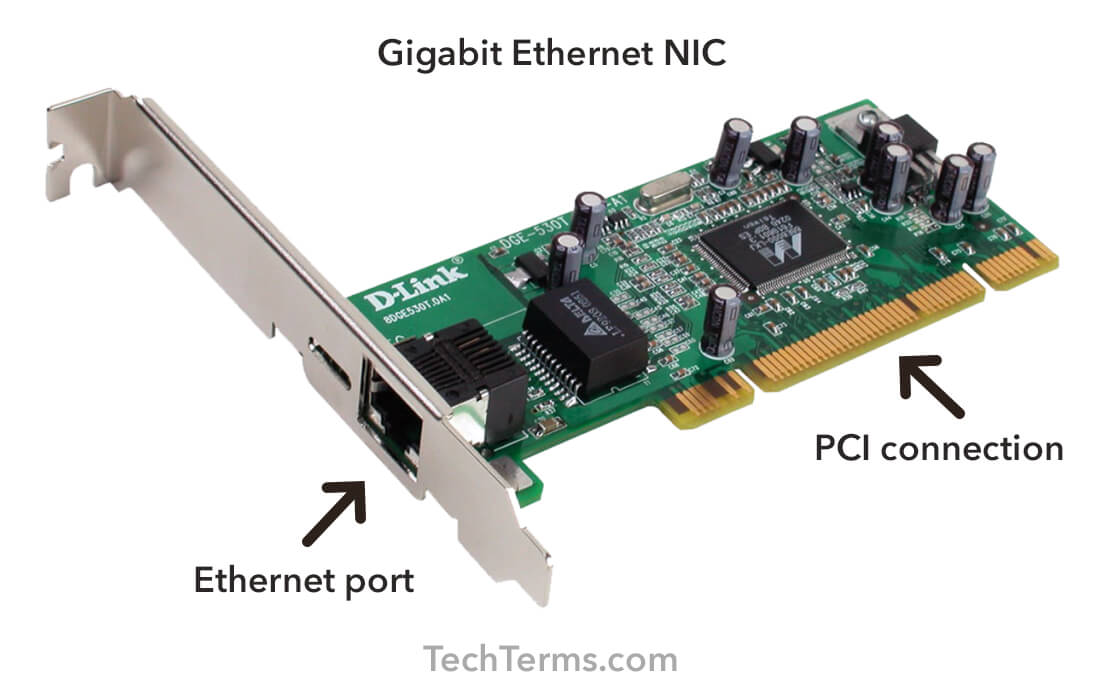
NICs can be found in two primary forms: integrated directly onto the computer’s motherboard or as separate expansion cards that can be added to a desktop computer. Integrated NICs are standard on most modern computers, offering a cost-effective and convenient solution for basic connectivity. However, for users requiring higher performance, additional network ports, or specific functionalities (like specialized network security features), add-on NICs, often connected via PCIe slots, provide greater flexibility and upgradeability. These add-on cards can offer faster speeds, multiple ports, or support for advanced protocols.
Specialized NICs: Tailored for Demanding Environments
Beyond the common wired and wireless NICs, specialized variants exist for demanding environments. Fiber optic NICs, for instance, are used in high-speed backbone networks and data centers to transmit data over optical fiber cables, offering significantly higher bandwidth and longer transmission distances than copper Ethernet. Server-grade NICs often include advanced features like offloading certain network tasks from the CPU to improve server performance, support for redundant connections for reliability, and specialized drivers for optimal integration with server operating systems.
The Software Interface: Drivers and Protocols
While the NIC is a piece of hardware, its functionality is intricately linked to software. The operating system needs a way to communicate with the NIC and instruct it on how to handle data. This communication is facilitated by device drivers and network protocols.
Device Drivers: The NIC’s Translator to the OS
Device drivers are software programs that act as intermediaries between the hardware (the NIC) and the operating system. The NIC driver translates the generic commands from the operating system into specific instructions that the NIC’s controller chip can understand and execute. It also translates the data received by the NIC back into a format that the operating system can interpret. Without the correct driver, the operating system wouldn’t be able to recognize or utilize the NIC, rendering it useless. Drivers are crucial for ensuring optimal performance, enabling advanced features, and resolving compatibility issues.
Network Protocols: The Rules of Communication
NICs operate within the framework of various network protocols, which are sets of rules that govern how data is formatted, addressed, transmitted, and received across a network. The NIC is responsible for implementing the lower layers of these protocols, particularly the Data Link Layer (Layer 2 of the OSI model). This layer handles tasks like framing data into packets (e.g., Ethernet frames), managing MAC addresses, and performing error detection. While the NIC doesn’t directly implement higher-level protocols like TCP/IP (which are handled by the operating system’s networking stack), it provides the fundamental physical and data link layer services that these protocols rely on. The NIC’s hardware capabilities are designed to efficiently support these protocols.
The Evolving Landscape of Network Interface Cards
The technology behind Network Interface Cards is constantly evolving, driven by the ever-increasing demand for faster, more reliable, and more efficient network connectivity. From the early days of dial-up modems to the high-speed fiber optic networks of today, NICs have been at the forefront of this technological advancement.
Bandwidth Demands and Speed Increases
The insatiable demand for higher bandwidth, fueled by video streaming, cloud computing, and massive data transfers, has led to continuous improvements in NIC speeds. We’ve moved from megabits per second to gigabits and even terabits per second. This has necessitated advancements in signal processing, data encoding, and the physical components of NICs to handle these escalating speeds without introducing errors or bottlenecks.
Power Efficiency and Miniaturization
As devices become more mobile and battery life becomes a critical factor, power efficiency in NICs has become increasingly important. Manufacturers are continuously working to reduce the power consumption of NICs, especially for wireless and mobile devices. Furthermore, miniaturization is key, allowing NICs to be integrated into smaller and more complex devices, from smartphones to tiny IoT sensors.
Advanced Features and Software-Defined Networking
Modern NICs are incorporating more sophisticated features beyond basic data transmission. These include hardware offloading capabilities that allow the NIC to handle tasks like checksum calculation and encryption/decryption, freeing up the CPU for other processes. The rise of Software-Defined Networking (SDN) is also influencing NIC design, with some NICs offering greater programmability and flexibility to adapt to dynamic network configurations. This allows for more intelligent traffic management and network virtualization.
In conclusion, the Network Interface Card is far more than just a port on your computer. It is a sophisticated piece of technology that acts as the vital link between your digital world and the vast interconnected network. Its ability to translate, address, and transmit data forms the bedrock of all our online activities, making it an indispensable component in the modern technological landscape.
aViewFromTheCave is a participant in the Amazon Services LLC Associates Program, an affiliate advertising program designed to provide a means for sites to earn advertising fees by advertising and linking to Amazon.com. Amazon, the Amazon logo, AmazonSupply, and the AmazonSupply logo are trademarks of Amazon.com, Inc. or its affiliates. As an Amazon Associate we earn affiliate commissions from qualifying purchases.