
In an increasingly connected world, the humble garage door has evolved beyond a simple barrier, becoming an integral part of our smart homes. While traditional remote controls offer convenience, they come with inherent limitations: they can be misplaced, stolen, or have their batteries die at the most inconvenient times. Enter the garage door keypad – a simple yet powerful technological upgrade that transforms how you access your garage, offering unparalleled security, convenience, and peace of mind.
This comprehensive guide will walk you through everything you need to know about installing a garage door keypad. From understanding its benefits and choosing the right model to a step-by-step installation process and essential troubleshooting tips, we’ll equip you with the knowledge to seamlessly integrate this smart access solution into your home. Embrace the future of home access and say goodbye to fumbling for keys or remotes.

I. Unlock Seamless Access: Why a Garage Door Keypad is a Smart Home Upgrade
The concept of digital entry has revolutionized various aspects of our lives, from banking to securing our front doors. Applying this principle to your garage door brings a similar level of modernity and efficiency. A garage door keypad isn’t just a gadget; it’s a strategic enhancement to your home’s security and daily functionality.
A. The Evolution of Garage Access: Beyond the Remote
For decades, the standard clicker remote was the sole arbiter of garage entry for most homeowners. While effective, this single point of failure often led to frustration. A lost remote meant being locked out, a dead battery meant manual intervention, and sharing access required physically handing over a device. The advent of keypads ushered in an era where physical possession of a device is no longer the sole prerequisite for entry, aligning garage access with modern digital security protocols. This shift reflects a broader trend in smart home technology, where convenience is paired with enhanced control and security.
B. Key Benefits: Security, Convenience, and Peace of Mind
The advantages of installing a garage door keypad extend far beyond mere novelty. They address fundamental aspects of home management and security, offering tangible improvements to your daily routine.
1. Enhanced Security: No More Lost Remotes or Hidden Keys
One of the most compelling reasons to install a keypad is the significant boost in security it provides. Unlike a physical remote that can be stolen from your car or a spare key hidden under a mat, a keypad operates on a personalized, memorized code. If your vehicle is broken into, a thief won’t gain access to your garage just by finding a remote. Furthermore, it eliminates the risky practice of leaving a hidden spare key, which is a common vulnerability. Many modern keypads also incorporate features like temporary codes, automatic lockout after multiple incorrect entries, and encrypted communication, further bolstering your home’s digital security posture against unauthorized access. This aligns perfectly with the “Digital Security” aspect of our Tech category.
2. Unmatched Convenience: Access for Family, Friends, and Deliveries
Imagine coming home from a run without your keys, or your kids needing to get into the garage after school. A keypad makes these scenarios effortless. Family members simply punch in the code. This convenience extends to others as well. Need to grant access to a pet sitter, gardener, or a trusted delivery service? You can provide them with a temporary or permanent code without having to make multiple copies of a physical remote or worry about retrieving it later. This is particularly valuable for homes where multiple people need access at different times, streamlining daily logistics. It also means you no longer need to keep track of multiple remotes for different cars or individuals, simplifying your life.
3. Emergency Preparedness and Smart Home Integration
In emergency situations, quick access can be crucial. A keypad ensures you can always get into your garage, even if power is out (as most keypads are battery-operated) or if you’ve been locked out of your main house. For the tech-savvy, some advanced keypads offer integration with smart home systems, allowing you to control and monitor your garage door status remotely via an app. While this guide focuses on traditional installation, it’s worth noting the potential for expanding your garage’s role within a larger smart home ecosystem, contributing to overall home automation and security management – a core element of “Technology Trends” and “Gadgets.”
C. Choosing the Right Keypad: Compatibility and Features
Before diving into installation, selecting the appropriate keypad is crucial. The primary consideration is compatibility. Most garage door openers (GDOs) manufactured after 1993 use rolling code technology for enhanced security. Keypads are typically designed to work with specific brands (e.g., Chamberlain, LiftMaster, Genie, Craftsman) and often specific frequency technologies (e.g., Security+ 2.0).
- Brand-Specific Keypads: These are designed to seamlessly integrate with your existing garage door opener brand. They often offer the most straightforward installation and programming.
- Universal Keypads: Designed to work with multiple brands and opener types, universal keypads offer greater flexibility, especially if you’re unsure of your opener’s exact model or frequency. However, programming can sometimes be slightly more involved.
When choosing, check your garage door opener’s manufacturer and model number. This information is usually found on a sticker or label on the motor unit itself. Look for keypads that explicitly state compatibility with your opener’s specifications. Beyond compatibility, consider features such as:
- Backlit Keypads: Essential for night-time visibility.
- Temporary PINs: Allows you to create limited-time access codes.
- Weather Resistance: Crucial for outdoor installation.
- Battery Life Indicator: Helps you know when to change batteries.
- Security Features: Such as automatic lockout after incorrect entries.
Investing a little time in research here ensures a smooth installation and long-term satisfaction.
II. Gearing Up for Installation: Tools, Materials, and Essential Preparations
A successful installation hinges on proper preparation. Gathering the right tools and materials beforehand not only saves time but also ensures safety and accuracy.
A. What You’ll Need: A Comprehensive Checklist
Most keypad installations are DIY-friendly and require only basic household tools. Here’s what you should have on hand:
1. The Keypad Kit Itself
Naturally, you’ll need your new garage door keypad. The kit usually includes:
- The Keypad Unit: The main device you’ll be interacting with.
- Mounting Screws: Specifically designed for outdoor use and securing the keypad.
- Anchors (if applicable): For mounting on masonry or stucco.
- Battery/Batteries: Most keypads are battery-operated for wireless installation.
2. Basic Hand Tools
- Power Drill: For drilling pilot holes. A cordless drill is ideal for outdoor use.
- Drill Bits: A small drill bit suitable for pilot holes (usually 1/8″ or 3/32″ is sufficient, but check your keypad’s manual for specific recommendations).
- Screwdriver: Phillips head, matching the mounting screws.
- Pencil or Marker: For marking drill points.
- Measuring Tape: To ensure accurate placement.
- Level: To ensure the keypad is mounted straight.
- Hammer (if using wall anchors): To gently tap anchors into place.
- Rag/Cloth: For wiping down the surface before mounting.
3. Safety Gear
- Safety Glasses: Always protect your eyes when drilling.
B. Pre-Installation Checks: Ensuring a Smooth Setup
Before you pick up a drill, a few preliminary steps will make the entire process smoother and prevent potential headaches.
1. Compatibility Verification: The Crucial First Step
As mentioned earlier, double-check that your keypad is compatible with your garage door opener. Look for the model number and brand on your opener’s motor unit, typically found on a label. Refer to your keypad’s instruction manual, which usually includes a compatibility chart. Attempting to install an incompatible keypad will lead to frustration and a non-functional system. If in doubt, contacting the keypad manufacturer’s support or consulting your garage door opener’s manual can provide clarity.
2. Optimal Placement: Where to Mount Your Keypad
Choosing the right location for your keypad is critical for both convenience and security.
- Accessibility: Mount the keypad at a comfortable height for all users – typically 4 to 5 feet off the ground. Ensure it’s easily reachable without stretching or bending, even for children or individuals with mobility issues.
- Visibility and Safety: Place it far enough from the garage door itself (at least 5 feet) so that someone operating the keypad isn’t struck by the door as it opens. This distance also makes it harder for potential intruders to see you enter your code from a distance.
- Protection from Elements: While keypads are weather-resistant, mounting it under an overhang or in a slightly sheltered spot can extend its lifespan and protect it from direct exposure to harsh sun, rain, or snow.
- Proximity to Opener (Wireless Signal): Ensure there are no major metallic obstructions directly between the keypad and the garage door opener that could interfere with the wireless signal. However, most modern keypads have strong enough signals that this is rarely an issue unless the distance is excessive.
Once you’ve identified a spot, hold the keypad in place and test its reach from various angles to confirm comfort and visibility before marking.
3. Powering Up: Battery Installation
Most wireless keypads are powered by standard AA or AAA batteries. Before mounting, open the battery compartment (usually on the back) and insert the fresh batteries. Test the keypad to ensure it powers on – you might see a light or hear a beep. This simple step ensures the keypad is functional before you permanently mount it, saving you from having to unscrew it later to insert batteries.
III. Step-by-Step Installation: From Mounting to Programming
With your tools ready and preparations complete, it’s time for the actual installation. This process typically involves two main phases: physically mounting the keypad and then programming it to communicate with your garage door opener.
A. Physical Installation: Securely Mounting Your Keypad
Mounting the keypad securely ensures it remains functional and resilient to outdoor elements and daily use.
1. Marking and Drilling Pilot Holes
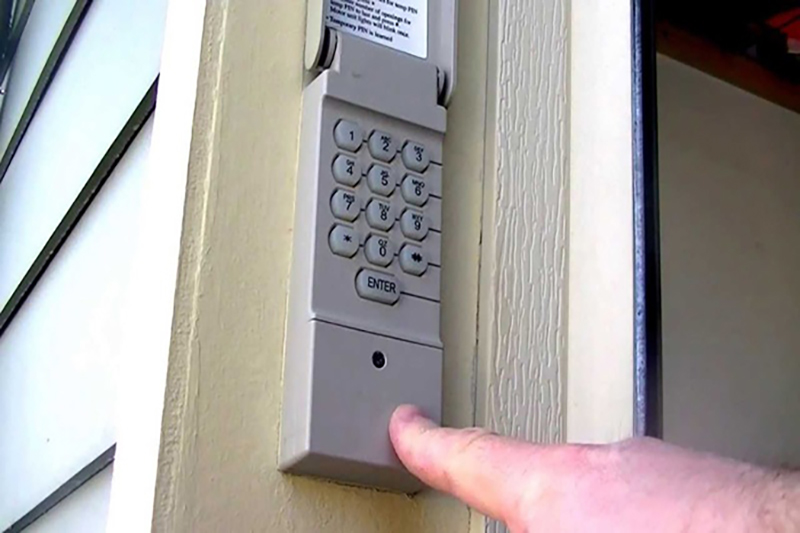
- Positioning: Hold the keypad (or its backplate, if it separates) against your chosen mounting surface at the desired height. Use a level to ensure it’s perfectly straight.
- Marking: Use your pencil or marker to precisely mark the locations for the mounting screws through the screw holes on the keypad or backplate.
- Drilling Pilot Holes: Using your power drill and the appropriate drill bit (refer to your keypad’s manual for recommended size, usually 1/8″ or 3/32″), carefully drill pilot holes at the marked spots. Pilot holes make it easier to drive screws and prevent cracking, especially on wood. If mounting on masonry or stucco, you’ll need a masonry bit and wall anchors, which should be tapped into the pilot holes with a hammer before screwing.
2. Attaching the Keypad Base or Backplate
If your keypad has a separate backplate or mounting bracket, attach this first. Align the holes in the backplate with your freshly drilled pilot holes. Drive the mounting screws (provided with your keypad) through the backplate and into the wall, securing it firmly. Do not overtighten, as this can strip the screws or damage the wall material. Ensure it’s snug and stable.
3. Securing the Keypad Unit
Once the backplate is secure, attach the main keypad unit. This usually involves snapping it onto the backplate or screwing it directly into the wall if it’s a single unit. Many keypads have a small security screw at the bottom to deter tampering and ensure it remains firmly attached. Install this screw if your model includes one. Give the keypad a gentle wiggle to confirm it’s securely mounted and doesn’t feel loose.
B. Programming Your Keypad: Connecting to Your Garage Door Opener
The physical installation is only half the battle. Now, you need to teach your keypad to speak to your garage door opener. This process can vary slightly depending on your opener’s brand and age, so always consult your specific keypad and garage door opener manuals for precise instructions. However, the general steps are quite similar across most modern systems.
1. Locating the “Learn” Button on Your Opener
This is the most critical step. The “Learn” button (sometimes labeled “SRT” for Smart/Learn/Remote button) is typically located on the motor unit of your garage door opener.
- Location: It’s usually on the back or side panel of the motor unit, often under the light cover. It’s usually a colored button (red, orange, green, purple, yellow) and might be small.
- Purpose: Pressing this button puts your garage door opener into “learn mode,” allowing it to recognize new remote controls or keypads.
2. Entering Your Desired PIN
Before interacting with the opener, decide on a personal identification number (PIN) for your keypad. Choose a strong, memorable code that is at least 4 digits long and not easily guessable (avoid birthdates, sequential numbers like 1234, or repeating digits like 1111).
- Initial Setup: Many keypads require you to enter a default programming code or a temporary code followed by the # or ENTER button to initiate programming mode on the keypad itself. Follow your keypad’s specific instructions.
- Input Your PIN: Once in programming mode, enter your desired PIN, followed by the # or ENTER button. You might be prompted to enter it again to confirm.
3. Syncing with the Garage Door Opener
Now comes the “learning” part.
- Press the “Learn” Button: Press and immediately release the “Learn” button on your garage door opener’s motor unit. The LED light next to the button will typically illuminate, indicating it’s in learn mode. You usually have about 30 seconds to complete the next step.
- Enter PIN on Keypad: Quickly go to your newly mounted keypad and enter your PIN again, followed by the # or ENTER button.
- Confirmation: The garage door opener’s light might flash once or twice, or you might hear a click, indicating that the code has been successfully learned. For some models, you may need to press the # or ENTER button on the keypad a second or even a third time after the initial PIN entry while the opener is in learn mode. Consult your manual!
4. Testing and Fine-Tuning
- Test the Keypad: Step away from the garage door, enter your new PIN, and press the # or ENTER button. The garage door should activate. Test it several times to ensure reliable operation.
- Adjust if Needed: If it doesn’t work, review the programming steps carefully. Ensure the batteries are fresh, you’re within range, and you pressed the “Learn” button correctly. Sometimes, the timing between pressing the “Learn” button and entering the code on the keypad is crucial.
IV. Troubleshooting Common Issues and Maximizing Your Keypad’s Potential
Even with careful installation, sometimes things don’t go exactly as planned. This section addresses common issues and explores how to get the most out of your new keypad.
A. When Things Go Wrong: Common Keypad Troubleshooting
Don’t panic if your keypad doesn’t work perfectly on the first try. Most issues are easily resolvable.
1. Keypad Not Responding: Battery, Range, or Obstruction
- Dead Batteries: This is the most frequent culprit. Even new batteries can sometimes be faulty or have a low charge. Replace them with fresh, high-quality alkaline batteries.
- Out of Range: While keypads are designed for outdoor use, extreme distances or heavy wireless interference can affect their signal. Ensure the keypad is within a reasonable range (usually 20-30 feet) of the garage door opener.
- Signal Obstruction: Large metallic objects, thick walls, or other wireless devices (like security cameras or smart home hubs) near the keypad or opener could interfere with the signal. Try to clear the path between the two devices or consider slightly repositioning the keypad if feasible.
- Keypad Malfunction: In rare cases, the keypad itself might be defective. If all other troubleshooting fails, contact the manufacturer for support or consider returning it.
2. Programming Failures: Retrying the “Learn” Process
- Incorrect Timing: The most common programming error is not completing the sequence quickly enough after pressing the “Learn” button on the opener. Repeat the steps, ensuring you press the “Learn” button, then quickly enter your PIN and the # or ENTER button on the keypad.
- Wrong “Learn” Button: Ensure you’re pressing the correct “Learn” button on your opener. Some openers have multiple buttons, and selecting the wrong one will prevent pairing.
- Incorrect PIN Entry: Double-check that you’re entering your PIN correctly on the keypad during the programming phase.
- Conflicting Remotes: Sometimes, too many existing remotes or another keypad can interfere with the learning process. You might try clearing all existing codes from your garage door opener (consult your opener manual for this, as it will require reprogramming all other remotes) and then reprogramming the keypad first.
3. Door Not Opening/Closing: Sensor Issues vs. Keypad Problems
If the keypad seems to be sending a signal (e.g., the light on the opener flashes), but the door isn’t moving, the problem is likely with the garage door opener system itself, not the keypad.
- Safety Sensors: The most common issue here is misaligned or obstructed safety sensors located near the bottom of the garage door tracks. Check if the indicator lights on both sensors are solid (not flashing), ensuring they are aligned and nothing is blocking their beam.
- Opener Malfunction: If the sensors are clear, the opener itself might have an issue. Try operating the door with a traditional remote or the wall button. If these also fail, the problem isn’t with the keypad.
B. Beyond Basic Access: Advanced Features and Security Best Practices
Once your keypad is installed and functioning, consider these tips to maximize its utility and maintain optimal security.
1. Temporary Access Codes for Guests
Many advanced keypads allow you to set temporary PINs. This is incredibly useful for providing limited-time access to contractors, service personnel, or house guests without compromising your primary code. The temporary code can be set to expire after a certain number of uses or a specific duration, enhancing your control over access. This feature is a great example of how “Tech” solutions contribute to practical “Digital Security.”
2. Regular Code Changes and Strong PINs
Just like you wouldn’t use the same password for all your online accounts, regularly changing your garage door keypad PIN is a wise security practice. Aim to change it every few months, or immediately if you suspect it might have been compromised. Always choose a strong, non-obvious PIN that is easy for you to remember but difficult for others to guess. Avoid patterns or personal information readily available.
3. Integrating with Smart Home Systems (where applicable)
For those keen on home automation, explore if your keypad or garage door opener is compatible with smart home ecosystems like Amazon Alexa, Google Assistant, or Apple HomeKit. This integration can allow voice control, remote monitoring of your garage door’s status, and even automated routines (e.g., closing the garage door when you leave for work). This falls squarely within “Technology Trends” and offers significant “Productivity” benefits.
C. Maintenance Tips for Longevity
To ensure your keypad operates reliably for years to come:
- Regular Battery Replacement: Don’t wait for the keypad to die. Most manufacturers recommend replacing batteries annually, especially if you live in an area with extreme temperatures, which can affect battery life. Some keypads have low-battery indicators.
- Keep it Clean: Periodically wipe down the keypad with a soft, damp cloth to remove dirt, dust, and grime that could interfere with button presses or make it hard to read. Avoid harsh chemicals.
- Check for Wear and Tear: Inspect the keypad for cracks, loose housing, or worn-out buttons, especially if it’s exposed to direct sunlight or heavy use. Address any issues promptly.
V. The Smart Choice: Long-Term Benefits and Future-Proofing Your Garage Access
Installing a garage door keypad is more than just a quick fix for a lost remote; it’s a strategic enhancement that adds significant value to your home. It’s a testament to how accessible technology can profoundly improve everyday living.
A. Enhancing Your Home’s Tech Ecosystem
In an era where smart homes are becoming the norm, a garage door keypad is a natural extension of a connected living space. It complements other smart security devices, offering another layer of controlled access and convenience. It simplifies daily routines, provides peace of mind, and modernizes your home’s entry points, aligning with the broader “Tech” trends that prioritize automation and intelligent design.
B. The Return on Investment: Security, Convenience, and Property Value
While the initial cost of a keypad is relatively low, the return on investment is substantial. The enhanced security it provides helps protect your valuable assets stored in the garage and deters potential intruders. The sheer convenience it offers saves time and reduces stress, particularly for busy families. Furthermore, homes equipped with modern security features and smart access solutions often boast a higher perceived value, appealing to tech-savvy buyers should you ever decide to sell. This touches upon the “Money” aspect, highlighting how a small investment can contribute to overall property value and security.

C. Final Thoughts: A Simple Upgrade, Profound Impact
The “how-to install a keypad for garage door” journey might seem like a minor project, but its impact on your daily life is anything but. By following these steps, you’ve not only added a practical gadget to your home but also embraced a smarter, more secure, and more convenient way of living. Enjoy the freedom of keyless entry and the confidence that comes with enhanced control over your home’s access points. Your garage door just got a whole lot smarter.
aViewFromTheCave is a participant in the Amazon Services LLC Associates Program, an affiliate advertising program designed to provide a means for sites to earn advertising fees by advertising and linking to Amazon.com. Amazon, the Amazon logo, AmazonSupply, and the AmazonSupply logo are trademarks of Amazon.com, Inc. or its affiliates. As an Amazon Associate we earn affiliate commissions from qualifying purchases.