
The dream of upgrading a laptop’s graphical prowess, akin to swapping out a desktop’s graphics card, is a tantalizing prospect for many. Gamers, video editors, and graphic designers often find themselves pushing the limits of their portable machines, wondering if a more powerful video card could breathe new life into their workflow. The question “Can you install a video card in a laptop?” is one that echoes through online forums and tech discussions, born from a desire for enhanced performance without the bulk of a desktop. While the direct, plug-and-play answer is often “no,” the reality is far more nuanced, involving workarounds, specific scenarios, and a deep dive into the intricate design of laptops.
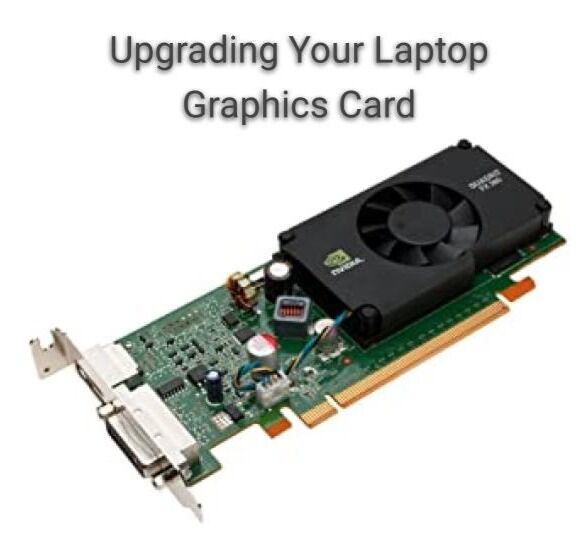
This article will explore the feasibility of upgrading a laptop’s video card, delving into the technical hurdles, the available solutions, and what you can realistically expect. We’ll examine the reasons behind the limitations, the technologies that attempt to bridge the gap, and consider the implications from a tech, brand, and even financial perspective.
The Desktop Advantage: Why Laptops Aren’t Built for Easy GPU Swaps
Understanding why installing a discrete video card into a laptop is not a straightforward process requires appreciating the fundamental design differences between desktops and laptops. Desktops are modular by nature, built with standardized components that can be easily accessed, removed, and replaced. The motherboard has dedicated PCIe slots, the power supply is robust and easily swappable, and cooling solutions are designed to handle significant heat output.
Laptops, on the other hand, prioritize portability, compactness, and power efficiency. This means components are often integrated directly onto the motherboard, soldered in place, and designed to fit within a very confined chassis.
Integrated vs. Discrete Graphics: The Core Distinction
At the heart of this limitation lies the distinction between integrated graphics and discrete graphics.
Integrated Graphics: The Built-in Solution
Integrated graphics are graphics processing units (GPUs) that are built directly into the CPU. They share system RAM and are designed for basic display tasks, everyday computing, and light gaming. While they have improved significantly over the years, they generally lack the raw power and dedicated memory required for demanding graphical applications. This is the default for most ultraportable laptops and budget-friendly machines.
Discrete Graphics: The Dedicated Powerhouse
Discrete graphics, often referred to as dedicated graphics cards or GPUs, are separate chips with their own dedicated video memory (VRAM). These are the powerhouses that enable smooth gameplay, high-resolution video editing, and complex 3D rendering. In desktops, these are typically installed in PCIe slots. In laptops, when a discrete GPU is present, it is usually soldered directly onto the motherboard, making it an inseparable part of the system.
The Soldering Barrier: A Permanent Integration
The primary obstacle to a simple video card installation in a laptop is that most discrete GPUs are soldered onto the motherboard. This is a manufacturing choice driven by space constraints and the need for efficient heat dissipation. Unlike a desktop GPU that plugs into a socket, a soldered GPU is a permanent fixture. Removing and replacing it would require specialized microsoldering skills, equipment, and a compatible replacement chip – a process that is highly risky, expensive, and often not commercially viable.
Thermal Management Challenges: Keeping the Beast Cool
Even if you could physically swap out a GPU, the cooling system in a laptop is meticulously designed for the specific components it came with. A more powerful GPU generates significantly more heat. Most laptop cooling solutions, consisting of heatsinks and fans, are simply not equipped to handle the increased thermal load of a high-end graphics card. Overheating can lead to performance throttling, component damage, and a shortened lifespan for the laptop.
Power Delivery Limitations: Not Enough Juice
High-performance GPUs are power-hungry. Desktop power supply units (PSUs) are designed to provide ample and stable power to these components. Laptop power adapters and internal power delivery systems are optimized for the original components and are often incapable of supplying the necessary wattage for a significantly more powerful GPU.
Workarounds and External Solutions: Bridging the Gap
While direct internal upgrades are largely out of the question for most users, there are ingenious workarounds and external solutions that can provide a significant graphical boost to a laptop. These methods, however, come with their own set of considerations and trade-offs.
External GPU (eGPU) Enclosures: The Most Viable Upgrade Path
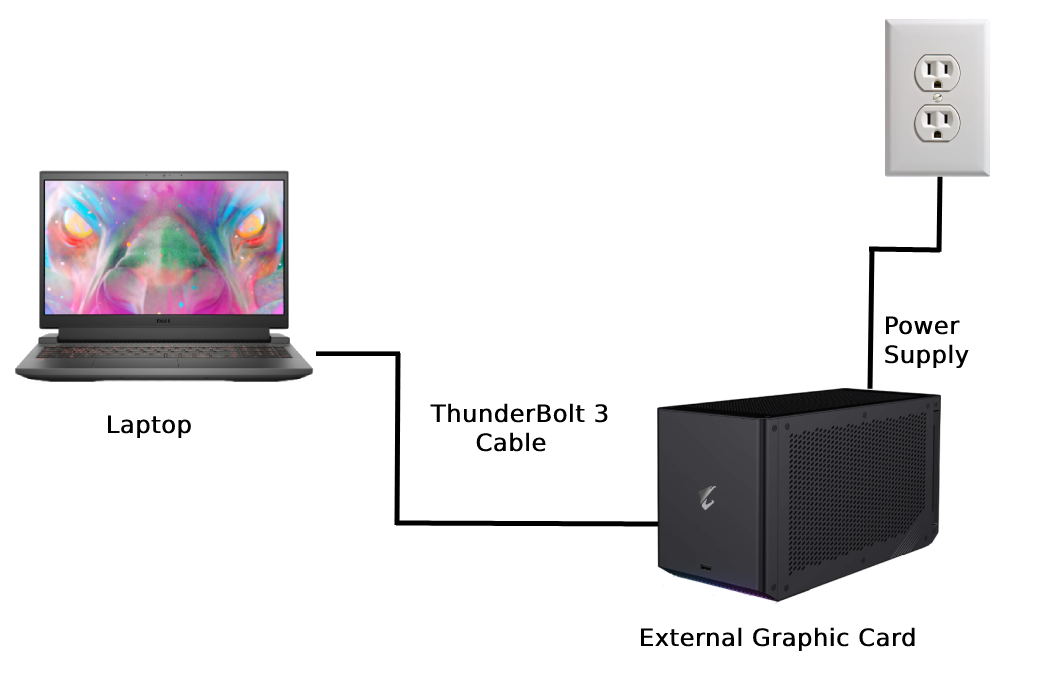
The most popular and effective way to add a powerful video card to a laptop is through an External GPU (eGPU) enclosure. An eGPU is essentially a desktop graphics card housed in an external chassis that connects to your laptop via a high-bandwidth interface, most commonly Thunderbolt 3 or Thunderbolt 4.
How eGPUs Work
- The Enclosure: This is a box that houses a standard desktop graphics card, a power supply to drive the card, and the necessary circuitry to interface with the laptop.
- The Connection: The enclosure connects to the laptop via a Thunderbolt cable. Thunderbolt offers a high data transfer rate, crucial for minimizing performance bottlenecks between the external GPU and the laptop’s CPU.
- The Graphics Card: You purchase a compatible desktop graphics card separately and install it within the eGPU enclosure.
- The Display: For optimal performance, it’s usually recommended to connect your monitor directly to the eGPU enclosure, bypassing the laptop’s internal display. This ensures the rendered frames don’t have to travel back through the Thunderbolt connection.
Benefits of eGPUs
- Significant Performance Boost: eGPUs can dramatically improve gaming performance, accelerate video rendering, and enhance 3D modeling capabilities.
- Upgradeability: You can upgrade the desktop graphics card within the eGPU enclosure as newer, more powerful options become available.
- Extends Laptop Lifespan: An eGPU can revitalize an older laptop that struggles with demanding graphical tasks.
- Flexibility: You can use the eGPU with multiple compatible laptops.
Limitations and Considerations of eGPUs
- Cost: eGPU enclosures themselves can be expensive, and you still need to purchase a desktop graphics card. The total cost can approach that of a mid-range desktop.
- Portability: The primary advantage of a laptop is its portability. An eGPU setup, with its enclosure and cables, significantly reduces this mobility.
- Thunderbolt Requirement: Your laptop must have a Thunderbolt 3 or Thunderbolt 4 port. Older laptops or those without Thunderbolt will not be compatible.
- Performance Bottlenecks: While Thunderbolt is fast, there can still be some performance loss compared to a desktop setup due to the limited bandwidth of the connection and the potential CPU limitations of the laptop.
- Compatibility: Not all graphics cards are guaranteed to work with all eGPU enclosures. Research is crucial.
- Power Consumption and Noise: eGPU enclosures have their own power supplies and cooling fans, contributing to noise and power draw.
M.2 NVMe SSD Slots: A Different Kind of “Upgrade”
It’s important to differentiate a video card upgrade from other internal upgrades. Some laptops do allow for upgrades to their storage (SSD) via M.2 slots. While this significantly impacts system responsiveness, boot times, and loading speeds, it is not a graphics card upgrade.
Mini PCIe and M.2 Slots (Rare for GPUs): Past and Niche Possibilities
In some older or specialized laptops, there might have been attempts to use Mini PCIe or even M.2 slots (not for NVMe SSDs, but for other functionalities) to house specialized mini-GPUs. However, these were never a mainstream or standardized solution for general-purpose graphics card upgrades, and the compatibility and performance were often very limited. These are largely historical footnotes in the context of modern laptop upgrades.
The Brand and Financial Implications of Laptop Graphics Upgrades
Considering the possibility of upgrading a laptop’s video card also touches upon brand perception and financial planning.
Brand Strategy: Performance as a Differentiator
For laptop manufacturers, the integrated nature of components is a key aspect of their brand strategy. They aim to provide a complete, optimized package. Offering laptops with soldered GPUs allows them to control the design, thermal performance, and ultimately, the user experience. Brands that offer high-performance gaming laptops often build their reputation on powerful, albeit non-upgradable, dedicated GPUs. The ability to easily swap out components would fundamentally change the engineering and marketing of these devices.
From a marketing perspective, a brand might position a laptop as “future-proof” based on its initial high-end GPU. If users could easily upgrade, this claim would be less compelling. Conversely, a brand that could offer a modular system with a user-replaceable GPU would be differentiating itself significantly, potentially attracting a niche but loyal customer base willing to pay a premium for that flexibility.
Money: The Cost of Performance and Obsolescence
The financial considerations of laptop graphics upgrades are significant.
The Initial Investment
When purchasing a laptop, you often pay a premium for a higher-tier integrated or discrete GPU. This initial cost reflects the hardware’s capabilities and the engineering to integrate it into the laptop.
The Cost of Non-Upgradeability
The fact that you generally cannot upgrade a laptop’s GPU means that as your needs evolve or new software demands more power, you are often faced with the prospect of buying a new laptop to achieve the desired performance. This contributes to the rapid cycle of obsolescence in the tech industry.
The eGPU as a Financial Compromise
An eGPU setup represents a different financial strategy. It allows you to extend the life of your current laptop by investing in an external component. However, the combined cost of a high-end desktop GPU and an eGPU enclosure can be substantial. The decision then becomes: is this investment more financially sound than purchasing a new, more powerful laptop altogether? This often depends on the specific pricing of components at the time, the performance gains desired, and the user’s existing laptop’s capabilities (CPU, RAM, etc.).
The “DIY” Repair Route: High Risk, Low Reward
Attempting to desolder and resolder a GPU on a laptop motherboard is an extremely high-risk endeavor. The cost of professional microsoldering services, if available, would likely be prohibitive, and the chance of damaging the motherboard beyond repair is very high. From a financial standpoint, this is almost never a sensible option.
Conclusion: The Evolving Landscape of Laptop Graphics
The direct answer to “Can you install a video card in a laptop?” remains largely no, in the traditional sense of swapping out a desktop component. Laptops are built with integration and portability as paramount concerns, leading to components like discrete GPUs being soldered onto the motherboard.
However, the advent of External GPU (eGPU) enclosures has dramatically altered the landscape, offering a viable, albeit not perfect, solution for users seeking enhanced graphical performance. These external solutions, while adding cost and reducing portability, allow users to leverage the power of desktop-grade graphics cards with their laptops, extending their useful life and catering to demanding applications.
For those considering a laptop upgrade, understanding these limitations and possibilities is crucial. While the dream of a universally swappable laptop GPU remains elusive, the current technological workarounds provide compelling options for those who need to push the boundaries of their portable computing power. As technology continues to evolve, we may see further innovations in modularity or more efficient integrated graphics, but for now, the eGPU stands as the primary gateway to significantly upgrading a laptop’s visual capabilities.
aViewFromTheCave is a participant in the Amazon Services LLC Associates Program, an affiliate advertising program designed to provide a means for sites to earn advertising fees by advertising and linking to Amazon.com. Amazon, the Amazon logo, AmazonSupply, and the AmazonSupply logo are trademarks of Amazon.com, Inc. or its affiliates. As an Amazon Associate we earn affiliate commissions from qualifying purchases.