
In the fast-evolving landscape of personal computing, the quest for superior performance is a constant drive, particularly for gamers, content creators, and professionals dealing with demanding applications. One of the most common questions that arise in this pursuit is: “Can you install a graphics card on a laptop?” The simple answer, for the vast majority of laptops, is no, not internally in the way you would on a desktop PC. However, the story doesn’t end there. Modern technology offers a compelling external solution that has revolutionized how we approach laptop graphics capabilities.
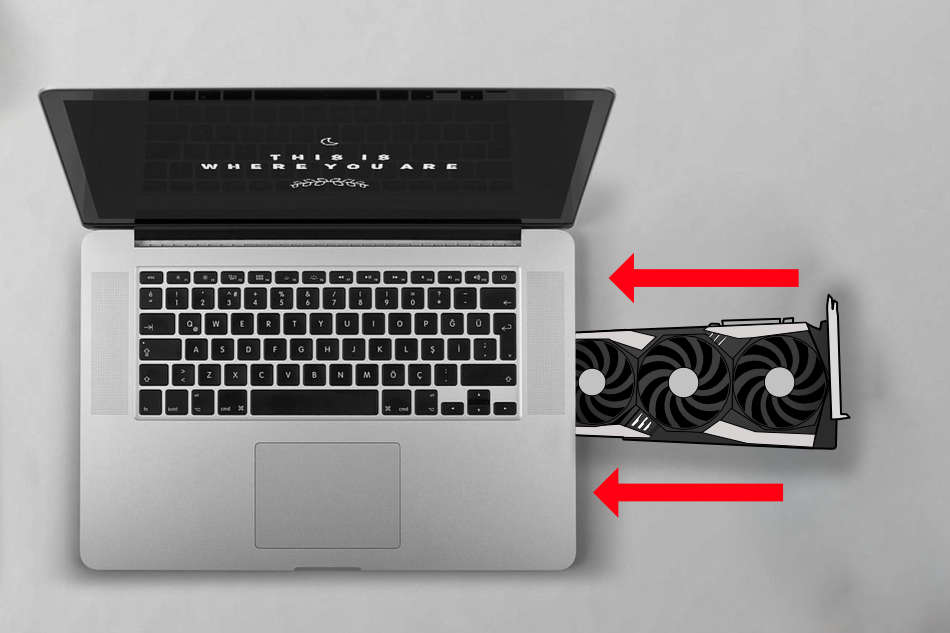
This comprehensive guide delves into the intricate reasons behind the limitations of internal laptop GPU upgrades, explores the groundbreaking potential of external graphics processing units (eGPUs), and offers practical considerations for anyone looking to boost their portable machine’s graphical prowess. Whether you’re a tech enthusiast, a brand-conscious creator, or someone carefully managing their finances, understanding these options is crucial for making informed decisions in today’s digital world.
The Intricacies of Laptop Design: Why Internal Upgrades are Mostly a Myth
To understand why upgrading a laptop’s internal graphics card is largely impossible, one must first appreciate the fundamental differences in design philosophy between laptops and desktop computers. Desktops are built for modularity, expandability, and repairability, allowing users to swap out components like GPUs, CPUs, RAM, and storage with relative ease. Laptops, by contrast, prioritize portability, thinness, and energy efficiency.
The Soldered Reality of Integrated and Dedicated Laptop GPUs
The primary reason for the lack of internal upgradeability stems from how graphics processing units (GPUs) are integrated into a laptop’s motherboard.
Integrated Graphics: The Everyday Workhorse
Most entry-level and mainstream laptops rely on integrated graphics, where the GPU is physically built into the same chip as the Central Processing Unit (CPU). This design, often seen in Intel’s Iris Xe or AMD’s Radeon Graphics, is highly efficient for general tasks, web browsing, and media consumption. It conserves space and power but offers limited graphical horsepower. Since it’s part of the CPU, it’s impossible to “upgrade” without replacing the entire CPU and, consequently, the motherboard – a task that is impractical and virtually unheard of for end-users.
Dedicated Graphics: More Power, Still Fixed
Even laptops equipped with dedicated graphics cards (like NVIDIA’s GeForce RTX series or AMD’s Radeon RX series), often found in gaming laptops and workstations, present a similar challenge. While these are separate chips from the CPU, they are almost universally soldered directly onto the laptop’s motherboard. This “Ball Grid Array” (BGA) packaging method ensures a compact, stable, and energy-efficient connection, crucial for the laptop’s form factor. Unlike desktop GPUs, which use a PCIe slot for easy installation and removal, laptop dedicated GPUs are permanent fixtures.
The reasons for this design choice are manifold:
- Space Constraints: Laptops are incredibly compact. A removable GPU card would require a large, standardized slot and additional structural support, making the laptop thicker and heavier.
- Thermal Management: High-performance GPUs generate significant heat. A laptop’s cooling system is meticulously designed around its specific components. Swapping out a GPU would necessitate an entirely new cooling solution, which is impossible to integrate post-purchase.
- Power Delivery: Dedicated GPUs consume substantial power. A laptop’s power delivery system and battery capacity are precisely engineered for its original components. A more powerful, upgraded GPU would likely overwhelm the existing power supply, leading to instability or even damage.
- Proprietary Designs: Each laptop manufacturer often has proprietary motherboard layouts and BIOS firmware tailored to their specific hardware configurations, further complicating any potential aftermarket upgrades.
In essence, the internal architecture of a laptop is a tightly integrated ecosystem where components are chosen and designed to work in harmony, making user-level internal GPU upgrades a logistical and technical impossibility.
The Game-Changer: External Graphics Processing Units (eGPUs)
While internal upgrades remain elusive, the tech world has developed an ingenious workaround: the External Graphics Processing Unit (eGPU). This technology allows laptops, particularly those with compatible ports, to harness the power of a full-sized desktop graphics card. An eGPU setup effectively turns your portable machine into a formidable gaming rig or a powerful workstation, unlocking performance levels previously unimaginable for a laptop.
How eGPUs Bridge the Performance Gap
An eGPU system comprises three main components:
- An eGPU Enclosure: This is a dedicated external chassis designed to house a standard desktop graphics card. It includes its own power supply (PSU) to deliver the necessary wattage to the GPU and an interface to connect to the laptop.
- A Desktop Graphics Card: You purchase a standard desktop GPU (e.g., NVIDIA GeForce RTX 4070, AMD Radeon RX 7800 XT) and install it into the enclosure. This is the heart of the performance upgrade.
- A Compatible Laptop: The laptop needs a high-bandwidth external port to communicate with the eGPU. The most common and effective port for this is Thunderbolt 3 or Thunderbolt 4.
The Power of Thunderbolt Technology
Thunderbolt, developed by Intel in collaboration with Apple, is a high-speed data transfer interface that uses the USB-C connector. What makes it ideal for eGPUs is its ability to transmit PCIe (Peripheral Component Interconnect Express) data. PCIe is the same bus that internal graphics cards use to communicate with the CPU in desktop PCs. Thunderbolt 3/4 provides up to 40 Gbps of bandwidth, allowing the laptop’s CPU to effectively “talk” to the external GPU with minimal latency, albeit with some performance overhead compared to an internally mounted GPU.
Setting Up Your eGPU System
The process of setting up an eGPU typically involves:
- Checking Laptop Compatibility: Verify your laptop has a Thunderbolt 3 or 4 port. Not all USB-C ports are Thunderbolt-enabled, so check your laptop’s specifications.
- Choosing an Enclosure: Research eGPU enclosures from brands like Razer (Core X), Sonnet (Breakaway Box), or AKiTiO (Node). Consider factors like design, available power, and additional ports.
- Selecting a Graphics Card: Based on your budget and performance needs, choose a desktop GPU. Remember that larger, more powerful cards might require specific enclosures with more space and higher wattage PSUs.
- Installation: Install the GPU into the enclosure, connect the enclosure’s power supply, and then connect the enclosure to your laptop via a Thunderbolt cable.
- Driver Installation: Install the latest graphics drivers for your chosen GPU on your laptop.
The Financial Implications and Value Proposition of eGPUs
From a Money perspective, eGPUs present a fascinating cost-benefit analysis.

Initial Investment
An eGPU setup is not cheap. You’re looking at:
- eGPU Enclosure: $200 – $500+
- Desktop Graphics Card: $300 – $1500+ (depending on performance)
- Thunderbolt Cable: ~$20 – $50 (ensure it’s certified for Thunderbolt 3/4)
This means a complete eGPU system can easily cost $500 to $2000 or more.
Pros: Extending Laptop Lifespan and Versatility
- Performance Boost: Significantly enhances gaming frame rates, video rendering speeds, 3D modeling capabilities, and AI/machine learning tasks on a laptop.
- Future-Proofing (to an extent): You can upgrade the desktop GPU within the enclosure as newer, more powerful cards become available, without having to replace your entire laptop. This offers a degree of future-proofing that is impossible with internal laptop GPUs.
- Flexibility: Use your laptop as a highly portable machine on the go, and transform it into a powerful workstation or gaming rig at your desk.
- Cost-Effective for Some: If you already own a high-end laptop (e.g., an Ultrabook with a powerful CPU but weak integrated graphics), investing in an eGPU might be more economical than buying a brand new, high-performance gaming laptop or desktop PC.
- Monitor Support: Most eGPU enclosures offer multiple display outputs, allowing you to drive several high-resolution monitors directly from the external GPU.
Cons: The Downsides to External Power
- Cost: As mentioned, it’s a significant investment.
- Performance Overhead: Due to the bandwidth limitations of Thunderbolt, there’s always a performance penalty (typically 10-20%) compared to the same GPU installed directly in a desktop PC. This overhead can be more pronounced at lower resolutions or in CPU-bound scenarios.
- Portability: While your laptop remains portable, the eGPU enclosure itself is not. It’s a “desk-bound” solution.
- Compatibility Issues: Not all laptops with Thunderbolt ports work perfectly with all eGPU enclosures and GPUs. Driver issues, BIOS settings, and specific laptop firmware can sometimes lead to frustrating troubleshooting. Researching user experiences with your specific laptop model is highly recommended.
- Laptop CPU Bottleneck: Even with a powerful external GPU, an older or weaker laptop CPU can become a bottleneck, preventing the GPU from reaching its full potential.
Ultimately, the decision to invest in an eGPU system often comes down to balancing current assets, future needs, and financial outlay. For users who primarily use their laptop for work but want powerful gaming or rendering capabilities at home, an eGPU can be a highly strategic investment.
Beyond eGPUs: Exploring Alternative Paths to Enhanced Performance
While eGPUs offer a compelling solution for extending the graphical lifespan of a capable laptop, they are not the only answer. Depending on your specific needs, budget, and willingness to compromise, several other alternatives exist. These options also touch upon the broader aspects of Tech advancements, Brand loyalty, and crucial Money management.
Investing in a New Laptop with Dedicated Graphics
For many, the most straightforward path to superior laptop graphics is to purchase a new laptop specifically designed with a powerful dedicated GPU.
The Appeal of Integrated Solutions
- Seamless Integration: Laptops like gaming rigs (e.g., ASUS ROG, MSI, Razer Blade) or mobile workstations (e.g., Dell XPS, Apple MacBook Pro with M-series chips) come with GPUs meticulously integrated into their cooling and power systems. This ensures optimal performance without the overhead or bulk of an external enclosure.
- Full Portability: No external components required; the entire solution is self-contained.
- Brand Ecosystems: Reputable brands offer comprehensive support, warranty, and an optimized user experience tailored to their hardware.
- Optimized Performance: Newer laptops often feature technologies like NVIDIA’s Optimus or AMD’s SmartShift, which dynamically switch between integrated and dedicated graphics to optimize performance and battery life.
Financial and Brand Considerations
This is often the most expensive option initially, but it can offer the best user experience. For a brand-conscious consumer, a new gaming laptop from a reputable brand like Alienware, Lenovo Legion, or Gigabyte Aorus also carries a certain prestige and ensures cutting-edge features. From a Money perspective, this is a significant upfront investment, but it provides a complete, factory-optimized solution that might offer better long-term reliability and less hassle than an eGPU setup.
Building or Buying a Desktop PC
If mobility is not your absolute top priority, or if you require the absolute maximum performance for a given budget, a desktop PC remains the undisputed champion.
Unrivaled Power and Expandability
- Superior Performance: Desktop GPUs operate with full bandwidth, ample power, and robust cooling, leading to superior performance compared to their laptop or eGPU counterparts.
- Unmatched Upgradeability: Desktops are designed for easy component upgrades, allowing you to swap out GPUs, CPUs, RAM, and storage independently as your needs evolve.
- Cost-Efficiency: For the same level of raw performance, a desktop PC often offers a better price-to-performance ratio than a laptop.
- Optimal Cooling: Larger chassis and dedicated cooling solutions allow desktop components to run cooler and often maintain higher boost clocks for longer periods.
The Desktop’s Place in the Tech Landscape
A desktop PC serves as the ultimate hub for demanding tasks. For professionals in fields like architectural rendering, high-end video production, or intensive scientific simulations, a desktop is often a necessity. While it lacks portability, its raw power, upgradeability, and often lower cost per frame make it an attractive alternative. From a Brand perspective, you can build a custom PC with components from your preferred manufacturers (Intel, AMD, NVIDIA, ASUS, Gigabyte, Corsair, etc.), creating a personalized, high-performance machine. The Money aspect here can range from budget-friendly builds to extreme high-end systems, offering unparalleled flexibility in investment.
Cloud Gaming and Remote Desktops
For users with excellent internet connectivity, cloud-based solutions are emerging as viable alternatives that bypass local hardware limitations entirely.
The Power of the Cloud
- Access to High-End Hardware: Services like NVIDIA GeForce NOW, Google Stadia (though now defunct, it showcased the potential), Amazon Luna, and Xbox Cloud Gaming stream games from powerful remote servers to your laptop. This means your laptop’s integrated graphics are largely irrelevant; the heavy lifting is done in the cloud.
- No Hardware Investment: You pay a subscription fee instead of a large upfront cost for a GPU or eGPU. This is a very attractive Money proposition for casual gamers or those on a tight budget.
- Platform Agnostic: Play games on virtually any device with a browser and internet connection.
Limitations and Future Trends
- Internet Dependency: A stable, high-speed internet connection with low latency is critical for a good experience.
- Ownership vs. Subscription: You don’t “own” the hardware or sometimes even the games in the same way.
- Input Lag: While improving, there can still be perceptible input lag compared to local processing.
Cloud computing for productivity (e.g., remote desktop services for professional applications) follows a similar principle, offering access to powerful virtual machines for demanding tasks without local hardware upgrades. This trend is a significant part of future Tech advancements, democratizing access to high-performance computing.
Conclusion: Making an Informed Decision for Your Performance Needs
The question “Can you install a graphics card on a laptop?” elicits a nuanced answer. While internal upgrades are a technical impossibility for almost all laptops due to design constraints, the advent of External Graphics Processing Units (eGPUs) has opened up a world of possibilities for significantly enhancing a laptop’s graphical horsepower.
Understanding the limitations of internal laptop architecture, the technical requirements and benefits of eGPUs, and the practical implications of each alternative is crucial. For the tech-savvy individual, an eGPU represents a fascinating frontier in hardware expansion. For those considering their brand identity and seeking optimized solutions, a new dedicated gaming laptop or a custom-built desktop might be the preferred route. And for everyone, the money aspect plays a pivotal role, weighing the initial investment against long-term value, flexibility, and performance gains.
Ultimately, the best solution depends on your individual needs, budget, and willingness to navigate the complexities of modern computing. Whether you opt for an eGPU to breathe new life into an existing laptop, invest in a cutting-edge machine, or embrace the power of cloud computing, the path to enhanced performance for your laptop is more diverse and accessible than ever before.
aViewFromTheCave is a participant in the Amazon Services LLC Associates Program, an affiliate advertising program designed to provide a means for sites to earn advertising fees by advertising and linking to Amazon.com. Amazon, the Amazon logo, AmazonSupply, and the AmazonSupply logo are trademarks of Amazon.com, Inc. or its affiliates. As an Amazon Associate we earn affiliate commissions from qualifying purchases.