
In the rapidly evolving landscape of data science and analytics, proficiency in powerful tools is not just an advantage—it’s a necessity. For anyone looking to extract meaningful insights from data, manipulate datasets with elegant efficiency, or create stunning visualizations, the Tidyverse collection of packages within the R programming environment stands out as an indispensable toolkit. This guide will walk you through the essential steps to install Tidyverse in RStudio, tackle common installation hurdles, and prepare you to harness its immense power for your technological pursuits, brand strategies, and financial analyses.
The digital age thrives on data. From tracking consumer behavior to optimizing marketing campaigns, or even forecasting personal investment trends, the ability to effectively process and interpret information is paramount. R, with its robust statistical capabilities, and RStudio, its intuitive integrated development environment (IDE), form the bedrock for countless data professionals. At the heart of this ecosystem, Tidyverse simplifies and streamlines data workflows, making complex tasks accessible and efficient. Whether you’re a budding data analyst, a seasoned researcher, or a business owner aiming for data-driven decisions, mastering the installation and utilization of Tidyverse is a foundational step towards unlocking profound insights and boosting productivity.
Understanding the Power of Tidyverse and RStudio
Before diving into the installation process, it’s crucial to appreciate what Tidyverse is and why its integration into the RStudio environment has become a gold standard in data science. Understanding its value will not only motivate you through the setup but also frame its potential impact on your work, aligning perfectly with the core tenets of technology, brand, and money.
What is Tidyverse and Why is it Indispensable?
Tidyverse is not a single package, but rather an opinionated collection of R packages designed for data science. These packages share an underlying philosophy, grammar, and data structures, all geared towards making data manipulation, exploration, and visualization more intuitive and consistent. Spearheaded by Hadley Wickham and the RStudio team, Tidyverse has revolutionized how many data scientists approach their work.
Consider its relevance across our core topics:
- Tech & Productivity: Tidyverse embodies modern software development principles by offering a cohesive set of tools. Packages like
dplyrfor data manipulation,ggplot2for data visualization,tidyrfor tidying data, andreadrfor importing data, drastically reduce the cognitive load and code complexity. This translates directly to increased productivity and efficiency in data analysis pipelines, allowing tech professionals to iterate faster and deliver results more reliably. It’s a prime example of how well-designed software can elevate an entire field. - Brand Strategy: In today’s competitive landscape, successful brands are data-driven. Tidyverse empowers marketing analysts and brand strategists to deep-dive into customer demographics, analyze sentiment from social media, track campaign performance, and visualize market trends. By simplifying the process of cleaning and analyzing complex datasets, Tidyverse helps companies understand their audience better, refine their messaging, and craft stronger, more resonant brand identities based on empirical evidence, rather than mere intuition.
- Money & Financial Insights: For personal finance, investing, or business financial analysis, Tidyverse is a game-changer. Imagine easily cleaning transaction data to understand spending habits, analyzing stock market trends with elegant plots, or building financial models with concise code. Entrepreneurs leveraging online income streams can use Tidyverse to dissect website analytics, optimize ad spend, and identify profitable niches. Businesses can analyze financial reports, track key performance indicators (KPIs), and make informed decisions on resource allocation. Tidyverse facilitates turning raw financial data into actionable intelligence, directly impacting profitability and strategic financial planning.
The RStudio Ecosystem: Your Data Science Workbench
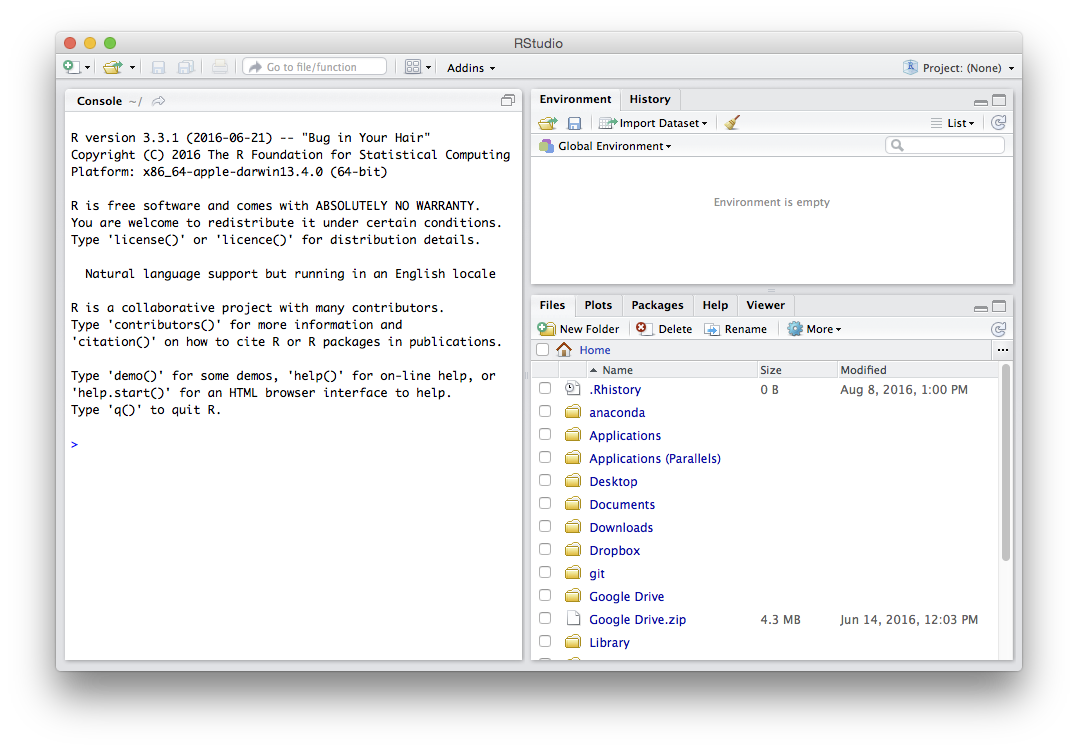
RStudio is an incredibly powerful and user-friendly Integrated Development Environment (IDE) specifically designed for R. While R is the statistical programming language itself, RStudio provides a comprehensive environment that makes coding, debugging, project management, and visualization seamless. Its multi-pane interface offers a console, script editor, environment pane, and a viewer for plots and help files, all in one place.
RStudio acts as the ideal host for Tidyverse, providing a visual and organized workspace that complements Tidyverse’s philosophy of tidy, readable code. It simplifies package management, debugging, and project organization—all critical aspects of maintaining an efficient data analysis workflow. For anyone serious about data science, RStudio is the essential command center, and Tidyverse is its most potent arsenal of tools.
Step-by-Step Installation Guide for Tidyverse
Installing Tidyverse in RStudio is generally a straightforward process. However, understanding the prerequisites and the exact commands ensures a smooth experience. Follow these steps carefully to get Tidyverse up and running on your system.
Prerequisites: Ensuring a Smooth Setup
Before you attempt to install Tidyverse, ensure you have the foundational components in place:
- Install R: If you haven’t already, download and install the latest version of R from CRAN (The Comprehensive R Archive Network) at https://cran.r-project.org/. Choose the installer appropriate for your operating system (Windows, macOS, or Linux). Always opt for the latest stable version to minimize compatibility issues.
- Install RStudio Desktop: Once R is installed, download and install the free RStudio Desktop Open Source Edition from https://posit.co/download/rstudio-desktop/. Again, select the installer that matches your operating system. RStudio leverages your R installation, so it’s vital to install R first.
- Internet Connection: Tidyverse packages are downloaded from CRAN, so a stable internet connection is essential during the installation process.
After installing R and RStudio, open RStudio. You should see its four-pane interface. The console pane (typically bottom-left) is where you’ll type your installation commands.
The Core Installation Command
The beauty of R’s package management system is its simplicity. To install Tidyverse, you primarily need one command.
In your RStudio console, type the following command and press Enter:
install.packages("tidyverse")
What happens next?
- CRAN Mirror Selection: R will likely prompt you to select a CRAN mirror. This is a server location from which the packages will be downloaded. Choose a mirror that is geographically close to you for faster download speeds.
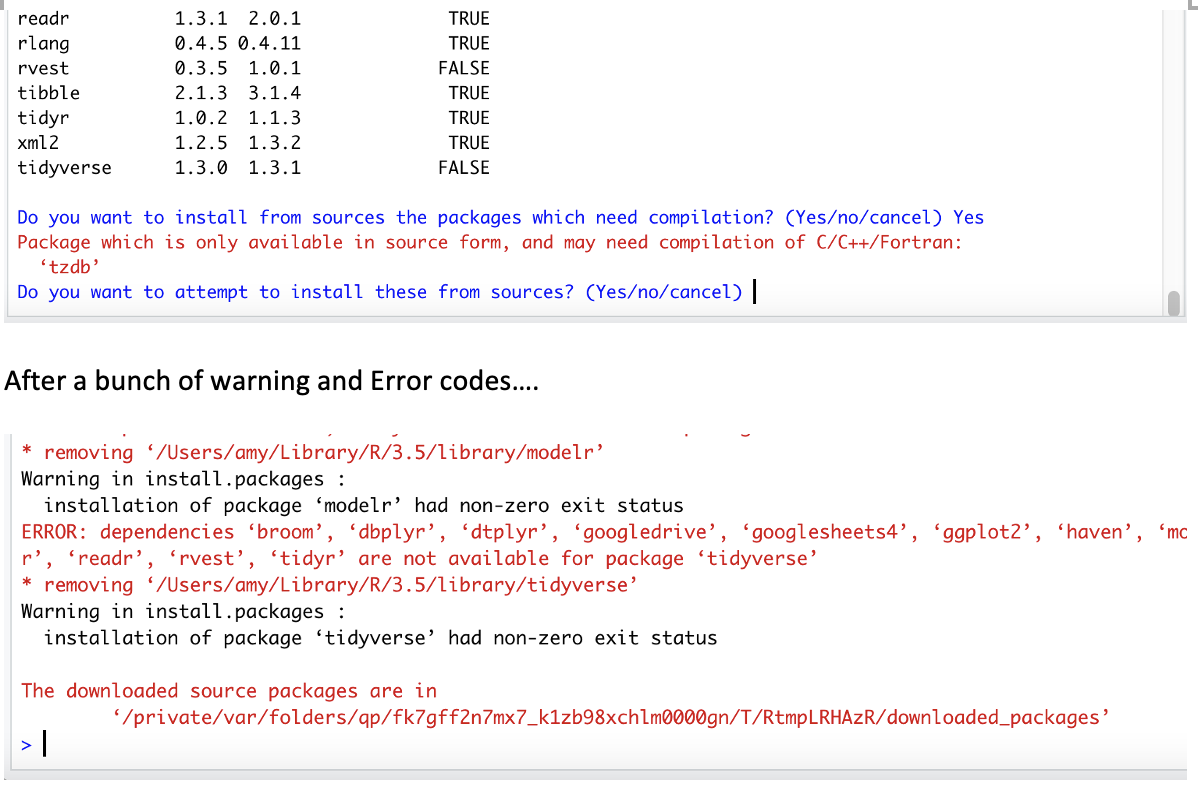
- Dependency Resolution: Tidyverse is a “meta-package,” meaning it doesn’t contain any functions itself but instead installs about 8-10 other core Tidyverse packages (like
dplyr,ggplot2,tidyr,readr,purrr,stringr,forcats,lubridate,magrittr,tibble, etc.) and all their respective dependencies. R’sinstall.packages()function intelligently handles downloading and installing all these required components. This process can take a few minutes, depending on your internet speed and system performance. - Progress Messages: You will see a stream of messages in the console indicating the download and installation progress of each package. Look for messages like
downloaded binary packages,package 'package_name' successfully unpacked and MD5 sums checked.
Verifying Your Installation
Once the installation process completes without apparent errors, it’s crucial to verify that Tidyverse is correctly installed and accessible.
-
Load Tidyverse: To use any of the Tidyverse packages in an R session, you need to load them. Since Tidyverse is a meta-package, loading it will load all its core components. Type the following in your console:
library(tidyverse) -
Success Messages: Upon successful loading, you’ll typically see a series of messages indicating which core Tidyverse packages are being attached (e.g.,
ggplot2,purrr,dplyr,readr,tidyr,stringr,forcats). It will also list any conflicts with other packages that might already be loaded in your R session. These conflicts are usually minor and don’t prevent Tidyverse from working.Example of expected output:
── Attaching packages ────────────────────────────────────── tidyverse 2.0.0 ── ✔ ggplot2 3.5.0 ✔ purrr 1.0.1 ✔ tibble 3.2.1 ✔ dplyr 1.1.4 ✔ tidyr 1.3.1 ✔ stringr 1.5.1 ✔ readr 2.1.5 ✔ forcats 1.0.0 ── Conflicts ───────────────────────────────────────── tidyverse_conflicts() ── ✖ dplyr::filter() masks stats::filter() ✖ dplyr::lag() masks stats::lag() -
Test a Tidyverse Function: As a final check, you can run a simple Tidyverse command. For instance, let’s use
dplyrto create atibble(Tidyverse’s enhanced data frame) andmutatea column:my_data <- tibble( id = 1:5, value = c(10, 15, 12, 18, 20) ) my_data_modified <- my_data %>% mutate(value_double = value * 2) print(my_data_modified)If this code runs without errors and prints the
my_data_modifiedtibble with the newvalue_doublecolumn, congratulations! Tidyverse is successfully installed and ready for your data endeavors.
Common Installation Challenges and Expert Troubleshooting
While the install.packages("tidyverse") command is designed to be robust, various factors can lead to installation failures. Understanding these common pitfalls and their solutions is crucial for any data professional, saving you significant time and frustration. This section delves into troubleshooting strategies that align with practical tech problem-solving.
Compiler Tools: RTools (Windows) and Xcode (macOS)
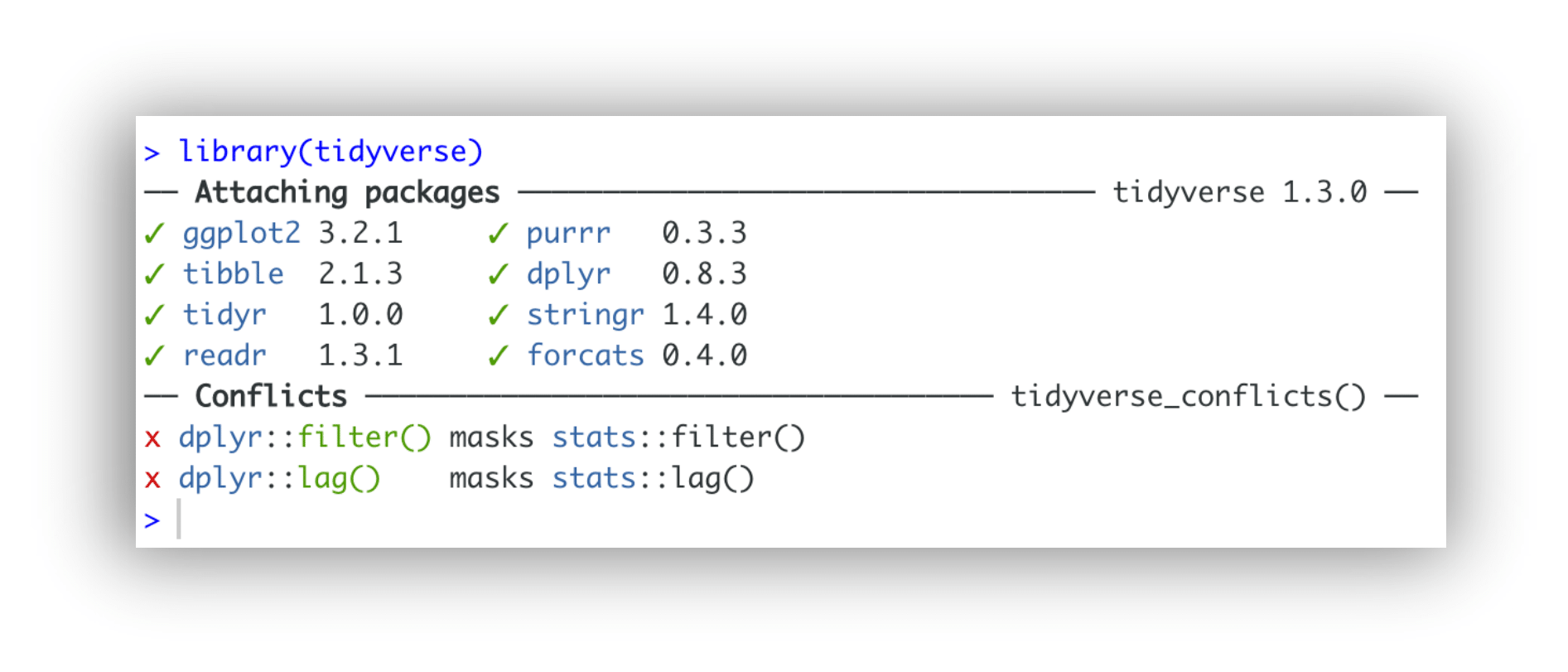
Many R packages, especially those with complex functionalities or dependencies on external libraries, require compilation from source code. This is particularly true if binary versions (pre-compiled versions for your operating system) aren’t available for some dependencies, or if you’re installing a development version.
-
For Windows users: You need to install RTools. RTools provides the necessary compilers (like MinGW GCC) and utilities.
- Go to the CRAN RTools page: https://cran.r-project.org/bin/windows/Rtools/.
- Download the appropriate RTools version for your R installation (e.g., RTools43 for R 4.3.x).
- Run the installer and follow the prompts. Ensure it’s added to your system’s PATH during installation, or manually add
C:rtools43usrbin(adjust version number) to your PATH environment variable. - After installation, open RStudio and run
Sys.which("make")in the console. If it returns a path, RTools is correctly recognized.
-
For macOS users: You need to install Xcode Command Line Tools.
- Open your Terminal (Applications > Utilities > Terminal).
- Run the command:
xcode-select --install - Follow the prompts to install the tools. This might take some time.
-
For Linux users: Compiler tools are usually part of your distribution’s standard development packages. For Debian/Ubuntu-based systems, you might need
sudo apt-get install build-essential. For Fedora/RHEL,sudo yum install gcc-c++orsudo dnf install @development-tools.
Relevance to Tech: This highlights a common challenge in software environments – managing dependencies and ensuring the underlying system has the necessary build tools. It’s a foundational tech skill to diagnose and resolve such environmental configurations.
Network and Proxy Settings
Corporate networks, firewalls, or proxy servers can often block R from connecting to CRAN to download packages.
-
Check Internet Connection: First, ensure you have a working internet connection outside RStudio.
-
Proxy Settings: If you are behind a corporate proxy, you might need to configure R to use it.
- In RStudio, go to
Tools > Global Options > Packages. - Look for “HTTP proxy” and enter your proxy server address and port (e.g.,
http://proxy.example.com:8080). - Alternatively, you can set proxy environment variables in R:
R

Sys.setenv(http_proxy = "http://proxy.example.com:8080")

Sys.setenv(https_proxy = "http://proxy.example.com:8080")
- If your proxy requires authentication, you might need to include credentials (e.g.,
http://username:password@proxy.example.com:8080).
- In RStudio, go to
-
Firewall: Ensure your firewall isn’t blocking RStudio or R from accessing the internet. You might need to add exceptions for
R.exeandrstudio.exe.
Relevance to Digital Security/Productivity: Network configuration is a core element of digital security and can significantly impact productivity if not managed correctly. Understanding how to configure applications like R for specific network environments is vital.
Permission Issues and Library Paths
Sometimes, R doesn’t have the necessary write permissions to install packages into the default library location. This is common on shared computers or systems with strict security settings.
- Error Message Clues: Look for error messages like “cannot open the connection” or “permission denied” when R tries to write files.
- Run RStudio as Administrator (Windows): Right-click the RStudio icon and select “Run as administrator.” This temporarily elevates permissions.
- Change Default Library Path: You can tell R to install packages into a directory where you do have write permissions.
- Create a folder, for example,
C:R_Library(Windows) or~/R_Library(macOS/Linux). - In RStudio, run:
R

.libPaths("C:/R_Library") # For Windows

# OR

.libPaths("~/R_Library")  # For macOS/Linux

install.packages("tidyverse", lib = "C:/R_Library") # Or "~/R_Library"
- To make this permanent, add
R_LIBS_USER="C:/R_Library"(or your chosen path) to a file named.Renvironin your user’s home directory. You can open and edit this file usingusethis::edit_r_environ()after installing theusethispackage.
- Create a folder, for example,
Relevance to Digital Security/Productivity: Understanding file system permissions and managing user access is fundamental to digital security and can prevent significant productivity roadblocks when installing software.
Outdated R or RStudio Versions
Using very old versions of R or RStudio can lead to compatibility issues with newer packages like Tidyverse. Package developers often target recent R versions.
- Check Your Versions:
- In RStudio, look at the console startup message to see your R version (e.g.,
R version 4.3.2). - Go to
Help > About RStudioto see your RStudio version.
- In RStudio, look at the console startup message to see your R version (e.g.,
- Update R: Install the latest version of R from CRAN. On Windows, installing a new version usually replaces the old one. On macOS, it installs side-by-side; you might need to adjust RStudio’s R version setting (Tools > Global Options > R General > R version).
- Update RStudio: Download and install the latest RStudio Desktop from Posit’s website. It generally updates without issues, preserving your settings.
Relevance to Technology Trends: Keeping software up-to-date is a key aspect of following technology trends and ensuring compatibility, security, and access to the latest features.
Memory and Dependency Conflicts
Large packages like Tidyverse and their numerous dependencies can sometimes strain system resources or encounter conflicts with other already installed packages.
- Memory Issues: If your system has limited RAM, installing many packages simultaneously can cause R to crash.
- Solution: Try installing individual Tidyverse packages one by one instead of the meta-package:
install.packages("dplyr"),install.packages("ggplot2"), etc. This spreads out the memory load.
- Solution: Try installing individual Tidyverse packages one by one instead of the meta-package:
- Dependency Conflicts: Occasionally, a dependency of Tidyverse might conflict with a package you already have installed.
- Solution: R will usually warn you about these conflicts. If they cause errors, you might need to selectively update conflicting packages using
update.packages("package_name")or, in rare cases, reinstall them. If all else fails, a fresh R library (by deleting your R_Library folder or changing the default path) can resolve deep-seated conflicts.
- Solution: R will usually warn you about these conflicts. If they cause errors, you might need to selectively update conflicting packages using
Relevance to Software/Productivity: Efficient resource management and understanding package dependencies are crucial for maintaining a stable and productive software environment. This knowledge enhances a tech professional’s ability to debug complex issues.
Maximizing Your Data Workflow with Tidyverse
Once Tidyverse is successfully installed, the real work—and fun—begins. Leveraging its capabilities effectively can dramatically improve your data analysis workflow, driving innovation in tech, refining brand strategies, and optimizing financial decisions.
Essential Tidyverse Packages and Their Applications
While the tidyverse meta-package installs a host of tools, understanding the core functionality of its most frequently used components is key to unlocking its full potential.
dplyr: The grammar of data manipulation. This package provides a consistent set of verbs (functions) likeselect(),filter(),mutate(),arrange(),group_by(), andsummarise()that make data wrangling incredibly intuitive. It’s the workhorse for transforming raw data into a clean, analytical format, critical for any tech solution, brand analysis, or financial model.ggplot2: The grammar of graphics. Widely regarded as one of the most powerful data visualization tools available,ggplot2allows you to create highly customized and aesthetically pleasing plots layer by layer. From exploratory data analysis in tech development to creating compelling infographics for brand marketing, or visualizing investment portfolio performance,ggplot2transforms data into understandable visual narratives.tidyr: For tidying data. This package helps ensure your data is in a “tidy” format, where each variable forms a column, each observation forms a row, and each type of observational unit forms a table. Functions likepivot_longer()andpivot_wider()are invaluable for reshaping data, making it easier to analyze withdplyrand visualize withggplot2. Tidy data is foundational for robust data analysis.readr: For reading rectangular data.readroffers fast and friendly functions (e.g.,read_csv(),read_tsv()) to import flat files into R, often outperforming base R functions, especially for large datasets. Its efficiency is a productivity booster for any data-intensive task.purrr: For functional programming.purrrenhances R’s functional programming toolkit, making it easier to work with lists and apply functions across multiple elements. This package is particularly useful for automating repetitive tasks and writing more elegant, concise code, which is a hallmark of good software development.stringr: For string manipulation. Working with text data is a common requirement.stringrprovides a consistent and user-friendly set of functions for manipulating strings, from detecting patterns to replacing text, vital for processing unstructured data in brand analysis (e.g., social media comments) or textual financial reports.forcats: For working with factors. Factors (categorical variables) can be tricky in R.forcatssimplifies common operations with factors, such as reordering levels, combining categories, or recoding values, making categorical data analysis more robust.
Best Practices for Package Management and Updates
Maintaining a healthy and efficient R environment goes beyond just initial installation. Adopting best practices for package management ensures continued productivity and prevents future headaches.
- Regularly Update Packages: The R ecosystem is dynamic. Developers frequently release updates with bug fixes, performance improvements, and new features. Periodically run
update.packages()in your RStudio console to keep your installed packages current. For Tidyverse specifically,install.packages("tidyverse")will typically update all its core components. - Use RStudio Projects: For every new analysis or project, create an RStudio Project (
File > New Project). This organizes all your scripts, data, and outputs within a single directory and ensures R’s working directory is always set correctly, improving reproducibility and collaboration. This is a fundamental organizational practice for any tech development or analytical task. - Specify Dependencies in Scripts: While
library(tidyverse)loads many packages, it’s good practice to explicitly load specific packages you use at the top of your R scripts (e.g.,library(dplyr),library(ggplot2)). This makes your code clearer about its dependencies. - Version Control: For collaborative projects or serious data work (especially relevant for brand and money applications where reproducibility and auditability are key), integrate Git and GitHub with RStudio. This allows you to track changes, collaborate effectively, and revert to previous versions if needed.
- Consider renv for Reproducibility: For advanced users or critical projects, the
renvpackage creates isolated, reproducible R environments. This ensures that your project will always run with the exact package versions it was developed with, even years down the line, addressing a major challenge in software deployment and long-term data validity.
Conclusion: Unlocking Data-Driven Insights for Tech, Brand, and Money
Successfully installing Tidyverse in RStudio is more than just a technical hurdle overcome; it’s an initiation into a more efficient, powerful, and intuitive way of engaging with data. This comprehensive toolkit empowers you to navigate the complexities of data analysis, transforming raw information into actionable intelligence across various domains.
In the realm of Technology, Tidyverse within RStudio equips developers and analysts with state-of-the-art software tools that promote clean code, enhance productivity, and facilitate sophisticated data science workflows, keeping you at the forefront of innovation.
For Brand strategists and marketers, Tidyverse provides the analytical horsepower to dissect market trends, understand customer demographics, and measure campaign effectiveness with precision. The ability to quickly visualize and interpret data gleaned from Tidyverse allows for the creation of more targeted messaging, stronger brand narratives, and ultimately, a more impactful presence in a crowded marketplace.
When it comes to Money – whether personal finance, online income generation, or corporate financial strategy – Tidyverse is an invaluable asset. It enables deep dives into financial data, from optimizing investment portfolios to dissecting business performance metrics and identifying profitable side hustles. By transforming complex financial datasets into clear, comprehensible insights, Tidyverse directly supports smarter, more lucrative financial decisions.
The journey into data science is continuous, but with Tidyverse and RStudio as your companions, you are well-equipped to embark on a path of discovery and innovation. Embrace these tools, practice regularly, and watch as your ability to manipulate, analyze, and visualize data transforms your projects, invigorates your brand, and enriches your financial foresight. The data revolution is here, and with Tidyverse, you’re not just observing it – you’re actively shaping it.
aViewFromTheCave is a participant in the Amazon Services LLC Associates Program, an affiliate advertising program designed to provide a means for sites to earn advertising fees by advertising and linking to Amazon.com. Amazon, the Amazon logo, AmazonSupply, and the AmazonSupply logo are trademarks of Amazon.com, Inc. or its affiliates. As an Amazon Associate we earn affiliate commissions from qualifying purchases.