
In an era where automotive technology constantly evolves to enhance safety and convenience, installing a rear camera in your car stands out as one of the most impactful upgrades. Whether you’re a seasoned DIY enthusiast or new to automotive projects, this guide will walk you through the process, transforming your vehicle with a critical piece of modern tech. Beyond merely aiding in parking, a rear camera acts as an extra set of eyes, mitigating blind spots, preventing costly accidents, and ultimately providing peace of mind. For those looking to save money on installation fees and gain a deeper understanding of their vehicle’s systems, a DIY approach offers immense satisfaction and practical benefits.

Why a Rear Camera is a Smart Investment: Safety, Convenience, and Value
The decision to install a rear camera transcends mere convenience; it’s a strategic investment in safety and the longevity of your vehicle. From navigating crowded parking lots to reversing out of driveways, the benefits are immediate and substantial.
Enhanced Safety and Accident Prevention
The primary advantage of a rear camera is its unparalleled contribution to safety. Rearview mirrors, by their nature, have significant blind spots that can obscure small children, pets, or objects behind your vehicle. A wide-angle rear camera eliminates these blind spots, providing a clear, real-time view of the area directly behind your car. This visual aid drastically reduces the risk of back-over accidents, which tragically account for numerous injuries and fatalities each year. For city drivers, parallel parking becomes less stressful, and for families, the added layer of security when children are playing near the car is invaluable. This technology, integrating seamlessly with your driving experience, is a testament to how modern gadgets can directly improve lives and prevent potential financial liabilities from accidents.
Unmatched Convenience and Parking Precision
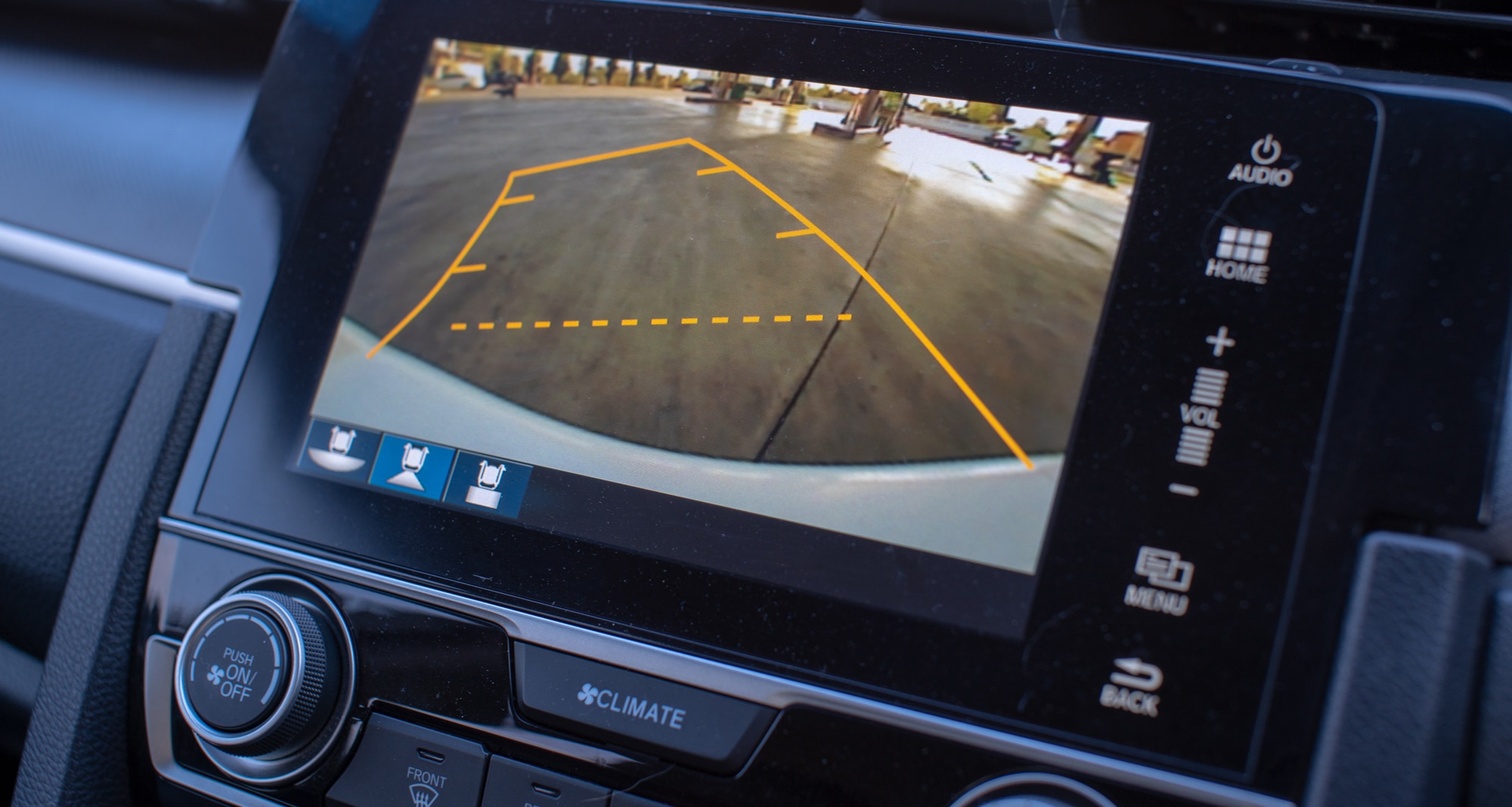
Beyond safety, a rear camera revolutionizes the parking experience. Struggling with parallel parking or squeezing into tight spots becomes a thing of the past. The on-screen guidelines, often overlaid on the camera feed, assist in precise maneuvering, allowing you to park with confidence and accuracy. This convenience not only saves time but also reduces the stress associated with challenging parking scenarios, making daily commutes and errands significantly more pleasant. It’s a prime example of how a simple tech upgrade can profoundly impact your daily productivity and reduce the mental load of driving.
Boosting Your Car’s Resale Value and Avoiding Costly Repairs
From a financial perspective, installing a rear camera is a wise move. The cost of a minor fender bender or scratched bumper can easily outweigh the expense of a quality camera system and the tools required for DIY installation. By preventing such incidents, you save on repair costs, insurance claims, and the hassle of dealing with body shops. Furthermore, in today’s competitive used car market, vehicles equipped with modern safety features like a rear camera often command a higher resale value. It positions your car as a more appealing option, signaling to potential buyers that it’s well-maintained and equipped with essential safety technology. This DIY project, therefore, not only serves your immediate needs but also acts as a smart financial investment in your vehicle’s future.
Essential Preparations: Gathering Your Tools and Understanding Your System
Before diving into the installation process, thorough preparation is key. This stage involves selecting the right camera, assembling the necessary tools, and familiarizing yourself with your vehicle’s electrical system. Taking the time here will ensure a smoother, more efficient installation and prevent common pitfalls.
Selecting the Right Rear Camera System
The market offers a diverse range of rear camera systems, each with its own set of features and installation complexities. Understanding your options is crucial for making an informed decision that aligns with your needs and your car’s compatibility.
- Wired vs. Wireless Systems: Wired cameras generally offer a more stable and reliable connection, free from interference, but require more extensive cable routing. Wireless systems, while easier to install from a wiring perspective, might occasionally suffer from signal drops or interference, though modern digital wireless cameras have significantly improved in this regard. Consider your comfort level with routing wires versus potential signal reliability.
- Display Options: Rear cameras can integrate with various displays:
- Standalone Monitors: These are dedicated screens mounted on your dashboard or windshield. They are often the most straightforward to install as they don’t require integration with your car’s existing infotainment system.
- Rearview Mirror Monitors: These replace your existing rearview mirror or clip over it, providing a discreet display when the camera is active. They offer a clean look but might require slightly more complex wiring to power the mirror itself.
- Head Unit Integration: If your car has an aftermarket head unit (stereo system) with a video input, integrating the camera here provides the most seamless and factory-like experience. This option leverages existing car tech and offers the most integrated user interface.
- Camera Features: Look for cameras with desirable features like:
- Wide-angle lens: Provides a broader view of the area behind your car.
- Night vision/low-light capability: Essential for visibility in dark conditions.
- Waterproof/weatherproof rating (IP67 or IP68): Ensures durability against rain, snow, and dust.
- Parking guidelines: Static or dynamic lines that assist in judging distances.
- Resolution: Higher resolution offers a clearer image, though most modern cameras provide sufficient clarity.
- Compatibility and Budget: Always verify the camera system’s compatibility with your specific vehicle model, especially if integrating with an existing head unit. Set a budget that balances features with quality, remembering that investing in a reputable brand often translates to better performance and longevity.
Required Tools and Materials
A successful DIY installation hinges on having the right tools at hand. Before you begin, gather the following:
- Basic Hand Tools: Screwdrivers (Philips, flathead), socket wrenches, pliers (needle-nose, cutting).
- Trim Removal Tools: Plastic pry tools are essential for safely removing interior trim panels without scratching or damaging them. These are indispensable for maintaining your car’s aesthetic integrity.
- Electrical Tools: Wire strippers, crimpers, a multimeter (for identifying power sources), electrical tape, heat shrink tubing, wire connectors (e.g., T-taps, butt connectors). A soldering iron and solder can also provide more secure connections.
- Cable Routing Aids: Fish tape or a coat hanger can be incredibly useful for pulling wires through tight spaces and behind panels.
- Cleaning Supplies: Isopropyl alcohol and a microfiber cloth for cleaning surfaces before mounting, and for the camera lens.
- Adhesives and Fasteners: Zip ties or cable clips for securing cables, double-sided automotive-grade tape for mounting monitors or cable runs.
- Safety Gear: Work gloves and eye protection are crucial for protecting yourself during the installation process.
Pre-Installation Checks and Planning
With your camera system and tools ready, a few preliminary steps will streamline the installation:
- Read the Manuals: Thoroughly review both your car’s owner’s manual (especially the sections on electrical systems and interior trim removal) and the rear camera system’s installation guide. These documents contain crucial, model-specific information.
- Familiarize Yourself with Your Car: Before dismantling anything, visually trace potential wiring paths from the rear of the car to the front. Identify where you’ll mount the camera and the monitor. Locate your reverse light assembly.
- Test the System: It’s highly recommended to perform a “bench test” of your camera system before routing any wires. Connect the camera, monitor, and power source (e.g., a 12V car battery or power supply) outside the car. This confirms that all components are working correctly, saving you significant troubleshooting time later.
- Gather Information: Look for vehicle-specific wiring diagrams online or in service manuals if you’re unsure about the reverse light wire color codes. Online forums and YouTube tutorials for your specific car model can also be invaluable resources.
Step-by-Step Installation Guide: Bringing Your Rear Camera to Life
This section outlines the detailed steps for installing your rear camera. Follow each step carefully, prioritizing safety and precision to ensure a successful and durable installation.
Step 1: Disconnecting Power and Accessing the Trunk
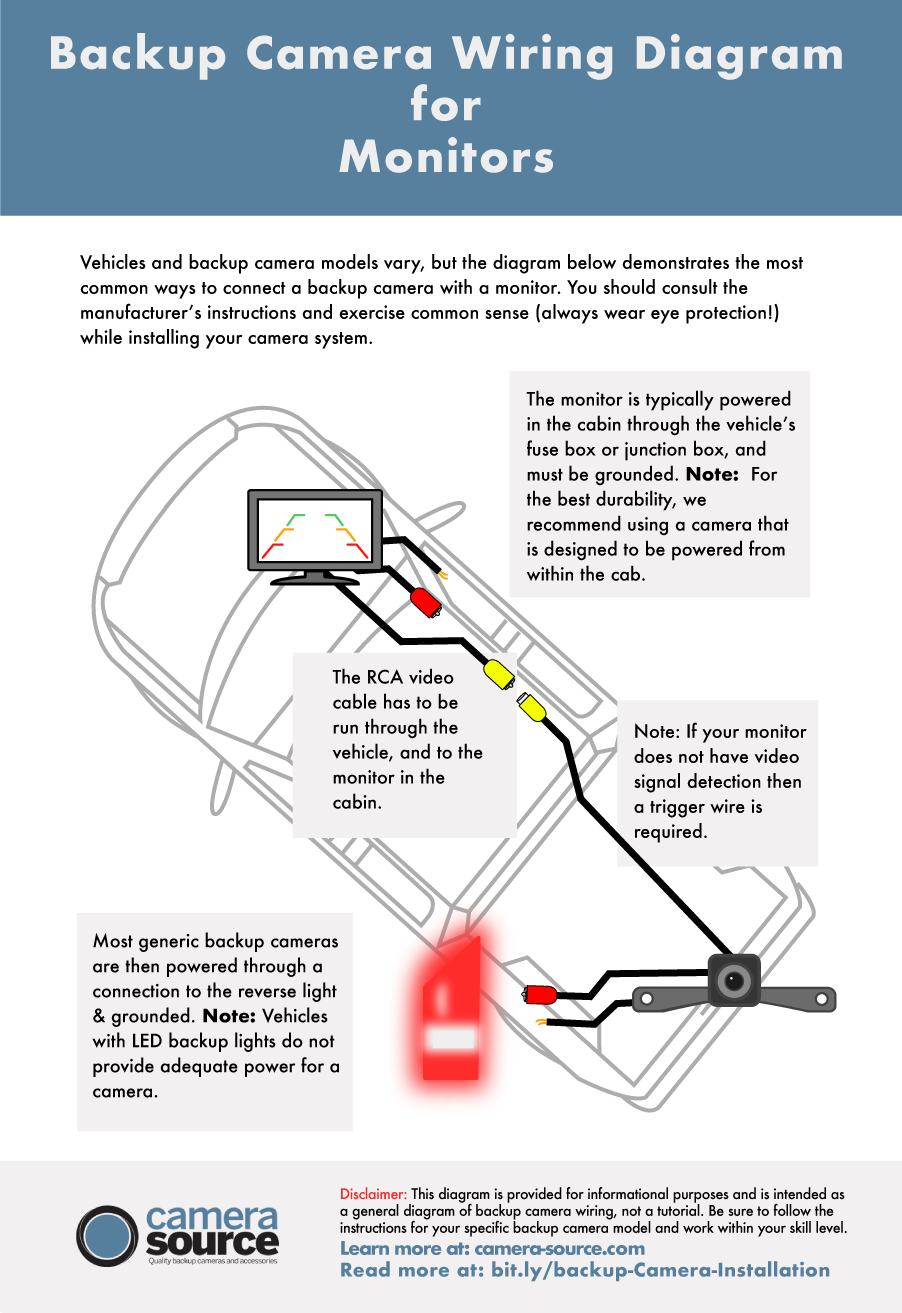
Safety is paramount. Begin by disconnecting your car’s battery (usually the negative terminal first) to prevent accidental shorts or electrical damage during wiring. This small but critical step safeguards both you and your vehicle’s electronics. Next, open your car’s trunk or hatch. You’ll need to remove interior trim panels to access the reverse light wiring and to route the camera cable. Use your plastic trim removal tools to gently pry off clips and fasteners, working methodically to avoid breakage. Keep track of all screws and clips, perhaps by placing them in a labeled container.
Step 2: Mounting the Camera
The camera’s placement is crucial for optimal visibility. Most commonly, rear cameras are mounted above the license plate, on the bumper, or within a specific vehicle-mounted housing.
- Location Selection: Choose a spot that provides a clear, unobstructed view of the area behind your car. Ensure it’s centered as much as possible for accurate perspective. Consider how the wires will be routed from the camera into the car’s interior without being exposed or pinched.
- Drilling (If Necessary): Some cameras require drilling a small hole for mounting screws or for passing the camera cable through the vehicle body. If drilling, measure precisely, apply painter’s tape to prevent paint chips, and use a step drill bit for a clean hole. Crucially, apply silicone sealant around any drilled holes to prevent water ingress and corrosion.
- Secure Mounting: Once the camera is positioned, secure it firmly. Use the provided screws, strong automotive-grade double-sided tape, or a combination of both. Ensure the camera’s angle is adjustable, allowing you to fine-tune the view after installation.
Step 3: Routing the Camera Cable
This is often the most time-consuming part, requiring patience and attention to detail. The goal is to route the cable discreetly and securely, protecting it from wear and tear.
- Through the Trunk Lid/Hatch: Start by feeding the camera cable from the mounted camera through the rubber grommet or existing wire channel into the interior of the trunk lid or hatch. If there isn’t an existing path, you may need to carefully make a small incision in a rubber grommet (ensure to seal it later).
- Along Existing Harnesses: Route the cable along existing wiring harnesses within the trunk, securing it with zip ties. This helps keep the cable tidy and prevents it from getting pinched or tangled.
- Under Trim Panels and Carpets: Continue routing the cable forward, along the side of the trunk, then under the rear seats, side door sills, and eventually up to the dashboard area. Use your trim removal tools to carefully lift panels and tuck the cable underneath. For areas under the carpet, you might need to use fish tape to guide the cable.
- Avoid Hazards: Ensure the cable avoids moving parts (e.g., seat mechanisms), heat sources (exhaust pipes), sharp edges, and areas where it might be easily pinched when panels are reinstalled. The aim is a clean, factory-like installation.
Step 4: Connecting to the Reverse Light Power
The camera and monitor typically need to receive power when the car is in reverse. This is usually achieved by tapping into the reverse light circuit.
- Locate Reverse Light Wires: Access the wiring harness for one of your car’s reverse lights (usually located inside the trunk or hatch, near the light assembly). With your multimeter, identify the positive (+) and negative (-) wires that power the reverse light only when the car is in reverse. Have someone shift into reverse (with the ignition on, engine off, and parking brake engaged) while you test for voltage.
- Tap into Wires: Once identified, carefully tap into the reverse light’s positive and negative wires. Crimp-on T-tap connectors are a common, non-invasive method. Strip a small section of insulation from your camera’s power and ground wires, and connect them to the respective reverse light wires using the T-taps or by carefully soldering the connections. Ensure all connections are secure and insulated with electrical tape or heat shrink tubing to prevent short circuits and corrosion, which could compromise digital security within your vehicle’s electrical system.
Step 5: Wiring the Monitor/Display
The method for wiring the monitor depends on your chosen display type.
- Standalone Monitor: If using a standalone monitor, it typically has its own power and ground wires. You can connect these to a 12V accessory power source (like a cigarette lighter adapter, though a more permanent solution is to tap into a fuse box using a fuse tap) and a ground point (e.g., a bolt connected to the car’s chassis). The camera’s video cable will then connect directly to the monitor’s video input.
- Head Unit Integration: For integration with an aftermarket head unit, you’ll connect the camera’s video RCA cable to the head unit’s “rear camera input” or “AUX-IN” video input. Additionally, most head units require a “reverse trigger” wire. This wire tells the head unit to switch to the camera feed when reverse gear is engaged. Connect this trigger wire to the same positive reverse light wire you tapped for the camera’s power. Route these cables cleanly from the back of the head unit to their respective connection points.
Step 6: Testing and Final Adjustments
Before reassembling everything, it’s crucial to test the system thoroughly.
- Reconnect Battery: Reconnect your car’s battery (negative terminal last).
- Test Functionality: Turn on the ignition (engine off for safety) and engage reverse gear. The camera feed should appear on your monitor or head unit. Check for a clear image, proper color, and accurate parking lines.
- Adjust Camera Angle: If the image isn’t optimal, adjust the camera’s physical angle. You may need to loosen its mounting screws slightly.
- Check Connections: If there’s no signal or a distorted image, recheck all electrical connections for looseness or incorrect wiring. Consult your camera’s troubleshooting guide.
Step 7: Reassembling the Interior
Once you’ve confirmed everything works perfectly, it’s time to put your car back together.
- Replace Trim Panels: Carefully reattach all removed trim panels, ensuring they snap securely into place and that no wires are pinched.
- Secure Loose Cables: Use zip ties or cable clips to secure any remaining loose cables, keeping them hidden and out of the way of moving parts.
- Clean Up: Clean any fingerprints or smudges from your car’s interior and the camera lens.
Post-Installation Care and Troubleshooting: Maintaining Your Tech Investment
Even after a successful installation, a little ongoing care can ensure your rear camera system continues to perform optimally.
Regular Maintenance for Longevity
- Clean the Lens: Periodically clean the camera lens with a soft, damp cloth and mild cleaning solution to remove dirt, dust, and grime that can obscure the view.
- Check Connections: Every few months, quickly check visible wiring connections (if any) to ensure they remain secure, especially after extreme weather conditions or off-road driving.
- Software Updates (if applicable): If your camera system integrates with a smart head unit or has its own firmware, check for manufacturer software updates that might improve performance or add features.
Common Troubleshooting Tips
- No Signal/Black Screen:
- Check all video cable connections (RCA) from the camera to the monitor/head unit.
- Ensure the camera and monitor are receiving power (check fuse, reverse light connection).
- Verify the head unit’s reverse trigger wire is correctly connected and functioning.
- Distorted/Flickering Image:
- This could be electrical interference. Ensure power and video cables are routed away from high-current wires or engine components.
- Check for loose connections.
- Ensure proper grounding for both camera and monitor.
- Camera Not Activating in Reverse:
- Double-check the reverse light power connection and the head unit’s reverse trigger wire.
- Use a multimeter to confirm the reverse light circuit is providing 12V when in reverse.
If you encounter persistent issues that you can’t resolve, don’t hesitate to consult the camera’s manufacturer support or a professional car audio/electronics installer. While the DIY approach saves money and builds skills, knowing when to seek expert help is also a smart financial decision, preventing potential further damage.
In conclusion, installing a rear camera in your car is a highly rewarding DIY project that significantly boosts safety, convenience, and potentially your vehicle’s market value. By carefully following these steps, leveraging modern tech tools, and paying attention to detail, you can successfully integrate this essential automotive gadget, enhancing your driving experience for years to come.
aViewFromTheCave is a participant in the Amazon Services LLC Associates Program, an affiliate advertising program designed to provide a means for sites to earn advertising fees by advertising and linking to Amazon.com. Amazon, the Amazon logo, AmazonSupply, and the AmazonSupply logo are trademarks of Amazon.com, Inc. or its affiliates. As an Amazon Associate we earn affiliate commissions from qualifying purchases.