
Grand Theft Auto V, a masterpiece in open-world gaming, has captivated millions since its release. While Rockstar Games provides an incredibly rich and detailed experience, a thriving community of modders has continuously pushed the boundaries, introducing enhancements, tools, and functionalities that elevate gameplay to unprecedented levels. Among the most popular and versatile of these modifications is Menyoo, a powerful mod menu that grants players unparalleled control over their in-game environment, characters, and vehicles. This comprehensive guide will walk you through every step of installing Menyoo, ensuring you can unlock a new realm of creativity and customization within the single-player experience of GTA V.

This tutorial is tailored for enthusiasts looking to delve deeper into the technical side of gaming, aligning perfectly with our website’s “Tech” focus. We’ll cover the necessary software components, detailed installation procedures, and crucial tips to ensure a smooth and secure modding journey, emphasizing digital security and best practices – elements relevant to both “Tech” and “Money” aspects of protecting your digital assets.
Understanding Menyoo and Its Essential Prerequisites
Before diving into the installation process, it’s vital to grasp what Menyoo is and why certain prerequisite software is necessary. Modding, at its core, involves modifying a game’s code or assets to introduce new features. For a powerful tool like Menyoo to function, it needs specific hooks into the game’s engine, which are provided by foundational modding frameworks.
What is Menyoo? A Gateway to Unprecedented Control
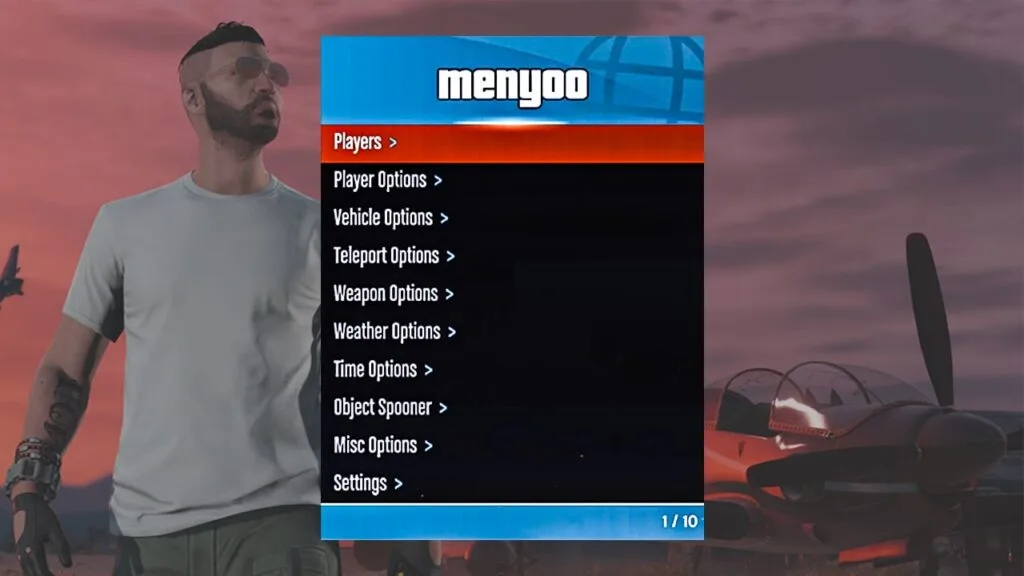
Menyoo is a highly acclaimed and feature-rich mod menu designed specifically for Grand Theft Auto V’s single-player mode. It’s often categorized as a “trainer” due to its ability to manipulate various aspects of the game in real-time. With Menyoo, players can:
- Spawn any vehicle: From rare prototypes to standard cars, and even custom-modded vehicles, instantly.
- Manipulate characters: Change player models, access various NPCs, customize clothing, and even give them weapons.
- Control the environment: Alter weather patterns, change the time of day, teleport to any location on the map, and interact with objects.
- Access unique abilities: Enable invincibility, super jump, super speed, no-clip mode, and a plethora of other “cheat” functionalities that enhance experimentation.
- Create intricate scenarios: Set up custom stunts, create cinematic scenes, or simply explore the world without limitations.
The sheer breadth of features makes Menyoo an indispensable tool for content creators, casual explorers, and anyone looking to experience GTA V in a fundamentally different way. It empowers players to transcend the game’s narrative boundaries and become the ultimate director of their own virtual sandbox. From a technological standpoint, Menyoo exemplifies how community-driven software development can dramatically extend the lifespan and creative potential of commercial entertainment products.
Essential Foundations: Script Hook V and ASI Loader
Menyoo, like many other sophisticated mods for GTA V, cannot function independently. It relies on a critical framework called Script Hook V and its accompanying ASI Loader. Think of these as the interpreters and loaders that allow third-party scripts (like Menyoo) to communicate with the game’s core engine.
- Script Hook V: Developed by Alexander Blade, Script Hook V is a library that allows custom scripts and trainers to be executed in GTA V. It injects a custom API (Application Programming Interface) into the game, enabling mod developers to write code that interacts directly with game functions, objects, and variables. Without Script Hook V, mods like Menyoo would have no way to “talk” to GTA V. It’s the backbone of virtually all advanced GTA V scripting mods.
- ASI Loader: Integrated with Script Hook V, the ASI Loader (
dinput8.dll) is responsible for loading.asifiles into the game..asifiles are essentially dynamic link libraries (DLLs) specifically formatted for GTA V mods. Menyoo itself comes as an.asifile, meaning the ASI Loader is crucial for the game to recognize and load it upon startup.
Understanding these foundational components is key to a successful installation. Any issues with Script Hook V or the ASI Loader will prevent Menyoo from working, making them the first points of troubleshooting for any mod-related problems. Their development and maintenance represent significant community contributions to the “Tech” ecosystem surrounding popular games, showcasing the power of collaborative ingenuity.
Preparing for Installation: Downloads and Verification
With a clear understanding of Menyoo and its dependencies, the next step involves acquiring the necessary files. This phase is critical, not just for functionality, but also for digital security. Downloading from unofficial or untrustworthy sources can expose your system to malware, compromisingsystem integrity and potentially your personal data – a significant concern that touches upon both “Tech” and “Money” (in terms of financial security and data protection).
Sourcing the Files: Menyoo and Dependencies from Reputable Sites
The internet is rife with downloads, but when it comes to game mods, exercising caution is paramount. Always prioritize official or widely recognized community hubs for your downloads.
-
Script Hook V and ASI Loader:
- The official source for Script Hook V is Alexander Blade’s website. A quick search for “Script Hook V” usually points to the correct domain (e.g.,
dev-c.com). - Always download the latest version that is compatible with your current GTA V game version. Game updates from Rockstar often break mod compatibility, requiring Script Hook V to be updated. Check the website for compatibility notes.
- The download will typically contain
ScriptHookV.dll,dinput8.dll(the ASI Loader), and a native trainer (which you can disregard if you’re installing Menyoo).
- The official source for Script Hook V is Alexander Blade’s website. A quick search for “Script Hook V” usually points to the correct domain (e.g.,
-
Menyoo:
- The primary, reputable source for Menyoo is typically GTA5-Mods.com. This website is a well-established and moderated hub for GTA V modifications, where mod developers often upload and maintain their files.
- Search for “Menyoo PC” or “Menyoo Trainer” on GTA5-Mods.com.
- Again, ensure you download the latest stable version that is compatible with the most recent game updates. Mod authors usually specify compatibility.
Crucial Digital Security Advice:
- Beware of Imitations: Malicious actors often create fake mod websites or distribute infected files masquerading as popular mods. Always double-check the URL and site reputation.
- Antivirus Scans: Even from reputable sites, it’s good practice to run a quick antivirus scan on any downloaded compressed files (
.zip,.rar) before extracting them. While rare on trusted sites, false positives or accidental inclusions can occur. - Read Comments/Reviews: On modding forums or download pages, always check the comments section. Users often report issues, malware warnings, or compatibility problems, serving as an early warning system.
Verifying File Integrity: A Best Practice
While most users skip this step, for those with a keen eye on digital security and robust “Tech” practices, verifying file integrity can add an extra layer of assurance. This typically involves checking the hash (a unique digital fingerprint) of a downloaded file against a hash provided by the developer.
- Reputable developers often post MD5 or SHA-256 hashes of their files alongside the download link.
- You can use free tools (or command-line utilities built into Windows) to calculate the hash of your downloaded file.
- If your calculated hash matches the developer’s provided hash, you can be reasonably certain the file hasn’t been tampered with during download or by a malicious third party.
This meticulous approach, while perhaps overkill for a simple mod for some, is a foundational “Tech” principle for ensuring software authenticity and security, vital for any user concerned about the integrity of their digital environment and, by extension, their “Money” spent on games and hardware.
Step-by-Step Menyoo Installation Guide
Now that you have the necessary files downloaded and verified, it’s time to integrate them into your GTA V installation. This process involves copying files into the game’s root directory. Precision is key here to avoid common errors.
Locating Your GTA V Directory
The first and most crucial step is to identify the main installation folder for Grand Theft Auto V. This is where the game’s executable (GTAV.exe) resides, along with core game files.
- Steam Users: Right-click on Grand Theft Auto V in your Steam Library, go to “Manage” -> “Browse local files.” This will open the correct folder.
- Epic Games Launcher Users: Open the Epic Games Launcher, go to your Library, find GTA V, click the three dots (…), and then select “Manage.” Under “Installation,” click the folder icon to “Open Install Location.”
- Rockstar Games Launcher Users: Open the Rockstar Games Launcher, go to “Settings,” then “Grand Theft Auto V” under “My Installed Games.” Click “Open” next to “View Installation Folder.”
Once you’ve found it, keep this folder open, as you’ll be copying files into it.
Installing Script Hook V
Assuming you’ve downloaded the Script Hook V package:
- Extract the Script Hook V archive: Use a program like 7-Zip or WinRAR to extract the contents of the downloaded
ScriptHookV_XXXX.zipfile (whereXXXXis the version number). - Identify key files: Inside the extracted folder, you’ll find:
ScriptHookV.dlldinput8.dll(this is the ASI Loader)NativeTrainer.asi(you can ignore or delete this, as Menyoo will replace its functionality).
- Copy files to GTA V directory: Copy
ScriptHookV.dllanddinput8.dlldirectly into your Grand Theft Auto V game root directory (the folder you located in the previous step).- Do NOT place them in any subfolders. They must be alongside
GTAV.exe.
- Do NOT place them in any subfolders. They must be alongside
Script Hook V and the ASI Loader are now installed. This foundational “Tech” layer is ready to support Menyoo.
Installing Menyoo
Now, let’s install Menyoo itself:
- Extract the Menyoo archive: Extract the contents of the downloaded
MenyooPC_XXXX.zipfile. - Identify Menyoo files: Inside the extracted folder, you will typically find:
Menyoo.asi- A folder named
menyooStuff
- Copy files to GTA V directory: Copy both
Menyoo.asiand the entiremenyooStufffolder directly into your Grand Theft Auto V game root directory.- Ensure
Menyoo.asiis alongsideGTAV.exe,ScriptHookV.dll, anddinput8.dll. - The
menyooStufffolder should also be in the root directory, not nested elsewhere. This folder contains all the configuration, custom options, and scripts for Menyoo.
- Ensure
Congratulations! Menyoo is now installed. This step-by-step “Tech” guide ensures all components are in their correct places, allowing the software to integrate seamlessly with your game.
First Launch and Basic Configuration
With all files in place, it’s time to launch GTA V and confirm Menyoo is working.
- Launch GTA V: Start the game through your preferred launcher (Steam, Epic Games, Rockstar Launcher).
- Verify Loading: You might briefly see a message on screen indicating that Script Hook V and Menyoo have loaded.
- Open Menyoo: Once you are in-game (preferably in single-player story mode), press the
F8key twice to open the Menyoo menu.- The first press usually closes any default in-game notifications.
- The second press should bring up the Menyoo interface on the left side of your screen.
- Navigation:
- Use the
8and2keys on your Numpad (orUpandDownarrow keys) to navigate up and down through the menu options. - Use
5on your Numpad (orEnter) to select an option. - Use
4and6on your Numpad (orLeftandRightarrow keys) to change values or toggle options. - Use
0on your Numpad (orBackspace) to go back in the menu. - Press
F8once to close the menu.
- Use the
Familiarize yourself with the controls. Menyoo’s interface is generally intuitive, allowing you to quickly access its vast array of features. This immediate feedback loop is crucial in “Tech” deployments, confirming successful integration.
Optimizing Your Modding Experience and Troubleshooting Common Issues
Installing Menyoo is just the first step. To ensure a stable, enjoyable, and secure modding experience, it’s important to adopt best practices and know how to address common issues. This section focuses on maintaining your modded environment, a critical aspect of “Tech” literacy, and safeguarding your investment in the game, which touches upon “Money” by preventing account loss.
Essential Tips for Safe Modding
Modding, while rewarding, comes with inherent risks, especially in online environments.
- ALWAYS Mod in Single-Player: Menyoo, like almost all trainers and script mods, is strictly intended for single-player use. Never attempt to use Menyoo or any similar mod in GTA Online. Rockstar Games has a robust anti-cheat system that will detect such modifications, resulting in immediate and permanent bans. This loss of your game account, its progress, and any in-game purchases represents a direct financial cost (“Money”) and a loss of effort (“Brand” for your online reputation).
- Backup Your Game Files: Before installing any mod, especially if it involves overwriting core game files (though Menyoo doesn’t usually do this), it’s a good practice to back up your
GTAV.exeandupdatefolder, or even your entire game directory. This allows for quick restoration if something goes wrong. This is a fundamental “Tech” security and recovery measure. - Keep Mods Updated: Just as game developers release patches, mod developers also release updates to ensure compatibility with new game versions or to fix bugs. Regularly check the mod’s download page for updates, especially after a major GTA V update.
- Use a Dedicated Modding Folder (Optional but Recommended): Some advanced modders copy their entire GTA V installation to a separate folder, creating a “modded” version of the game. They then use a separate, vanilla installation for GTA Online. This offers the ultimate separation, but requires more storage space.
Common Installation Pitfalls and Solutions
Even with careful steps, issues can arise. Here are some frequent problems and their resolutions:
- Menyoo Menu Not Appearing (F8 does nothing):
- Outdated Script Hook V: The most common culprit. If GTA V recently updated, Script Hook V likely needs an update. Check
dev-c.comfor the latest version. - Incorrect File Placement: Ensure
ScriptHookV.dll,dinput8.dll,Menyoo.asi, and themenyooStufffolder are all in the game’s root directory, alongsideGTAV.exe. - Missing ASI Loader: Verify
dinput8.dllis present. Without it,Menyoo.asicannot be loaded. - Antivirus Interference: Your antivirus software might quarantine or delete
ScriptHookV.dllordinput8.dll, mistaking them for malicious files. Check your antivirus quarantine, restore the files, and add an exception for them and your GTA V directory.
- Outdated Script Hook V: The most common culprit. If GTA V recently updated, Script Hook V likely needs an update. Check
- Game Crashes on Startup:
- Incompatible Script Hook V: Again, an outdated or incorrect version of Script Hook V for your GTA V build can cause crashes.
- Corrupted Download: Re-download Menyoo and Script Hook V from reputable sources to rule out corrupted files.
- Other Mods Conflicting: If you have other mods installed, try removing them temporarily to see if Menyoo works alone. Conflicts are a common “Tech” challenge in modding environments.
- Cannot Navigate Menyoo:
- Numpad Issues: Ensure your Numpad is enabled (Num Lock on). Some users prefer arrow keys; check Menyoo’s configuration files (in
menyooStuff) for keybinding options if needed.
- Numpad Issues: Ensure your Numpad is enabled (Num Lock on). Some users prefer arrow keys; check Menyoo’s configuration files (in
Maintaining Your Modded Game
Regular maintenance is key to a long-lasting modded game experience. This involves:
- Staying Informed: Keep an eye on modding forums (like GTA5-Mods.com forums) for news about GTA V updates and their impact on mods.
- Selective Updates: Don’t update Script Hook V or Menyoo just because a new version is out. Wait for confirmation that it’s stable and compatible with your current game version.
- Clean Installations: If you encounter persistent issues, consider performing a “clean” reinstallation of Script Hook V and Menyoo: delete the old files, then copy over the new ones.
These “Tech” maintenance practices are essential for preventing frustration and maximizing your enjoyment of the mod.
The Broader Impact of Modding: Community, Creativity, and Caution
Beyond the immediate technical installation, the world of modding, and Menyoo specifically, illuminates broader themes relevant to our website’s core topics: the power of “Tech” to extend product life, the dynamics of “Brand” in community building, and the importance of “Money” in valuing digital assets and security.
Enhancing Gameplay and Creativity: The Power of Community Tech
Menyoo is a prime example of how community-driven “Tech” enhancements can drastically extend the lifespan and creative potential of a commercial game. GTA V is already an expansive sandbox, but mods like Menyoo transform it into a truly boundless canvas. Players can orchestrate scenarios that the original developers never envisioned, fostering a sense of ownership and personal expression. From complex stunt videos to elaborate machinima, Menyoo provides the tools for individual players to become virtual content creators, sharing their unique visions with the wider gaming community. This active engagement creates a feedback loop, inspiring further mod development and demonstrating the immense value that player-generated content adds to a game’s “Brand” and longevity.
The Modding Community and Digital Ethics
The success of Menyoo is built upon a vibrant and generally ethical modding community. Developers like the creators of Script Hook V and Menyoo dedicate countless hours to build and maintain these complex tools, often receiving little direct financial compensation. Their work is driven by passion and a desire to enhance the shared gaming experience.
This community aspect touches upon “Brand” in several ways:
- Reputation of Modders: Trustworthy modders earn a strong reputation, becoming respected figures whose creations are eagerly anticipated.
- Community Standards: Modding communities often self-regulate, promoting responsible modding (e.g., single-player only rules) and discouraging malicious practices. This collective “Brand” of integrity helps ensure a safe environment for new modders.
- Collaborative Innovation: Modding is rarely a solitary endeavor. It involves sharing knowledge, troubleshooting together, and building upon each other’s work, showcasing a powerful collaborative “Tech” ecosystem.
Digital Security and Account Integrity: Protecting Your Investment
While modding opens doors to creativity, the imperative for digital security cannot be overstated. The strict enforcement of anti-cheat policies in GTA Online highlights the “Money” aspect of gaming: a player’s investment in the game itself, downloadable content, and the time spent accumulating in-game wealth. A permanent ban means losing all of this.
Therefore, the emphasis on downloading from reputable sources, understanding the risks, and strictly adhering to single-player modding isn’t just about avoiding technical glitches; it’s about protecting your digital assets. For many, a game account represents significant monetary value, whether directly through purchases or indirectly through the time invested. Good “Tech” practices in mod management directly translate to safeguarding this “Money” and preserving the integrity of your gaming “Brand.”

Conclusion
Installing Menyoo is a straightforward process that unlocks an extraordinary level of control and creativity within Grand Theft Auto V’s single-player experience. By carefully following the steps outlined in this guide – from understanding the essential prerequisites like Script Hook V and ASI Loader, to sourcing files from reputable sites, and finally, executing the precise installation steps – you can seamlessly integrate this powerful mod menu into your game.
Remember, the key to a successful and enjoyable modding journey lies not only in the technical installation but also in adopting responsible practices. Always prioritize digital security by downloading from trusted sources, regularly backing up your game, and, most importantly, confining Menyoo’s use strictly to single-player mode to protect your GTA Online account from potential bans.
The world of GTA V modding is a testament to the symbiotic relationship between advanced “Tech,” community-driven innovation, and the creative spirit of players. Menyoo empowers you to redefine your GTA V experience, turning a fantastic game into your ultimate virtual sandbox. Dive in, experiment responsibly, and discover the limitless possibilities that await.
aViewFromTheCave is a participant in the Amazon Services LLC Associates Program, an affiliate advertising program designed to provide a means for sites to earn advertising fees by advertising and linking to Amazon.com. Amazon, the Amazon logo, AmazonSupply, and the AmazonSupply logo are trademarks of Amazon.com, Inc. or its affiliates. As an Amazon Associate we earn affiliate commissions from qualifying purchases.