
In an increasingly digital world, the accessibility of technology is paramount. For many, interacting with computers is a seamless experience, a fluid dance between fingers and keyboard. Yet, for a significant portion of the global population, what seems effortless can present substantial challenges. This is where dedicated accessibility features step in, quietly but powerfully leveling the playing field. Among these unsung heroes of digital inclusivity are Filter Keys, a vital component designed to enhance the computing experience for individuals with motor control impairments. Far from being a niche tool, Filter Keys represent a cornerstone of thoughtful software design, impacting everything from individual productivity to corporate brand reputation and the broader digital economy.
This article delves into the intricacies of Filter Keys, exploring their fundamental purpose, how they operate, and their profound implications across technology, brand strategy, and even financial considerations. We’ll uncover how this seemingly simple feature empowers users, contributes to a more inclusive digital landscape, and highlights the value of accessible design in modern tech.
The Core Concept: Understanding Filter Keys
At its heart, Filter Keys is an accessibility feature primarily found in operating systems like Microsoft Windows and Apple macOS. Its fundamental goal is to instruct the keyboard to ignore brief or repeated keystrokes, making typing more manageable for individuals who may experience involuntary tremors, muscle spasms, or other motor control challenges that lead to unintentional key presses. Without such a feature, a user might accidentally type “hhheelllooo” instead of “hello,” or find that a single press registers multiple times, creating frustration and hindering productivity.
Definition and Primary Purpose
The primary purpose of Filter Keys is to “filter” out unwanted keystrokes, ensuring that only intentional key presses are registered by the computer. This is achieved by introducing a delay between when a key is pressed and when the operating system actually registers it, or by ignoring rapid successive presses of the same key. The feature is part of a larger suite of accessibility options, often grouped under categories like “Ease of Access” (Windows) or “Accessibility” (macOS), which aim to customize the user interface and input methods to suit diverse needs.
For users with fine motor skill difficulties, tremors, or conditions like Parkinson’s disease, multiple sclerosis, or even simple dexterity issues due to age or injury, Filter Keys transform a chaotic typing experience into a controlled and predictable one. It reduces the cognitive load associated with correcting frequent errors, allowing users to focus on the content they are creating rather than the mechanics of input.
How Filter Keys Work: Key Mechanisms
Filter Keys achieve their objective through several distinct, yet interconnected, mechanisms. Understanding these mechanisms is crucial to appreciating the sophistication behind this seemingly straightforward feature:
-
Bounce Keys: This is perhaps the most fundamental aspect. Bounce Keys instruct the computer to ignore repeated presses of the same key if they occur within a very short timeframe. Imagine someone whose finger might “bounce” off a key after pressing it, causing it to register twice. Bounce Keys prevent this by requiring a minimum delay between subsequent presses of the identical key before registering the second (or third) input. This mechanism directly addresses the issue of unintentional key repetition.
-
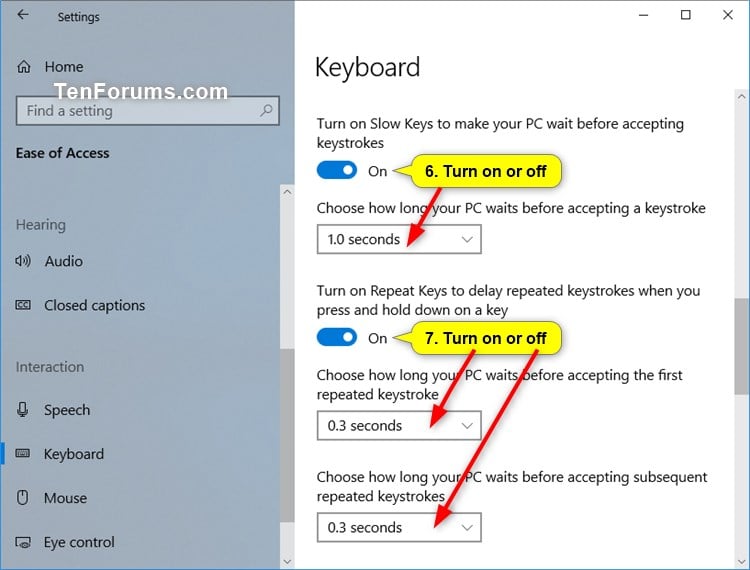
Repeat Delay: Many keyboards are designed to automatically repeat a character if a key is held down. While useful for holding down the backspace key, it can be problematic for users who struggle to lift their fingers quickly enough. Repeat Delay allows you to specify a longer duration that a key must be held down before it starts repeating. This means an accidental linger on a key won’t immediately result in a string of identical characters, granting the user more time to release the key.
-
Repeat Rate: Complementary to Repeat Delay, the Repeat Rate determines how quickly characters repeat once the repeat function has been activated (i.e., after the Repeat Delay period has passed). By slowing down the Repeat Rate, users can maintain better control, even if they intentionally hold a key down for continuous input. This prevents a rapid-fire stream of characters that might be difficult to stop precisely.
-
Acceptance Delay (or Keystroke Delay): Some implementations also include an acceptance delay, which sets a minimum time a key must be held down to be registered at all. This helps filter out very brief, unintentional “taps” that might occur due to spasms or tremors, ensuring only deliberate presses are acknowledged.
By combining these mechanisms, Filter Keys create a highly customizable input environment that can be fine-tuned to an individual’s specific motor control requirements, significantly improving accuracy and reducing frustration.
Beyond Motor Impairment: Unexpected Benefits
While primarily designed for individuals with specific motor challenges, the underlying principles of Filter Keys can offer subtle benefits to a broader audience. For instance, in environments with faulty or overly sensitive keyboards, adjusting repeat delays or bounce key settings might prevent accidental inputs. In high-stakes data entry or programming scenarios, where precision is paramount, even users without diagnosed impairments might find a slightly adjusted repeat delay beneficial to avoid costly errors. Furthermore, for those learning to type or using new input devices, these settings can provide a more forgiving learning curve. This highlights Filter Keys not just as an assistive technology, but as a robust tool for general input customization.
Enabling Productivity and Digital Inclusivity
The impact of Filter Keys extends far beyond simply correcting typos. It is a powerful enabler of productivity, educational attainment, and professional participation for countless individuals. By smoothing out the fundamental interaction with a computer, Filter Keys unlock opportunities that might otherwise remain out of reach, fostering a more inclusive digital society.
Practical Applications and User Scenarios
Consider the practical implications of Filter Keys in everyday scenarios:
- Students: A student with cerebral palsy might struggle to complete essays or participate in online learning without the aid of Filter Keys. The feature allows them to accurately transcribe thoughts into text, ensuring their academic performance reflects their intellect, not their motor control challenges.
- Professionals: For a professional with essential tremor, an email or report could become a frustrating ordeal of constant backspacing and correction. Filter Keys enable them to draft documents, respond to communications, and manage digital tasks with efficiency and confidence, maintaining their professional output and career viability.
- Creative Workers: Graphic designers, musicians, or writers who rely on precise keyboard inputs can find their creative flow disrupted by accidental repeats. Filter Keys ensure their digital canvas or score accurately reflects their artistic intention.
- Elderly Users: As individuals age, dexterity can naturally decline. Filter Keys can help older adults maintain their independence in communicating with family, managing finances online, and engaging with digital entertainment, preventing technology from becoming a barrier.
In each of these scenarios, Filter Keys don’t just fix a problem; they empower individuals to fully participate in the digital world, reducing barriers to communication, learning, and employment.
Step-by-Step Configuration (Windows and macOS examples)
Enabling and configuring Filter Keys is typically straightforward, integrated directly into the operating system’s accessibility settings.
For Microsoft Windows:
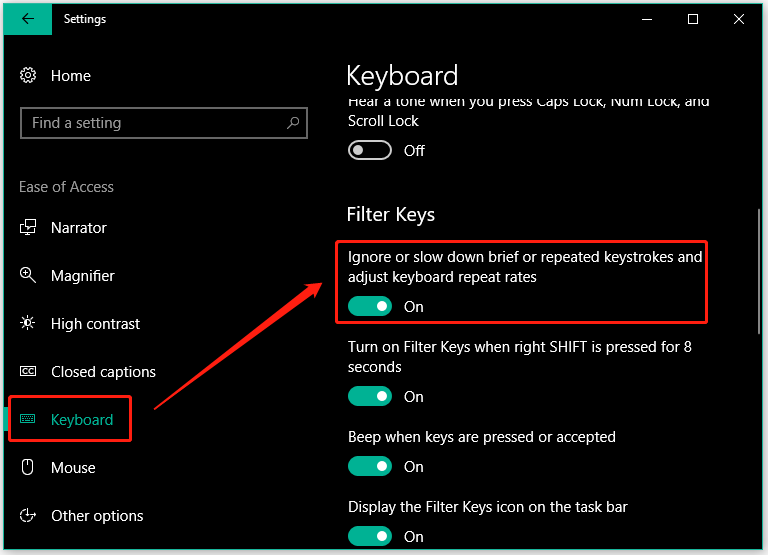
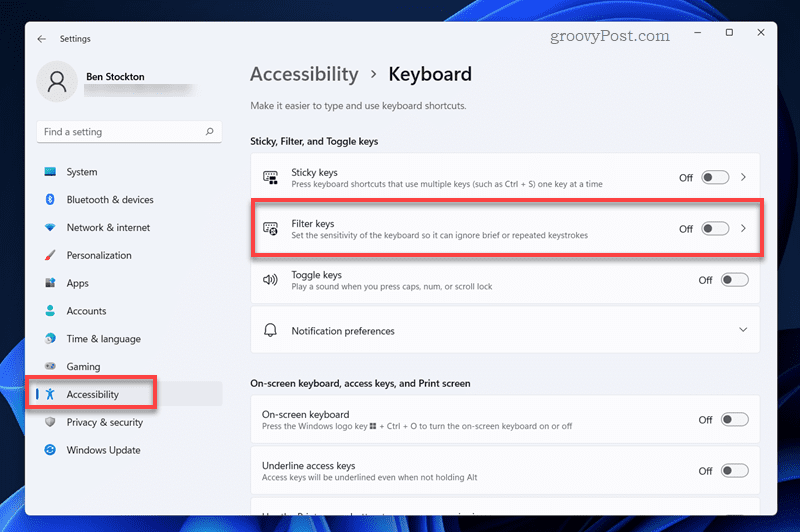
- Access Settings: Go to “Start” > “Settings” (gear icon) > “Accessibility” (or “Ease of Access” in older versions).
- Navigate to Keyboard: Select “Keyboard” from the left-hand menu.
- Toggle Filter Keys: Find the “Filter Keys” option and toggle it “On.”
- Customize Settings: Below the toggle, you’ll usually find options to customize “Bounce Keys,” “Repeat Keys,” and “Keystroke delay” (acceptance delay). You can adjust the delay times in milliseconds to suit your needs. Windows often provides a test area to try out your new settings.
- Sound and Visual Cues: You can also choose to have a sound play when Filter Keys are activated or when a key is ignored, providing auditory feedback.
For Apple macOS:
- Access System Settings: Go to “Apple Menu” > “System Settings” (or “System Preferences” in older versions).
- Navigate to Accessibility: Select “Accessibility” from the sidebar.
- Choose Keyboard: In the Accessibility pane, click on “Keyboard” (often under the “Motor” section).
- Enable Slow Keys: The macOS equivalent to Filter Keys is primarily “Slow Keys.” Toggle “Slow Keys” to “On.”
- Adjust Delay: Click “Options…” next to Slow Keys to adjust the acceptance delay (the time a key must be held down to be accepted). You can also enable an audible click for when a key is accepted.
- Repeat Key Settings: For repeat delay and rate, you’d typically adjust these in the main “Keyboard” settings panel (not under Accessibility directly), where you can set the “Key Repeat” rate and “Delay Until Repeat.”
These steps demonstrate how major operating systems integrate this crucial feature, making it accessible to a wide user base without requiring third-party software.
Filter Keys and the Broader Accessibility Landscape
Filter Keys are but one piece of a much larger accessibility puzzle. They are often used in conjunction with other assistive technologies, such as Sticky Keys (which allow modifier keys like Shift, Ctrl, Alt to be pressed sequentially rather than simultaneously), On-Screen Keyboards, speech-to-text software, or specialized hardware like alternative pointing devices. This holistic approach ensures that individuals with a spectrum of disabilities can interact with technology effectively. The continuous development and integration of such features underscore a growing recognition within the tech industry of its responsibility to design for all users, not just the able-bodied.
The Strategic Impact: Brand, Business, and Financial Implications
Beyond individual user empowerment, the existence and thoughtful implementation of features like Filter Keys have significant strategic implications for technology companies, brand perception, and even the broader economy. They reflect a commitment to inclusivity that resonates with consumers, attracts talent, and contributes to a more robust digital society.
Enhancing Brand Reputation Through Inclusive Design
For tech giants like Microsoft and Apple, embedding comprehensive accessibility features such as Filter Keys is not merely a philanthropic gesture; it’s a strategic move that profoundly impacts their brand reputation.
- Corporate Social Responsibility (CSR): Companies demonstrating a strong commitment to accessibility are viewed as socially responsible and ethical. This commitment resonates with customers, investors, and employees who prioritize companies with strong CSR values.
- Market Leadership and Innovation: Prioritizing inclusive design positions a brand as forward-thinking and innovative. It suggests a deep understanding of user needs, even those outside the majority, which can be a powerful differentiator in a competitive market.
- Customer Loyalty and Trust: When users with disabilities find a product that genuinely meets their needs, they often become incredibly loyal advocates. This fosters a sense of trust and appreciation for the brand, leading to positive word-of-mouth and sustained customer relationships.
- Diverse Talent Attraction: Companies known for their inclusive products often attract a more diverse talent pool, including designers, engineers, and researchers who are passionate about creating accessible technology. This enriches the company culture and leads to even more innovative solutions.
In essence, a brand that embraces accessibility builds a stronger, more positive public image, enhancing its perceived value and strengthening its bond with its user base.
Economic Benefits: Productivity, Cost Savings, and Market Growth
The economic impact of accessibility features like Filter Keys, while sometimes indirect, is substantial.
- Increased Workforce Participation: By making standard computing tools usable for individuals with motor impairments, Filter Keys enable them to enter or remain in the workforce. This directly contributes to economic productivity and reduces reliance on social welfare programs, fostering greater financial independence.
- Reduced Training and Support Costs: For businesses, providing accessible tools means employees can use standard equipment, reducing the need for expensive specialized adaptive hardware or extensive one-on-one training for modified workflows. This translates into tangible cost savings.
- Expanded Market Opportunities: The global market for assistive technologies and accessible products is growing. Companies that design their core offerings with accessibility in mind, rather than as an afterthought, tap into this burgeoning market. This foresight can lead to new product lines, partnerships, and revenue streams.
- Compliance and Risk Mitigation: In many regions, accessibility is a legal requirement (e.g., ADA in the US, EN 301 549 in the EU). Implementing features like Filter Keys helps companies comply with these regulations, mitigating legal risks and potential financial penalties associated with non-compliance.
- Enhanced Digital Economy Participation: When more people can effectively use computers and the internet, they contribute more broadly to the digital economy, whether through online shopping, digital services, or content creation. Filter Keys contribute to this foundational capability.
Thus, investing in accessibility is not just good ethics; it’s sound business strategy that yields both direct and indirect financial returns.
Personal Branding for Tech Professionals and Advocates
For individuals working within the tech industry, particularly those specializing in software development, user experience (UX) design, or product management, a deep understanding and advocacy for accessibility features like Filter Keys can significantly enhance their personal brand.
- Expertise and Specialization: Demonstrating knowledge of assistive technologies positions a professional as an expert in inclusive design, a highly valued skill set in today’s market.
- Thought Leadership: Contributing to discussions, writing articles, or presenting on accessibility topics establishes a professional as a thought leader and an advocate for user-centric design.
- Empathy and Social Impact: Integrating accessibility into one’s work showcases empathy and a desire to create technology that benefits all, which can be a powerful motivator for career growth and networking.
For tech professionals, understanding how tools like Filter Keys bridge the gap between technology and diverse human needs is not just a technical skill, but a testament to a broader commitment to ethical and impactful innovation.
Optimizing Your Digital Experience with Filter Keys
While Filter Keys offer immense benefits, optimal usage requires a bit of understanding and fine-tuning. Knowing how to set them up effectively and avoiding common pitfalls can make a significant difference in a user’s digital quality of life.
Best Practices for Using Filter Keys
- Start with Moderate Settings: When first enabling Filter Keys, don’t go straight for extreme delays. Begin with moderate settings (e.g., 0.5-1 second for repeat delay, 0.2-0.3 seconds for bounce keys) and gradually adjust them based on your experience.
- Test Thoroughly: Use a simple text editor or a testing area (if provided by the OS) to type freely and observe how the settings affect your input. Pay attention to how keys register and if you’re still experiencing accidental repeats or missed intentional presses.
- Combine with Other Accessibility Features: Filter Keys often work best in conjunction with other accessibility tools. For instance, if you also have difficulty pressing multiple keys simultaneously, enable Sticky Keys. If vision is an issue, consider a high-contrast theme.
- Regular Review and Adjustment: As motor skills can change over time (due to rehabilitation, disease progression, or age), it’s a good practice to periodically review and adjust your Filter Keys settings to ensure they continue to meet your evolving needs.
- Educate Others: If you’re an IT professional, educator, or family member assisting someone with motor impairments, take the time to explain what Filter Keys are and how they can be customized. Awareness is key to adoption.
Troubleshooting and Common Misconceptions
One common “problem” users encounter is accidentally enabling Filter Keys via a keyboard shortcut (often by holding down the right Shift key for several seconds). This can lead to a sudden, inexplicable delay in typing, causing frustration for users unaware of the feature.
- Misconception: “My keyboard is broken!” Often, what seems like a faulty keyboard is actually Filter Keys active with default or unoptimized settings.
- Troubleshooting Tip: If your typing suddenly becomes unresponsive or slow, first check your operating system’s accessibility settings for Filter Keys (or Slow Keys/Bounce Keys) and ensure they are either off or set appropriately for your needs.
- Misconception: “Filter Keys are only for people with severe disabilities.” While most beneficial for those with significant motor impairments, the underlying mechanisms can subtly enhance typing precision for anyone looking to reduce accidental inputs, even in less extreme scenarios.
Understanding these points ensures that Filter Keys remain a helpful tool rather than a source of confusion.
Conclusion
Filter Keys stand as a quiet testament to the power of thoughtful, inclusive design in technology. More than just a setting in an operating system, they represent a bridge between potential and participation, enabling countless individuals to engage with the digital world with greater ease, accuracy, and independence. From enhancing individual productivity and fostering academic success to driving corporate brand value and contributing to a more robust digital economy, the impact of Filter Keys ripples across multiple facets of our tech-driven society.
As technology continues to advance, the principles embodied by Filter Keys—empathy, adaptability, and user-centricity—will remain crucial. They remind us that true innovation lies not just in creating the next groundbreaking gadget or AI, but in ensuring that technology is truly accessible to all, empowering every individual to reach their full potential in an increasingly connected world.
aViewFromTheCave is a participant in the Amazon Services LLC Associates Program, an affiliate advertising program designed to provide a means for sites to earn advertising fees by advertising and linking to Amazon.com. Amazon, the Amazon logo, AmazonSupply, and the AmazonSupply logo are trademarks of Amazon.com, Inc. or its affiliates. As an Amazon Associate we earn affiliate commissions from qualifying purchases.