
In the intricate tapestry of our digital lives, every tap, scroll, and interaction leaves a trace. On platforms like Instagram, these traces – particularly our “likes” – can inadvertently paint a picture of our interests, values, and even our whereabouts. While liking posts is a fundamental way to engage with content and connect with others, there are legitimate reasons why one might wish to manage or even “hide” what they’ve liked. Whether it’s to curate a specific online persona, maintain privacy, or simply clean up a cluttered digital footprint, understanding how to manage your liked activity is a crucial aspect of digital literacy in today’s interconnected world.
This guide delves into the practical steps and strategic considerations for managing your liked posts on Instagram. We’ll explore the platform’s features, discuss the implications for personal branding and privacy, and provide actionable advice to help you control your online image. In an era where tech giants constantly refine algorithms and our digital presence increasingly intersects with our professional and financial lives, mastering these nuances is more important than ever.
Understanding Instagram’s Like Visibility Settings
Before diving into how to “hide” your likes, it’s essential to understand how Instagram handles likes in the first place. The platform has evolved significantly, offering users more granular control over their interactions, but fundamental visibility rules still apply.
How Likes Work on Instagram (Public vs. Private Accounts)
The basic premise of Instagram’s like system is straightforward: when you like a post, that action is typically visible to others. However, the extent of this visibility depends heavily on your account’s privacy settings and the settings of the post you’re liking.
- Public Accounts: If your Instagram account is public, anyone can see your profile, your posts, and generally, your likes on other public posts. When you like a post from another public account, that like contributes to the total like count visible to everyone, and your username might appear in the list of people who have liked the post (depending on how many likes there are and if you’re among the first few or mutuals with the post owner).
- Private Accounts: If your Instagram account is private, only your approved followers can see your posts and who you follow. When you like a post, your followers can see that you liked it if they also follow the account that posted it. For public posts, your like will still contribute to the overall like count, but your username might not be as readily visible to non-followers in the list of likers. For private posts from accounts you follow, only mutual followers of both you and the poster would typically see your like.
It’s crucial to understand that Instagram does not offer a direct “hide my activity from everyone” switch for individual likes you make on other people’s posts, apart from unliking them. The platform’s design inherently encourages interaction and visibility to foster community. However, there are features that often get confused with “hiding what I liked.”
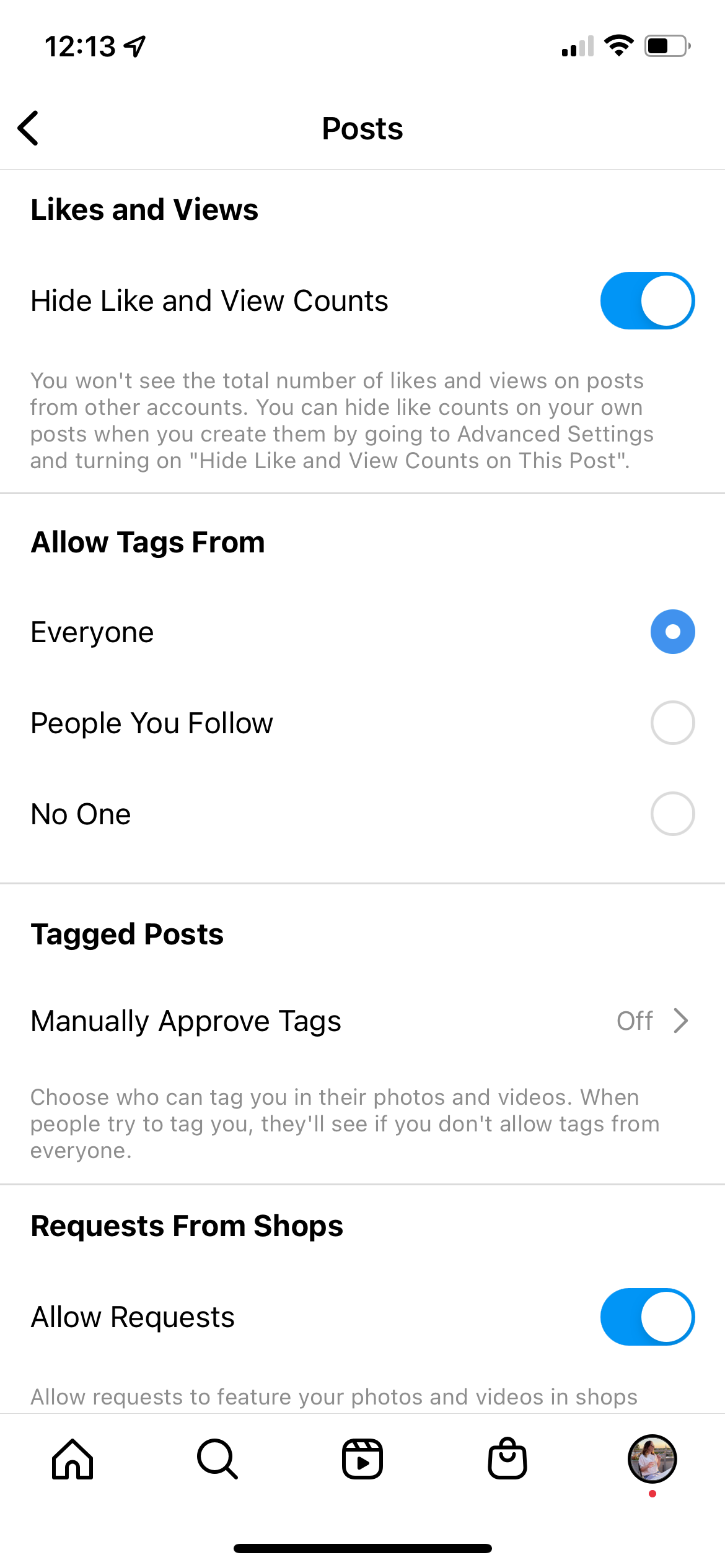
The ‘Hide Like Counts’ Feature (On Your Posts)
A significant development in Instagram’s privacy toolkit was the introduction of the “Hide Like Counts” feature. This feature, however, does not hide the likes you make on other people’s posts. Instead, it allows you to hide the total number of likes that your own posts receive from other people.
When you enable this feature for your posts:
- For your audience: They will no longer see a numerical count of how many people liked your post. Instead, they might see “Liked by [one friend] and others,” or simply “Liked by [username]” if only one person liked it. They can still tap to see a list of who liked it, but the aggregated number is gone.
- For you: You, as the post owner, can still see the private like count by tapping on the “others” text.
This feature was primarily introduced to reduce social pressure and anxiety associated with chasing likes, shifting the focus back to content quality rather than popularity metrics. While valuable for personal well-being and managing brand perception (by not overtly displaying engagement numbers), it doesn’t directly address the original query of “how to hide what I liked.” However, it is an important distinction to make when discussing like visibility on Instagram.
Strategies for Managing Your Liked Posts History
Since Instagram doesn’t offer a blanket “hide all my past likes” button, managing your liked posts primarily involves reviewing and unliking content. This is a manual process but offers complete control over your digital footprint.
Reviewing Your Liked Posts
Instagram provides a convenient way to see all the posts you’ve ever liked. This is your starting point for any cleanup or review effort.
Step-by-Step Guide to Accessing Your Liked Posts:
- Open Instagram: Launch the Instagram app on your mobile device.
- Go to your Profile: Tap on your profile picture icon in the bottom right corner of the screen.
- Access the Menu: Tap the three horizontal lines (hamburger menu) in the top right corner of your profile page.
- Select ‘Your Activity’: From the pop-up menu, tap on “Your Activity.” This section houses various historical interactions you’ve had on Instagram.
- Choose ‘Interactions’: Within “Your Activity,” tap on “Interactions.”
- Select ‘Likes’: Here, you will see options like “Likes,” “Comments,” and “Story replies.” Tap on “Likes.”
You will now see a chronological list of every post you have ever liked, from the most recent to the oldest. This feature is invaluable for auditing your past activity. For individuals or brands focused on reputation management, this provides a critical overview of content they have implicitly endorsed. Reviewing this list can reveal past likes that no longer align with current personal values, professional image, or branding strategies.
Filtering and Sorting Your Liked Posts:
Instagram also allows you to filter and sort this list. You can:
- Filter by Author: Search for posts you’ve liked from a specific user.
- Filter by Date: Narrow down your liked posts to a specific date range.
- Sort by Oldest or Newest: Reorder the list to make it easier to navigate older interactions.
These filtering options are particularly useful if you’re trying to locate specific likes or address a period of activity you wish to review.
Unliking Posts: The Direct Approach
The most direct and effective way to “hide” what you’ve liked on Instagram is to simply unlike the post. When you unlike a post, your interaction is removed, and it no longer appears in your “Liked Posts” history.

Step-by-Step Guide to Unliking a Post from Your Liked History:
- Access Your Liked Posts: Follow the steps above to navigate to “Your Activity” > “Interactions” > “Likes.”
- Select Posts to Unlike: Browse through the list and tap on any post you wish to unlike. This will open the original post.
- Tap the Heart Icon: Once the post is open, locate the heart icon below the image or video. It will be filled in (red for recent likes, grey for older ones depending on the app version). Tap this heart icon to unlike the post.
- Confirmation: The heart icon will change to an outline, indicating that you have successfully unliked the post. If you then return to your “Liked Posts” list, that post will no longer be there.
Bulk Unliking (Limited Feature):
While Instagram doesn’t offer a “select all and unlike” button, you can select multiple posts directly from your “Liked Posts” list to unlike them more efficiently.
- From the ‘Likes’ List: On the “Likes” screen, tap “Select” in the top right corner.
- Choose Posts: Tap on the posts you wish to unlike. A blue circle will appear next to selected posts.
- Tap ‘Unlike’: Once you’ve selected all the desired posts, tap the “Unlike” button at the bottom of the screen.
This bulk action streamlines the process, especially if you have numerous posts you wish to remove from your liked history. It’s a powerful tool for maintaining your personal brand and ensuring your digital footprint reflects your current identity.
Advanced Privacy & Personal Branding Considerations
Beyond the direct act of unliking, managing your presence on Instagram involves a broader strategy encompassing privacy settings and an awareness of your digital footprint. This is where the intersection of Tech, Brand, and Money becomes particularly relevant.
Curating Your Digital Footprint
Your “liked posts” history isn’t just a list; it’s a reflection of your interests, affiliations, and even your values. For individuals, especially those building a personal brand, navigating a career, or seeking online income opportunities, this footprint is critical.
- Personal Branding: An inconsistent or unprofessional “liked” history can undermine your personal brand. For instance, an aspiring environmental activist liking posts promoting unsustainable practices, or a financial advisor liking posts about risky, unregulated investments, could damage their credibility. Curating your likes ensures that your public interactions align with the image you wish to project.
- Professional Reputation: Employers, potential business partners, and clients often conduct “social media audits.” Your Instagram activity, including your likes, can be part of this assessment. Removing likes on controversial, explicit, or politically charged content can mitigate risks to your professional reputation.
- Avoiding Misinterpretation: A like is a simple interaction, but its meaning can be easily misconstrued. Unliking posts that could be taken out of context or generate unnecessary controversy is a proactive step in managing how others perceive you. This is especially true for those engaged in online income or side hustles, where public perception directly impacts their ability to attract and retain followers, sponsors, or customers.
The ability to audit and clean your liked history is a powerful tool for maintaining digital hygiene and ensuring your online persona is authentic and beneficial to your goals.
Leveraging Account Settings for Broader Privacy
While unliking directly addresses past interactions, Instagram offers several other account-wide settings that contribute to your overall privacy and indirectly control who sees your activity.
- Setting Your Account to Private: This is the most fundamental privacy setting. As discussed, a private account restricts who can see your posts and who you follow. While it doesn’t hide your likes on public posts from those who can see them, it does significantly limit the audience for your overall activity. For those prioritizing privacy over broad reach, especially for personal accounts not focused on public branding, this is a crucial step.
- Blocking Users: If there are specific individuals you don’t want to see your activity, including your likes, blocking them is an effective measure. A blocked user cannot see your profile, posts, or any of your interactions on Instagram. This is a decisive action for maintaining personal boundaries.
- Restricting Accounts: A softer alternative to blocking, restricting an account hides your comments on their posts from them and limits their ability to see when you’re online. While it doesn’t directly hide your likes, it contributes to a broader strategy of limiting interaction with specific users.
- Managing Follower List: Regularly review your follower list. Remove or block followers who you no longer wish to have access to your activity. This is particularly relevant for private accounts.
- Reviewing Third-Party App Access: Under “Your Activity” > “App and Website Permissions,” you can see which third-party applications have access to your Instagram data. Some apps might request permission to see your likes or other interactions. Regularly auditing and revoking access for apps you no longer use or trust is a vital digital security practice, protecting not just your likes but your entire digital footprint from potential misuse. This directly ties into the “Tech” and “Digital Security” aspects of our website topics.
The Impact of Hiding Likes on Your Instagram Experience
Taking control of your liked posts history isn’t just about privacy; it can also subtly influence your Instagram experience and the broader digital ecosystem.
Algorithmic Implications
Instagram’s algorithm is designed to serve you content it believes you’ll enjoy, based heavily on your past interactions, including your likes. When you actively unlike posts, especially in large numbers or across specific themes:
- Refining Your Feed: You are essentially sending a signal to the algorithm that certain types of content or content from particular accounts are no longer of interest. Over time, this could lead to a cleaner, more relevant feed that aligns better with your updated preferences. This can be beneficial for productivity and mental well-being, reducing exposure to unwanted or distracting content.
- Impact on Recommendations: Your “Explore” page and suggested accounts are heavily influenced by your liking patterns. A curated like history could lead to more tailored recommendations, enhancing your discovery of content truly relevant to your evolving interests, personal brand, or even potential business ventures.
- Data Privacy & User Profiling: From a “Tech” perspective, every like contributes to your user profile that Instagram (and its parent company, Meta) builds. By unliking content, you are subtly altering that profile, potentially influencing how you are targeted by ads or how your data is categorized. While individual unlikes might have minimal immediate impact, consistent management reflects a conscious effort to control your data narrative.
Maintaining Authenticity vs. Privacy
There’s a delicate balance between maintaining a curated, professional online presence and being authentically yourself. Some might argue that meticulously cleaning one’s like history is disingenuous. However, in a world where personal and professional lines blur, and where every online interaction can have real-world consequences (financial, reputational, or otherwise), conscious management of your digital footprint is not about being fake, but about being strategic.
- Strategic Self-Presentation: For entrepreneurs, influencers, or professionals leveraging Instagram for “Brand” or “Money” (online income, side hustles), managing likes is a strategic necessity. It’s about presenting a cohesive brand image, avoiding potential conflicts of interest, and ensuring that all public interactions contribute positively to their goals.
- Personal Evolution: People change. Interests evolve. What you liked five years ago might not reflect who you are today. The ability to revisit and prune your digital past allows for personal evolution without being permanently tethered to outdated preferences or potentially embarrassing moments. It empowers users to define their current identity online, rather than being defined by every past interaction.
Ultimately, the decision to hide or manage your liked posts is a personal one, driven by individual needs for privacy, personal branding, or digital hygiene. Instagram, as a powerful tech platform, provides the tools; it is up to the user to wield them responsibly and strategically.
Conclusion
Managing your “liked” activity on Instagram is a proactive step towards greater digital control and a more intentional online presence. While Instagram doesn’t offer a magic “hide all likes” button for your interactions on others’ posts, it provides effective tools through its “Your Activity” section to review and unlike content. By leveraging these features, you can effectively “hide” past likes by removing them from your history, thereby curating your digital footprint.
This practice is more than just about privacy; it’s a vital component of personal branding, reputation management, and even digital security. For individuals building a brand, seeking online income, or simply wishing to maintain a professional image, understanding and utilizing these functions is paramount. In an increasingly interconnected world, where our digital actions can have tangible impacts on our careers, finances, and personal lives, mastering the nuances of platforms like Instagram is not just a technical skill but a fundamental aspect of modern digital literacy. Take the time to audit your liked posts, understand your privacy settings, and consciously shape the narrative of your online identity. Your digital self is a powerful asset – manage it wisely.
aViewFromTheCave is a participant in the Amazon Services LLC Associates Program, an affiliate advertising program designed to provide a means for sites to earn advertising fees by advertising and linking to Amazon.com. Amazon, the Amazon logo, AmazonSupply, and the AmazonSupply logo are trademarks of Amazon.com, Inc. or its affiliates. As an Amazon Associate we earn affiliate commissions from qualifying purchases.