
In an increasingly digital world, data is the universal language. From the photos on your smartphone to the vast servers powering global enterprises, everything is measured, stored, and transmitted in quantities of digital information. Understanding these quantities is not just a technicality; it’s a fundamental aspect of navigating technology, making informed financial decisions, and even building a stronger brand. Among the most common units of digital measurement you’ll encounter are the Megabyte (MB) and the Gigabyte (GB). But when you see these terms, which one signifies a larger amount of data? This article will demystify these essential units, explain their hierarchy, and explore their profound implications across technology, finance, and branding strategies.

Decoding Digital Measurement: The Foundation of Data Storage
At its core, all digital information is built upon a simple binary system. Understanding this foundation is key to grasping the relative sizes of MB and GB.
Bits and Bytes: The Building Blocks
The absolute smallest unit of digital information is a bit. A bit is a binary digit, representing one of two states: 0 or 1, off or on, false or true. While incredibly fundamental, a single bit holds very little practical information for us. For instance, whether a light switch is on or off could be represented by a bit.
To make information more meaningful, bits are grouped together. The most common grouping is eight bits, which form a byte. A byte is the smallest addressable unit of data for most computers and is the fundamental building block for representing characters, numbers, and colors. For example, a single letter of the alphabet, like ‘A’, typically occupies one byte of space. As we move from bits to bytes, we begin to see the first steps in data aggregation. It’s bytes, not bits, that usually form the basis of the storage units we commonly discuss.
From Bytes to Gigabytes: A Hierarchy of Scale
Once we understand bytes, we can begin to appreciate the prefixes that scale them up to more practical and commonly used units. These prefixes follow a standard convention, though sometimes with slight variations in the exact calculation (especially when distinguishing between binary and decimal interpretations, where 1024 vs. 1000 can arise). For the purposes of digital storage, the binary calculation based on powers of 2 is the most commonly used and accurate.
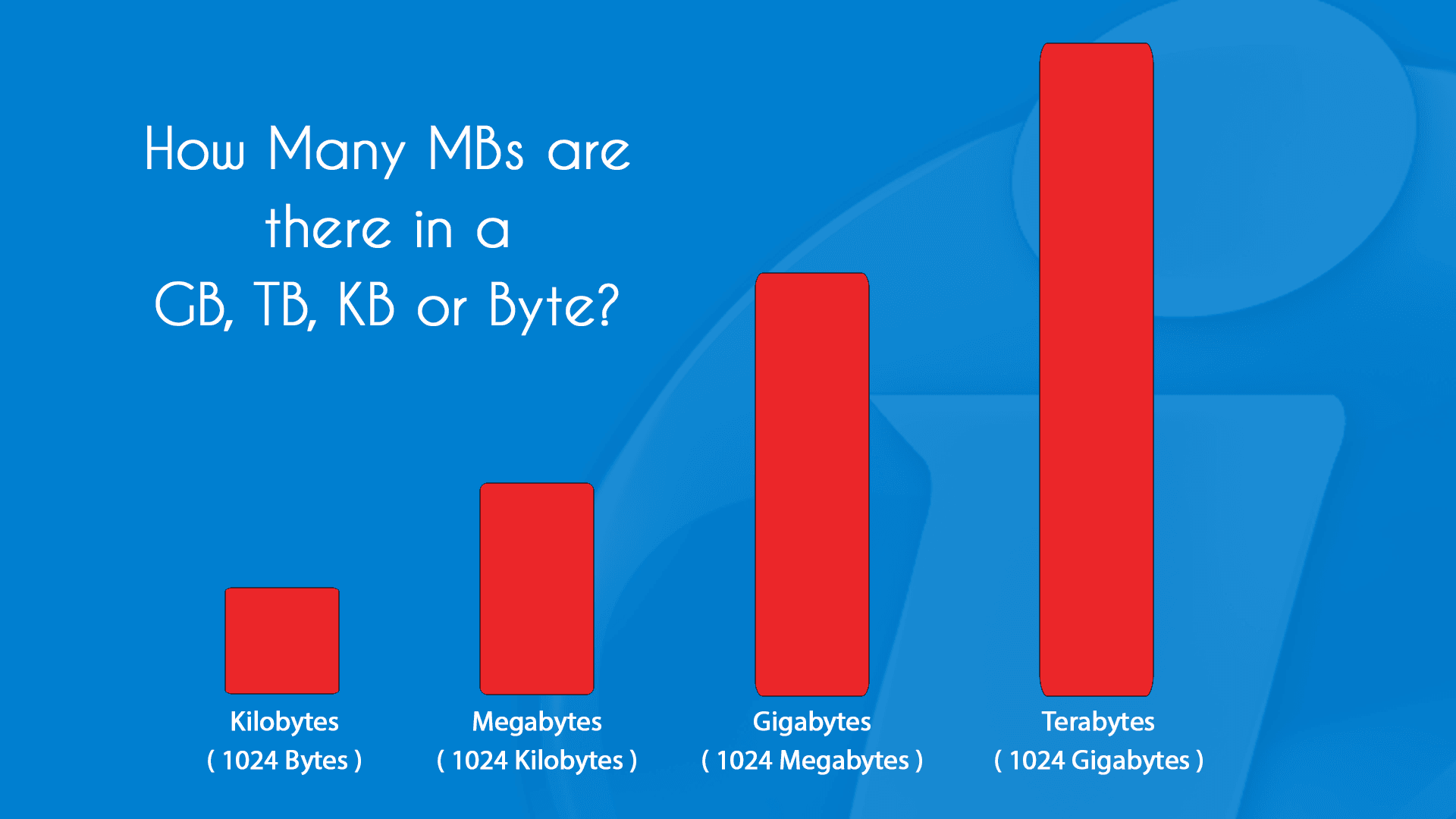
- Kilobyte (KB): One Kilobyte is approximately one thousand bytes. More precisely, it’s 1,024 bytes. A small text document or a very low-resolution image might be measured in kilobytes.
- Megabyte (MB): Moving up, one Megabyte is approximately one million bytes, or more precisely, 1,024 Kilobytes (KB). This is equivalent to 1,048,576 bytes. A high-resolution photo, a short audio file, or a typical Word document often fall within the megabyte range.
- Gigabyte (GB): This is where our primary question comes into focus. One Gigabyte is approximately one billion bytes, or more precisely, 1,024 Megabytes (MB). This translates to 1,073,741,824 bytes. A movie in standard definition, several hundred high-resolution photos, or a significant software application would typically be measured in gigabytes.
- Terabyte (TB): Continuing the pattern, one Terabyte is 1,024 Gigabytes (GB). This is a common storage size for modern desktop hard drives and large external backup solutions.
- Petabyte (PB), Exabyte (EB), Zettabyte (ZB): Beyond Terabytes, these units represent even vaster quantities of data, often used to describe the storage capacities of large data centers, cloud infrastructure, or the total data generated globally.
So, to definitively answer the initial question: A Gigabyte (GB) is significantly larger than a Megabyte (MB). Specifically, 1 GB is equal to 1,024 MB. This means that if you have 1 GB of storage, you have enough space for 1,024 times the amount of data that would fit into 1 MB. Understanding this hierarchy is crucial for making sense of everything from your phone’s storage capacity to your internet data plan.
Practical Implications: Where MBs and GBs Matter in Your Digital Life
The difference between MBs and GBs isn’t just an academic exercise; it has tangible impacts on our daily digital interactions, influencing everything from device purchasing decisions to budgeting for online services.
Understanding File Sizes and Storage Needs
Knowing the typical sizes of different types of digital content helps you manage your devices and understand your storage requirements.
-
Megabyte (MB) Examples:
- Photos: A typical high-resolution photo from a modern smartphone can range from 2 MB to 10 MB, depending on the camera settings and file format. Older, lower-resolution images might be less than 1 MB.
- Documents: A standard Word document with text only is usually a few KBs, but with images and complex formatting, it could easily be a few MBs. A PDF document can also range from a few KBs to tens of MBs.
- Audio Files: A 3-minute MP3 song, depending on its quality, typically falls between 3 MB and 8 MB.
- Small Applications/Updates: Many lightweight apps or app updates are often measured in tens of MBs.
-
Gigabyte (GB) Examples:
- Videos: This is where GBs truly shine. A minute of Full HD (1080p) video can be anywhere from 100 MB to 300 MB, meaning a typical 2-hour movie could be 10 GB to 30 GB or more. 4K video consumes even more, often several GBs per hour.
- Large Software & Operating Systems: Installing a modern operating system like Windows or macOS requires tens of GBs. Major software suites (e.g., Adobe Creative Suite) can easily take up 20-50 GB.
- Video Games: Modern video games are notorious for their large file sizes, frequently requiring 50 GB, 100 GB, or even 200 GB+ of storage.
- Photo Libraries: If you have thousands of high-resolution photos, your entire photo library will quickly accumulate into many GBs.
When purchasing a new smartphone, laptop, or external hard drive, the advertised storage capacity (e.g., 128GB, 256GB, 1TB) directly relates to how many photos, videos, apps, and documents you can store. Misjudging your needs can lead to constantly running out of space, forcing you to delete files or invest in costly upgrades.
Data Plans and Internet Usage
For most mobile phone users and many home internet users with data caps, understanding MBs and GBs is crucial for managing monthly data consumption and avoiding additional charges. Mobile data plans are almost universally measured in Gigabytes (e.g., “10 GB per month,” “unlimited data”).

- MB Usage: Checking emails, browsing text-heavy websites, using messaging apps (without heavy media), and light social media scrolling consume data in the MB range.
- GB Usage: Streaming high-definition video (Netflix, YouTube), downloading large files (software, games), video conferencing, and extensive cloud backups are major GB consumers. Even a few hours of HD streaming can eat up several GBs of your data plan.
From a money perspective, choosing the right data plan involves a careful assessment of your typical GB usage. Underestimating your needs can lead to expensive overage charges, while overestimating can mean paying for data you never use. Monitoring your data usage and understanding which activities are data-intensive is key to optimizing your monthly spending.
Cloud Storage and Backup Strategies
Cloud storage services (like Google Drive, Dropbox, OneDrive, iCloud) are an integral part of modern digital life, offering convenience and security. These services also typically measure their storage offerings in GBs. Free tiers often provide a few GBs (e.g., 5GB or 15GB), while paid subscriptions offer hundreds of GBs or even Terabytes for a monthly or annual fee.
Knowing your total data footprint – how many MBs and GBs your files occupy – is essential for selecting the appropriate cloud storage plan. If your entire digital life amounts to 200GB, a 2TB plan might be overkill, while a 50GB plan would be insufficient.
For backup strategies, whether to a local drive or the cloud, understanding file sizes impacts both the time it takes to complete a backup and the storage space required. Backing up a 50GB game will take significantly longer and consume more space than backing up a 50MB document folder. For businesses, efficient backup strategies are critical for data recovery and business continuity, directly tying into financial planning for disaster recovery.
Navigating the Digital Landscape: Strategic Considerations for Individuals and Brands
The concepts of MBs and GBs extend beyond personal device management, influencing strategic decisions for both individuals seeking to optimize their digital experience and businesses aiming to thrive in the digital economy.
For Consumers: Optimizing Your Digital Footprint and Budget
For individuals, an informed understanding of data units empowers better decision-making in several areas:
- Storage Management: Regularly reviewing and managing files can prevent storage headaches. Deleting unnecessary apps, moving old photos/videos to external storage or cloud archives, and clearing cache files can free up precious GBs on your devices. This proactive management can extend the life of your devices and delay the need for new purchases.
- Purchasing Decisions: When buying new gadgets, consider your real storage needs. Do you really need the most expensive 512GB smartphone if your digital life fits comfortably in 128GB, especially if you heavily utilize cloud storage? Understanding the cost-per-GB can save you significant money upfront. Similarly, for laptops or desktops, assess if a larger SSD (measured in hundreds of GBs or TBs) is genuinely necessary for your workflow, balancing speed benefits with cost.
- Budgeting for Digital Services: Many digital services, from streaming platforms to premium cloud storage, come with recurring costs. While some offer unlimited data for streaming, cloud storage tiers are directly tied to GB capacity. Factoring these into your personal finance budget requires an awareness of how much data you consume and store. Opting for a cheaper, smaller cloud plan might seem economical, but if you consistently exceed its limits, you could face upgrade costs or data loss.
For Businesses and Brands: Data Management, Performance, and Reputation
For businesses, the scale of data (from MBs to PBs) has profound implications for operational efficiency, customer experience, marketing, and the bottom line.
- Website/App Performance and Brand Reputation: In today’s fast-paced digital world, website and app loading times are critical. Large image files, high-resolution videos, or unoptimized application assets – often measured in MBs – can significantly slow down loading speeds. A website that takes too long to load frustrates users, leads to higher bounce rates, and negatively impacts search engine rankings. This directly damages a brand’s online reputation and can result in lost customers and revenue. Tech teams must prioritize optimizing all digital assets to ensure they are as small as possible (in MBs) without sacrificing quality, balancing visual appeal with performance.
- Data Analytics & Storage (Money Implications): Modern businesses thrive on data. Customer behavior, sales figures, operational metrics – this “big data” can amount to Terabytes and Petabytes. Storing, processing, and analyzing such vast quantities of information requires substantial infrastructure, whether on-premise or in the cloud. The financial costs associated with data storage, data transfer (egress fees from cloud providers), and the computing power needed for analytics are significant line items in a business budget. Strategic data management, including efficient data compression and archiving policies, can lead to substantial cost savings.
- Content Strategy and Delivery: Brands produce vast amounts of content, from marketing videos to high-resolution product images. Understanding file sizes helps in planning content delivery. Should a video be streamed in 4K (heavy GB usage) or a more compressed 1080p format (lighter GB usage) to ensure wider accessibility and faster loading times for all users? How does this impact the user experience, particularly for those on slower connections or with data caps? This involves a strategic balance between delivering high-quality experiences and ensuring broad reach and accessibility, directly impacting brand perception.
- Digital Security and Compliance: Businesses must protect their data. Backing up critical business data, often measured in hundreds of GBs or TBs, is a cornerstone of digital security. The cost and logistical challenge of implementing robust backup and disaster recovery plans are directly tied to the volume of data involved. Compliance with data regulations (e.g., GDPR, CCPA) also often requires secure storage and careful management of specific data types, adding layers of complexity and cost.
The Future of Data: Beyond MBs and GBs
The exponential growth of data shows no signs of slowing down. As we generate more sophisticated content, engage with higher-fidelity experiences (like VR and AR), and connect more devices to the Internet of Things (IoT), the units we discuss today will continue to scale. Terabytes are already common for personal storage, and Petabytes are increasingly becoming relevant for smaller businesses and specialized applications. Exabytes and Zettabytes will define the scale of global data in the coming decades.
This continuous data explosion presents both challenges and opportunities. From a tech perspective, it drives innovation in storage technologies (faster SSDs, denser hard drives, advanced cloud architectures) and data compression algorithms. From a money standpoint, it fuels entire industries focused on data management, analytics, and monetization. Brands that can effectively harness, secure, and leverage vast datasets will gain a significant competitive advantage, using insights to personalize experiences, predict market trends, and optimize operations. The ability to manage these ever-growing volumes of data will increasingly define success, making the fundamental understanding of MBs and GBs even more crucial as stepping stones to comprehending the future of digital information. The discussion also touches upon sustainability, as the energy consumption of massive data centers becomes a growing concern, pushing for more efficient data storage and processing solutions.
Conclusion
The question “What’s bigger: MB or GB?” has a clear answer: a Gigabyte (GB) is 1,024 times larger than a Megabyte (MB). However, the implications of this simple relationship are far-reaching. Understanding these fundamental units of digital measurement is not merely about technical knowledge; it’s about empowering yourself to make smarter choices in your digital life.
For individuals, it means intelligently managing device storage, selecting cost-effective data plans, and making informed purchasing decisions. For businesses and brands, it translates into optimizing website performance, strategically managing vast data assets, controlling costs, enhancing cybersecurity, and ultimately building a stronger, more responsive presence in the digital marketplace. As data continues its relentless growth, a solid grasp of these basic units will remain an essential skill, ensuring you’re well-equipped to navigate the complexities and opportunities of our increasingly digital world. Data is indeed the new currency, and understanding its scale is the first step towards mastering its value.
aViewFromTheCave is a participant in the Amazon Services LLC Associates Program, an affiliate advertising program designed to provide a means for sites to earn advertising fees by advertising and linking to Amazon.com. Amazon, the Amazon logo, AmazonSupply, and the AmazonSupply logo are trademarks of Amazon.com, Inc. or its affiliates. As an Amazon Associate we earn affiliate commissions from qualifying purchases.