
In the modern digital landscape, our streaming services are more than just repositories for music; they are reflections of our digital identities, containing years of curated data, algorithmic preferences, and personal information. Spotify, as the world’s leading audio streaming platform, manages the data of over 500 million users. With such a massive footprint, the security of individual accounts becomes paramount. Whether you have forgotten your credentials or are performing a proactive security audit, knowing how to effectively reset your Spotify password is a fundamental skill in digital literacy.
This guide provides a deep dive into the technical process of password recovery, the underlying security architecture of the platform, and best practices for maintaining a robust digital defense in an era of increasing cyber threats.
1. Navigating the Spotify Security Ecosystem
Before diving into the “how-to,” it is essential to understand the technical framework that governs a Spotify account. Unlike legacy software, Spotify utilizes a cloud-native identity management system that syncs across multiple devices—from smartphones and desktops to smart speakers and automotive interfaces.
The Importance of Frequent Credential Updates
In the world of cybersecurity, “password rot” is a significant vulnerability. Using the same password for years, or across multiple platforms, increases the risk of being caught in a credential-stuffing attack. This occurs when hackers use databases of leaked emails and passwords from other site breaches to gain access to accounts on different platforms like Spotify. By resetting your password regularly, you invalidate old data that might be circulating on the dark web, ensuring that your listening history and subscription billing remain under your control.
Third-Party Authentication: OAuth and Linked Accounts
Many users do not have a traditional “Spotify password” because they sign up using Google, Facebook, or Apple ID. This utilizes the OAuth (Open Authorization) protocol, which allows Spotify to verify your identity without ever seeing your third-party password. If you belong to this category, resetting your Spotify password actually involves resetting the password of the parent account (e.g., your Facebook account). Understanding this distinction is the first step in troubleshooting login issues; if your Facebook account is compromised, your Spotify account is inherently at risk as well.
2. Step-by-Step Protocols for Password Recovery
The process for resetting a password varies slightly depending on whether you are currently logged into the platform or have been locked out. Spotify’s user interface is designed for “frictionless” recovery, but there are specific technical steps one must follow to ensure the change propagates across all synced devices.
Resetting When You Are Locked Out (Forgotten Password)
If you cannot access your account, the recovery process is initiated through the web browser rather than the mobile app, as this provides a more secure environment for identity verification.
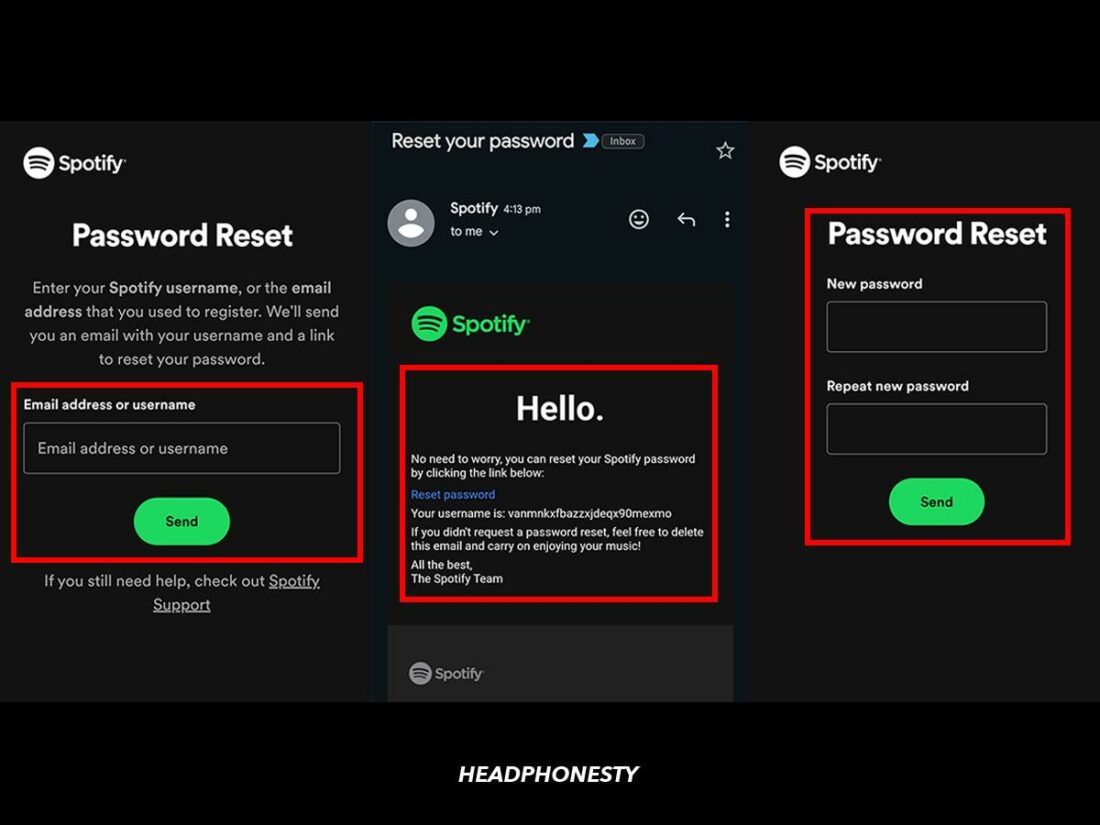
- Navigate to the Password Reset Page: Access the official Spotify password recovery portal.
- Identity Verification: Enter your username or the email address associated with the account. From a technical standpoint, Spotify then checks this against its encrypted user database.
- The Secure Link: Spotify sends a cryptographically signed link to your email. This link is time-sensitive (usually expiring within an hour) to prevent “replay attacks” by malicious actors.
- Credential Entry: Upon clicking the link, you are prompted to enter a new password. Modern security standards suggest a minimum of 12 characters, mixing alphanumeric symbols and cases.
Changing Your Password While Logged In
For users who know their current password but wish to update it for security reasons, the process is handled through the “Account Overview” section on the Spotify website.
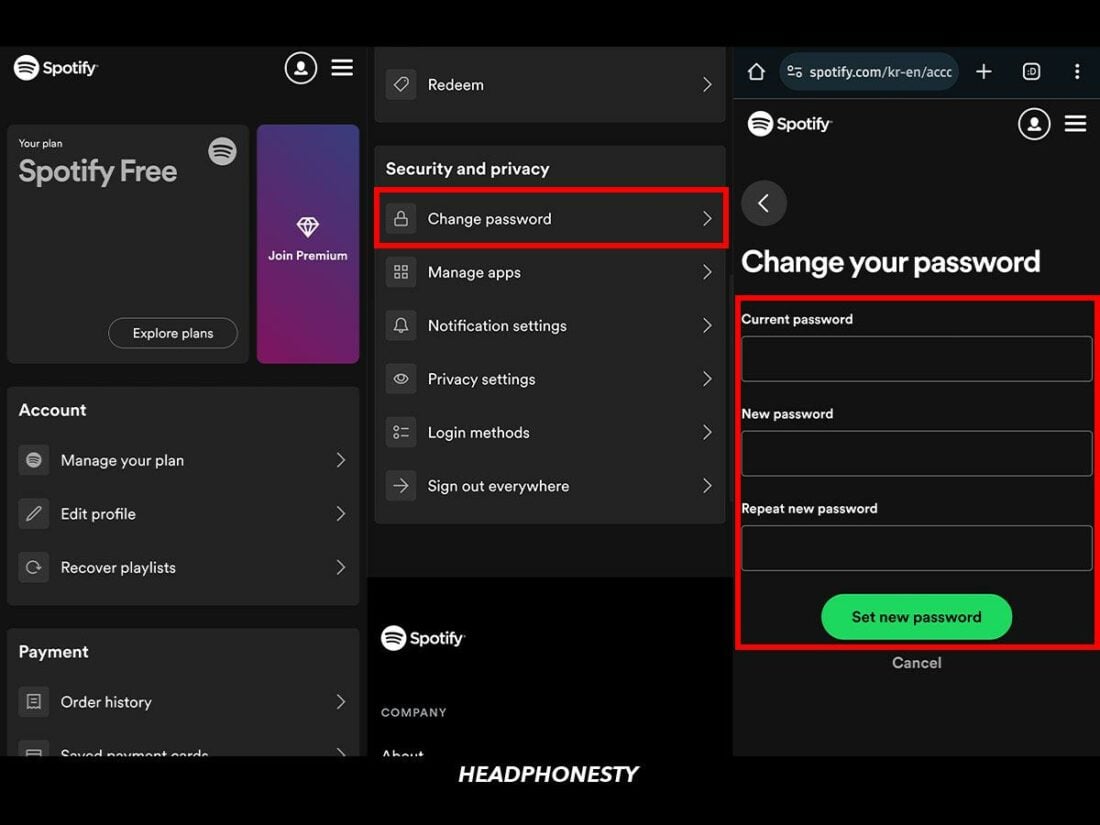
- Account Management: Log in to your account via a web browser.
- Navigation: Select ‘Change password’ from the sidebar menu.
- Authentication: You must provide your current password before the system allows a change. This is a “double-blind” security measure intended to prevent someone who finds your laptop open from hijacking your account.
- Finalization: Once the new password is saved, Spotify’s backend servers update your profile, and you may be prompted to re-authenticate on your mobile devices.
Managing Logins via the Mobile App
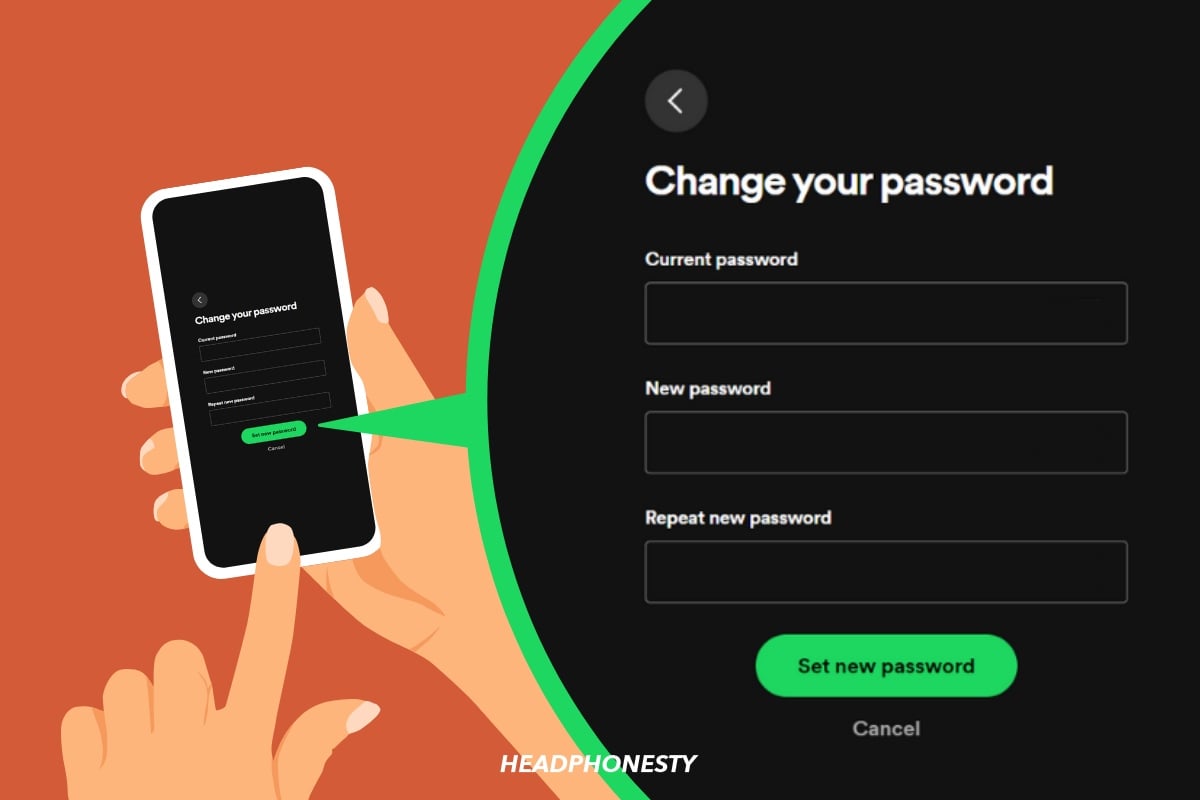
While the Spotify mobile app (iOS and Android) allows you to manage many settings, password resets are often redirected to a mobile browser for security reasons. This ensures that the reset process utilizes standard web security protocols (HTTPS) and allows for easier integration with password managers like Keychain or LastPass.
3. Troubleshooting Technical Hurdles in Recovery
Despite a streamlined design, technical glitches can occur during the reset process. These are often related to network security settings or local cache issues rather than the Spotify platform itself.
Non-Receipt of Recovery Emails
The most common issue users face is not receiving the password reset email. This can be caused by several technical factors:
- ISP Filtering: Some Internet Service Providers (ISPs) employ aggressive spam filters that may divert automated emails from Spotify into a “Junk” or “Promotions” folder.
- Email Queuing: During periods of high server load, there may be a delay in the SMTP (Simple Mail Transfer Protocol) relay. Waiting 10–15 minutes is often a necessary technical requirement.
- Mismatched Credentials: If the email entered does not exactly match the one in the Spotify database (e.g., a typo in the domain), the system will not send an email for security reasons—to prevent “username enumeration” where hackers test emails to see which ones are registered.
Expired Links and Browser Cache Issues
If you receive the email but the link leads to an error page, the issue is likely browser-related. Modern browsers store “cache” and “cookies” to speed up browsing, but these can sometimes interfere with the dynamic tokens used in password reset links. Clearing your browser cache or attempting the reset in “Incognito Mode” (Private Browsing) bypasses these local files and establishes a clean connection with Spotify’s servers.
4. Advanced Security: Beyond the Password
In the current tech climate, a password—no matter how complex—is often considered a “single point of failure.” To truly secure your Spotify account, you should look toward more advanced digital security methodologies.
The Role of Multi-Factor Authentication (MFA)
While Spotify has been slower than some tech giants to implement native app-based Two-Factor Authentication (2FA) for all users, many accounts are protected via the 2FA of their linked services (like Apple or Google). By securing your primary email or social login with a hardware key (like YubiKey) or an authenticator app, you add a layer of defense that makes a password reset unnecessary in the event of a simple credential leak.
The Power of “Sign Out Everywhere”
A critical but often overlooked feature in the Spotify tech suite is the “Sign Out Everywhere” button. Located at the bottom of the Account Overview page, this command sends a “de-authorize” signal to every device currently logged into your account. If you suspect your account has been compromised, you should change your password and then immediately use this feature. This forces every smartphone, tablet, and smart TV to drop their current session and require the new, secure credentials for access.
Password Managers: The Tech-Savvy Solution
To avoid the cycle of forgetting and resetting passwords, tech experts recommend the use of dedicated password managers. These tools generate high-entropy passwords (e.g., 8f#L2p!qZ9*m) and store them in an encrypted vault. By using a manager, you ensure that your Spotify password is unique, complex, and never reused on another site, effectively neutralizing the threat of large-scale data breaches.
Conclusion: Digital Hygiene as a Habit
Resetting a Spotify password is a relatively simple technical task, but it serves as a gateway to better digital hygiene. In an age where our software preferences and data are increasingly interconnected, treating account security as an ongoing process rather than a one-time fix is essential. By understanding the nuances of the reset process—from OAuth integrations to SMTP delays—you empower yourself to navigate the digital world with confidence.
Remember, your digital security is only as strong as your weakest credential. Whether you are recovering a forgotten account or performing a routine security refresh, the steps outlined above ensure that your Spotify experience remains private, secure, and uninterrupted. Keep your recovery email accessible, use a password manager, and don’t hesitate to “sign out everywhere” if things look suspicious. Your soundtrack is personal; your security should be, too.
aViewFromTheCave is a participant in the Amazon Services LLC Associates Program, an affiliate advertising program designed to provide a means for sites to earn advertising fees by advertising and linking to Amazon.com. Amazon, the Amazon logo, AmazonSupply, and the AmazonSupply logo are trademarks of Amazon.com, Inc. or its affiliates. As an Amazon Associate we earn affiliate commissions from qualifying purchases.