
In the modern digital landscape, streaming services have evolved from mere entertainment platforms into repositories of deeply personal data. Spotify, the world’s leading audio streaming service, is no exception. It houses your listening preferences, payment information, social connections, and personalized algorithms. Given the sensitivity of this data and the rising prevalence of credential stuffing attacks, knowing how to change and manage your Spotify password is a fundamental skill in digital hygiene.
Whether you are performing a routine security update, reacting to a potential breach, or simply trying to regain access to an account you haven’t used in months, understanding the technical nuances of Spotify’s authentication system is essential. This guide provides a deep dive into the practical steps of password management, the security infrastructure supporting your account, and troubleshooting common technical hurdles.
The Step-by-Step Process: Changing and Resetting Your Spotify Password
Unlike many modern applications that allow full account management within a mobile interface, Spotify maintains a distinct separation between its media consumption app and its core account settings. This is a strategic technical choice, often aimed at streamlining app performance and centralizing security protocols on a secure web-based server.
Changing Your Password via the Web Browser
If you currently have access to your account and simply wish to update your credentials for security reasons, you must use a desktop or mobile web browser.
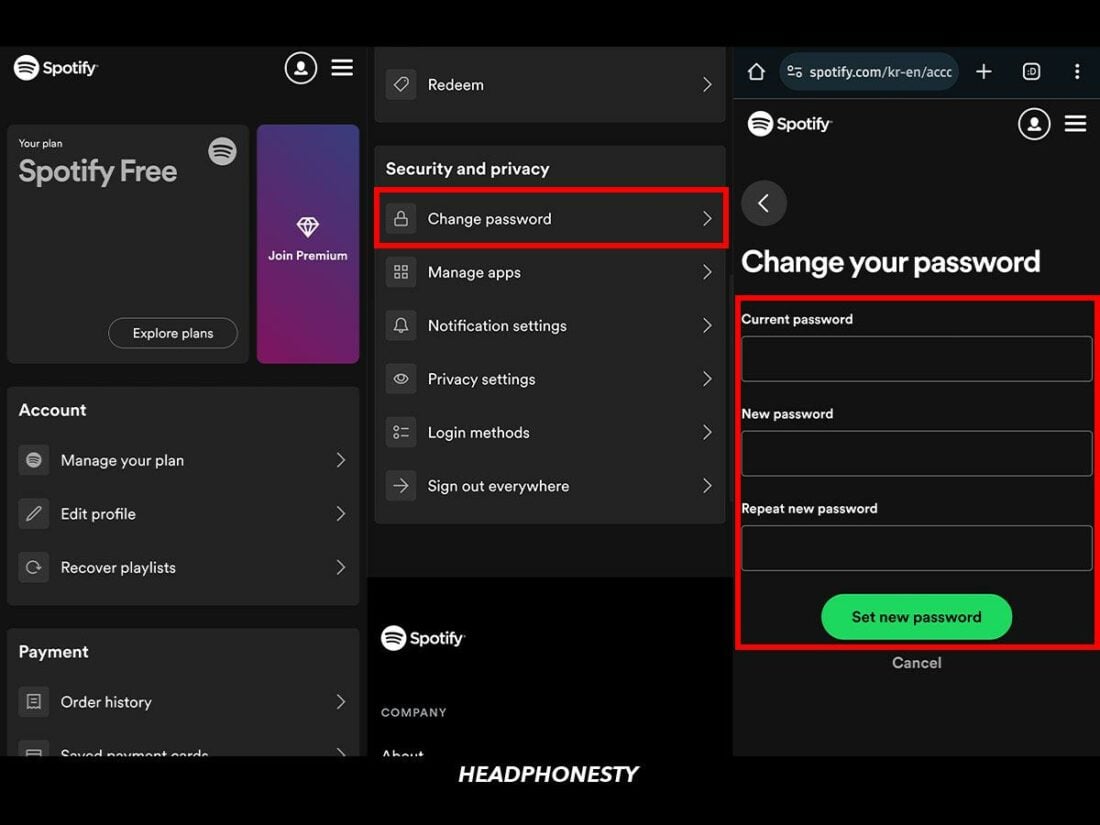
- Access the Account Overview: Navigate to the official Spotify website and log in. Once authenticated, click on your profile icon in the top right corner and select “Account.”
- Locate the Password Tab: In the sidebar menu (on desktop) or the drop-down navigation (on mobile), find the “Change password” section.
- Authentication and Verification: You will be prompted to enter your “Current password” followed by your “New password.” Spotify requires you to repeat the new password to ensure there are no typographical errors.
- Finalization: Click “Set new password.” The system will instantly invalidate previous sessions on most devices, though some may require a manual logout/login cycle to reflect the update.
Resetting a Forgotten Password
If you have been locked out of your account, the process shifts from a simple change to a recovery protocol. This involves Spotify’s automated mail server sending a cryptographically unique link to your registered email address.
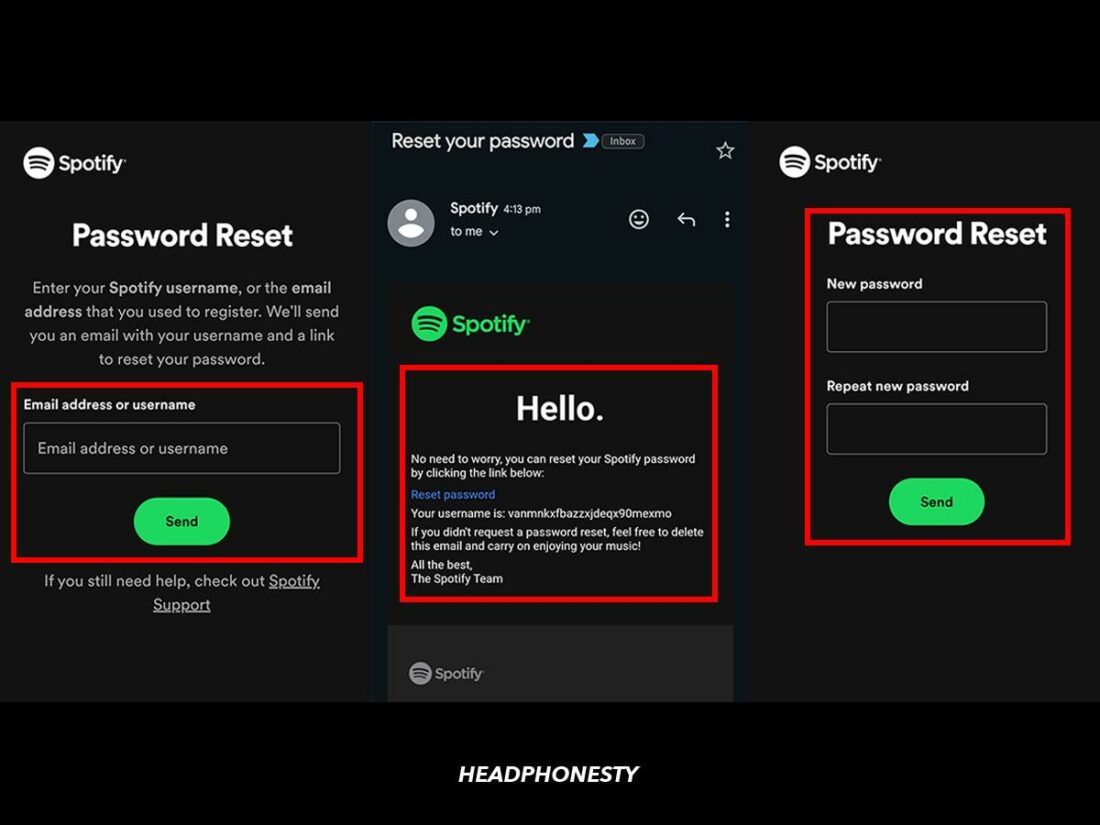
- The Password Reset Page: Go to the Spotify login page and click “Forgot your password?”
- Identifier Entry: Enter your username or the email address associated with the account.
- Email Verification: Check your inbox for a message from Spotify. This email contains a time-sensitive “Reset password” link. If you do not see it within minutes, check your spam folder or “Promotions” tab, as automated triggers are sometimes flagged by aggressive ISP filters.
- Creating New Credentials: Clicking the link takes you back to a secure Spotify portal where you can input a new password without needing the old one.
Updating Your Password Through Linked Accounts
Many users bypass traditional email/password setups by using “Social Login” via Facebook, Apple, or Google. It is a common technical misconception that you can change your Spotify password if your account is linked this way.
In these instances, Spotify does not actually store a password for you; it uses an OAuth (Open Authorization) token provided by the third-party service. To “change your password” in this scenario, you must change the password of the parent account (e.g., your Google or Facebook password). If you wish to switch to a standalone Spotify password, you must use the “Forgot password” flow with the email address associated with that social account to establish a unique set of credentials.
Enhancing Account Integrity: Why Frequent Password Management Matters
In the realm of digital security, a password is the first and often only line of defense between an unauthorized user and your private data. While it may seem like Spotify only contains music, the technical reality is that your account is a gateway to your digital identity.
Protecting Your Personal Data and Listening Habits
Spotify accounts are frequently targeted by bad actors for “account hijacking.” These stolen accounts are often sold on the dark web to users who want “Premium” access without paying. From a technical standpoint, a compromised account can lead to:
- Data Scraping: Access to your linked social media accounts and email addresses.
- Payment Fraud: If your billing information is saved, unauthorized changes to your subscription tier can occur.
- Algorithmic Distortion: Unauthorized users changing your playlists and listening history, which permanently skews your “Made for You” recommendations and “Wrapped” data.
By changing your password every 3 to 6 months, you significantly reduce the window of opportunity for hackers who may have obtained your credentials through third-party data breaches (a concept known as “Password Re-use Vulnerability”).
The Role of Multi-Factor Authentication (MFA) in Modern Apps
One of the most discussed topics in the tech community regarding Spotify is its implementation of Multi-Factor Authentication (MFA). Unlike many financial or enterprise software tools, Spotify does not always require a secondary code (via SMS or an Authenticator app) for every login.
However, they do employ “Risk-Based Authentication.” If the system detects a login attempt from an unrecognized IP address or a new geographic location, it may trigger an email verification code. Understanding this mechanism highlights the importance of keeping your Spotify password unique; if your email account and your Spotify account share the same password, the “security” of a verification email is rendered moot, as the attacker can access both.
Troubleshooting Common Password Issues on Spotify
Technology is rarely seamless, and users often encounter friction when attempting to update their security settings. Understanding the technical reasons behind these errors can save hours of frustration.
Dealing with the “Password Reset Link Not Working” Error
This is one of the most common technical complaints. When a reset link fails, it is usually due to one of three reasons:
- Token Expiration: Password reset links are typically valid for only a few hours. If you click an old link, the server will reject it for security reasons.
- Browser Cache and Cookies: Sometimes, old session data stored in your browser interferes with the new authentication token. Attempting the reset in an “Incognito” or “Private” window often bypasses this.
- Multiple Requests: If you click “Forgot Password” multiple times, Spotify’s server generates multiple unique links. Only the most recent link is valid. Clicking an earlier link in your inbox will result in an error.
Resolving Issues with Third-Party Login Integrations
When users try to change a password but receive an error saying “This account is linked to [Facebook/Apple/Google],” it indicates a conflict in the authentication layer.
To fix this, you may need to “Disconnect” the service. This is done in the “Apps” section of your Spotify account settings. By revoking the OAuth token, you force Spotify to rely on its own internal credential database, allowing you to set a traditional password. However, proceed with caution: disconnecting these services can sometimes lead to temporary sync issues with friends or shared playlists.
Best Practices for Digital Credential Management
As we move further into a cloud-based existence, the sheer number of passwords a user must remember becomes unmanageable. Applying advanced tech strategies to your Spotify account can enhance both security and convenience.
Utilizing Password Managers for Seamless Access
The tech industry consensus is clear: humans are bad at creating and remembering secure passwords. We tend to use predictable patterns or reuse the same password across multiple sites.
Using a dedicated password manager (like Bitwarden, 1Password, or LastPass) allows you to generate high-entropy passwords—strings of random characters like *&jK9!pL#2zQ. These are virtually impossible to brute-force. When you change your Spotify password, saving it immediately to an encrypted vault ensures that you have access across your smartphone, desktop, and smart speakers without needing to memorize the complex string.

The Shift Toward Passwordless Authentication
Looking toward the future of technology, the industry is moving away from passwords entirely in favor of “Passkeys.” Based on FIDO2 standards, passkeys use local device authentication (like FaceID, TouchID, or a hardware security key) to verify identity.
While Spotify has been slower than companies like Google or Apple to fully implement passkeys for all users, the groundwork is being laid. This transition will eventually make the “Change Password” ritual obsolete, replacing it with cryptographic key pairs that are much harder to intercept or phish. Until that technology becomes the universal standard, maintaining a rigorous and proactive approach to your Spotify password remains your best defense in the digital age.
aViewFromTheCave is a participant in the Amazon Services LLC Associates Program, an affiliate advertising program designed to provide a means for sites to earn advertising fees by advertising and linking to Amazon.com. Amazon, the Amazon logo, AmazonSupply, and the AmazonSupply logo are trademarks of Amazon.com, Inc. or its affiliates. As an Amazon Associate we earn affiliate commissions from qualifying purchases.