
In the modern era of the “subscription economy,” the ease of signing up for a service is almost always in direct contrast with the complexity of terminating it. SiriusXM, a pioneer in the satellite radio space that has successfully pivoted to a digital streaming model, remains a primary example of this friction. For many users, the question of “how do you cancel SiriusXM” is not just a matter of finding a button, but of navigating a sophisticated digital architecture designed to maximize retention.
From a technological standpoint, the cancellation process involves interacting with specific User Interface (UI) designs, automated chatbots, and customer relationship management (CRM) systems. This guide provides a comprehensive technical walkthrough of how to terminate a SiriusXM subscription while exploring the broader software trends that define modern digital service management.

The Architecture of Retention: Understanding “Dark Patterns” in Software
Before diving into the “how-to,” it is essential to understand the technical environment you are entering. In software engineering and UI/UX design, many subscription-based platforms utilize what are known as “dark patterns.” These are user interface designs specifically crafted to trick or impede users from performing certain actions—in this case, leaving the platform.
The Friction-by-Design Philosophy
SiriusXM’s digital platform has historically utilized a high-friction model. While you can subscribe with a single click via an API integration with a credit card processor, the cancellation path often requires multiple steps, including modal pop-ups, “Are you sure?” redirects, and forced interactions with human or AI agents. Technically, this is achieved through complex decision trees in the backend code that trigger different retention offers based on user data.
Identifying the Digital Hurdles
When you attempt to cancel, the system’s CRM tracks your engagement levels. If the software recognizes you as a long-term user, it may trigger an automated script designed to offer a “lower-tier” software package. Understanding that these are automated programmatic responses can help a user navigate the process more efficiently without getting bogged down by the software’s persuasive algorithms.
Step-by-Step Technical Instructions for Digital Cancellation
Depending on how you initially subscribed (via the web, an app store, or a vehicle integration), the technical steps to cancel will vary. Most users will find the most success through the central web portal, though mobile OS-level cancellations are becoming more common.
Method 1: Using the SiriusXM Web Portal and Online Chat
The most direct way to cancel is through the official website. This involves navigating their account management dashboard, which is built on a framework that often prioritizes “Save” offers.
- Authentication: Log in to your SiriusXM account using your credentials. If you have forgotten your password, the “Account Recovery” tool uses standard SMTP protocols to send a reset link to your registered email.
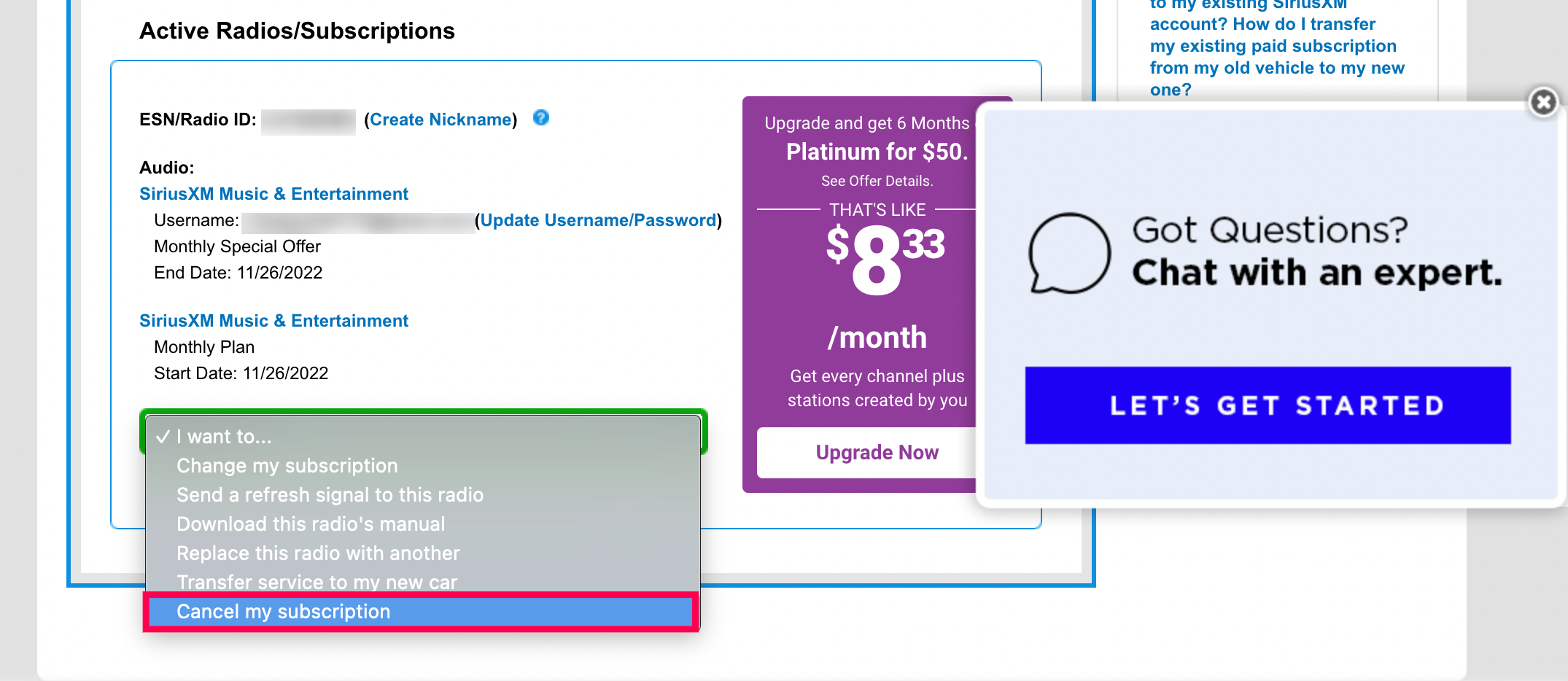
- Accessing the Subscription Tab: Navigate to the “Manage Your Account” section. Locate the specific radio or streaming ID associated with your hardware or digital profile.
- The Chat Interface: In many regions, SiriusXM has moved toward a “Chat to Cancel” model. This interface utilizes a Natural Language Processing (NLP) chatbot. When prompted, type “Cancel Service.” The bot will attempt to redirect you to a live agent via a secure WebSocket connection.
- Finalizing the Request: Once connected to the agent (or the advanced automated flow), you must explicitly state that you wish to terminate the service. Ensure you receive a “Cancellation Reference Number.” This is a critical piece of metadata generated by their database that serves as your proof of transaction.
Method 2: App Store and Third-Party Management
If you subscribed to SiriusXM through the Apple App Store or Google Play Store, the cancellation does not happen through SiriusXM’s website. Instead, it is managed through the OS-level subscription API.
- iOS (Apple): Go to Settings > [Your Name] > Subscriptions. This interface communicates directly with Apple’s billing servers, bypassing the service provider’s retention scripts.
- Android (Google): Open the Play Store app > Profile Icon > Payments & Subscriptions > Subscriptions. Here, you can toggle the “Auto-Renew” status to “Off,” which triggers a webhook to SiriusXM’s servers to let them know the subscription will lapse at the end of the current billing cycle.
Leveraging Technology to Manage and Secure Digital Services
The difficulty of cancelling individual services like SiriusXM has given rise to a new category of technology: Subscription Management Software and Digital Security Tools. These tools act as a layer between the consumer and the service provider’s billing department.
Subscription Management Apps
Apps such as Rocket Money or Trim utilize Plaid—a financial data transfer protocol—to scan your transaction history for recurring SaaS (Software as a Service) charges. These platforms often have automated “concierge” scripts or legal templates that they send to companies on your behalf. By leveraging these apps, you are essentially using one piece of software to battle the retention algorithms of another.
Virtual Credit Cards and Privacy Tools
One of the most effective technical methods for managing subscriptions is the use of virtual credit cards, such as those provided by Privacy.com. When you sign up for a service like SiriusXM, you can generate a “Single-Use” or “Merchant-Locked” virtual card.
- The Technical Advantage: You can set a “Spend Limit” on the card. If you wish to cancel and find the process too cumbersome, you can simply “Pause” or “Close” the virtual card at the software level. When the service provider attempts to ping the payment gateway for the next billing cycle, the transaction will be declined by your virtual card’s API, effectively stopping the service without you having to navigate the company’s internal cancellation maze.
The Future of Digital Consumer Protection and “Click-to-Cancel”
The technical frustration associated with cancelling services like SiriusXM has caught the attention of regulatory bodies. We are currently seeing a shift in how software must be designed to accommodate user rights.
The FTC’s “Click-to-Cancel” Mandate
In the United States, the Federal Trade Commission (FTC) has proposed new rules that would require businesses to make it as easy to cancel a subscription as it was to sign up. From a software development perspective, this means if a company has a “One-Click” sign-up button, they must—by law—provide a “One-Click” cancellation button. This would eliminate the need for forced chat interactions and multi-page retention funnels.
Automated AI Assistants
As AI continues to evolve, we are seeing the rise of “User-Side” AI agents. These are tools designed to handle the bureaucratic technicalities of digital life. In the near future, instead of searching for “how do you cancel SiriusXM,” a user might simply instruct their personal AI assistant: “Cancel my SiriusXM subscription and handle the retention negotiations for me.” The AI would then navigate the website, interact with the chatbot, and verify the cancellation, reporting back once the task is complete.

Summary of the Technical Workflow
Cancelling a subscription in the digital age is an exercise in navigating managed software environments. To successfully terminate your SiriusXM service:
- Identify your billing source (Direct, Apple, Google, or Third-party).
- Navigate the UI specifically toward the “Manage Account” section, bypassing marketing-focused elements.
- Utilize technical tools like Virtual Cards or Subscription Managers if you want to avoid direct interaction with retention scripts.
- Verify the data by securing a cancellation confirmation code, ensuring the change is reflected in the service’s database.
While the current landscape of digital subscriptions often feels like a technical labyrinth, understanding the underlying UI/UX patterns and leveraging modern financial software can empower users to take back control of their digital footprint and their data. As technology continues to shift toward more transparent and user-centric designs, the “dark patterns” of the past will likely be replaced by streamlined, API-driven cancellation processes that respect the user’s intent.
aViewFromTheCave is a participant in the Amazon Services LLC Associates Program, an affiliate advertising program designed to provide a means for sites to earn advertising fees by advertising and linking to Amazon.com. Amazon, the Amazon logo, AmazonSupply, and the AmazonSupply logo are trademarks of Amazon.com, Inc. or its affiliates. As an Amazon Associate we earn affiliate commissions from qualifying purchases.