
Amazon Prime has become an indispensable digital utility for millions worldwide, offering a vast array of benefits from expedited shipping to an extensive library of digital content. While the individual subscription model is straightforward, many users wonder about the possibilities of sharing these perks. This guide delves into the technical intricacies of sharing your Amazon Prime membership, focusing on the official mechanisms, maximizing its value, understanding critical security considerations, and troubleshooting common issues within the digital ecosystem. As a cornerstone of modern digital services, understanding how to leverage Prime’s sharing features is key to optimizing its utility and value.

Understanding Amazon Prime Household: The Official Sharing Mechanism
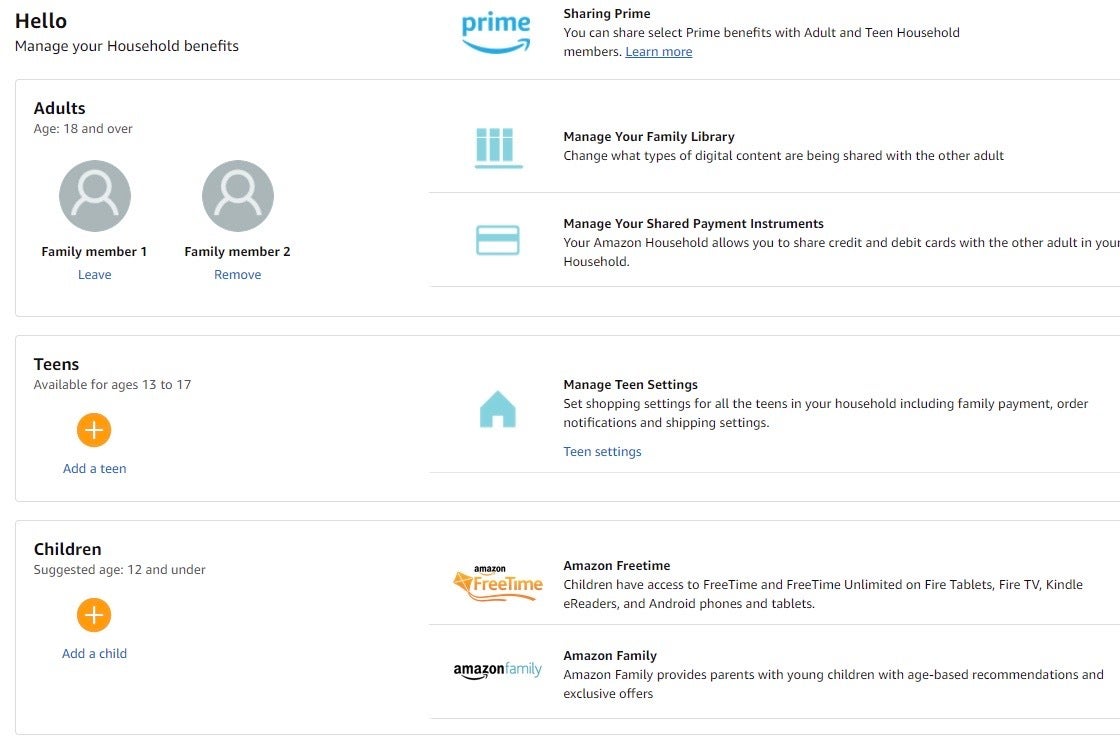
At the heart of Amazon’s official sharing capabilities lies “Amazon Prime Household.” This feature is specifically designed to allow two adults and up to four teenagers (13-17 years old) and up to four children (12 and under) to share select Prime benefits. It’s a structured approach to multi-user access that prioritizes both convenience and security, differentiating it significantly from simply sharing login credentials. From a technical perspective, it involves linking separate Amazon accounts under a single Prime umbrella, each maintaining its distinct identity and purchase history while accessing shared Prime benefits.
Eligibility and Limitations
The primary requirement for participating in an Amazon Prime Household as an adult is that both individuals must have their own separate Amazon accounts, and they must agree to share payment methods. This shared payment method is a crucial technical and trust-based element. When setting up a household, you grant the other adult permission to use your payment methods stored in your wallet for purchases on Amazon.com. This shared financial responsibility is a key differentiator from other family-sharing plans where payment might be centralized or restricted.
Regarding benefits, not all Prime perks are universally shared. The core benefits that transfer to the second adult include Prime Video streaming, free Prime shipping, Prime Reading, Prime Gaming, and early access to Lightning Deals. However, certain benefits remain exclusive to the primary Prime member. For instance, Amazon Music Prime is typically tied to the individual Prime account and does not extend to the second adult in the household. Similarly, Twitch Prime (now Prime Gaming) benefits for specific games or in-game content often require individual linking to the Prime member’s account, although the overall access is shared. The ability to share digital benefits like Prime Video is predicated on the underlying licensing agreements and the technical architecture of Amazon’s content delivery network, which recognizes linked accounts within a household as authorized users.
Teen accounts (13-17 years old) can make purchases on Amazon with their own login, but their orders require approval from a parent or guardian in the household. Child profiles (12 and under) can only access age-appropriate content on devices like Fire tablets and Kindle e-readers, with parental controls dictating their digital experience. The underlying technology behind these profiles is designed for robust parental supervision, allowing for granular control over content access and purchasing capabilities, which are essential features for digital family management.
Step-by-Step Setup
Setting up an Amazon Prime Household is a straightforward process, managed directly through your Amazon account settings. The interface is designed for user-friendliness, guiding you through each stage.
- Access Your Account: Log into your Amazon account on a web browser.
- Navigate to Prime Settings: Go to “Account & Lists” and select “Your Prime Membership.”
- Find Prime Household: Scroll down to the “Prime Household” section and click on “Manage Your Household.”
- Add an Adult: Select “Add an Adult” and input the name and email address of the second adult you wish to invite.
- Mutual Agreement: An invitation will be sent to their email. The invited adult must accept the invitation within 14 days and agree to share payment methods. This mutual agreement is a critical technical validation step, confirming both parties understand and accept the implications of shared payment information. During this process, both users must also confirm their birth dates to verify they are indeed adults.
- Add Teen/Child Profiles (Optional): Once the adult household is established, you can proceed to add teen or child profiles. This usually involves creating new profiles linked to the primary adult account, allowing for parental control settings to be applied.
The system ensures that both adults explicitly consent to sharing payment methods, which is a significant digital security feature preventing unauthorized access or misuse. The technical architecture relies on secure tokens and encrypted communications to establish and maintain the links between the accounts within the household.
Managing Your Household
Once established, managing your Amazon Prime Household is equally intuitive. From the same “Manage Your Household” page, you can:
- View Members: See all adults, teens, and children currently linked to your Prime Household.
- Remove Members: Should circumstances change, you can easily remove an adult or a child/teen profile. When an adult is removed, they lose access to shared Prime benefits, and the mutual payment method sharing is terminated. Note that if you remove an adult, neither of you can join another Prime Household for 180 days, a cool-down period implemented to prevent abuse of the sharing feature. This technical restriction acts as a safeguard to ensure the stability and intended use of the household feature.
- Update Payment Methods: Since payment methods are shared, any updates made by either adult to their default payment method will typically be reflected and accessible by the other, ensuring seamless purchasing across the household.
The digital dashboard for managing your household provides a clear overview of who has access and to what, empowering the primary account holder to maintain control over their shared digital environment.
Maximizing Shared Prime Benefits: Beyond the Basics
Leveraging Amazon Prime Household effectively means understanding the full spectrum of benefits accessible to all members, turning a single subscription into a multifaceted digital hub for an entire family. This extends beyond simple shipping perks to a rich ecosystem of digital entertainment, reading, and storage.
Shared Shopping Perks
The most immediate and widely recognized benefit of Prime is the free, fast shipping. For every adult in the household, this means:
- Free Two-Day Shipping: On millions of eligible items, a cornerstone of the Prime experience.
- Free Same-Day/One-Day Shipping: Available in select areas, providing unparalleled delivery speed.
- Prime Day Access: Both adults gain full access to exclusive deals and early lightning deals during Prime Day, Amazon’s annual sales event. This is a significant perk, as it allows both individuals to capitalize on time-sensitive offers from their respective accounts.
From a technical standpoint, Amazon’s order fulfillment system recognizes the Prime status of linked household accounts, automatically applying the appropriate shipping benefits at checkout. This integration is seamless, making the shopping experience identical to that of a primary Prime member.
Digital Entertainment Access
Prime Video is arguably the most valuable shared digital entertainment benefit. Both adults in the Prime Household can stream content from the Prime Video library on their respective devices using their own Amazon accounts. This means personalized watchlists, viewing history, and recommendations, all separate but under the shared Prime Video umbrella. The platform’s content delivery network (CDN) authenticates each user against the linked household, ensuring access without compromising individual viewing preferences.
While Amazon Music Prime typically doesn’t extend to the second adult, Prime Gaming (formerly Twitch Prime) generally does, offering free games, in-game content, and a free Twitch channel subscription each month. However, this often requires each individual to link their Amazon account to their Twitch account separately, then confirm their Prime status. This decentralized linking mechanism allows for individual customization of gaming benefits.
Reading and Photo Storage
Prime Reading grants access to a rotating selection of free eBooks, magazines, and comics. Both adults can independently borrow titles from this library on their Kindle devices or through the Kindle app. This digital lending library operates on a per-user basis, ensuring individual reading preferences are respected.
Amazon Photos offers unlimited full-resolution photo storage and 5 GB of video storage for Prime members. While this is primarily tied to the primary account, the Prime Household feature allows members to invite up to five family members (including children and teens) to a “Family Vault” to collect and share photos. This extends the utility of Prime Photos beyond just the primary member, creating a shared digital repository for family memories. The technical architecture supports a shared storage pool while maintaining individual user access and management.
Digital Security Considerations for Shared Accounts
While Amazon Prime Household offers legitimate and secure sharing, any form of account sharing, especially those involving financial data, necessitates a robust understanding of digital security. The shared payment method agreement is a particular point of focus, making vigilance crucial for all adult members.
Password Management Best Practices
Even though separate accounts are used, the overall security posture of the Prime Household depends on the individual security of each linked account.
- Unique, Strong Passwords: Each adult should use a unique, complex password for their Amazon account. Reusing passwords across different services is a significant vulnerability.
- Two-Factor Authentication (2FA): Enable 2FA on both Amazon accounts. This adds an extra layer of security, requiring a code from your phone in addition to your password, significantly reducing the risk of unauthorized access even if a password is compromised. Amazon provides multiple 2FA options, including authenticator apps and SMS.
- Regular Password Updates: Periodically updating passwords, especially after any suspicious activity, is a good habit.
These practices are not unique to Amazon but are fundamental to managing any digital identity securely, especially when financial information is interconnected.
Monitoring Account Activity
With shared payment methods, monitoring account activity becomes paramount for both adults.
- Order History Review: Regularly review your Amazon order history for any unfamiliar purchases. Both adults should do this.
- Payment Method Statements: Check your bank and credit card statements for Amazon charges. Discrepancies should be investigated immediately.
- Digital Content Usage: While less critical than financial transactions, being aware of unexpected digital content usage (e.g., rentals or purchases on Prime Video) can also signal unauthorized access.
- Account Notifications: Enable email and push notifications for key account activities, such as new logins from unrecognized devices or significant purchases.
Amazon’s account activity logs provide a detailed audit trail, which is a critical technical feature for forensic analysis if any suspicious activity is detected.
Understanding Privacy Settings
When you join a Prime Household, certain information is inherently shared, particularly regarding payment methods. However, your individual browsing history, personalized recommendations, and wishlists generally remain private to your specific Amazon account.
- Purchase History: While payment methods are shared, each adult’s purchase history remains distinct to their account. One adult cannot see the other adult’s individual order history unless they explicitly log into that account (which should be avoided due to security risks).
- Payment Information: The critical piece of shared data is the stored payment methods. Both adults agree to share access to these. This implies a high level of trust and understanding of financial implications.
- Prime Video Watch History: Each adult maintains their own watch history and viewing preferences within Prime Video, ensuring privacy for individual entertainment choices.
It’s crucial to understand these distinctions. The technical implementation of Amazon Prime Household is designed to balance the convenience of sharing benefits with the necessity of individual privacy where appropriate.
Troubleshooting Common Sharing Issues
Even with a robust system, users might encounter occasional glitches or misunderstandings when managing their Prime Household. Familiarity with common issues and their resolutions can save time and frustration.
Account Linking Problems
- Invitation Not Received: Ensure the email address used for the invitation is correct and check spam/junk folders. If the invitation expires (after 14 days), the inviting adult can resend it.
- Acceptance Issues: The invited adult must log into their own Amazon account to accept the invitation. They cannot accept it while logged into the primary member’s account. This is a security feature to ensure the correct account is linked.
- Age Verification: Both adults must confirm their birth dates, and if there’s an inconsistency or a technical hiccup, the linking process might fail. Amazon may require further verification in such cases.
- Existing Household Membership: An adult can only be part of one Amazon Household at a time. If an adult was recently part of another household, they might be subject to the 180-day cool-down period before they can join a new one.
These technical barriers are primarily in place to maintain the integrity and security of the household system.
Benefit Access Discrepancies
- Missing Prime Video: Ensure the linked adult is logged into their own Amazon account on the streaming device or browser. Sometimes a simple log out and log back in can refresh the account’s Prime status.
- No Prime Shipping: Verify the item is “Prime eligible.” In rare cases, a temporary system glitch might prevent benefits from appearing. Contacting Amazon customer service is the best course if benefits consistently fail to apply.
- Amazon Music Prime: As noted, Amazon Music Prime is typically not shared. This is a common point of confusion, and users should verify the specific benefits included in the household agreement.
- Prime Gaming/Twitch Issues: Ensure individual Amazon and Twitch accounts are correctly linked and that the Prime status is activated on the Twitch platform for the specific user. This often requires navigating a few separate web pages to ensure all integrations are complete.
Understanding the specific benefits that are designed to be shared vs. those that are not is key to diagnosing these discrepancies.
Resolving Payment and Order Conflicts
The shared payment method can sometimes lead to unintended purchases or confusion.
- Unrecognized Purchases: If an adult sees an unfamiliar charge, they should first check with the other adult in the household. Most “conflicts” arise from one adult making a purchase the other wasn’t aware of.
- Purchase Approval for Teens: Parents/guardians should regularly check their email or app notifications for teen purchase requests. Setting up notifications for “all orders” for teen accounts can help maintain oversight.
- Returns/Refunds: If a purchase made by one adult needs to be returned, that adult should initiate the return from their own account. The refund will typically go back to the payment method used for the original purchase.
Clear communication within the household, coupled with regular monitoring of account activity, is the best strategy for preventing and resolving these types of conflicts. Amazon’s system logs each transaction to the specific user who initiated it, providing clarity even when payment methods are shared.
Alternatives to Amazon Prime Household (and their implications)
While Amazon Prime Household is the official and recommended way to share benefits, some users might consider other approaches, often without fully understanding the technical and security implications.
Sharing Login Credentials (and why it’s not recommended)
The most common “alternative” is simply sharing your Amazon login email and password with another individual. This practice, while seemingly convenient, carries significant risks and is strongly discouraged for several reasons:
- Security Risks: Giving someone your login credentials grants them full access to your entire Amazon account. This includes your payment methods, shipping addresses, order history, digital content library, and potentially linked third-party services. If that individual’s device is compromised, or if they are careless with your credentials, your entire digital identity on Amazon is at risk.
- Terms of Service Violation: Sharing login credentials often violates the terms of service (TOS) of most digital platforms, including Amazon. While Amazon may not actively police every instance, severe or repeated violations could lead to account suspension or termination.
- Loss of Privacy: The other person can see your entire purchase history, browsing activity, and personalize your recommendations based on their own usage, destroying any semblance of individual privacy within the account.
- Lack of Control: You lose granular control over who accesses what. You cannot easily revoke access without changing your password, which then affects all legitimate users.
Technically, this method bypasses all the security features and distinct account management that Amazon Prime Household provides. It transforms a multi-user, secure system into a single point of failure, making it a highly insecure and ill-advised practice.
Gifting a Prime Membership
A completely distinct and fully legitimate alternative for providing Prime benefits to someone else is to purchase a Prime Gift Membership.
- Separate Accounts, Full Benefits: When you gift Prime, the recipient receives a full Prime membership linked to their own Amazon account. This means they have their own payment methods, private order history, personalized recommendations, and access to all Prime benefits, including those not shared by Prime Household (like Amazon Music Prime).
- No Shared Financial Risk: The gift giver pays upfront, and there’s no shared payment method or financial risk between the giver and the recipient.
- Perfect for Non-Household Members: This is an ideal solution for sharing Prime with friends, extended family members, or anyone outside your immediate household where a shared payment agreement is inappropriate or undesirable.
From a technical perspective, gifting a Prime membership creates an entirely new, independent Prime subscription for the recipient, completely segregated from the giver’s account, offering maximum security and privacy while ensuring full access to all benefits.
In conclusion, understanding how to share Amazon Prime effectively boils down to embracing the official Amazon Prime Household feature. It’s a well-engineered solution that balances the desire for shared access with critical security, privacy, and control mechanisms. By leveraging this feature and adhering to best practices in digital security, users can maximize the value of their Prime subscription while maintaining a secure and personalized digital experience for everyone involved.
aViewFromTheCave is a participant in the Amazon Services LLC Associates Program, an affiliate advertising program designed to provide a means for sites to earn advertising fees by advertising and linking to Amazon.com. Amazon, the Amazon logo, AmazonSupply, and the AmazonSupply logo are trademarks of Amazon.com, Inc. or its affiliates. As an Amazon Associate we earn affiliate commissions from qualifying purchases.