
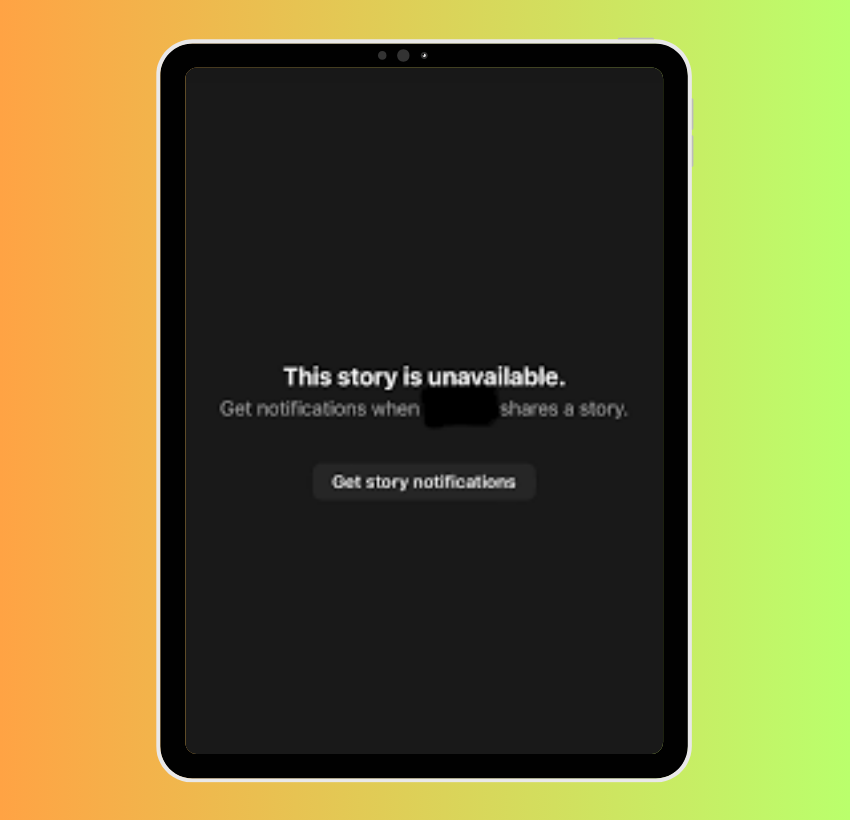
Few messages on social media are as frustratingly vague and universally encountered as “Story Unavailable” on Instagram. You’re scrolling through your feed, tapping on a friend’s vibrant Story, only to be met with this curt, uninformative notification. It’s a digital dead-end that leaves users scratching their heads, wondering if the problem lies with their own device, Instagram’s servers, or something more personal. This seemingly simple error message, however, is a gateway to a myriad of underlying technical, privacy, and content-related issues that can prevent you from viewing an Instagram Story. Understanding its true meaning requires a deep dive into Instagram’s architecture, user behavior, and the fundamental principles of app functionality and digital security.
This article aims to demystify “Story Unavailable,” breaking down the common culprits behind this message, offering comprehensive troubleshooting steps, and empowering you with the knowledge to either resolve the issue or understand why a Story is genuinely beyond your reach. Whether it’s a fleeting technical glitch or a deliberate privacy choice, knowing the nuances can save you time, frustration, and ensure a smoother Instagram experience.
Deciphering the “Story Unavailable” Message
The “Story Unavailable” message is Instagram’s catch-all notification for any instance where a Story cannot be displayed to a particular user at a particular time. It’s a broad umbrella covering everything from expired content to privacy blocks, and even temporary server hiccups. The core challenge for the user is that the message itself provides no specific context, leaving interpretation entirely up to guesswork.
The Immediate Implications: User-Side vs. Creator-Side Issues
When you see “Story Unavailable,” the very first question that arises is: “Is it me, or is it them?” This message can originate from issues on your end (client-side), Instagram’s end (server-side), or the Story creator’s end (content or account status).
- Client-Side Issues: These relate to your device, app, or internet connection. Your Instagram app might be buggy, your internet connection might be unstable, or your device might be running low on resources.
- Creator-Side Issues: These involve the person who posted the Story. They might have deleted it, restricted access, or had their account impacted.
- Server-Side Issues: Less common but still possible, these are Instagram’s internal problems, such as a temporary outage or a glitch in their content delivery network.
Understanding this distinction is the first step in effective troubleshooting, as it directs your investigative efforts appropriately. Without specific error codes or explanations, Instagram places the burden of diagnosis squarely on the user.
Common Scenarios Leading to Unavailability
Before diving into specific technicalities, it’s helpful to categorize the most frequent reasons a Story might become unavailable. These generally fall into four main baskets:
- Content Lifecycle: The Story has either expired or been manually deleted by the creator.
- Privacy Restrictions: The creator has set specific privacy controls that prevent you from viewing it.
- Account Status: Either the creator’s account or your own has been impacted by Instagram’s policies or a block.
- Technical Glitches: A temporary bug in the app, your device, or Instagram’s servers is preventing proper loading.
Each of these scenarios requires a different approach to understanding and potentially resolving the problem. The ambiguity of the “Story Unavailable” message is precisely why a systematic approach to troubleshooting is essential.
Common Technical & User-Centric Causes
Many instances of “Story Unavailable” are rooted in factors related to the Story’s inherent lifecycle or the deliberate choices made by its creator regarding privacy and content management. These are often the most straightforward explanations, though not always immediately obvious from the error message.
Story Deletion or Expiration: The Most Straightforward Reasons
Instagram Stories are ephemeral by design, intended to be temporary snapshots rather than permanent posts.
- Creator Deleted It: The simplest explanation is often the correct one. The user who posted the Story may have manually deleted it before its natural 24-hour expiration period. Perhaps they regretted posting it, found an error, or simply wanted it gone. Once deleted, it becomes unavailable to everyone.
- 24-Hour Expiration Rule: The fundamental principle of Instagram Stories is their 24-hour lifespan. After this period, the Story automatically disappears from public view and moves into the creator’s archive. If you’re seeing “Story Unavailable,” it’s highly probable that more than 24 hours have passed since the Story was originally posted.
- Archived Stories (for the creator): While a Story disappears from public view after 24 hours, the creator can still access it in their “Archive.” However, this doesn’t make it available again to their followers unless they choose to highlight it or re-share it as a new Story or post. For a viewer, an archived Story is effectively unavailable.
Privacy Settings and Blocking: When You’re Not Meant to See It
Instagram offers robust privacy controls, and these are a common reason why a Story might be inaccessible.
- Private Account Status: If the user who posted the Story has a private account, only approved followers can view their content, including Stories. If you were previously able to see their Stories but now cannot, it might be that they’ve switched their account to private, and you are not an approved follower. Alternatively, if they accepted your follow request but later removed you as a follower, their Stories would become unavailable.
- Blocked by the Creator: This is a direct and definitive reason for “Story Unavailable.” If a user has blocked your account, you will not be able to see any of their content, including their profile, posts, or Stories. The “Story Unavailable” message is one of the indicators of a block, though Instagram doesn’t explicitly state “You have been blocked.”
- Restricted Audience (Close Friends): Instagram allows users to share Stories with a select group of “Close Friends.” If a Story is shared only with this specific list, anyone not on that list will see “Story Unavailable” if they attempt to view it, even if they are otherwise a follower of the creator’s public account. This is a deliberate privacy choice by the creator.
Account Status and Violations: When the Creator’s Account is Affected
Sometimes, the unavailability stems from issues with the creator’s Instagram account itself.
- Account Suspended or Deleted: If the user’s account has been temporarily suspended by Instagram for violating community guidelines, or if they have permanently deleted their account, all their content, including Stories, will become inaccessible.
- Content Violation and Removal: Instagram has strict community guidelines. If a Story contains content that violates these guidelines (e.g., hate speech, graphic violence, harassment), Instagram may automatically remove the Story. In such cases, it would become unavailable to everyone.

Addressing Client-Side (Your End) Technical Glitches
While creator-side issues are frequent, often the problem lies closer to home: with your own device, internet connection, or the Instagram app itself. These “client-side” issues are usually temporary and can often be resolved with some basic troubleshooting.
Network Connectivity Issues: The Internet Basics
A stable and strong internet connection is paramount for loading dynamic content like Instagram Stories.
- Poor Wi-Fi or Mobile Data: If your Wi-Fi signal is weak, or your mobile data connection is unstable or exhausted, Instagram might struggle to download the Story content. This can manifest as “Story Unavailable” or endless loading spinners. Moving to an area with better signal or connecting to a stronger Wi-Fi network can often resolve this.
- VPN Interference: While VPNs offer privacy and security, they can sometimes interfere with app functionality, especially if the VPN server is experiencing issues or is located far from Instagram’s content delivery networks. Temporarily disabling your VPN can help determine if it’s the culprit.
- Router/Modem Glitches: Occasionally, your home router or modem might be acting up. A simple restart of these devices can often clear up minor network issues affecting all connected devices, including your phone running Instagram.
Instagram App Malfunctions: App-Specific Problems
The Instagram app itself can sometimes be the source of the problem due to bugs, outdated versions, or corrupted data.
- Outdated App Version: Developers frequently release updates to fix bugs, improve performance, and introduce new features. An outdated Instagram app might contain known bugs that prevent Stories from loading correctly. Ensuring your app is always up-to-date is a crucial first step in troubleshooting.
- Corrupted Cache and Data: Apps store temporary files (cache) and data to speed up loading times and improve user experience. However, this cached data can sometimes become corrupted, leading to various app malfunctions, including Stories not loading. Clearing the app’s cache and data can resolve these issues, essentially giving the app a “fresh start.”
- Temporary Server Outages (Instagram’s End, but impacts your view): Although less frequent, Instagram’s servers can experience temporary outages or maintenance. While this is a server-side issue, it manifests as a client-side problem for users. During such periods, various features, including Stories, might become unavailable. Checking independent outage trackers (like DownDetector) can confirm if Instagram is experiencing widespread issues.
Device-Related Problems: Your Phone or Tablet
Your device’s health and configuration can also impact Instagram’s performance.
- Insufficient Storage: If your phone or tablet is critically low on storage, apps might struggle to function correctly, including downloading new content like Stories. Freeing up space can often alleviate performance issues across the board.
- Operating System Issues: An outdated or buggy operating system (iOS or Android) can sometimes cause conflicts with apps. Ensuring your device’s OS is up-to-date is good practice for overall stability and security.
- Overloaded RAM: If your device has too many apps running simultaneously or has been active for a long period, its RAM might be full, leading to performance slowdowns or app crashes. A simple device restart can clear the RAM and resolve many temporary performance issues.
Troubleshooting Steps and Best Practices
When faced with “Story Unavailable,” a systematic approach to troubleshooting can help pinpoint the problem efficiently. Starting with the simplest solutions and gradually moving to more complex ones is usually the most effective strategy.
Basic Connectivity Checks: First Line of Defense
Always begin by ensuring your internet connection is robust.
- Check Wi-Fi/Data Connection: Verify that your Wi-Fi is connected and working, or that your mobile data is active and has sufficient allowance. Try loading other websites or apps to confirm internet functionality.
- Toggle Airplane Mode: Turning airplane mode on and then off can refresh your network connection, often resolving minor glitches.
- Restart Router/Phone: For persistent network issues, a full restart of your Wi-Fi router or your mobile device can clear temporary network and system errors.
App-Specific Solutions: Fixing Instagram Itself
If connectivity isn’t the issue, focus on the Instagram app.
- Update Instagram App: Head to your device’s app store (Google Play Store or Apple App Store) and check for any pending updates for Instagram. Installing the latest version can fix known bugs.
- Clear Cache and Data: On Android, go to Settings > Apps > Instagram > Storage > Clear Cache, and then Clear Data. On iOS, you generally need to offload or reinstall the app to clear its data effectively, as there isn’t a direct “clear cache” option for individual apps in the same way.
- Reinstall the App: If clearing cache and data doesn’t work, uninstalling and then reinstalling Instagram can often resolve deeper app corruption issues. This ensures you have a completely fresh installation.
Account and Device Maintenance: General Tech Hygiene
Maintaining your device and account in good health can prevent many common app issues.
- Restart Your Device: A simple restart can often resolve minor operating system glitches and free up system resources that might be causing app problems.
- Check for OS Updates: Ensure your phone or tablet’s operating system is updated to its latest stable version. OS updates often include performance improvements and bug fixes.
- Free Up Storage: Delete unnecessary apps, photos, or videos to ensure your device has ample free storage, which is crucial for apps to function smoothly.
When to Contact Support: Last Resort
If you’ve tried all the above steps and are still consistently encountering “Story Unavailable” for multiple users or seemingly random Stories, it might be time to escalate.
- Report a Problem to Instagram: Instagram has a “Report a Problem” feature within the app (Settings > Help > Report a Problem). Provide as much detail as possible, including screenshots if you can capture them.
- Check Instagram’s Official Channels: Sometimes, Instagram will announce widespread issues on their official Twitter account or other social media channels.
In conclusion, “Story Unavailable” on Instagram is a multifaceted error message that demands a systematic approach to diagnosis. By understanding the various technical, privacy, and content-related reasons behind it, users can effectively troubleshoot the issue, distinguish between a temporary glitch and a deliberate restriction, and ultimately enjoy a more informed and less frustrating Instagram experience. The digital world often presents such opaque errors, and empowering oneself with knowledge is the best tool for navigating them.
aViewFromTheCave is a participant in the Amazon Services LLC Associates Program, an affiliate advertising program designed to provide a means for sites to earn advertising fees by advertising and linking to Amazon.com. Amazon, the Amazon logo, AmazonSupply, and the AmazonSupply logo are trademarks of Amazon.com, Inc. or its affiliates. As an Amazon Associate we earn affiliate commissions from qualifying purchases.