
In the ecosystem of modern home technology, few tools are as ubiquitous yet misunderstood as the three-prong outlet tester. Whether you are setting up a high-end home server, configuring a smart home hub, or simply ensuring your gaming rig is plugged into a stable power source, the integrity of your electrical infrastructure is paramount. Among the various diagnostic readings these devices provide, the “Open Hot” indicator is one of the most critical. Understanding this reading requires a technical grasp of how AC circuits operate and how these pocket-sized gadgets interpret electrical signals to keep your hardware—and your home—safe.
The Technical Architecture of the Plug-In Outlet Tester
To understand what “Open Hot” means, one must first understand the hardware tool itself. Often referred to as a “receptacle tester” or “cube tester,” this device is a basic yet ingenious piece of diagnostic technology. It is designed to verify that a standard NEMA 5-15R (the common North American three-prong outlet) is wired correctly to the branch circuit.
The Logic of the Three-Light System
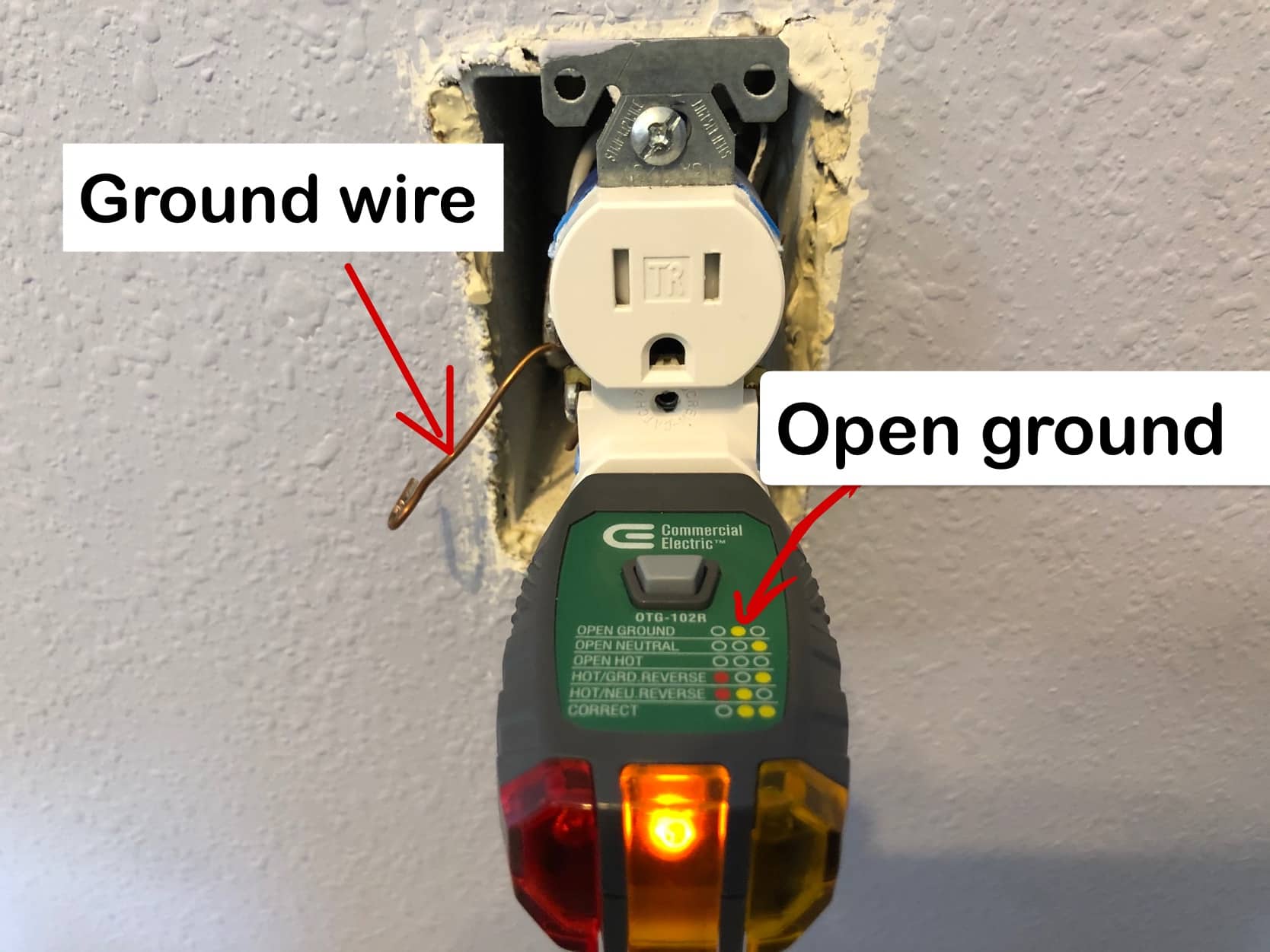
Most outlet testers utilize a series of three neon bulbs or LEDs wired in a specific configuration between the three slots of the outlet: the Hot (narrow slot), the Neutral (wide slot), and the Ground (U-shaped slot). The “Tech” inside these devices is essentially a set of simple logic gates. Depending on which wires are carrying current and which are completing the circuit, specific lights will illuminate.
A “Correct” reading typically involves the two outer lights turning on, indicating that there is a completed circuit between Hot and Neutral, and Hot and Ground, while no current is leaking where it shouldn’t be. When a specific wire is disconnected or “open,” the internal circuitry of the tester cannot complete the path for the specific light associated with that connection, leading to the error codes we see on the legend.
Why Digital Accuracy Matters for Sensitive Hardware
For tech enthusiasts, an outlet tester is the first line of defense. Modern switching power supplies found in PCs and high-end audio equipment are designed to handle minor fluctuations, but they rely heavily on a stable ground and a consistent hot-to-neutral potential. A fault in the wiring can lead to “dirty power,” which shortens the lifespan of capacitors and integrated circuits. Therefore, the ability to accurately interpret a tester’s readout is a fundamental skill in digital hardware maintenance.
Decoding the “Open Hot” Error Condition
When your tester displays an “Open Hot” reading—usually indicated by all three lights remaining dark—it signifies a specific technical failure in the circuit. In the language of electrical engineering, “Open” means there is a break in the continuity of the circuit. “Hot” refers to the ungrounded conductor that carries the 120-volt current from the breaker panel to the outlet.
The Science of the Broken Path
In an “Open Hot” scenario, the energized wire (typically black) has been disconnected or broken somewhere between the service panel and the outlet. Because the “Hot” wire is the source of the electrical potential, its absence means there is no voltage reaching the tester. Without voltage, the neon lamps inside the gadget cannot ionize and glow.
While it might seem redundant—after all, if the hot wire is open, the outlet won’t work anyway—the tester provides the diagnostic certainty that the issue is specifically the supply line. This distinguishes it from an “Open Neutral” or “Open Ground,” where the outlet might still show voltage under certain conditions but remain dangerous or non-functional for high-load tech devices.
Potential Technical Failures Leading to “Open Hot”
There are several technical reasons why a “Hot” connection might fail:
- Back-Stabbed Wiring: Many modern outlets use “back-stab” connectors where the wire is pushed into a spring-loaded hole. Over time, thermal expansion and contraction can cause these connections to fail, resulting in an open circuit.
- Tripped GFCI Upstream: In many digital home setups, outlets are daisy-chained. An “Open Hot” reading might occur if a Ground Fault Circuit Interrupter (GFCI) outlet earlier in the chain has tripped, cutting power to all subsequent outlets.
- Broken Terminal Screws: If a wire was wrapped poorly around a terminal screw, vibration or physical stress on the outlet can cause the wire to snap or slip off.
Troubleshooting and Diagnostic Procedures for the Tech-Savvy
Once an “Open Hot” status is identified, the troubleshooting process moves from simple observation to active diagnostics. For those who manage their own tech infrastructure, following a systematic approach is essential to avoid damaging equipment or risking electrical fire.

Step 1: Evaluating the Breaker and Upstream Devices
The first step is a software-like “reset.” Check the circuit breaker panel. A tripped breaker is the most common cause of an “Open Hot” reading. If the breaker is on, the next technical check involves identifying if the outlet is “downstream” from a GFCI outlet. Pressing the “Reset” button on all GFCI outlets in the room (or nearby bathrooms/kitchens) often restores the hot connection to the entire circuit.
Step 2: Physical Inspection of the Interface
If the source of the power is active but the tester still shows “Open Hot,” the physical interface must be inspected. This involves de-energizing the circuit and removing the outlet from the wall box. A tech-centric approach looks for signs of “arcing”—pitting or carbon deposits on the wires—which indicates a high-resistance connection that eventually failed.
Step 3: Using Advanced Diagnostic Tools
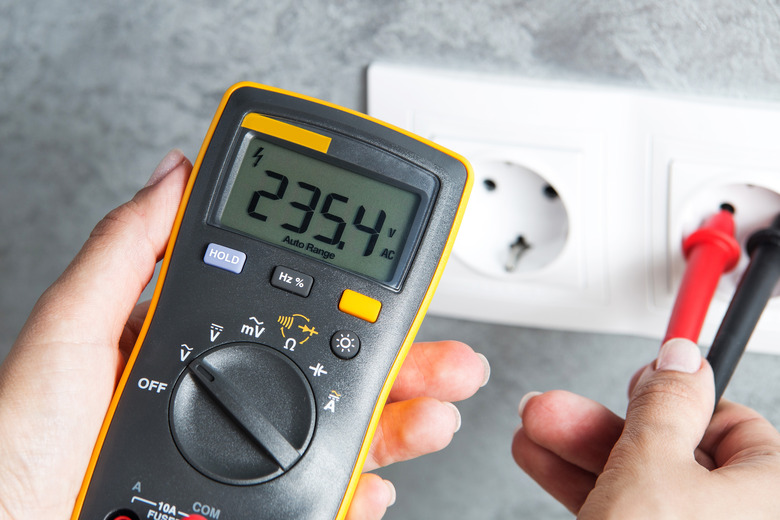
While the basic outlet tester is great for a quick “Go/No-Go” test, more advanced tech tools like a Digital Multimeter (DMM) are required for a deep dive. By setting the DMM to AC Voltage, you can probe the wires directly. If the multimeter reads 120V between the black wire and the white wire at the back of the outlet, but the tester showed “Open Hot” when plugged into the front, the outlet itself has an internal mechanical failure and must be replaced.
The Evolution of Smart Electrical Testing Tools
The basic three-light tester has remained largely unchanged for decades, but the rise of the Smart Home and the “Internet of Things” (IoT) is driving a transformation in electrical diagnostic technology. We are moving away from simple neon bulbs toward integrated digital circuit analyzers.
Digital Circuit Analyzers vs. Analog Testers
Advanced digital analyzers provide much more than an “Open Hot” reading. These professional-grade tech gadgets can measure “Voltage Drop” under a simulated 15-amp or 20-amp load. This is a crucial metric for tech professionals; a circuit might show a correct “Hot” connection under no load, but the voltage may plummet when a high-performance server starts up, causing unexpected reboots or data corruption.
Integration with Smart Home Ecosystems
We are beginning to see the emergence of smart outlets with built-in diagnostic capabilities. These devices function as permanent outlet testers, monitoring the integrity of the “Hot,” “Neutral,” and “Ground” connections in real-time. If an “Open Hot” condition occurs—perhaps due to a failing wire in the wall—the outlet can send a push notification to the user’s smartphone via Zigbee, Z-Wave, or Wi-Fi. This proactive tech-driven safety layer prevents the “Open Hot” issue from being discovered only when a critical device fails to power on.
Safety Protocols and Digital Integrity
The technical significance of an “Open Hot” reading extends beyond mere convenience. In the context of digital security and hardware longevity, electrical stability is a foundational requirement.
Protecting Sensitive Data and Components
An “Open Hot” reading is a clear signal that the electrical supply chain has been compromised. For enthusiasts running Network Attached Storage (NAS) or home labs, an intermittent “Hot” connection is particularly dangerous. Rapid “power cycling” caused by a loose hot wire can lead to “head crashes” in traditional hard drives or file system corruption in SSDs. Ensuring a solid, consistent “Hot” connection is as important to data integrity as a robust firewall.
The Role of Surge Protectors and UPS Systems
It is a common tech myth that a Surge Protector or an Uninterruptible Power Supply (UPS) can “fix” an “Open Hot” condition. In reality, a UPS will detect the “Open Hot” as a loss of utility power and switch to battery mode. While this protects your data temporarily, it does not solve the underlying infrastructure tech issue. Furthermore, most high-quality surge protectors feature a “Site Wiring Fault” LED. This light is essentially a built-in version of the outlet tester, and it will illuminate if it detects that the hot, neutral, or ground paths are not technically sound.
Conclusion: Mastering the Tools of the Trade
In the modern world, where our lives are increasingly mediated by digital devices, the “Tech” of the home itself—the wiring, the breakers, and the outlets—cannot be ignored. Understanding what “Open Hot” means on an outlet tester is more than just a home maintenance tip; it is an essential part of managing a technological environment.
The “Open Hot” indicator is a digital “404 Not Found” for your electrical system. It tells you that the primary data stream—the 120V AC power—is missing at the source. By leveraging both simple gadgets like the three-light tester and advanced tools like digital multimeters and smart monitors, tech-savvy users can ensure their infrastructure is as reliable as the software running on it. Whether you are troubleshooting a dead outlet in a home office or auditing the power quality of a new build, the humble outlet tester remains an indispensable gadget in the modern technologist’s toolkit.
aViewFromTheCave is a participant in the Amazon Services LLC Associates Program, an affiliate advertising program designed to provide a means for sites to earn advertising fees by advertising and linking to Amazon.com. Amazon, the Amazon logo, AmazonSupply, and the AmazonSupply logo are trademarks of Amazon.com, Inc. or its affiliates. As an Amazon Associate we earn affiliate commissions from qualifying purchases.