
In the modern landscape of personal finance, your bank account number serves as the foundational coordinate for your financial identity. Whether you are setting up a direct deposit for a new job, automating your monthly bill payments, or linking your Chase account to an external investment platform, knowing exactly where to find your account number is essential. While it may seem like a basic piece of information, Chase—like many major financial institutions—prioritizes security by masking these numbers across various interfaces.
Understanding how to navigate Chase’s digital and physical tools to retrieve this information is a vital skill for anyone looking to manage their money with precision and security. This guide provides a deep dive into the various methods available to locate your Chase account number, while also offering insights into why this data is protected and how to use it safely in your financial journey.
1. Utilizing Chase Digital Platforms for Instant Access
In an era dominated by financial technology, the quickest way to access your banking information is through Chase’s robust digital ecosystem. Chase has invested heavily in its user interface to ensure that while sensitive data is protected, it remains accessible to the authenticated user.
Navigating the Chase Mobile App
The Chase Mobile® app is perhaps the most convenient tool for on-the-go account management. Because the app utilizes biometric security (Face ID or fingerprint) or multi-factor authentication, it is a secure environment for viewing sensitive details.
To find your account number in the app:
- Log In: Open the app and authenticate your identity.
- Select Your Account: Tap on the specific checking or savings account you are inquiring about.
- Account Details: Look for a section or link usually labeled “Account details” or “Show details.”
- Unmasking the Number: By default, Chase masks the account number, showing only the last four digits. Look for an icon (often an “eye” symbol) or a text link that says “See full account number.” Once tapped, the full string of digits will be revealed.
Using the Chase Online Banking Portal
For those who prefer a desktop experience, the Chase Online℠ website offers a comprehensive view of your financial profile. This is often the preferred method for users who are simultaneously filling out digital forms or setting up external transfers.
- Secure Sign-In: Navigate to the official Chase website and enter your credentials.
- Dashboard Overview: From the main dashboard, click on the specific account name.
- The “Show Details” Feature: Just below the account balance, you will typically find a “Show details” toggle. Clicking this will expand a menu that displays the full account number alongside the routing number.
- Copy and Paste Security: While it is tempting to copy and paste this number, ensure you are using a secure, private connection to prevent “clipboard” data theft by malicious software.
2. Locating Your Account Number via Traditional Documentation
While digital access is instantaneous, there are times when you may not have access to your smartphone or a reliable internet connection. In these instances, traditional physical or digital documents are your primary resource.
Reading Your Physical Checks
If you have a Chase checking account and use paper checks, your account number is printed directly on every leaf. This is one of the most reliable ways to verify your information without logging into a portal.
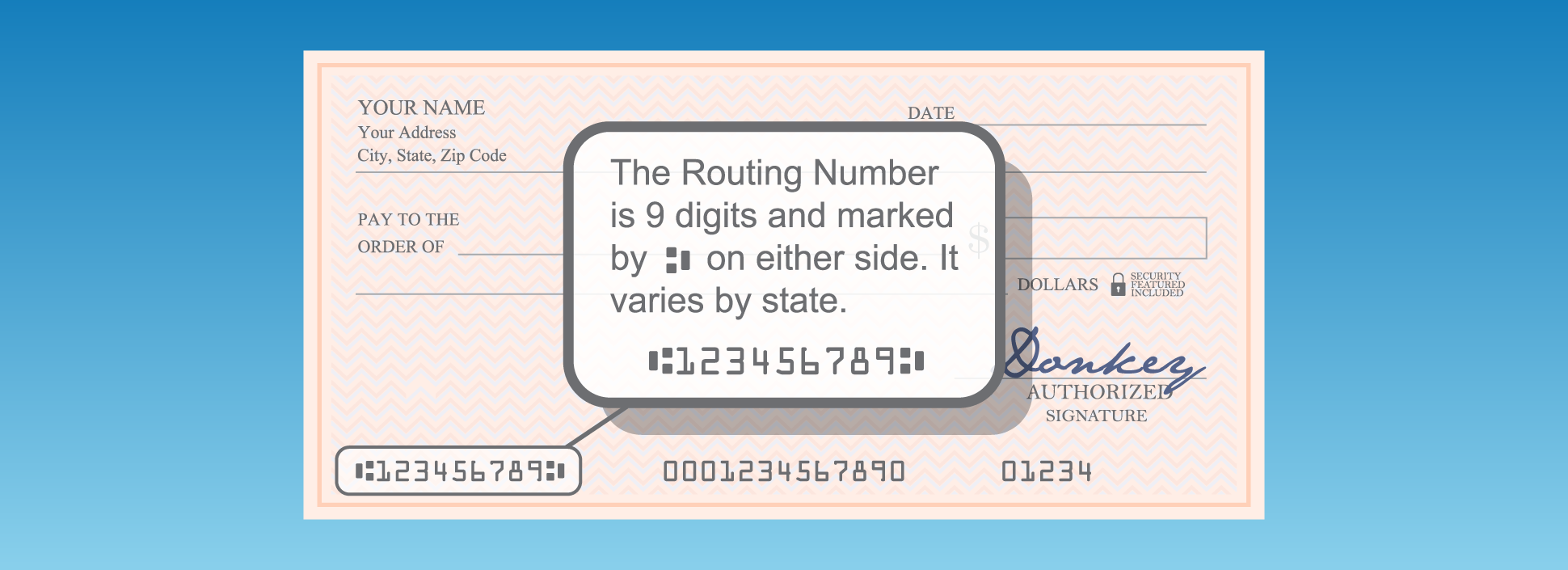
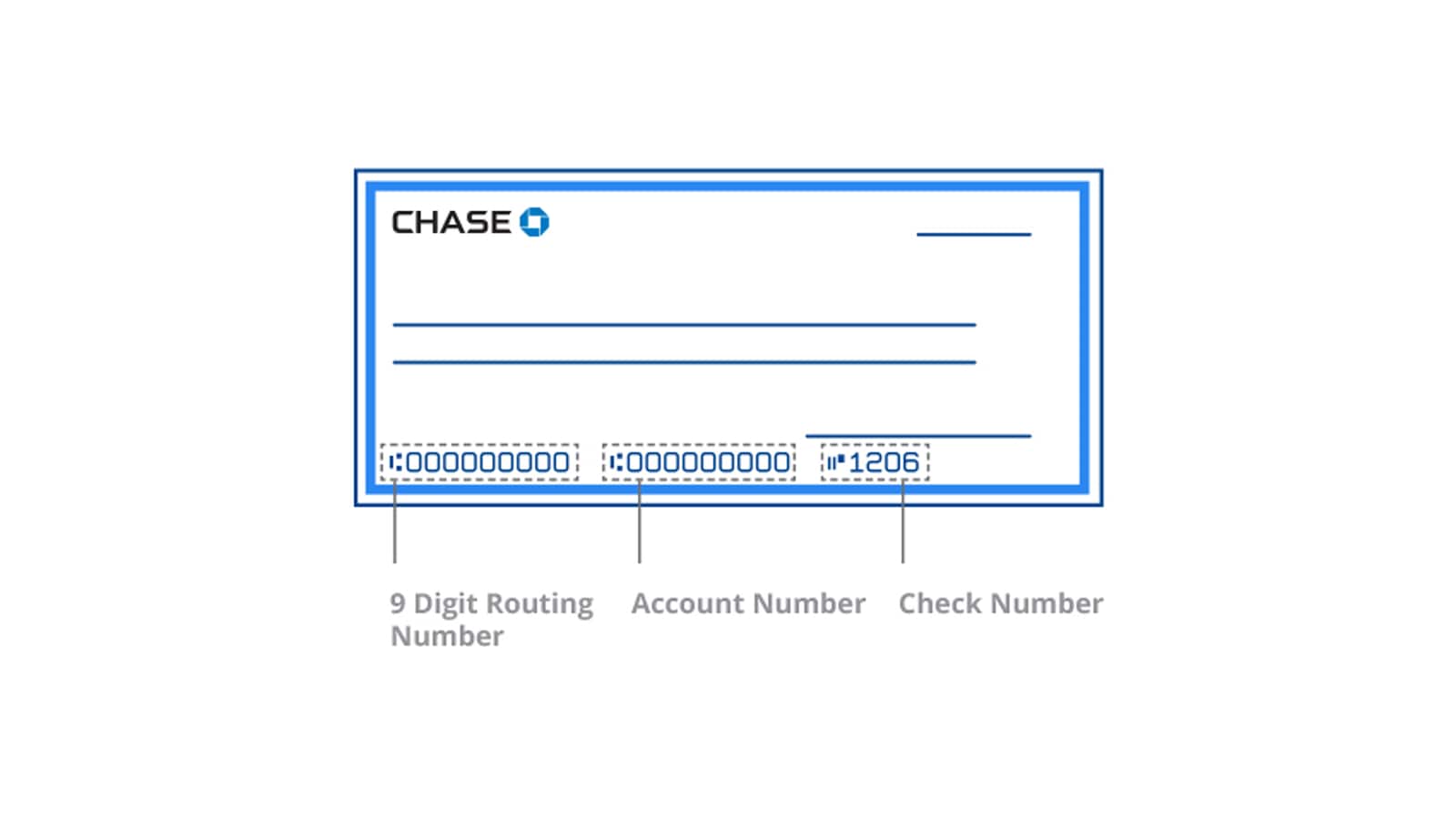
At the bottom of a Chase check, you will see a string of numbers printed in a specialized font (MICR). This string consists of three parts:
- The Routing Number: The first nine digits on the left. This identifies Chase as the financial institution.
- The Account Number: The middle set of numbers. This is your unique identifier within the Chase system.
- The Check Number: The final set of digits on the far right, which corresponds to the specific check in your book.
Accessing Monthly Statements
Your monthly bank statement is a legal record of your financial activity and contains all necessary account identifiers. You can access these either through the mail or by downloading a PDF version from the “Statements & Documents” section of the Chase website.
On the first page of any Chase statement, usually in the top right or left header, your account number will be listed. This is particularly useful for verifying information for tax purposes or mortgage applications, as most institutions require a full statement rather than just a handwritten number.

3. Understanding the Strategic Difference: Account vs. Routing Numbers
In the world of personal finance, there is often confusion between the account number and the routing number. Distinguishing between the two is crucial for ensuring that your money moves to the right place without delays or “returned item” fees.
The Role of the Routing Number
The routing number (also known as an ABA routing transit number) is a nine-digit code that identifies the specific bank responsible for the funds. Chase, being a massive national entity, has different routing numbers based on the state or region where the account was originally opened. You use the routing number to tell the financial system which bank to go to; you use the account number to tell them which person to pay.
When You Need Both
Most financial transactions, such as setting up an ACH (Automated Clearing House) transfer or a wire transfer, require both pieces of information. For example, when setting up an employer direct deposit, the payroll system needs the routing number to find Chase and the account number to ensure the paycheck lands in your specific checking account. Using the wrong combination can lead to significant financial headaches, including lost funds or lengthy recovery processes.
4. Security Protocols and Protecting Your Financial Data
Because your account number is the “key” to your funds, Chase employs rigorous security measures to protect it. Understanding these measures—and your role in maintaining them—is a cornerstone of modern financial literacy.
Why Chase Masks Your Information
You may notice that in many views, Chase only shows the last four digits of your account number (e.g., ****6789). This practice, known as data masking, is designed to prevent “shoulder surfing” or unauthorized viewers from capturing your full details in public spaces. Only after a secondary layer of authentication (like re-entering a password or using biometrics) does the system reveal the full number.
Best Practices for Sharing Your Account Number
Your account number should be treated with the same level of secrecy as your Social Security number. To maintain high-level financial security:
- Avoid Emailing Details: Never send your full account and routing numbers via unencrypted email. If a financial advisor or employer needs them, use a secure document upload portal or provide them via a phone call.
- Shred Sensitive Documents: If you print out a statement or have old voided checks, ensure they are shredded before disposal. Identity thieves can use these numbers to create fraudulent checks or initiate unauthorized ACH withdrawals.
- Monitor for Unauthorized Transfers: Regularly review your transaction history. If you see small, “test” deposits or withdrawals you don’t recognize, it may be a sign that someone has gained access to your account number and is verifying it for future theft.
5. Use Cases: When Will You Be Asked for Your Account Number?
Proactive financial management often requires sharing your account details with third parties. Knowing the context of these requests helps you determine if a request is legitimate or a potential phishing attempt.
Setting Up Wealth Management and Investment Tools
When linking your Chase account to an external brokerage (like Vanguard, Fidelity, or Schwab) or a budgeting app (like YNAB or Monarch Money), you will need your account number. Most modern apps use “Plaid” or similar APIs to link accounts securely without you having to manually type the number, but having it on hand as a backup is always wise.
Facilitating Large Financial Transactions
During a home purchase or a major business transaction, you may be required to provide your Chase account number for a wire transfer. In these high-stakes scenarios, accuracy is paramount. Wire transfers are often irreversible. Always double-check the account number found in your Chase app against the instructions provided by your title company or legal representative.
Automating Personal Finance
The most common use for your Chase account number is the automation of “outflows.” By providing your account and routing numbers to utility companies, insurance providers, or credit card issuers, you can set up “Auto-Pay.” This ensures you never miss a deadline, helping you maintain a high credit score and avoid late fees—a fundamental pillar of successful personal finance management.
Conclusion: Empowering Your Banking Experience
Locating your Chase account number is more than just a technical necessity; it is a gateway to full control over your financial life. Whether you utilize the streamlined Chase Mobile app, refer to the traditional paper check, or download a formal statement, the information is always within reach.
By understanding the distinction between routing and account numbers and maintaining a high standard of digital hygiene, you can navigate the complexities of modern banking with confidence. Your account number is the primary link between your hard-earned money and the global financial system—treat it with the care and security it deserves.
aViewFromTheCave is a participant in the Amazon Services LLC Associates Program, an affiliate advertising program designed to provide a means for sites to earn advertising fees by advertising and linking to Amazon.com. Amazon, the Amazon logo, AmazonSupply, and the AmazonSupply logo are trademarks of Amazon.com, Inc. or its affiliates. As an Amazon Associate we earn affiliate commissions from qualifying purchases.