
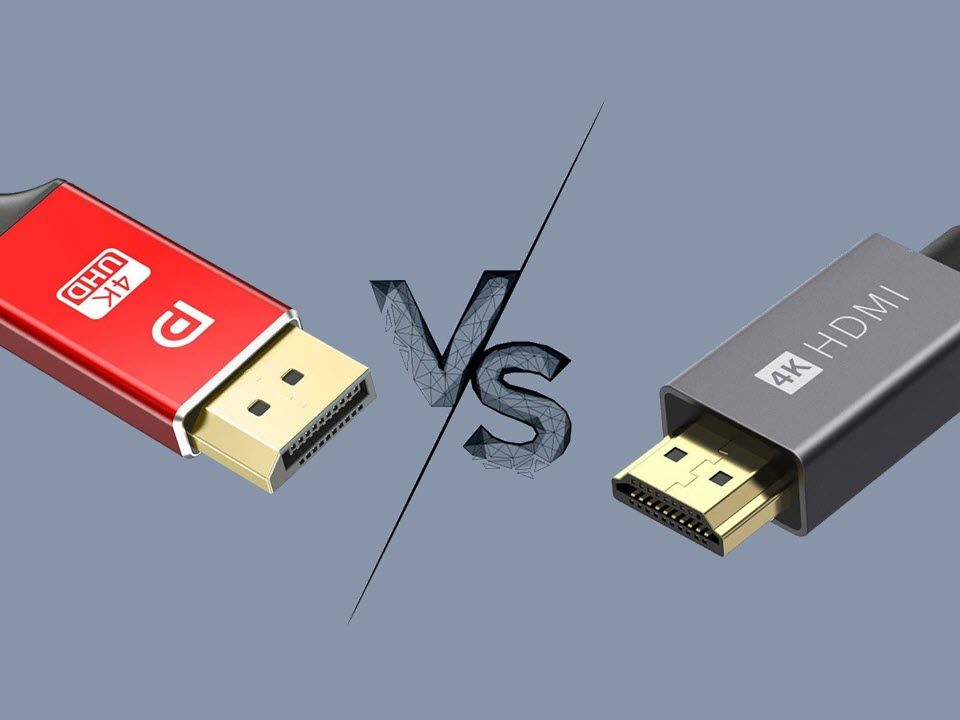
The digital world thrives on seamless visual experiences. From immersive gaming to professional content creation and everyday productivity, the quality and reliability of how our devices communicate visuals are paramount. At the heart of this connection lie two ubiquitous standards: DisplayPort and HDMI. For anyone navigating the landscape of monitors, graphics cards, televisions, and a myriad of other displays, the question inevitably arises: which is superior, DisplayPort or HDMI? This article delves deep into the technical intricacies, practical applications, and future trajectory of these crucial display interface technologies, empowering you to make informed decisions for your tech setup. We will explore their core functionalities, compare their strengths and weaknesses across various use cases, and ultimately, help you determine which port reigns supreme for your specific needs.
The Genesis and Evolution of DisplayPort and HDMI
Before we can definitively answer which is “better,” understanding the origins and developmental paths of both DisplayPort and HDMI is essential. Their respective design philosophies, driven by different market needs and technological advancements, have shaped their current capabilities and future potential.
HDMI: The Universal Standard for Consumer Electronics
HDMI, or High-Definition Multimedia Interface, emerged in the early 2000s primarily to consolidate audio and video signals into a single, convenient cable for consumer electronics. Its genesis was driven by the desire to simplify connections for home theater systems, replacing a tangle of separate cables for audio and video. This focus on ease of use and broad compatibility with televisions, Blu-ray players, gaming consoles, and AV receivers quickly cemented its dominance in the consumer space.
Over the years, HDMI has undergone numerous revisions, each iteration bringing significant improvements in bandwidth, resolution support, refresh rates, and advanced features. From the early HDMI 1.0, which supported resolutions up to 1080p, to the latest HDMI 2.1, capable of delivering 8K at 60Hz and 4K at 120Hz, HDMI has consistently adapted to the evolving demands of high-definition content. Key features introduced over time include support for 3D, audio return channel (ARC) and enhanced audio return channel (eARC) for simplified soundbar connections, dynamic HDR for improved contrast and color accuracy, and variable refresh rate (VRR) and auto low latency mode (ALLM) that are crucial for gaming. The widespread adoption by major manufacturers has ensured that nearly every modern display and source device features HDMI ports, making it the de facto standard for many users.
DisplayPort: The Powerhouse for Computing and Professional Applications
DisplayPort, on the other hand, was developed by the Video Electronics Standards Association (VESA) with a primary focus on the personal computer market. Its design emphasized higher bandwidth, greater flexibility, and superior performance for graphics-intensive applications like gaming and professional content creation. DisplayPort was envisioned as a more advanced and scalable interface, capable of pushing the boundaries of what was possible with digital display technology within the PC ecosystem.
Like HDMI, DisplayPort has also seen significant evolution. Early versions offered impressive capabilities for their time, but subsequent revisions, particularly DisplayPort 1.4 and the upcoming DisplayPort 2.0/2.1, have dramatically increased bandwidth. DisplayPort 1.4, for instance, introduced Display Stream Compression (DSC), a visually lossless compression technology that allows for higher resolutions and refresh rates over existing cable lengths. The latest DisplayPort 2.0/2.1 specifications represent a monumental leap, offering up to 80 Gbps of bandwidth, which is more than double that of HDMI 2.1. This massive increase in bandwidth unlocks support for incredibly high resolutions and refresh rates, such as 8K at 85Hz, 4K at 240Hz, or even dual 8K displays. DisplayPort also excels in its support for multi-monitor setups through daisy-chaining, a feature less common or less robust with HDMI. Its adoption is particularly strong among PC manufacturers, graphics card vendors, and high-end monitor producers.
Key Technical Differences and Performance Benchmarks
The fundamental differences in their architecture and design lead to distinct performance characteristics that cater to different scenarios. Understanding these technical nuances is crucial for selecting the right interface.
Bandwidth and Resolution/Refresh Rate Capabilities
Bandwidth is the most critical factor dictating the maximum resolution and refresh rate a display interface can support. Higher bandwidth allows for more data to be transmitted per second, translating directly to sharper images and smoother motion.
HDMI:
- HDMI 2.0: Supports 4K at 60Hz, 18 Gbps bandwidth.
- HDMI 2.1: Supports 4K at 120Hz, 8K at 60Hz (with DSC for 8K/60Hz), 48 Gbps bandwidth. This is a significant upgrade, making HDMI 2.1 a strong contender for high-end gaming and home theater.
DisplayPort:
- DisplayPort 1.4: Supports 4K at 120Hz, 8K at 60Hz (with DSC), 32.4 Gbps bandwidth (25.92 Gbps usable). This version has been the workhorse for high-performance PCs for several years.
- DisplayPort 2.0/2.1: Supports up to 8K at 85Hz, 4K at 240Hz, 16K at 60Hz (with DSC), and a staggering 80 Gbps bandwidth (65.54 Gbps usable). This represents a substantial leap and positions DisplayPort as the future-proof option for the most demanding visual applications.
In terms of raw bandwidth and future-proofing for extreme resolutions and refresh rates, DisplayPort 2.0/2.1 currently holds a significant advantage over even HDMI 2.1. This makes it the preferred choice for professionals working with extremely high-resolution displays or for gamers who demand the absolute highest refresh rates.
Features and Functionality Beyond Raw Data Transmission
Beyond bandwidth, both interfaces offer a suite of advanced features that enhance the user experience and expand their capabilities.
HDMI Features:
- CEC (Consumer Electronics Control): Allows devices connected via HDMI to control each other. For example, your TV remote can control your Blu-ray player or soundbar.
- ARC/eARC (Audio Return Channel/Enhanced Audio Return Channel): Simplifies audio setups by allowing audio to be sent from the TV back to an AV receiver or soundbar over the same HDMI cable used for video. eARC supports higher bandwidth audio formats like Dolby Atmos and DTS:X.
- VRR (Variable Refresh Rate): Synchronizes the display’s refresh rate with the graphics card’s frame rate, eliminating screen tearing and stuttering for smoother gameplay.
- ALLM (Auto Low Latency Mode): Automatically switches the display to its lowest latency mode when a game console or PC is detected, reducing input lag.
- Dynamic HDR: Optimizes contrast, brightness, and color on a scene-by-scene or frame-by-frame basis for a more lifelike image.
DisplayPort Features:
- MST (Multi-Stream Transport): The ability to connect multiple independent displays to a single DisplayPort output by “daisy-chaining” them or using an MST hub. This is a significant advantage for productivity and multi-monitor workstations.
- Adaptive-Sync: The underlying technology that enables VRR, allowing for variable refresh rates. VESA has standardized this as “Adaptive-Sync,” which is the basis for AMD’s FreeSync and NVIDIA’s G-Sync Compatible technologies.
- Higher Bit Depth and Color Support: DisplayPort generally offers more robust support for higher color depths (e.g., 10-bit, 12-bit) and wider color gamuts, crucial for professional color grading and graphic design.
- USB Type-C Alt Mode: DisplayPort can be transmitted over a USB Type-C connector, allowing a single cable to carry video, data, and power. This is a major convenience for laptops and modern peripherals.
While HDMI has made significant strides in gaming-related features and audio transmission, DisplayPort generally offers greater flexibility for multi-monitor setups and raw data throughput for the most demanding professional use cases.
Use Case Scenarios: Which Port Serves Which Purpose Best?
The “better” interface is entirely dependent on your primary use case. A gamer’s needs will differ significantly from those of a home theater enthusiast or a graphic designer.
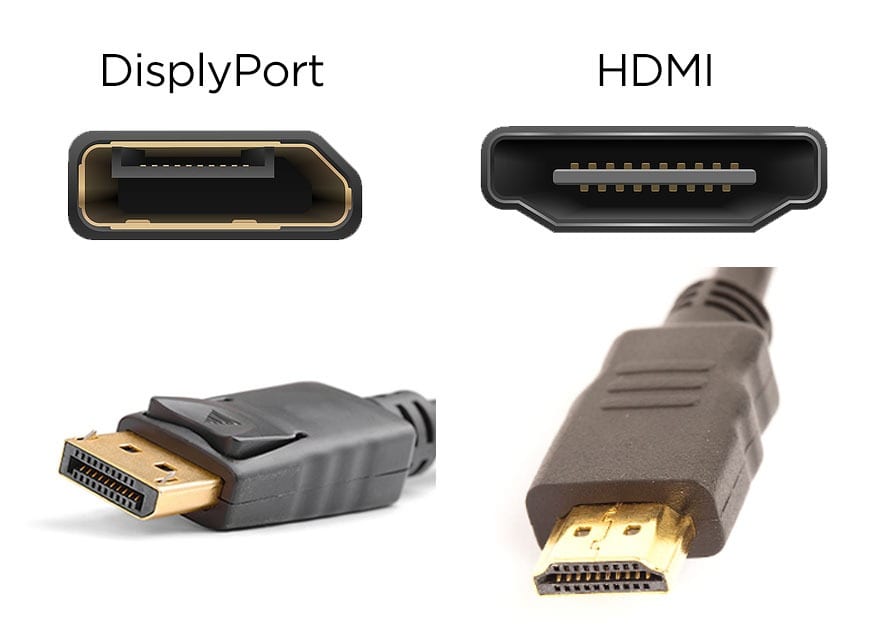
Gaming: The Quest for High Refresh Rates and Low Latency
For gamers, the pursuit of ultra-smooth visuals and immediate responsiveness is paramount. This translates to a need for high refresh rates (144Hz, 240Hz, and beyond) and low input lag.
- DisplayPort: Historically, DisplayPort has been the king of PC gaming. Its higher bandwidth capabilities and robust support for Adaptive-Sync (which powers FreeSync and G-Sync Compatible) have made it the default choice for high-refresh-rate gaming monitors. For resolutions above 4K, or for achieving extremely high refresh rates at 4K and above, DisplayPort 2.0/2.1 is the clear leader. Its ability to consistently deliver high frame rates without compromises makes it indispensable for competitive gamers and those seeking the most fluid experience.
- HDMI: With the advent of HDMI 2.1, the landscape has changed. Modern gaming consoles like the PlayStation 5 and Xbox Series X/S leverage HDMI 2.1 to deliver 4K at 120Hz. Many high-end gaming TVs also support HDMI 2.1, offering VRR and ALLM. For console gamers, HDMI 2.1 is often the only option to achieve these performance levels. PC gamers using gaming laptops or systems with HDMI 2.1 outputs can also benefit, especially if their monitor also supports these features. However, for the absolute highest refresh rates on PC, particularly at resolutions beyond 4K, DisplayPort still holds the edge.
Verdict for Gaming: For PC gamers seeking the absolute highest refresh rates and resolutions, especially those pushing beyond 4K, DisplayPort remains the superior choice. For console gamers and those with HDMI 2.1-capable displays and source devices, HDMI 2.1 offers an excellent experience and is often the primary or only option.
Home Entertainment: Immersive Movies and Simplified Audio
The home entertainment setup prioritizes visual fidelity for movies and TV shows, along with convenient audio connections.
- HDMI: HDMI is the undisputed champion of home entertainment. Its widespread adoption by TV manufacturers, streaming devices, Blu-ray players, and soundbar/AV receiver companies makes it the universal standard. Features like ARC/eARC simplify audio setups significantly, allowing for a single cable to carry both video and high-quality audio. CEC makes managing multiple devices with a single remote intuitive. Support for HDR (including Dolby Vision and HDR10+) is excellent and widely implemented. For most users connecting a TV, streaming box, or gaming console to a display, HDMI is the most practical and feature-rich solution.
- DisplayPort: While DisplayPort can technically output high-resolution video, its lack of widespread adoption in consumer A/V equipment means it’s rarely the primary choice for home theater. You won’t find DisplayPort inputs on most televisions or Blu-ray players. Its strengths lie in PC-to-TV connections when a PC is used as a media center, but even then, HDMI is often more straightforward and offers better audio integration.
Verdict for Home Entertainment: HDMI is overwhelmingly the better choice for home entertainment due to its universal compatibility, simplified audio features (ARC/eARC), and extensive support for HDR formats.
Professional Workstations and Multi-Monitor Setups
For professionals in fields like graphic design, video editing, CAD, or programming, productivity is key. This often involves working with multiple high-resolution displays to maximize screen real estate and streamline workflows.
- DisplayPort: DisplayPort truly shines in professional environments. Its Multi-Stream Transport (MST) capability is a game-changer, allowing users to connect several monitors to a single DisplayPort output via daisy-chaining or an MST hub. This dramatically simplifies cable management and reduces the need for multiple expensive graphics cards. DisplayPort’s typically higher bandwidth and support for higher color depths and wider color gamuts are also crucial for tasks requiring precise color accuracy. The increasing prevalence of USB Type-C Alt Mode further enhances its utility, allowing a single cable to power a monitor and transmit data to peripherals connected to the monitor’s hub.
- HDMI: While HDMI can support multiple displays (e.g., through a receiver), it lacks the native daisy-chaining capability of DisplayPort. Each HDMI output from a graphics card can only drive one display. This can lead to more complex and costly multi-monitor setups. While HDMI can support good color depth, DisplayPort is often preferred by professionals for its more consistent and robust implementation of advanced color standards.
Verdict for Professional Workstations: DisplayPort is generally the superior choice for professional workstations, especially those requiring multi-monitor setups, due to its MST technology, superior color support, and flexibility with USB Type-C integration.
The Future of Display Connectivity: Convergence and Beyond
The landscape of display technology is constantly evolving, and both HDMI and DisplayPort are poised to adapt to new challenges and opportunities.
The Rise of USB-C and Thunderbolt
The integration of DisplayPort functionality into USB Type-C ports, often referred to as “DisplayPort Alt Mode,” is a significant trend. This allows a single USB-C cable to carry DisplayPort video signals, USB data, and even power (USB Power Delivery), simplifying connectivity for laptops, tablets, and docking stations. Thunderbolt technology, which builds upon the USB-C physical connector, further enhances this, offering even higher bandwidth and supporting multiple DisplayPort streams alongside PCI Express data. This convergence means that a single port on your device can handle a multitude of functions, leading to a cleaner and more streamlined setup.
The Bandwidth Race Continues
As resolutions increase and refresh rates climb, the demand for bandwidth will only grow. DisplayPort 2.0/2.1’s massive bandwidth advantage signals its readiness for future demands, potentially enabling resolutions like 8K at very high refresh rates or even 16K displays. HDMI is also expected to continue evolving, though its primary focus may remain on consumer electronics and maintaining broad compatibility. The ongoing competition between these standards will undoubtedly drive innovation and benefit consumers and professionals alike.
Towards Universality and Specialization
While there’s a trend towards convergence with USB-C, it’s also likely that HDMI will continue to dominate the consumer entertainment space due to its established ecosystem and features like CEC and eARC. DisplayPort will likely retain its position as the preferred interface for high-performance computing, gaming, and professional applications. Ultimately, the “better” choice will continue to be dictated by the specific requirements of the user and the devices they are connecting, but the underlying technologies will undoubtedly become more powerful and versatile.
Conclusion: Making the Informed Choice
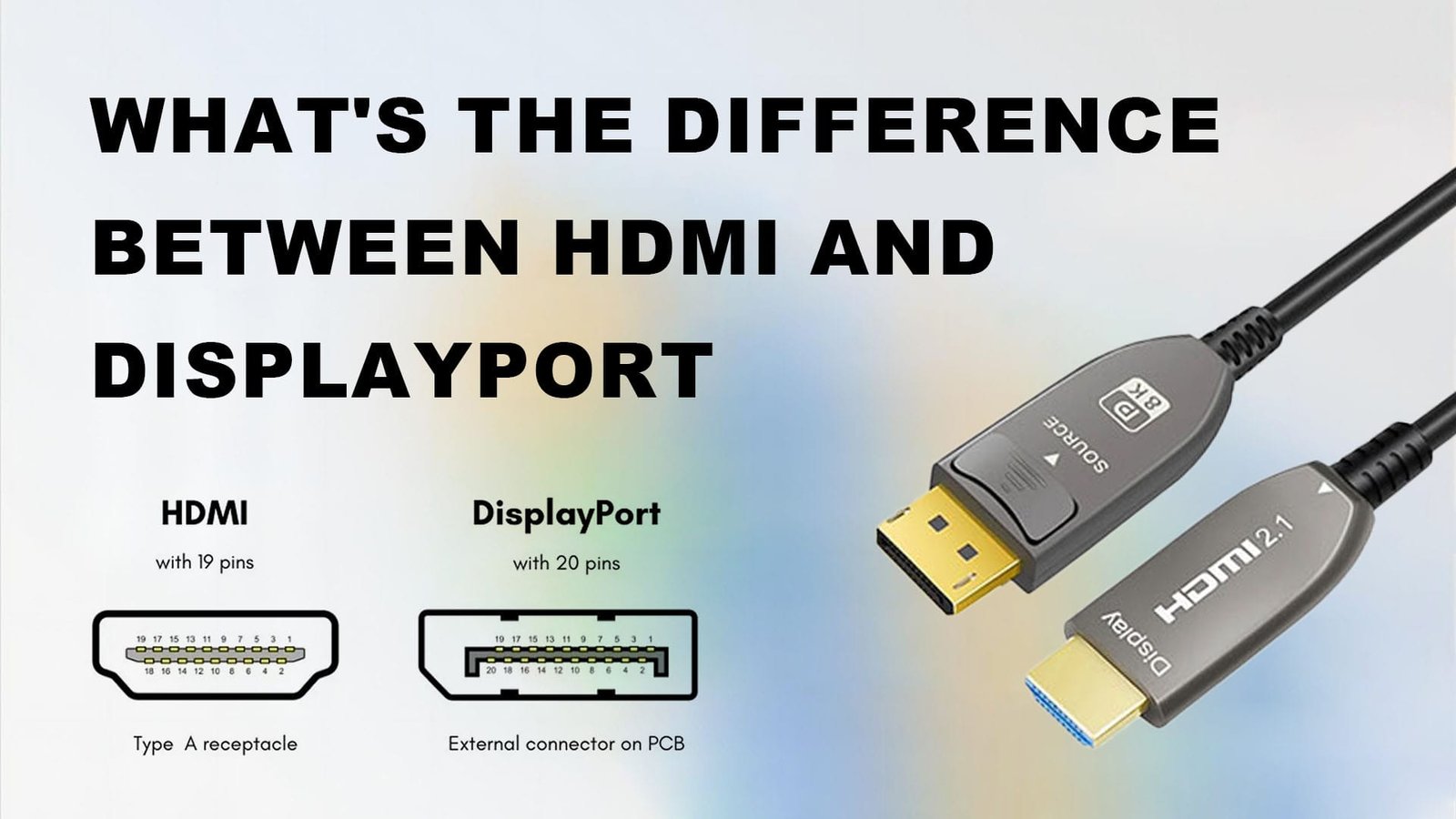
In the ongoing debate of DisplayPort versus HDMI, there is no single definitive winner. Both interfaces are technological marvels that have revolutionized how we experience visual content.
Choose HDMI if:
- You are connecting a gaming console to a TV or monitor.
- You are setting up a home theater system with a TV, soundbar, or AV receiver.
- You prioritize ease of use and broad compatibility with consumer electronics.
- Features like CEC and ARC/eARC are important to your setup.
- You are using an HDMI 2.1-certified device and want to take advantage of its 4K@120Hz or 8K@60Hz capabilities.
Choose DisplayPort if:
- You are a PC gamer seeking the absolute highest refresh rates and resolutions.
- You work with multiple high-resolution monitors in a professional workstation.
- Color accuracy and high bit depth are critical for your work (e.g., graphic design, video editing).
- You need to connect multiple displays to a single port (daisy-chaining or MST hub).
- You are utilizing the flexibility of USB Type-C for display output.
- You want the most future-proof solution for ultra-high resolutions and refresh rates.
By understanding the strengths and weaknesses of each, and by considering your specific needs and intended applications, you can confidently select the display interface that will best serve your technological ambitions. The continued evolution of both DisplayPort and HDMI ensures that the visual future is bright, offering ever more immersive, responsive, and visually stunning experiences.
aViewFromTheCave is a participant in the Amazon Services LLC Associates Program, an affiliate advertising program designed to provide a means for sites to earn advertising fees by advertising and linking to Amazon.com. Amazon, the Amazon logo, AmazonSupply, and the AmazonSupply logo are trademarks of Amazon.com, Inc. or its affiliates. As an Amazon Associate we earn affiliate commissions from qualifying purchases.