
In an era increasingly defined by digital convenience, applications designed to streamline our financial lives have become indispensable. Among these, Cash App stands out as a prominent player, transforming how individuals send, receive, and manage money. More than just a peer-to-peer payment service, Cash App has evolved into a comprehensive digital financial toolkit, integrating traditional banking functionalities with innovative investment opportunities. For newcomers, however, the initial setup can seem daunting. This guide will walk you through the process of setting up Cash App, exploring its core technological underpinnings, security features, and the myriad functionalities that make it a cornerstone of modern digital finance.
Understanding Cash App: More Than Just a Payment Tool
At its heart, Cash App is a mobile payment service developed by Block, Inc. (formerly Square, Inc.), designed to facilitate seamless money transfers between users. However, to categorize it merely as a payment app would be to overlook its technological depth and broad utility. From its intuitive user interface to its robust backend infrastructure, Cash App embodies a convergence of financial technology (FinTech) and user-centric design, making complex financial transactions accessible to a wider audience.
What is Cash App?
From a technical perspective, Cash App is an ecosystem of integrated services accessible via a mobile application on iOS and Android devices. It operates as a digital wallet that allows users to send and receive money using a unique identifier called a “$Cashtag” or via phone numbers and email addresses. Beyond these fundamental peer-to-peer (P2P) transactions, Cash App has significantly expanded its feature set. It offers a free debit card (the Cash Card) linked to your in-app balance, enabling withdrawals from ATMs and purchases at merchants. Users can also set up direct deposits for paychecks, effectively utilizing the app as a primary banking account, complete with routing and account numbers.
What truly distinguishes Cash App in the FinTech landscape is its foray into more sophisticated financial instruments. Users can buy, sell, and store Bitcoin directly within the app, democratizing access to cryptocurrency. Additionally, Cash App provides a simplified platform for investing in stocks, allowing users to buy fractional shares of public companies with as little as $1. This integration of P2P payments, digital banking, cryptocurrency, and stock trading within a single, streamlined interface highlights Cash App’s technological ambition to be a holistic financial solution. Its architecture is built on secure, scalable cloud infrastructure, ensuring high availability and rapid transaction processing, critical for a real-time financial service.
Why Choose Cash App?
The decision to adopt a new financial technology often boils down to a blend of convenience, security, and functionality. Cash App excels in these areas, particularly for users seeking a modern, mobile-first approach to managing their money. From a technological standpoint, its primary advantages include:
- Ease of Use and Intuitive UI/UX: The app is renowned for its clean, straightforward interface, making it incredibly easy for users of all technical proficiencies to navigate. The design prioritates essential functions, ensuring that sending money, checking balances, or making investments is just a few taps away. This focus on user experience minimizes the learning curve often associated with financial applications.
- Speed and Accessibility: Transactions are typically instantaneous, allowing for real-time money transfers between users. This immediacy is powered by sophisticated backend processing that minimizes latency and maximizes throughput. Its availability on major mobile platforms ensures broad accessibility.
- Integrated Financial Services: The ability to manage P2P payments, banking, crypto, and stock investments from a single application is a significant technological achievement. This integration reduces the need for multiple apps and platforms, offering a cohesive financial management experience.
- Security Features: While no digital platform is entirely immune to threats, Cash App employs robust security protocols, including encryption, fraud detection algorithms, and multi-factor authentication options, which we will delve into later. These measures are crucial for building user trust in a financial application.
- Innovation: Cash App consistently introduces new features and refines existing ones, often leveraging cutting-edge technology to enhance user experience and expand its service offerings. This commitment to innovation keeps it relevant in a rapidly evolving FinTech market.
For individuals seeking a versatile, easy-to-use, and technologically advanced tool for their daily financial needs, Cash App presents a compelling option, streamlining everything from splitting a dinner bill to dabbling in the stock market.
The Step-by-Step Setup Process: Getting Started with Cash App
Setting up Cash App is a relatively straightforward process designed to be completed quickly, getting users into the digital finance ecosystem with minimal friction. However, understanding each step ensures a smooth activation and lays the groundwork for leveraging the app’s full potential securely.
Downloading and Installing the Application
The very first step is to acquire the Cash App application itself. This involves accessing your device’s official app store.
- For iOS users: Open the Apple App Store, search for “Cash App,” and tap “Get.” You might need to authenticate with Face ID, Touch ID, or your Apple ID password.
- For Android users: Open the Google Play Store, search for “Cash App,” and tap “Install.”
Ensure you are downloading the official application developed by “Square, Inc.” (now Block, Inc.) to avoid phishing or malicious lookalike apps. Once downloaded, the app icon will appear on your home screen or in your app drawer, signifying successful installation. This initial stage is crucial for establishing the foundational software on your device that will host your digital financial activities.
Initial Account Creation: Phone Number or Email
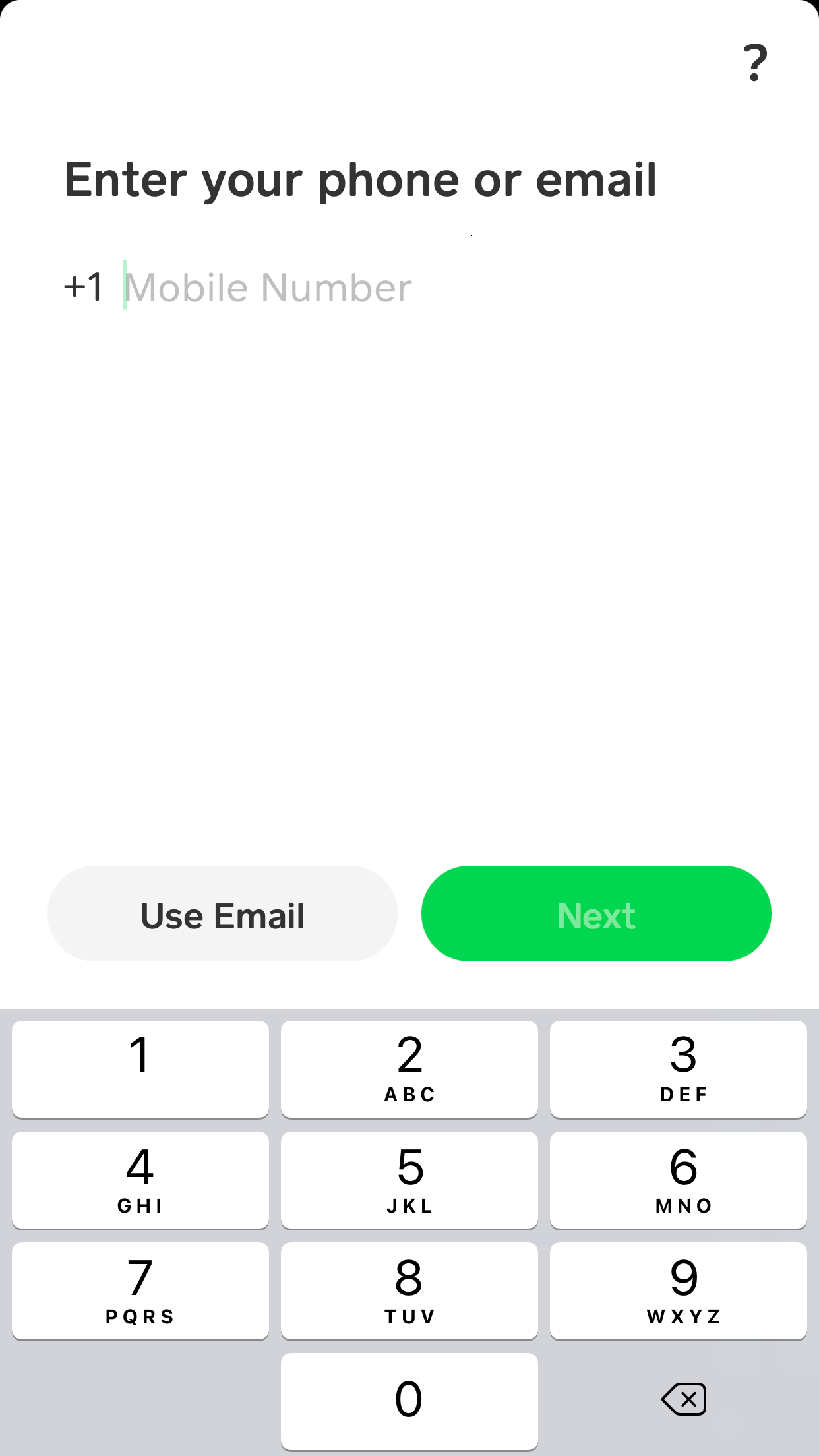
Upon opening the Cash App for the first time, you’ll be prompted to enter either your phone number or email address. This serves as your primary identifier for the account and is a critical piece of information for security and communication.
- Input your chosen identifier: Enter a phone number you regularly use and have control over, or an active email address.
- Verification Code: Cash App will send a verification code (a one-time passcode, or OTP) to the phone number or email you provided. This is a standard security measure to confirm ownership and prevent unauthorized account creation.
- Enter the code: Input the code into the app when prompted. If you don’t receive it immediately, check your spam folder for email or ensure your phone has signal for SMS.
This step establishes your digital identity within the Cash App system and creates the basic framework for your profile. It’s a fundamental security layer, ensuring that only the owner of the phone number or email can proceed with the setup.
Linking a Bank Account or Debit Card
To send money, receive funds that you want to transfer out, or utilize most of Cash App’s features, you need a funding source. This typically involves linking a bank account or a debit card.
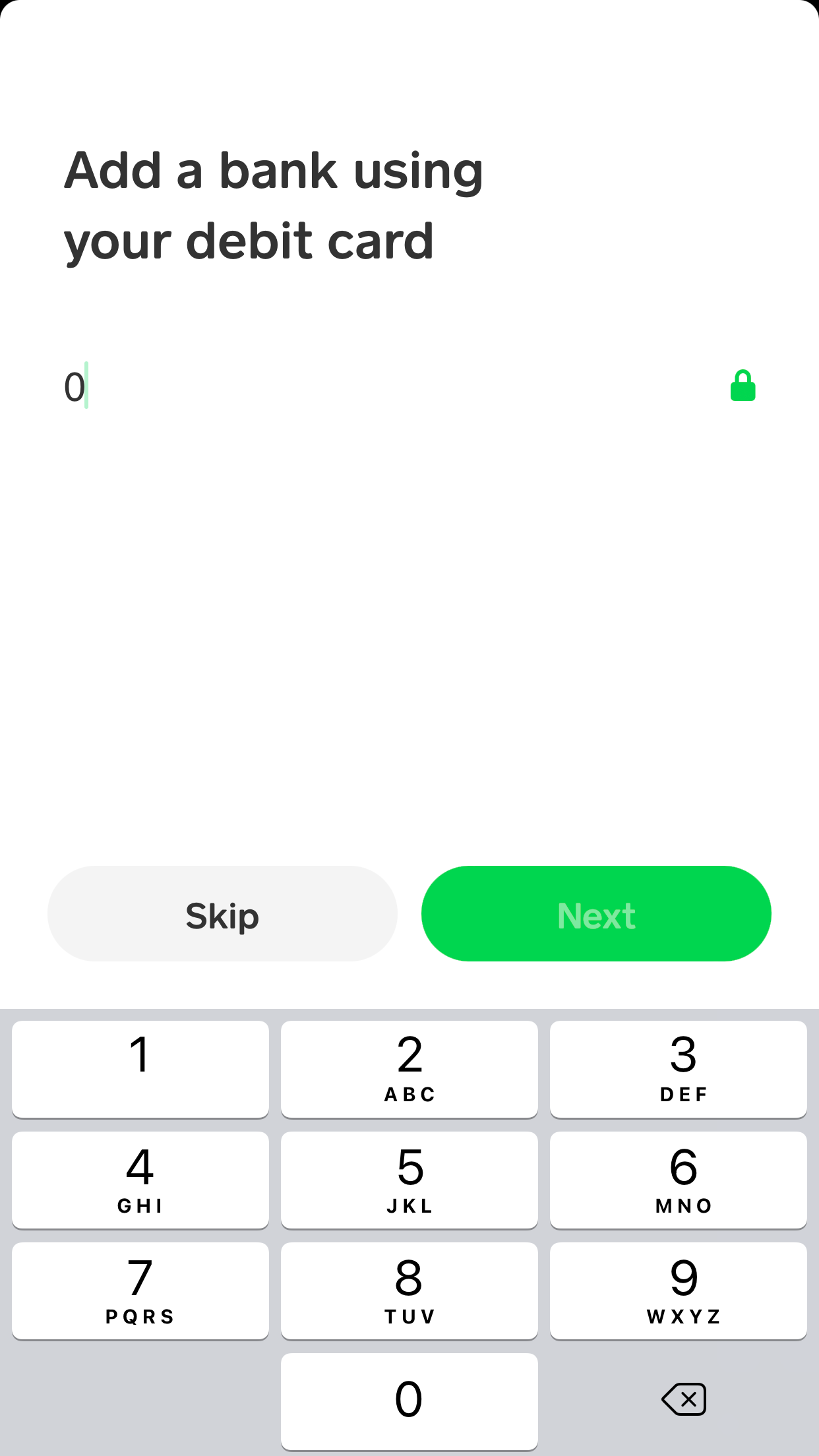
- Connecting a Debit Card: This is often the quickest method. You’ll be asked to enter your debit card number, expiration date, CVV, and zip code. This securely links your existing bank account via your debit card for direct transfers. The system uses encryption to protect this sensitive data during transmission and storage.
- Linking a Bank Account (Manually): For full direct deposit capabilities or if you prefer not to use a debit card, you can manually link your bank account using your bank’s routing number and account number. Cash App uses secure third-party financial data aggregators (like Plaid) that connect to your online banking portal to verify ownership and establish a link, often requiring you to log into your bank through a secure in-app browser. This method provides a more robust connection for larger transactions and direct deposits.
It’s vital to ensure that the debit card or bank account you link is in your name, aligning with the identity you’ll verify later. This step is where Cash App truly integrates with your broader financial infrastructure, enabling the flow of funds.
Choosing a $Cashtag
A $Cashtag is your unique identifier within the Cash App ecosystem, similar to a username but specifically for financial transactions. It makes it incredibly easy for others to find and send money to you without needing your phone number or email.
- Create a unique $Cashtag: You’ll be prompted to choose a $Cashtag. It must be unique and starts with a dollar sign. For example, “$JohnDoe42.”
- Publicity and Privacy: Your $Cashtag becomes public, allowing anyone to search for you and send money. Choose one that is professional or easily recognizable.
This feature is a prime example of Cash App’s user-centric design, simplifying the process of receiving money by abstracting complex account numbers into a memorable and shareable handle.
Verifying Your Identity for Full Functionality
While you can perform basic P2P transactions with just a phone number/email and a linked debit card, to unlock Cash App’s full potential – including sending and receiving larger amounts, ordering a Cash Card, and accessing investing features (Bitcoin and stocks) – you must verify your identity. This is a legal requirement known as Know Your Customer (KYC) and Anti-Money Laundering (AML) compliance.
- Provide Personal Information: You’ll be asked for your full legal name, date of birth, and the last four digits of your Social Security Number (SSN). For some users, full SSN or even a photo ID might be requested.
- Data Security: Cash App emphasizes that this information is securely encrypted and transmitted. It is used solely for verification purposes and not shared.
- Processing Time: Verification can be instantaneous for some, while others might experience a short processing delay if manual review is required.
Completing identity verification is a critical technical and regulatory step. It not only enhances the security of your account by confirming you are who you say you are but also removes transaction limits, allowing for more substantial financial activities within the app.
Navigating Cash App’s Core Features After Setup
Once your Cash App account is fully set up and verified, you gain access to a powerful suite of financial tools. Understanding how to interact with these features is key to leveraging the app for your daily financial management.
Sending and Receiving Money
The foundational utility of Cash App revolves around its peer-to-peer payment system.
- Sending Money: To send money, you typically enter the desired amount on the main screen, tap “Pay,” and then select the recipient using their $Cashtag, phone number, or email. You confirm the transaction, and the funds are instantly deducted from your Cash App balance or linked bank account/debit card. The user interface is designed for speed and clarity, minimizing steps for this frequent action.
- Receiving Money: When someone sends you money, it automatically appears in your Cash App balance. You’ll receive a notification. You can then choose to keep the money in your Cash App balance for future transactions or “Cash Out” to transfer it to your linked bank account. Standard cash-outs are free but take 1-3 business days, while “Instant Deposits” incur a small fee (typically 0.5-1.75%) but transfer funds immediately. This flexibility in managing received funds highlights the app’s hybrid nature between a digital wallet and a direct conduit to traditional banking.
The Cash Card: A Physical Extension of Your Digital Wallet
The Cash Card is a free, customizable debit card issued by Sutton Bank, linked directly to your Cash App balance. It’s a Visa debit card, meaning it’s accepted anywhere Visa is, both online and in physical stores.
- Ordering Your Cash Card: Once your account is verified, you can order a Cash Card through the app. You can customize its design and even add a signature. The card is mailed to your address, typically arriving within a week or two.
- Activating and Using the Card: Upon arrival, you activate it through the app using the CVV and expiration date. The Cash Card allows you to spend the money in your Cash App balance like a regular debit card. This feature bridges the gap between digital funds and the physical world, enabling users to make purchases, withdraw cash from ATMs (subject to ATM fees and Cash App limits), and utilize “Boosts” – instant discounts at specific merchants – further integrating the app into daily spending habits. Technologically, the Cash Card functions like any EMV chip debit card, providing secure, encrypted transactions at points of sale.
Direct Deposit and Banking Capabilities
Cash App has increasingly positioned itself as a viable alternative to traditional bank accounts, particularly for those who prefer mobile-first solutions or have limited access to conventional banking services.
- Setting Up Direct Deposit: In the “Banking” tab, you’ll find your account and routing numbers. You can provide these to your employer or any institution for direct deposits of paychecks, tax refunds, or government benefits. Funds arrive directly into your Cash App balance, often faster than traditional banks depending on the payer’s system.
- Spending and Managing Funds: With direct deposit, your Cash App balance essentially functions as a checking account. You can spend directly from it using your Cash Card, pay bills, or transfer funds to other accounts. This feature significantly enhances Cash App’s utility, moving it beyond a simple P2P app to a primary financial management tool for many users, leveraging digital infrastructure to mimic and even improve upon traditional banking conveniences.
Exploring Investing Options (Bitcoin and Stocks)
Cash App’s integration of investment features is a testament to its innovation in democratizing access to financial markets.
- Buying and Selling Bitcoin: Within the “Bitcoin” tab, users can buy and sell Bitcoin directly, with real-time market data integrated into the app. Cash App simplifies the process, abstracting away much of the complexity typically associated with cryptocurrency exchanges. It handles the secure storage (custody) of Bitcoin on behalf of users, making it accessible even for beginners. While the app does charge a small service fee for transactions, its user-friendly interface makes entry into the crypto market straightforward.
- Investing in Stocks: The “Investing” tab allows users to buy fractional shares of thousands of public companies. This means you can invest in expensive stocks like Apple or Amazon with as little as $1. Cash App partners with a brokerage firm (DriveWealth LLC) to facilitate these trades, providing real-time stock prices and a clean interface for managing your portfolio. The technological advantage here is making stock market investment incredibly accessible and affordable, breaking down traditional barriers to entry. Both features are designed with simplicity in mind, providing basic tools without overwhelming advanced analytical capabilities, aligning with its mission to be broadly user-friendly.
Enhancing Your Cash App Experience: Security and Customization
While Cash App is designed for ease of use, understanding its security features and customization options is paramount to safeguarding your financial information and personalizing your experience. As with any digital financial tool, user responsibility plays a critical role in maintaining security.
Securing Your Account: PIN, Touch ID, and Two-Factor Authentication
Cash App employs multiple layers of security, but users must activate and utilize these features for maximum protection.
- PIN (Personal Identification Number): Upon initial setup or when prompted, you’ll create a PIN. This PIN is required for sending money, accessing certain features, and cashing out. It acts as a primary defense against unauthorized access if your phone is lost or stolen.
- Touch ID/Face ID (Biometric Authentication): For supported devices, you can enable biometric authentication. This allows you to use your fingerprint or facial scan instead of your PIN for faster, more convenient, and often more secure access to the app. This leverages hardware-level security features of your smartphone.
- Two-Factor Authentication (2FA) / Login Code: Cash App sends a unique login code to your registered phone number or email every time you log in from a new device or sometimes even from your primary device after a period of inactivity. This “something you have” (your phone/email) combined with “something you know” (your PIN) or “something you are” (your biometrics) creates a robust security barrier, significantly reducing the risk of unauthorized account access even if your password or PIN is compromised. Activating and consistently using these security measures is non-negotiable for protecting your digital wallet.
Privacy Settings and Notifications
Cash App provides options to manage your privacy and control how you receive alerts, putting you in charge of your data and awareness.
- Privacy Settings: While your $Cashtag is public, you can control other aspects of your profile. Reviewing the privacy policy and understanding how your data is used is always recommended. For instance, transaction details are private by default, but you might consider whom you share your $Cashtag with.
- Notifications: You can customize which notifications you receive – for money sent, received, direct deposits, Cash Card activity, etc. Setting up appropriate notifications ensures you’re immediately aware of all activity on your account, which is crucial for detecting any suspicious transactions quickly. This is managed within the app’s settings and allows for a personalized experience without compromising security.
Troubleshooting Common Setup Issues
Despite its user-friendly design, users may occasionally encounter issues during setup or use. Recognizing and addressing these common problems efficiently is part of a robust tech ecosystem.
- Verification Problems: If identity verification fails, double-check that your legal name, date of birth, and SSN are entered precisely as they appear on official documents. Sometimes, a poor internet connection can also cause issues. If persistent, contacting Cash App support with relevant documentation may be necessary.
- Linking Bank/Card Issues: Ensure all card details are entered correctly. If using instant verification with Plaid, make sure your online banking credentials are correct. Some banks have stricter security protocols that might temporarily block connections. Trying again later or contacting your bank can resolve this.
- Login Issues: If you’re not receiving login codes, check your phone’s signal, ensure the registered phone number/email is correct, and check spam folders. If you forget your PIN, the app provides a recovery process typically involving email/phone verification.
- App Glitches: Occasionally, the app might freeze or behave unexpectedly. Often, simply closing the app completely and reopening it, or restarting your phone, can resolve minor software glitches. Ensuring your app is always updated to the latest version via your app store is also crucial, as updates often contain bug fixes and performance enhancements. Understanding basic troubleshooting steps empowers users to resolve minor issues independently, enhancing overall user satisfaction and system reliability.
The Future of Digital Payments: Cash App’s Role
Cash App is not just a tool; it’s a testament to the ongoing revolution in financial technology. Its evolution reflects broader trends in how we perceive and interact with money, indicating a future where financial services are more integrated, accessible, and user-centric.
The Evolution of Fintech
Cash App’s journey from a simple P2P payment service to a multifaceted financial platform mirrors the broader evolution of FinTech. Initially, FinTech focused on digitizing existing financial processes (e.g., online banking, electronic payments). However, companies like Cash App have pushed beyond this, innovating new service models and integrating diverse financial functions into single, intuitive applications. This shift leverages advancements in cloud computing, mobile technology, artificial intelligence (for fraud detection and personalization), and distributed ledger technology (for cryptocurrencies) to create more efficient and accessible financial ecosystems. Cash App, by offering services ranging from direct deposits to fractional stock trading within one app, exemplifies this trend towards comprehensive, digitally native financial management. It lowers barriers to entry for complex financial products, making investing and banking more inclusive.

Innovation and Future Prospects
The trajectory of Cash App suggests a continuous drive towards innovation. Future developments could include deeper integrations with other Square/Block products, expanded cryptocurrency offerings beyond Bitcoin, potentially supporting more altcoins, or even decentralized finance (DeFi) functionalities. We might see advanced budgeting tools, AI-powered financial advice, or even direct integration with merchant loyalty programs. The core technological challenge and opportunity for Cash App will be to maintain its famed simplicity and user-friendliness while continuously adding more sophisticated features and services. Ensuring robust security against evolving cyber threats, maintaining regulatory compliance across various financial products, and scaling its infrastructure to accommodate a growing user base will remain paramount. As digital wallets become increasingly central to our financial lives, Cash App is poised to play a significant role in shaping how we interact with money in the years to come, pushing the boundaries of what a mobile financial application can achieve.
aViewFromTheCave is a participant in the Amazon Services LLC Associates Program, an affiliate advertising program designed to provide a means for sites to earn advertising fees by advertising and linking to Amazon.com. Amazon, the Amazon logo, AmazonSupply, and the AmazonSupply logo are trademarks of Amazon.com, Inc. or its affiliates. As an Amazon Associate we earn affiliate commissions from qualifying purchases.