
In the rapidly evolving world of consumer electronics, the specifications of a display often dictate the quality of our digital experiences. Whether you are a competitive gamer seeking a split-second advantage, a creative professional editing high-definition video, or an office worker spending eight hours a day in front of a spreadsheet, understanding the technical nuances of your hardware is essential. Among the myriad of specifications listed on a monitor’s box—resolution, panel type, response time—one of the most critical is the “refresh rate.”
But what exactly is the refresh rate, and how does it fundamentally change the way we interact with technology? This guide explores the mechanics behind the screen, the psychological impact of motion fluidity, and the technical requirements needed to push modern displays to their limits.

Understanding the Fundamentals: What Exactly is Refresh Rate?
At its most basic level, the refresh rate is a measurement of how many times per second a monitor updates the image on the screen. Because digital displays do not show continuous motion in the way the physical world does, they rely on a series of static images shown in rapid succession to trick the human eye into perceiving movement.
The Definition of Hertz (Hz)
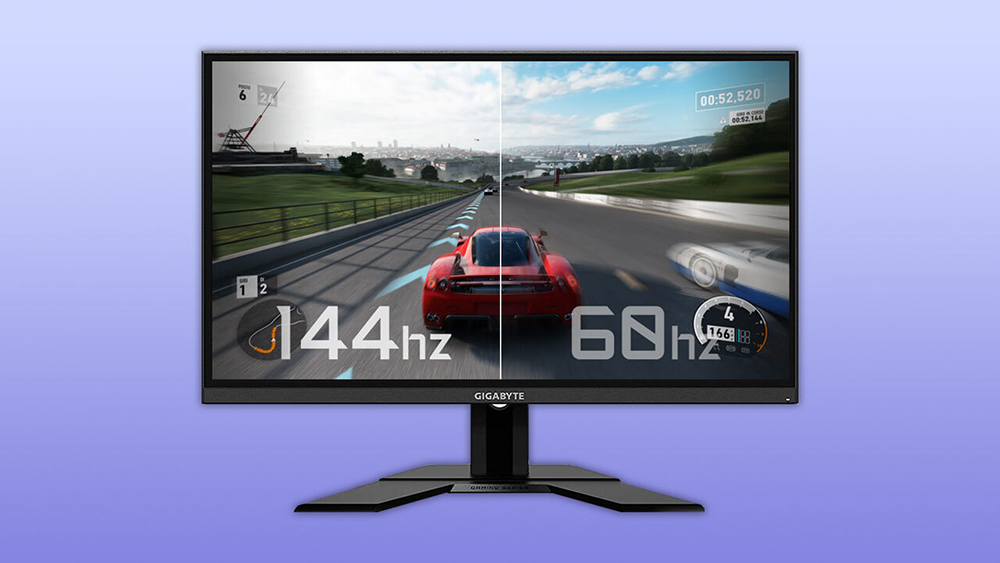
The refresh rate is measured in Hertz (Hz). If a monitor is rated at 60Hz, it means the screen is redrawing the image 60 times every second. A 144Hz monitor redrafts the image 144 times per second, and high-end boutique gaming monitors can now reach 360Hz or even 540Hz. The higher the number, the more information your eyes receive in a given timeframe, leading to a smoother visual experience.
How It Differs from Frame Rate (FPS)
A common point of confusion in the tech community is the difference between refresh rate and frame rate (Frames Per Second, or FPS). While they are related, they originate from different components of your computer:
- Frame Rate (FPS): This is the number of frames the Graphics Processing Unit (GPU) can produce per second. It is a measure of the computer’s raw power.
- Refresh Rate (Hz): This is the fixed rate at which the monitor can display those frames. It is a hardware limitation of the panel itself.
If your GPU is powerful enough to generate 120 FPS, but you are using a standard 60Hz monitor, you will only actually see 60 updates per second. Conversely, if you have a 144Hz monitor but your computer can only output 30 FPS, the monitor will simply repeat frames, resulting in a choppy experience despite the high-end display.
The Evolution of Monitor Technology and Smooth Motion
For decades, 60Hz was the industry standard for televisions and computer monitors. This was largely dictated by the frequency of the power grid in North America and parts of Asia. However, as display technology transitioned from bulky CRTs (Cathode Ray Tubes) to LCDs and eventually OLEDs, the push for higher refresh rates became a primary driver of innovation.
The Transition from 60Hz to High-Refresh Displays
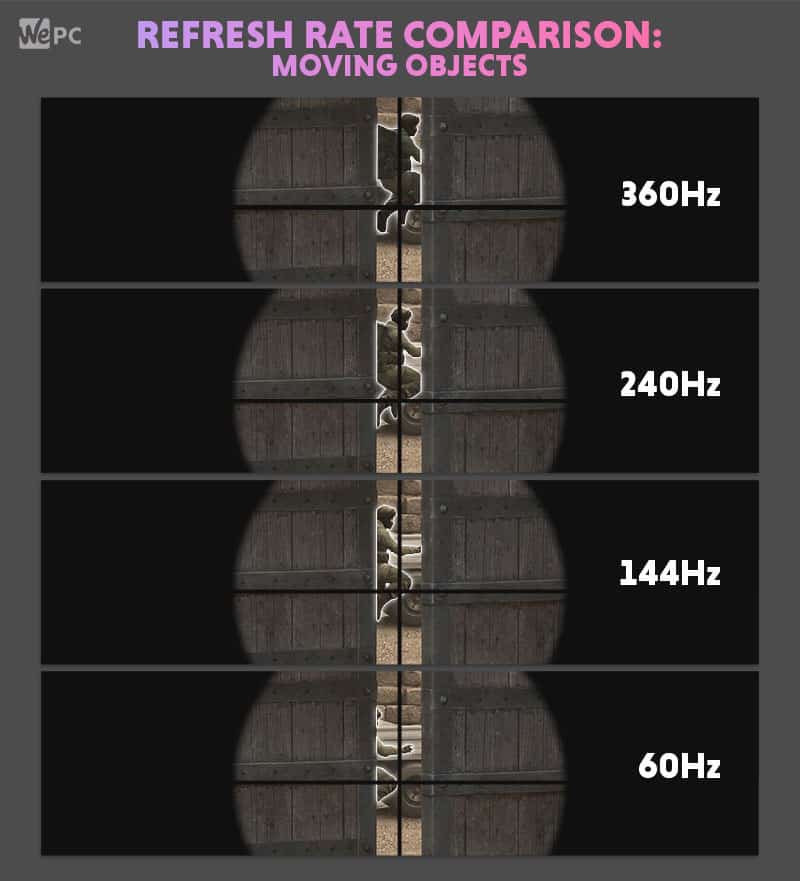
The jump from 60Hz to 120Hz or 144Hz is often described by users as “transformative.” At 60Hz, moving a mouse cursor across the desktop can look like a series of “ghost” trails. At 144Hz, that same movement appears as a fluid, singular motion. This transition significantly reduces motion blur—the perceived smearing of objects when they move quickly across the screen. For tech enthusiasts, the reduction in motion blur makes the entire operating system feel more responsive and “snappy.”
Why 144Hz and 240Hz are the New Standards for Enthusiasts
In the current tech landscape, 144Hz has become the “sweet spot” for most consumers. It offers a massive leap over standard office monitors without requiring the extreme financial investment of ultra-high-end gear. However, for professional eSports athletes, 240Hz and 360Hz have become the baseline. These monitors offer “frame times” (the time between each update) of just a few milliseconds. At 360Hz, a new image is presented every 2.8 milliseconds, providing the most current information possible to the user’s brain.
Synchronization Technologies: G-Sync, FreeSync, and VRR
One of the greatest challenges in display technology is the “handshake” between the GPU and the monitor. Because the GPU often produces frames at varying intervals (depending on the complexity of the scene), and the monitor historically refreshed at a fixed interval, a mismatch often occurred. This mismatch leads to a visual artifact known as “screen tearing,” where the monitor displays pieces of two different frames at the same time.
Solving Screen Tearing and Stuttering
To solve this, technology giants NVIDIA and AMD introduced synchronization protocols. NVIDIA’s G-Sync and AMD’s FreeSync are forms of Variable Refresh Rate (VRR). These technologies allow the monitor to communicate directly with the GPU. Instead of the monitor refreshing at a rigid 144 times per second, it waits for the GPU to finish a frame before updating. If the GPU slows down, the monitor slows down; if the GPU speeds up, the monitor matches it. This eliminates tearing and makes lower frame rates feel significantly smoother than they would on a fixed-rate display.
The Role of Adaptive-Sync in Modern Computing
Beyond gaming, Adaptive-Sync technology is making its way into the broader tech ecosystem. Modern smartphones and high-end laptops (such as those using Apple’s ProMotion technology) use variable refresh rates to save battery life. If you are looking at a static image or reading an article, the screen may drop to 10Hz or even 1Hz. The moment you scroll, it ramps back up to 120Hz for a smooth experience. This intelligent management of refresh rates is a cornerstone of modern mobile efficiency.
How Refresh Rate Impacts Different Use Cases
While it is easy to assume that higher is always better, the necessity of a high refresh rate depends largely on what you are doing with your computer.
Competitive Gaming and Input Lag
In the realm of competitive gaming, refresh rate is a performance-altering stat. High refresh rates reduce “input lag”—the delay between clicking your mouse and seeing the action on the screen. Because the screen is updating more frequently, you see the enemy’s movement sooner, allowing for faster reaction times. In titles like Counter-Strike, Valorant, or Apex Legends, the difference between 60Hz and 240Hz can literally be the difference between winning and losing an encounter.
Productivity, Eye Strain, and Everyday Use
For the average professional, the benefits are more subtle but equally important. Research suggests that higher refresh rates can reduce eye strain during long working hours. Because the motion of text and windows is smoother, the brain has to work less hard to track movement on the screen. Furthermore, for creative professionals involved in video editing or UI/UX design, having a high-refresh display allows them to preview animations and transitions exactly as they will appear to the end-user.
Technical Requirements: What You Need to Support High Refresh Rates
Purchasing a high-refresh-rate monitor is only half the battle. To actually utilize those Hertz, your entire hardware chain must be compatible. This is where many users run into technical bottlenecks.
Connectivity Matters: HDMI vs. DisplayPort
Not all cables are created equal. To push high resolutions at high refresh rates (such as 4K at 144Hz), you need specific versions of display cables.
- HDMI 2.1: The latest standard, capable of supporting 4K at 120Hz or 8K at 60Hz. Older HDMI 1.4 cables are often capped at 60Hz for 1080p.
- DisplayPort 1.4 and 2.1: Generally preferred by PC users, DisplayPort 1.4 supports high bandwidth for 1440p and 4K high-refresh gaming. DisplayPort 2.1 is the cutting-edge standard designed for the next generation of ultra-high-bandwidth displays.
The Importance of GPU Power and Bandwidth
Finally, the “engine” of your setup—the Graphics Card—must be capable of delivering the frames. While almost any modern integrated graphics chip can handle 144Hz for basic office work or web browsing, gaming is a different story. To hit 240 FPS in a modern, graphically intensive game, you require a top-tier GPU (like the NVIDIA RTX 40-series or AMD RX 7000-series).
In summary, the refresh rate is the heartbeat of your monitor. It defines the “feel” of your digital world, bridging the gap between static code and fluid human perception. As technology continues to advance, we are likely to see high refresh rates move from a premium luxury to a standard feature across all devices, making the digital experience more natural and responsive than ever before.
aViewFromTheCave is a participant in the Amazon Services LLC Associates Program, an affiliate advertising program designed to provide a means for sites to earn advertising fees by advertising and linking to Amazon.com. Amazon, the Amazon logo, AmazonSupply, and the AmazonSupply logo are trademarks of Amazon.com, Inc. or its affiliates. As an Amazon Associate we earn affiliate commissions from qualifying purchases.