
In the rapidly evolving landscape of mobile technology, the transition from an old smartphone to a new flagship device is often met with a mixture of excitement and anxiety. While the prospect of upgraded hardware and fresh features is appealing, the logistical challenge of moving gigabytes of personal data—ranging from high-resolution photographs to sensitive system settings—remains a significant hurdle for many users. Recognizing this friction, Samsung developed the Smart Switch app, a robust utility designed to simplify the migration process for Android users, particularly those entering the Samsung Galaxy ecosystem. This article provides an in-depth exploration of what Smart Switch is, how it operates, and why it has become an indispensable tool in the modern digital toolkit.
The Core Functionality and Evolution of Samsung Smart Switch
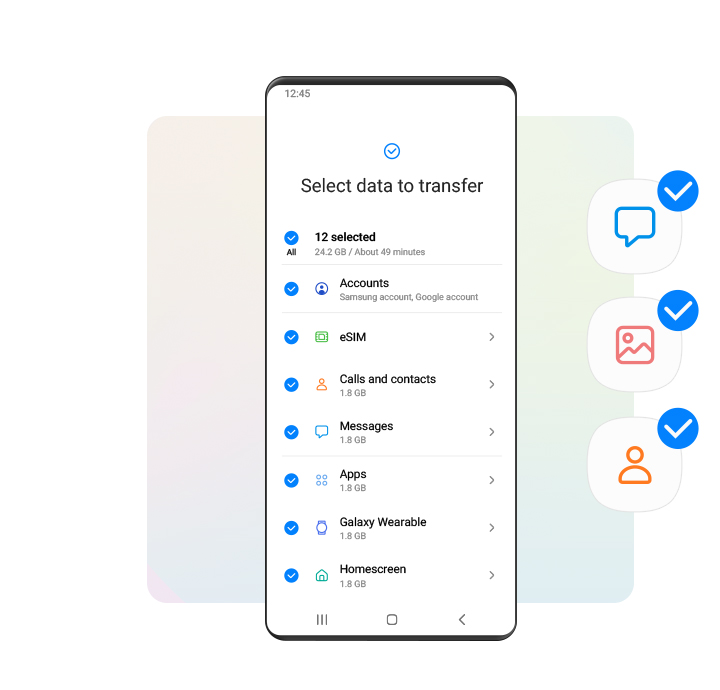
At its most fundamental level, Samsung Smart Switch is a data transfer application that facilitates the movement of content from a source device (which can be an iPhone, a Windows Phone, or another Android device) to a target Samsung Galaxy device. Since its inception, the app has evolved from a simple contact-transfer tool into a sophisticated migration engine capable of mirroring an entire mobile environment.
What is Samsung Smart Switch?
Samsung Smart Switch is a proprietary software solution that bridges the gap between different mobile platforms. Available as both a mobile application on the Google Play Store and a desktop application for Windows and macOS, it serves as a central hub for device onboarding. Unlike generic cloud backup services that may struggle with app-specific data or system configurations, Smart Switch is optimized to communicate directly with the hardware and operating system of Galaxy devices. This integration allows for a “deep copy” of the user’s digital life, ensuring that the new device feels familiar from the very first boot.
The Importance of Smooth Transitions in the Mobile Ecosystem
In the tech industry, the concept of “churn”—where a user switches from one brand to another—is a critical metric. One of the primary reasons users hesitate to switch platforms is the “sunk cost” of their data. If a user feels that moving to a new phone will result in the loss of messages, game progress, or curated settings, they are less likely to upgrade. Smart Switch acts as a strategic utility to mitigate this friction. By offering a reliable, high-speed, and comprehensive transfer method, Samsung removes the technical barriers to entry, making the transition between devices as frictionless as possible.
How Smart Switch Works: Methods and Compatibility
The versatility of Smart Switch lies in its multiple connection protocols. Samsung has designed the app to be resilient, offering various ways to connect devices depending on the user’s hardware availability and the amount of data being transferred.
Wireless vs. Wired Transfers
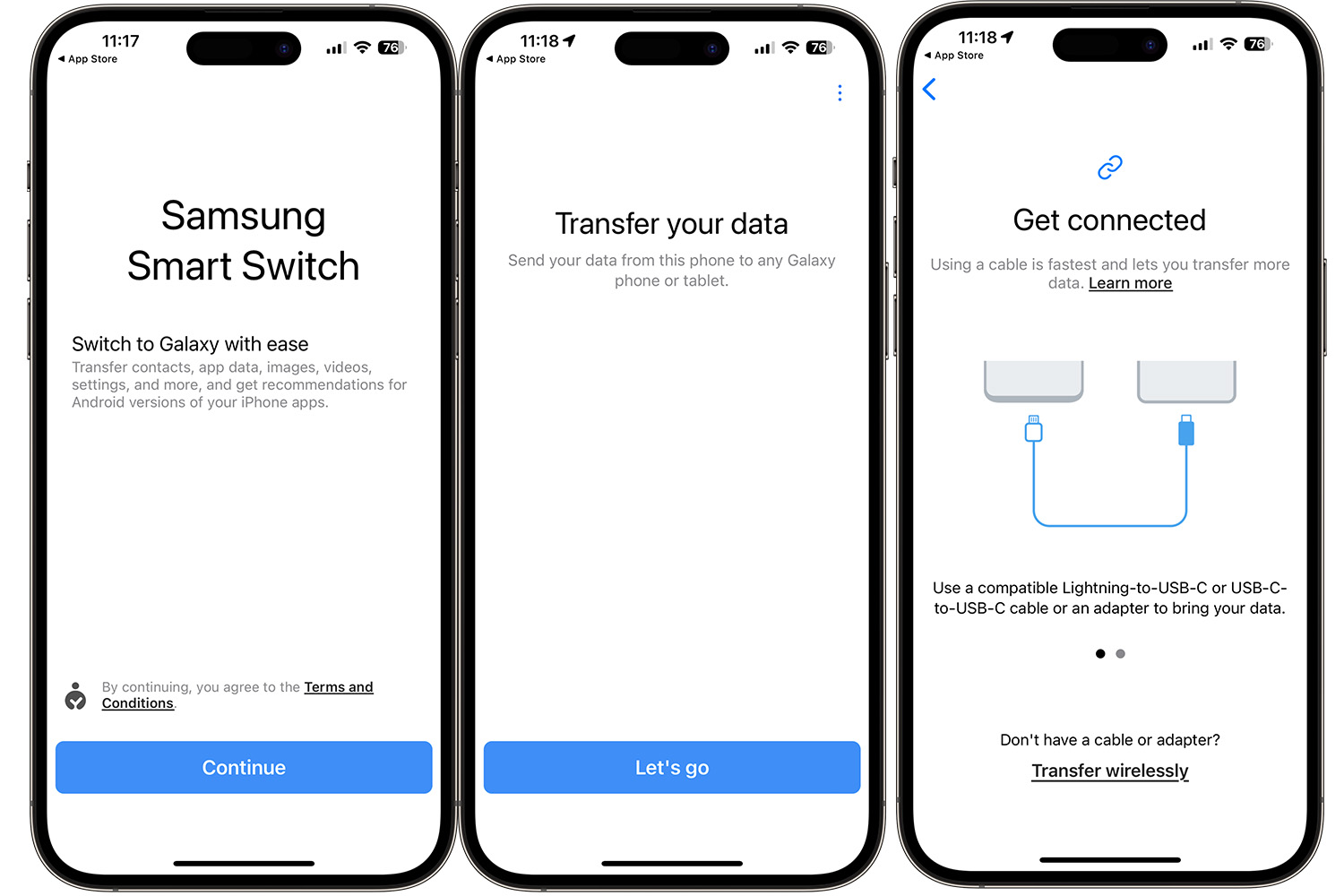
Smart Switch offers two primary modes of direct transfer: wireless and USB cable.
- Wireless Transfer: This method utilizes Wi-Fi Direct technology. Unlike standard Wi-Fi, which requires a router, Wi-Fi Direct establishes a high-speed, peer-to-peer connection between the two devices. This is ideal for users who do not have a compatible USB-OTG (On-The-Go) adapter. While convenient, the speed of wireless transfer is susceptible to electromagnetic interference and the physical distance between devices.
- Wired Transfer (USB Cable): For users with large media libraries—sometimes exceeding 100GB—the wired method is the gold standard. By connecting the two devices using a USB-C to USB-C cable (or a Lightning to USB-C cable for iPhone users), Smart Switch can achieve much higher data throughput. This method is also more stable, as it is not subject to wireless signal drops, making it the preferred choice for comprehensive migrations.
Cross-Platform Support: From iOS to Android
One of the most impressive technical feats of Smart Switch is its ability to interface with Apple’s closed ecosystem. When migrating from an iPhone to a Galaxy device, Smart Switch can pull data directly from an iCloud backup or via a physical connection. It can successfully migrate contacts, calendars, notes, photos, videos, and even bookmarks. Furthermore, the app attempts to find Android equivalents for the iOS apps the user had installed, presenting a list of downloadable matches on the Google Play Store to ensure continuity in the user’s app library.
PC and Mac Integration
Beyond mobile-to-mobile transfers, the Smart Switch desktop application provides an additional layer of data security. Users can connect their Samsung device to a computer to create a full local backup. This is particularly useful for enterprise users or those who prefer not to store their entire digital history in the cloud. The desktop version also facilitates firmware updates, allowing users to manually push software optimizations to their devices, ensuring the hardware is running at peak performance.
Data Versatility: What You Can and Cannot Transfer
The utility of a migration tool is measured by the granularity of the data it can move. Smart Switch is renowned for its ability to handle complex data types that standard backup tools often overlook.
The “Full Package” Migration
Smart Switch is not limited to just media. It handles the “bread and butter” of smartphone data with high fidelity:
- Personal Information: Contacts, call logs, SMS and MMS messages, and calendar events.
- Media: Photos, videos, music, and voice recordings.
- Documents: PDF files, Word documents, and other saved files in the internal storage.
- Apps: While the app binaries themselves are usually re-downloaded from the Play Store to ensure compatibility with the new hardware, Smart Switch facilitates the movement of the list of apps and, in many cases, the app data associated with them.
System Settings and Personalization
What sets Smart Switch apart from generic Android migration tools is its ability to transfer system-level customizations. This includes home screen layouts, wallpaper choices, Wi-Fi passwords, and even alarm clock settings. For a user, there is an immense psychological benefit to turning on a new phone and seeing their apps arranged in the exact same folders as they were on their previous device. It minimizes the “learning curve” associated with new hardware.
Limitations and Restricted Data Types
Despite its power, Smart Switch does have technical and legal limitations.
- DRM-Protected Content: Any media protected by Digital Rights Management (DRM), such as certain movies or music tracks purchased through specific storefronts, may not transfer due to licensing restrictions.
- Encrypted App Data: Apps that use high-level encryption for security—such as banking apps, Signal, or WhatsApp (which requires its own internal backup system)—cannot have their internal data moved via Smart Switch for security reasons. Users will generally need to log back into these accounts and verify their identity on the new device.
- Game Progress: While the app itself moves, game saves that are stored locally rather than in the cloud (Google Play Games or the developer’s servers) might not always transfer.
Security, Privacy, and Performance Optimization
In an era where data privacy is paramount, the security of the migration process is a significant concern for users. Smart Switch is built with several safeguards to ensure that the data remains private and the hardware remains healthy during the transfer.
End-to-End Security Protocols
When using the wireless transfer method, Smart Switch employs encrypted Wi-Fi Direct connections. This ensures that the data packets traveling between the two devices cannot be intercepted by third parties on the same network. Furthermore, because the transfer is direct (peer-to-peer), the data does not need to be uploaded to a third-party server, reducing the “attack surface” for potential data breaches.
Optimizing the Transfer Process for Speed
To maximize performance, it is recommended that both devices have at least 20% battery life before beginning, although keeping them plugged into a power source is ideal. Smart Switch performs a “pre-transfer scan” to estimate the time required and allows users to deselect unnecessary folders. By excluding temporary cache files or large, redundant video files, users can significantly decrease the migration time. Modern Galaxy devices also utilize UFS (Universal Flash Storage) technology, which allows for rapid write speeds, further accelerating the process.
Troubleshooting and the Future of Device Onboarding
While Smart Switch is designed to be “plug-and-play,” the complexity of mobile operating systems can occasionally lead to technical glitches. Understanding how to navigate these issues is key to a successful transfer.
Common Issues and How to Resolve Them
The most common issues encountered with Smart Switch include connection drops and “insufficient storage” errors.
- Connection Stability: If the wireless transfer fails, switching to a wired connection usually resolves the issue. Disabling “Smart Network Switch” in the Wi-Fi settings can also prevent the device from hopping to a known internet-connected network during the peer-to-peer transfer.
- Storage Management: If the target device has less storage than the source device, the transfer will fail. Smart Switch provides a breakdown of data categories, allowing users to prioritize essential data (like contacts and messages) while leaving large media files to be moved via a computer or cloud service later.

The Role of Migration Apps in Future Tech Trends
As we move toward a future of foldable devices, wearable tech, and integrated IoT ecosystems, the role of apps like Smart Switch will only expand. We are seeing a trend where migration is not just about moving files, but about migrating “digital identities.” Future iterations of Smart Switch will likely integrate more deeply with AI to suggest which apps a user might want to “hibernate” during a move and which settings are most critical for their specific usage patterns.
In conclusion, the Smart Switch app on Android is more than just a utility; it is a vital bridge in the hardware upgrade cycle. By offering a secure, comprehensive, and user-friendly way to manage data migration, Samsung has set a high standard for how manufacturers should handle the onboarding of new customers. Whether you are a tech enthusiast moving to the latest S-series flagship or a casual user simply trying to save your family photos, Smart Switch provides the technical infrastructure to ensure that your digital life moves with you, seamlessly and securely.
aViewFromTheCave is a participant in the Amazon Services LLC Associates Program, an affiliate advertising program designed to provide a means for sites to earn advertising fees by advertising and linking to Amazon.com. Amazon, the Amazon logo, AmazonSupply, and the AmazonSupply logo are trademarks of Amazon.com, Inc. or its affiliates. As an Amazon Associate we earn affiliate commissions from qualifying purchases.