
In the rapidly evolving landscape of web development, the tools we use to style the digital world have undergone a massive transformation. For years, Cascading Style Sheets (CSS) served as the bedrock of visual design on the internet. However, as web applications grew more complex, standard CSS began to reveal its limitations. Developers found themselves repeating code, struggling with global scope issues, and managing massive, unorganized stylesheets. This friction led to the birth of CSS preprocessors, the most prominent of which are Sass and SCSS.
To the uninitiated, these terms are often used interchangeably, yet they represent two distinct syntaxes within the same powerful ecosystem. Understanding the nuances of Sass and SCSS is not just about learning a new tool; it is about adopting a more programmatic, efficient, and scalable approach to front-end engineering.
Understanding the Core Concepts of CSS Preprocessors
At its heart, a CSS preprocessor is a scripting language that extends the default capabilities of CSS. It allows developers to use features that do not exist in standard CSS—such as variables, nested rules, and functions—which are then compiled into regular CSS that a browser can understand. Because browsers cannot natively read Sass or SCSS files, a “compiler” acts as a bridge, translating your advanced code into a standard .css file.
What is Sass? (The Indented Syntax)
Sass, which stands for Syntactically Awesome Style Sheets, was the original version of this technology. Developed in 2006, it took a radical departure from traditional CSS syntax. It is often referred to as the “indented syntax.” In a Sass file (using the .sass extension), you won’t find curly braces {} or semicolons ;. Instead, the code relies on indentation to determine the nesting of selectors. This results in a much cleaner, shorthand version of styling that appeals to developers who prefer a minimalist, Python-like aesthetic.
What is SCSS? (Sassy CSS)
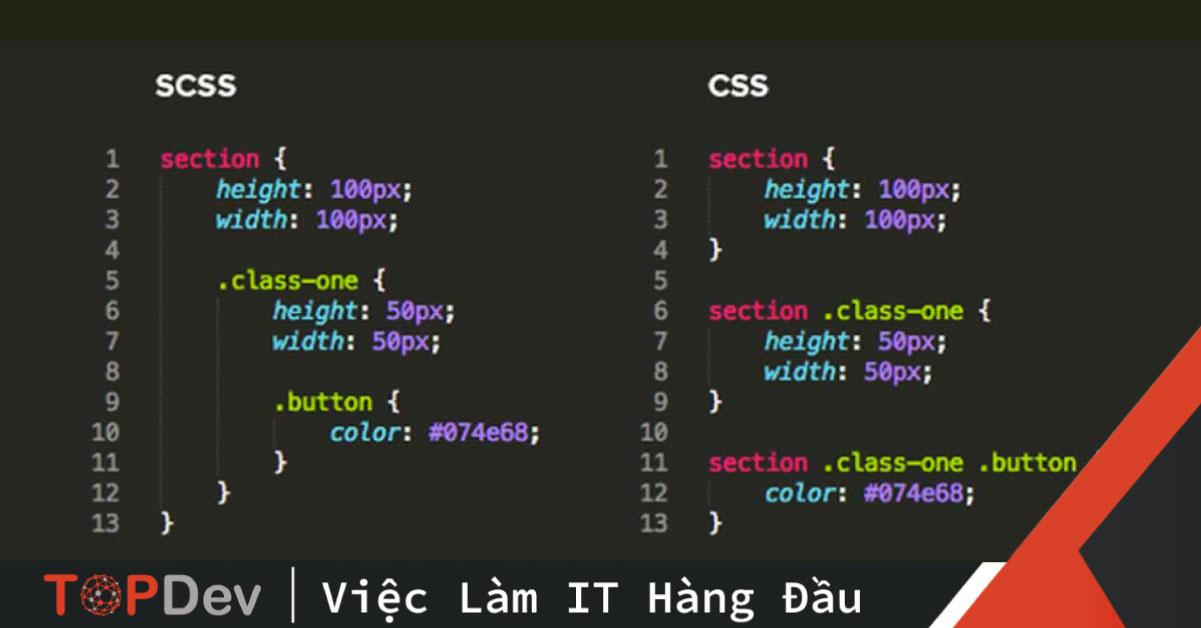
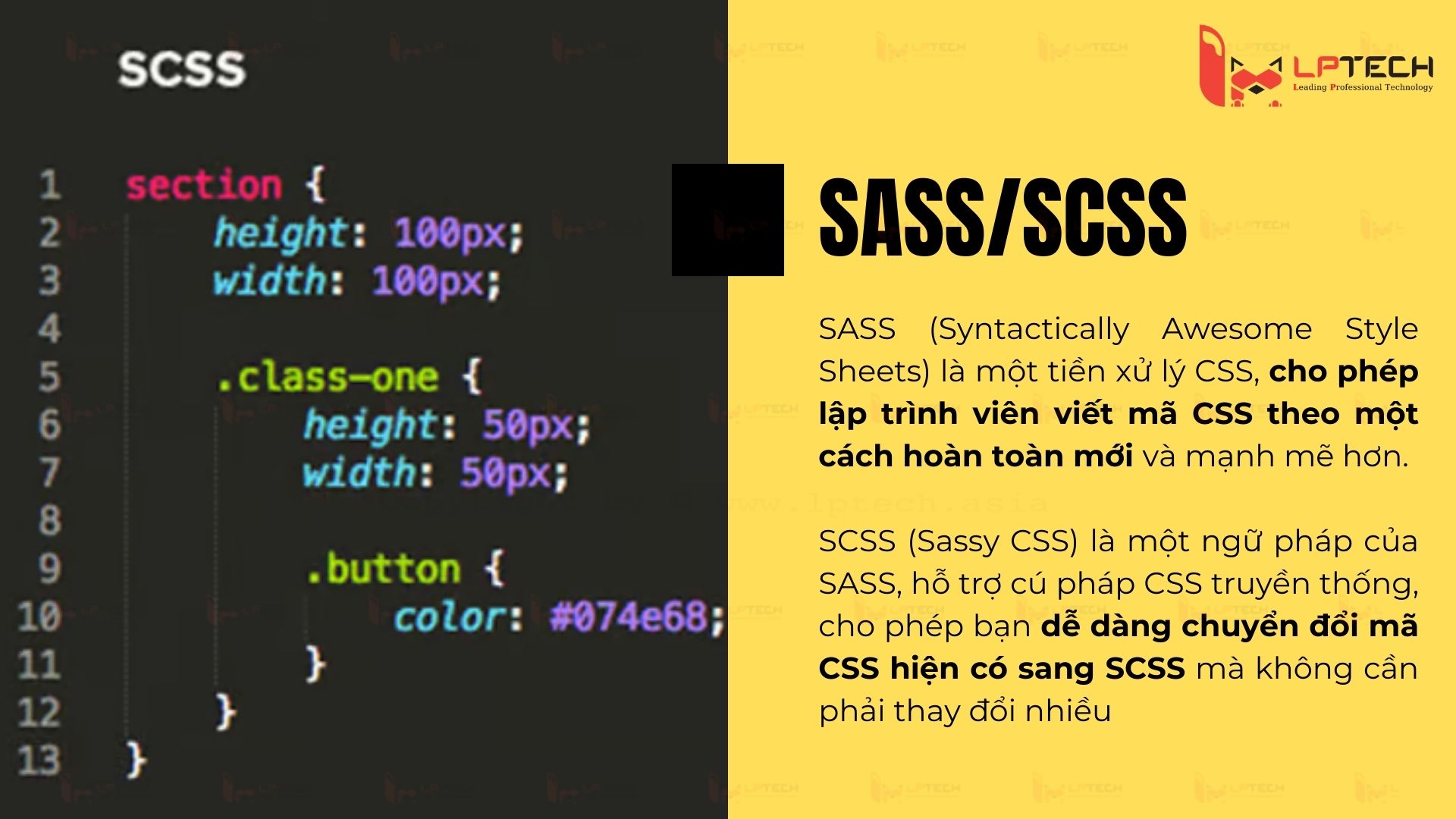
SCSS, or Sassy CSS, was introduced as a newer syntax with the release of Sass 3. It was designed to bridge the gap between traditional CSS and the power of Sass. The key difference is that SCSS is a “superset” of CSS. This means that every valid CSS file is also a valid SCSS file. It retains the curly braces and semicolons that developers are accustomed to, making the learning curve much shallower. Because of its compatibility with existing CSS and its intuitive nature, SCSS has become the industry standard and is significantly more popular than the original indented syntax.
How Preprocessors Work: The Compilation Process
The workflow involving Sass/SCSS is fundamentally different from writing vanilla CSS. When you write in SCSS, you are working in a “development environment.” Before your website goes live, a compiler (such as Dart Sass or a build tool like Vite or Webpack) watches your files for changes. Every time you save your .scss file, the compiler processes the logic and outputs a minified, optimized .css file. This separation of concerns allows developers to write human-readable, logical code while delivering high-performance, machine-optimized code to the end-user.
Key Features that Elevate Sass and SCSS Above Standard CSS
The reason Sass and SCSS have remained relevant for over a decade, even as native CSS evolves, is the sheer power of their programmatic features. They bring the logic of programming languages—like Ruby or JavaScript—to the world of design.
Variables for Consistency and Theming
In standard CSS, if you want to change a primary brand color used in 50 different places, you might have to perform a “find and replace” or rely on CSS custom properties (which have limitations in older browsers). In Sass/SCSS, you define a variable once: $primary-color: #3498db;. If the brand decides to shift to a darker blue, you change that one line, and the entire application updates instantly. This is crucial for maintaining design systems and ensuring visual consistency across large-scale software products.
Nesting for Logical Structure
One of the most frustrating aspects of vanilla CSS is the constant repetition of parent selectors. To style a navigation menu, you might have to write .nav, .nav ul, and .nav ul li separately. Sass solves this through nesting. You can place the styles for the ul and li tags directly inside the .nav block. This visually mimics the hierarchy of the HTML, making the code much easier to read and maintain. However, seasoned developers caution against “over-nesting,” which can lead to overly specific CSS selectors that are hard to override.
Mixins and Functions for Reusability
The “Don’t Repeat Yourself” (DRY) principle is a pillar of software engineering, and Mixins are how Sass implements it. A Mixin allows you to define a group of CSS declarations that you want to reuse throughout your site. For example, if you have a specific button style with complex box shadows and gradients, you can wrap it in a @mixin. Whenever you create a new button type, you simply @include that mixin. Sass also supports functions, allowing you to perform mathematical calculations—like dynamically calculating font sizes or converting pixels to rems—directly within your stylesheet.
Inheritance and Extends
Sass provides an @extend directive that allows one selector to inherit the styles of another. This is particularly useful for UI components that share a base style but have small variations, such as “Success,” “Warning,” and “Error” alerts. Rather than copying and pasting the base alert code, the specific alerts simply extend the base class, resulting in a cleaner and more modular codebase.
Choosing Between Sass and SCSS: Which One Fits Your Workflow?
While both syntaxes offer the same features under the hood, the choice between .sass and .scss usually comes down to team preference and project requirements.
The Cleanliness of the Indented Syntax
For developers who prioritize speed and brevity, the original Sass syntax is often the winner. By removing the need for semicolons and braces, it reduces the number of keystrokes and minimizes visual clutter. It forces a strict indentation rule, which can actually result in better-organized code. However, it can be jarring for those who are used to the “look and feel” of the web, and it is less friendly to designers who might only occasionally dip into the code.
The Compatibility and Popularity of SCSS
SCSS is the overwhelming favorite in the professional tech industry. Because it is a superset of CSS, you can take any existing CSS file, change the extension to .scss, and it will work perfectly. This makes it incredibly easy to migrate legacy projects to a modern workflow. Furthermore, most documentation, tutorials, and third-party libraries (like Bootstrap or Foundation) are written in SCSS. If you are looking to work in a collaborative environment or contribute to open-source projects, mastering SCSS is essential.
Performance and Scalability in Large Projects
When it comes to enterprise-level software, the ability to split styles into multiple files is a game-changer. Both Sass and SCSS utilize “Partials.” These are smaller files (prefixed with an underscore, like _buttons.scss) that contain specific components. A main style sheet then imports all these partials. This means you don’t have to scroll through a 5,000-line CSS file to find a single bug; you simply navigate to the specific component file. This modularity is a core requirement for modern DevOps and CI/CD pipelines.
Integrating Sass into Modern Tech Stacks
In the current era of React, Vue, and Angular, Sass has successfully adapted to the component-based architecture of modern web development. It is no longer just a standalone tool but a deeply integrated part of the build process.
Tools and Compilers
The industry has moved from the original Ruby-based Sass to “Dart Sass,” which is faster and more compliant with modern standards. Most developers interact with Sass through build tools. If you are using a tool like Vite or Create React App, adding Sass support is often as simple as installing a single package via npm. These tools handle the compilation in the background, providing features like “Hot Module Replacement,” where your styles update in the browser the millisecond you save your file without requiring a page refresh.
Best Practices: The 7-1 Pattern
To truly harness the power of Sass/SCSS in a tech-heavy environment, many professionals adopt the “7-1 Pattern.” This architecture involves organizing your styles into seven folders: base, components, layout, pages, themes, abstracts (for variables and mixins), and vendors. All of these are compiled into one single main.scss file. This level of organization ensures that as a project grows from a simple landing page to a massive SaaS platform, the styling remains manageable, searchable, and scalable.
The Future: Sass vs. Native CSS Features
A common question in the tech community is whether Sass is still necessary now that native CSS has variables (Custom Properties), calc(), and upcoming nesting features. While CSS is catching up, Sass still offers logical operations, complex loops, and advanced mixin capabilities that CSS likely won’t implement for years. For professional developers, Sass remains a “power-user” tool that provides a level of control and abstraction that vanilla CSS simply cannot match. It isn’t just about what the browser sees—it’s about the developer experience and the maintainability of the source code.
In conclusion, whether you choose the minimalist indented syntax of Sass or the CSS-friendly structure of SCSS, you are investing in a workflow that prioritizes logic and efficiency. As the digital world becomes more complex, the ability to write “Sassy” code ensures that your technical debt remains low and your creative potential remains high.
aViewFromTheCave is a participant in the Amazon Services LLC Associates Program, an affiliate advertising program designed to provide a means for sites to earn advertising fees by advertising and linking to Amazon.com. Amazon, the Amazon logo, AmazonSupply, and the AmazonSupply logo are trademarks of Amazon.com, Inc. or its affiliates. As an Amazon Associate we earn affiliate commissions from qualifying purchases.