
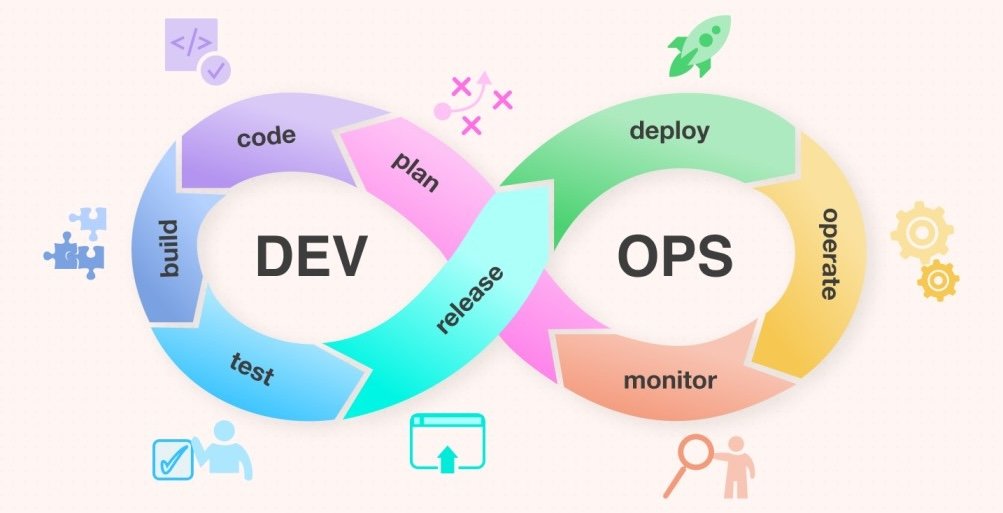
In the world of software engineering, few terms carry as much weight—or as much anxiety—as “the deploy.” For developers, a deploy represents the culmination of hours, days, or even months of coding, debugging, and refining. For a business, it is the moment a new feature finally starts generating value or a critical bug is finally silenced. At its simplest, a “deploy” (or deployment) is the process of moving software from a development environment to a live environment where it can be used by its intended audience.
However, in the modern landscape of cloud computing, microservices, and rapid iteration, a deploy is far more than just “uploading a file.” it is a complex, multi-staged transition that sits at the intersection of development and operations (DevOps). Understanding what happens during a deploy is essential for anyone looking to navigate the modern tech stack.
Defining the Deploy: From Source Code to Live Application
To understand what a deploy is, one must first understand the journey software takes. Software doesn’t just appear on the internet; it is built in controlled, private environments. A deploy is the bridge between the “lab” and the “real world.”
The Core Concept of Deployment
Technically speaking, deployment is the act of distributing software to a server, mobile device, or client-side browser so that it can be executed. In the early days of computing, this might have involved physically carrying a stack of punch cards or a floppy disk to a mainframe. Today, it involves sophisticated automated pipelines that move code across the globe in seconds.
A “deploy” is often confused with a “release,” but in high-level tech circles, they are distinct. A deploy is the technical act of putting the code on a server. A release is the business decision to make that code visible or functional for users. You can deploy code “darkly” (where it sits on the server but isn’t active) and release it later with a toggle switch.
The Difference Between Development and Production
The primary reason a deploy is a distinct event is the difference between environments. Developers work in a “Local Environment” (their own laptop) or a “Development Environment” (a shared sandbox). These environments are messy, full of debugging tools, and often lack the scale of the real world.
The “Production Environment” is the live stage. It is where real users interact with the data. A deploy must ensure that the code which worked perfectly on a developer’s MacBook will also work perfectly on a Linux server cluster handling millions of requests. This transition requires “packaging”—turning raw code into a stable, executable format known as an “artifact.”
The Modern Deployment Pipeline: How Code Reaches the User
Gone are the days when a developer would manually transfer files via FTP (File Transfer Protocol). Modern tech companies utilize a “Deployment Pipeline,” a series of automated steps that ensure code is safe, functional, and optimized before it reaches the end user. This is often referred to as CI/CD.
Continuous Integration (CI)
Before a deploy can happen, the code must undergo Continuous Integration. This is the practice of frequently merging code changes into a central repository. Every time a developer “commits” code, an automated system builds the application and runs a suite of tests. If the build fails or a test breaks, the deploy process stops immediately. This ensures that “broken” code never even gets the chance to reach the production environment.
Continuous Delivery and Deployment (CD)
While they share an acronym, Continuous Delivery and Continuous Deployment have a slight nuance.
- Continuous Delivery means the code is always in a “deployable state.” It has passed all tests and is sitting in a staging area, waiting for a human to click “go.”
- Continuous Deployment takes it a step further. Every change that passes the automated testing suite is automatically pushed to production without human intervention. This allows companies like Netflix or Amazon to deploy code thousands of times per day.
Automated Testing and Validation
A crucial stage of the pipeline is validation. This involves “Unit Tests” (testing individual functions), “Integration Tests” (testing how different parts of the system talk to each other), and “End-to-End Tests” (simulating a real user clicking buttons). If the deployment pipeline detects a regression—a new bug caused by the new code—the deploy is aborted, protecting the user experience.
Advanced Deployment Strategies for High Availability
In the early era of the web, “deploying” often meant taking the website down for a few hours. You would see a “Maintenance Mode” screen. In today’s 24/7 digital economy, downtime is unacceptable. To solve this, engineers use sophisticated deployment strategies.
Blue-Green Deployment
This is a technique that reduces risk and downtime by running two identical production environments, called Blue and Green. At any time, only one of them (e.g., Blue) is live, serving all production traffic. When it’s time to deploy, the new version is pushed to the Green environment. Once the Green environment is fully tested and ready, the load balancer simply flips the switch, routing all traffic to Green. If something goes wrong, the team can instantly flip back to Blue.
Canary Releases
Inspired by the “canary in a coal mine,” a canary release involves rolling out the new code to a very small subset of users (perhaps 1% or 5%) before pushing it to the entire population. Engineers monitor the “canaries” for errors or performance drops. If the metrics look good, the deploy continues to the rest of the users. This minimizes the “blast radius” of a potential bug.
Rolling Updates
In a rolling update, the new version of the software is gradually deployed across the server fleet. Instead of updating everything at once, the system takes one server down, updates it, brings it back online, and then moves to the next one. This ensures that there is always enough server capacity to handle incoming traffic, providing a seamless experience for the user.
The Role of Infrastructure and Containerization
The “where” of a deploy has changed as much as the “how.” We have moved away from physical hardware toward abstracted, cloud-based environments that allow for much faster deployments.
Virtualization vs. Containers (Docker)
In the past, deploying meant configuring a specific server with a specific operating system. This led to the “it works on my machine” problem. Today, most deploys use containers, specifically tools like Docker. A container packages the code together with all the libraries and dependencies it needs to run. Because the container is a self-contained unit, it behaves exactly the same way on a developer’s laptop as it does on a cloud server in a different country.
Orchestration with Kubernetes
When you have hundreds or thousands of containers, you need a way to manage them. This is where Kubernetes comes in. Kubernetes acts as the conductor of the deployment orchestra. It decides which servers have the room to run a new container, monitors the health of those containers, and automatically restarts them if they crash. It makes the “deploy” process resilient and scalable.
Serverless Deployment Models
The latest trend in tech is “Serverless” computing (like AWS Lambda or Google Cloud Functions). In this model, the developer doesn’t even think about servers. They simply deploy a single function or snippet of code. The cloud provider handles the entire infrastructure. This represents the ultimate abstraction of a deploy: code is simply “pushed,” and it exists everywhere instantly.
Best Practices for Seamless and Secure Deploys
A successful deploy is measured by its invisibility. If the users don’t notice anything changed (other than the arrival of new features), the deploy was a success. To achieve this, high-performing tech teams follow specific best practices.
Infrastructure as Code (IaC)
Modern deployment doesn’t just involve code; it involves the environment itself. With Infrastructure as Code (using tools like Terraform or Ansible), the servers, databases, and networks are defined in text files. This means that every time you deploy, you aren’t just deploying the app—you are deploying a perfectly configured environment, ensuring consistency and preventing “configuration drift.”
Rollback Mechanisms
No matter how much you test, things will eventually go wrong. A hallmark of a professional deployment system is the “One-Click Rollback.” If a deploy causes a spike in errors or a drop in revenue, the team must be able to revert the entire system to the previous “known good” state in seconds. The speed of a rollback is often more important than the speed of the deploy itself.
Monitoring and Observability
A deploy doesn’t end when the progress bar hits 100%. The “post-deploy” phase is critical. Teams use observability tools (like Datadog, New Relic, or Prometheus) to monitor real-time metrics. They look for “latent errors”—bugs that only appear under heavy load or specific user conditions. By integrating monitoring into the deployment workflow, tech teams can catch and fix issues before the majority of users even realize there was a problem.
Ultimately, a deploy is the heartbeat of a technology company. It is the mechanism through which innovation is delivered. By mastering the pipeline, choosing the right strategy, and utilizing modern containerization, organizations can move faster, stay more secure, and provide a more reliable experience for their users.
aViewFromTheCave is a participant in the Amazon Services LLC Associates Program, an affiliate advertising program designed to provide a means for sites to earn advertising fees by advertising and linking to Amazon.com. Amazon, the Amazon logo, AmazonSupply, and the AmazonSupply logo are trademarks of Amazon.com, Inc. or its affiliates. As an Amazon Associate we earn affiliate commissions from qualifying purchases.