
The rapid evolution of generative artificial intelligence has introduced the world to various interfaces designed to harness the power of Large Language Models (LLMs). While most casual users are familiar with the standard ChatGPT interface—a user-friendly, conversational web application—there exists a more sophisticated, granular environment known as the OpenAI Playground. Often referred to as “ChatGPT Playground” by the community, this platform serves as a powerful laboratory for developers, researchers, and AI enthusiasts to experiment with the underlying mechanics of OpenAI’s models.
Unlike the consumer-facing ChatGPT, which is optimized for fluid conversation and safety-guarded interactions, the Playground offers a “behind-the-scenes” look. It provides users with direct access to API parameters, model selection, and configuration settings that are typically hidden from the average user. Understanding the Playground is essential for anyone looking to transition from basic AI usage to professional prompt engineering and software integration.

Understanding the Architecture: Playground vs. ChatGPT
To understand what the Playground is, one must first distinguish it from the standard ChatGPT interface. While both use the same foundational models, such as GPT-3.5, GPT-4, and GPT-4o, they serve entirely different purposes within the technology stack.
The Core Difference: Chat vs. Completion
The standard ChatGPT interface is a “wrapped” product. It includes a pre-configured system prompt that tells the AI to behave as a helpful assistant, along with built-in memory management and safety filters. The Playground, conversely, is a raw development environment. In the Playground, the user is responsible for defining the “System” instructions from scratch. This allows for a much higher degree of customization, enabling the model to act as anything from a specialized coding assistant to a creative writing engine with specific tonal constraints.
Model Selection and Versatility
One of the most significant technical advantages of the Playground is the ability to toggle between different model versions. While ChatGPT usually defaults to the latest stable release, the Playground allows users to select specific snapshots of models (e.g., GPT-4-0613 or GPT-4o). This is critical for developers who are building software on top of OpenAI’s API and need to ensure that their application remains stable even when OpenAI updates its primary consumer-facing models.
The User Interface and Layout
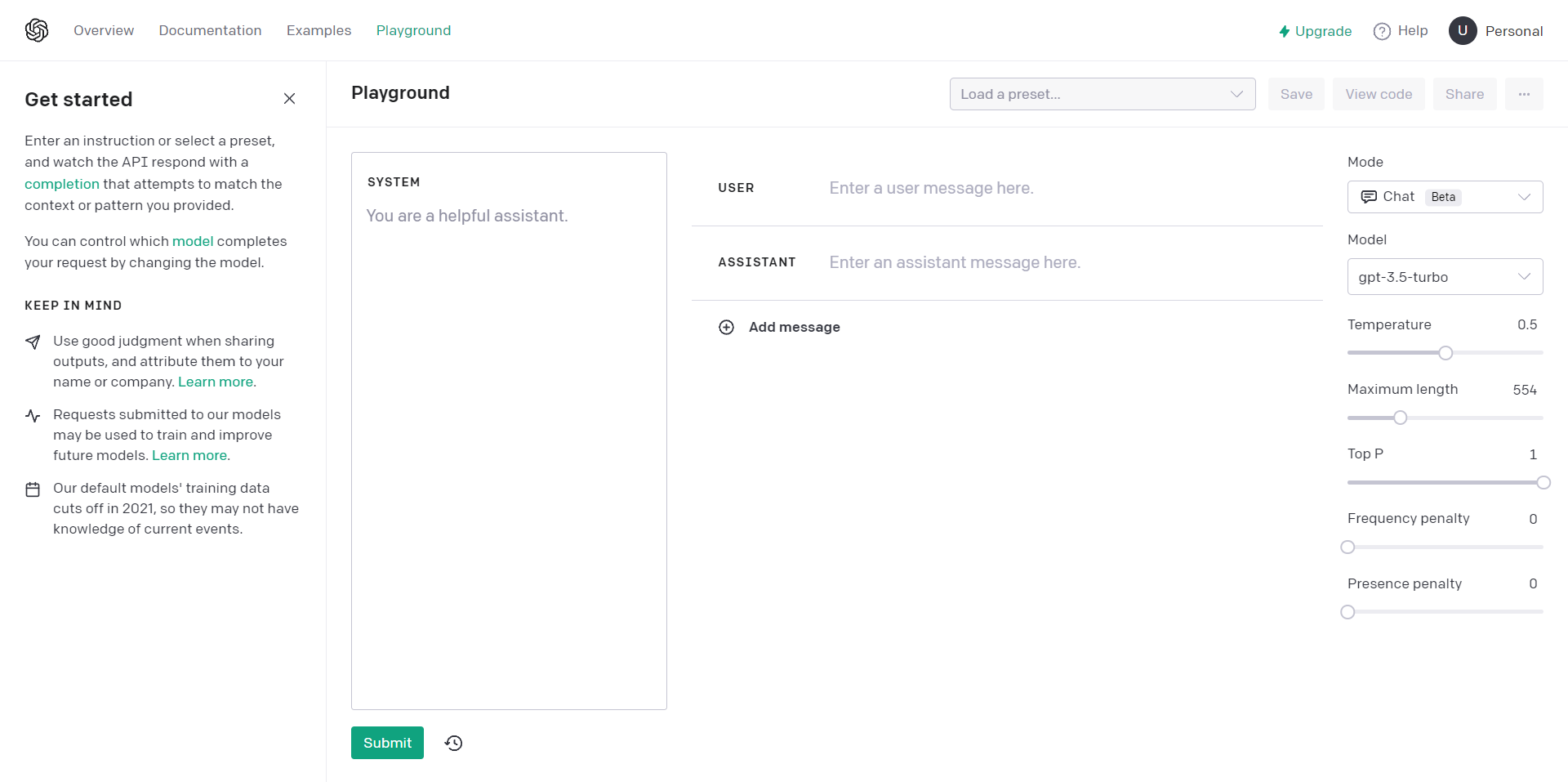
The Playground layout is designed for technical efficiency rather than aesthetic simplicity. The screen is divided into a main text area for input and output, and a sidebar containing various sliders and dropdown menus. This interface allows for rapid iteration—users can tweak a single parameter and immediately see how it influences the model’s predictive logic.
Advanced Configuration: Mastering the Parameter Sidebar
The true power of the ChatGPT Playground lies in its parameter sidebar. These settings control the “stochastic” (probabilistic) nature of the AI, allowing users to dial in the exact balance between creativity and accuracy.
Temperature and Randomness
Temperature is perhaps the most critical setting in the Playground. It ranges from 0 to 2 and controls the randomness of the model’s output.
- Low Temperature (e.g., 0.1 – 0.3): Makes the model more deterministic. It will consistently choose the most likely next word, making it ideal for technical documentation, data extraction, and factual queries.
- High Temperature (e.g., 0.8 – 1.5): Increases randomness. The model is more likely to take “risks” with word choices, which is excellent for creative brainstorming, poetry, or diverse content generation.
Top P (Nucleus Sampling)
Similar to temperature, Top P controls the diversity of the output but through a different mathematical lens. It limits the model’s word choices to a subset of the most likely tokens whose cumulative probability reaches the threshold “P.” For example, a Top P of 0.1 means the model only considers words that make up the top 10% of the probability mass. Adjusting Top P is a more refined way to prevent the model from “hallucinating” or wandering off-topic during complex tasks.
Frequency and Presence Penalties
To prevent the model from repeating the same phrases or becoming stuck in a loop, the Playground offers Frequency and Presence penalties.
- Frequency Penalty: Reduces the likelihood of the model repeating the exact same word or phrase within a single response.
- Presence Penalty: Encourages the model to talk about new topics by penalizing tokens that have already appeared in the text. These tools are indispensable for long-form content generation where variety is key.

Stop Sequences and Maximum Length
Developers use “Stop Sequences” to tell the model exactly where to stop generating text. This is useful when generating structured data like JSON or code snippets. Additionally, the “Maximum Length” slider allows users to hard-cap the number of tokens (words/characters) the model uses, which is a vital component of managing API costs and ensuring concise responses.
Practical Use Cases for Technical Professionalism
The Playground is not just a sandbox for curiosity; it is a professional tool used for rigorous testing and development. By removing the “guardrails” of the standard chat interface, it enables several high-level technical workflows.
Advanced Prompt Engineering
Prompt engineering is the art of crafting inputs that elicit the most accurate outputs from an LLM. In the Playground, engineers can use the “System” box to provide permanent instructions that govern the entire session. For instance, a developer can instruct the model: “You are a JSON formatter. Only output valid JSON code. Do not include conversational text.” Because the Playground doesn’t have the conversational overhead of ChatGPT, it is the ideal place to “stress test” these instructions before deploying them into a real-world application.
Testing API Integrations
Before a software engineer writes a single line of Python or JavaScript code to integrate OpenAI’s API into an app, they use the Playground. It allows them to simulate how the API will respond under different configurations. Once the desired result is achieved, the Playground even provides a “View Code” button, which exports the current settings into a code snippet (curl, Python, or Node.js) that can be pasted directly into a development project.
Debugging Model “Hallucinations”
When an AI model provides false information (hallucinations), it is often due to a combination of high temperature and vague prompting. The Playground allows researchers to isolate these variables. By lowering the temperature to 0 and providing a more restrictive system prompt, a user can determine if the hallucination is a result of the model’s training data or if it is simply a byproduct of the current settings.
Security, Tokenomics, and Access Management
Accessing and using the Playground requires a more nuanced understanding of the “AI economy” than using ChatGPT. It involves a shift from a subscription-based mindset to a consumption-based one.
The Token System and Pricing
While ChatGPT Plus offers a flat monthly fee, the Playground operates on a “pay-as-you-go” token system. A token is roughly equivalent to 0.75 words. Every time you hit “Submit” in the Playground, you are billed based on the number of tokens in your prompt plus the tokens in the model’s response. This makes the Playground a more cost-effective solution for light users, but it requires careful monitoring for heavy users. The sidebar provides a real-time token count, helping users understand the computational cost of their requests.
API Key Security and Management
To use the Playground, users must have an OpenAI API account. This involves generating API keys—secret strings of code that identify your account. From a digital security perspective, managing these keys is paramount. Unlike a standard password, an API key is often embedded in code; if leaked, it can lead to unauthorized charges. The Playground serves as the central hub for monitoring usage limits, setting hard monthly spend caps, and rotating keys to maintain security.
Data Privacy and Training Policies
A common concern for tech professionals is whether their data is used to train future iterations of the model. In the standard ChatGPT interface, data usage for training is often the default (though it can be opted out of). However, for data sent through the Playground and the API, OpenAI maintains a more stringent privacy policy for enterprise and developer users. Generally, data submitted via the API is not used to train models unless the user explicitly opts in, making the Playground a more appropriate environment for handling proprietary or sensitive technical logic.
Conclusion: The Playground as a Gateway to AI Maturity
The ChatGPT Playground is the bridge between being an AI consumer and an AI architect. By providing a transparent, granular, and highly configurable interface, OpenAI has given the tech community a tool to move beyond simple chat interactions and toward robust, automated, and specialized AI solutions.
Whether you are a developer looking to integrate LLMs into a new software product, a data scientist testing model limits, or a power user seeking to bypass the constraints of the standard ChatGPT interface, the Playground is an indispensable asset. It demands a higher level of technical literacy—requiring an understanding of tokens, temperature, and system roles—but in return, it offers a level of control that is essential for the future of digital innovation and software development. In the evolving landscape of artificial intelligence, the Playground is where the real work gets done.
aViewFromTheCave is a participant in the Amazon Services LLC Associates Program, an affiliate advertising program designed to provide a means for sites to earn advertising fees by advertising and linking to Amazon.com. Amazon, the Amazon logo, AmazonSupply, and the AmazonSupply logo are trademarks of Amazon.com, Inc. or its affiliates. As an Amazon Associate we earn affiliate commissions from qualifying purchases.