
In the world of technology, we often interact with sleek user interfaces, high-definition displays, and complex applications without ever considering the invisible engine driving the experience. At the very heart of every computer, smartphone, and server lies a critical piece of software known as the kernel. If an operating system (OS) were a kingdom, the kernel would be its central administration—an essential, low-level program that manages everything from how your processor handles data to how your keyboard communicates with your screen.
Understanding the kernel is fundamental to understanding how modern computing works. It is the bridge between software and hardware, ensuring that the two can communicate effectively while maintaining the security and stability of the system. In this comprehensive guide, we will explore the architecture, types, and functions of the kernel to demystify this invisible powerhouse.

1. The Fundamental Architecture of a Kernel
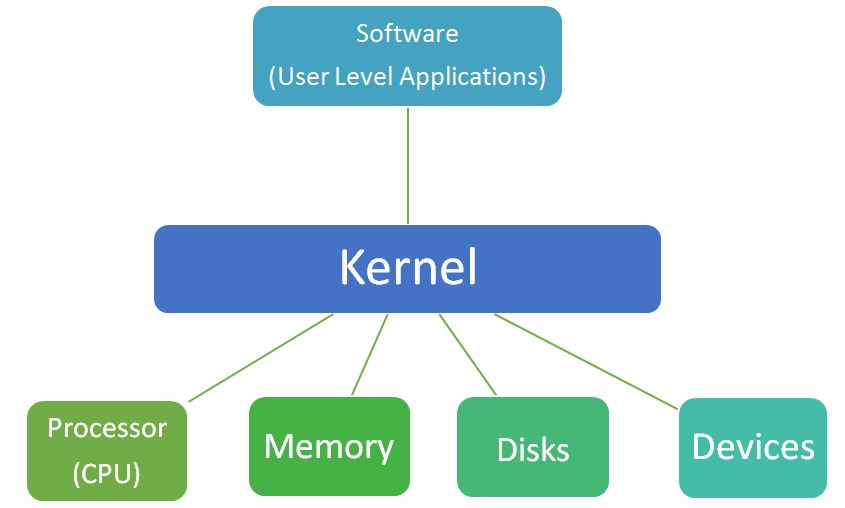
To understand the kernel, one must first understand its position in the hierarchy of a computer system. A computer is essentially a collection of hardware components—CPU, RAM, storage drives, and peripherals—that need instructions to perform tasks. Software applications, like web browsers or photo editors, are the tools users use to generate those instructions. However, software cannot talk directly to hardware. If every app could write directly to your hard drive, the result would be digital chaos.
The kernel acts as the primary interface between these two layers. It sits in a protected area of the memory, often referred to as “kernel space,” while user applications run in “user space.”
The Concept of Kernel Space vs. User Space
Modern operating systems divide memory into two distinct areas to prevent system crashes and security breaches. User space is where your applications—like Chrome, Spotify, or Word—reside. These programs have restricted access to hardware. When an application needs to perform a task like saving a file or connecting to the internet, it must send a “system call” to the kernel.
Kernel space is where the kernel executes its tasks and provides its services. This area is strictly protected; if an application attempts to access kernel space directly, the processor triggers an exception, and the program is typically terminated. This separation ensures that a bug in a music player doesn’t cause the entire computer to crash.
The Role of System Calls
System calls are the “knocks on the door” that applications use to request services from the kernel. Whether it is creating a new process, opening a file, or sending data over a network, the application issues a system call. The kernel then evaluates the request, checks for permissions, and executes the instruction on behalf of the software. This mediation is the cornerstone of system stability.
Resource Abstraction
One of the kernel’s most profound jobs is abstraction. It hides the messy complexities of hardware from the software developer. A programmer doesn’t need to know the specific electrical specifications of a Western Digital hard drive versus a Samsung SSD; they simply tell the kernel to “save this data.” The kernel translates that generic request into the specific commands required by that specific piece of hardware.
2. Key Responsibilities and Operations
The kernel is a master multitasker. It manages several critical subsystems simultaneously, ensuring that the computer remains responsive and efficient.
Process Management and Scheduling
A modern computer runs hundreds of “processes” at once. However, a single CPU core can only do one thing at a specific nanosecond. The kernel uses a “scheduler” to determine which process gets to use the CPU, for how long, and in what order. It creates the illusion of multitasking by switching between processes so rapidly that the human eye cannot perceive the gaps. This involves saving the state of a current task (context switching) and loading the state of the next one.
Memory Management
Every application requires a certain amount of RAM to function. The kernel is responsible for allocating and deallocating memory. It keeps track of which parts of the memory are currently in use and by whom. Through a technique called “Virtual Memory,” the kernel can even fool applications into thinking they have more RAM than is physically available by swapping data between the RAM and the hard drive (paging).
Device Management and Drivers
To interact with hardware like printers, GPUs, or Wi-Fi cards, the kernel uses “device drivers.” These are specialized pieces of software that act as translators. While many drivers are built into the kernel itself, others are loaded dynamically. The kernel manages these drivers to ensure that data flows smoothly between the OS and the peripheral devices without conflicts.

Input/Output (I/O) Communication
The kernel manages the flow of data to and from the computer’s peripherals. When you type on a keyboard, the kernel receives an “interrupt” signal. It stops what it’s doing for a microsecond to process that keystroke and pass the information to the appropriate application. This ensures that the hardware and software stay in sync.
3. The Different Types of Kernels
Not all kernels are designed the same way. The architecture of a kernel depends on the specific goals of the operating system, such as speed, security, or modularity.
Monolithic Kernels
A monolithic kernel is a single, large program that contains all the necessary services for the OS: memory management, file systems, device drivers, and network stacks. Because everything runs in the same address space, communication between components is incredibly fast.
- Examples: Linux, macOS (XNU), and Windows (though Windows is technically hybrid, it leans monolithic in practice).
- Pros: High performance due to low overhead.
- Cons: If one part of the kernel (like a buggy driver) fails, the entire system can crash (the infamous Blue Screen of Death).
Microkernels
In a microkernel design, the kernel is stripped down to its bare essentials—usually just inter-process communication (IPC) and basic memory management. All other services, such as device drivers and file systems, run in user space as separate processes.
- Examples: QNX (used in cars), Minix, and L4.
- Pros: High stability and security. If a driver crashes, it can be restarted without taking down the whole system.
- Cons: Slower performance because moving data between different spaces requires more processing power.
Hybrid Kernels
Hybrid kernels attempt to combine the speed of monolithic kernels with the modularity of microkernels. They run some services in kernel space for performance while keeping others modular.
- Example: The Windows NT kernel is the most famous example of a hybrid architecture.
Nanokernels and Exokernels
These are highly specialized, minimalist kernels used in academic research or specific embedded systems. An exokernel, for instance, provides almost no hardware abstraction, allowing applications to access hardware as directly as possible for maximum efficiency in niche use cases.
4. The Evolution of Kernels in Modern Computing
The history of the kernel is the history of computing itself. From the early days of Unix in the 1970s to the billions of Android devices running today, the kernel has evolved to meet the demands of an increasingly digital world.
The Rise of the Linux Kernel
Perhaps the most influential kernel in history is Linux. Created by Linus Torvalds in 1991, it is a monolithic, open-source kernel that powers everything from the world’s most powerful supercomputers and the servers hosting the internet to your smart fridge and Android smartphone. Its success is due to its modularity; while it is monolithic, it can load and unload “modules” (like drivers) on the fly, making it incredibly versatile.
Security in the Modern Era
As cyber threats become more sophisticated, the kernel has become the primary battleground for digital security. Features like Kernel Address Space Layout Randomization (KASLR) help prevent hackers from predicting where kernel code is stored in memory. Modern kernels are also adopting “Ring-based” security models, where the kernel occupies “Ring 0” (the highest privilege level) and applications are relegated to “Ring 3.”
Kernels and the Cloud
In the era of cloud computing and virtualization, we now have “Hypervisors,” which are essentially kernels for virtual machines. A hypervisor allows multiple operating systems to run on a single piece of physical hardware, each believing it has full control over the processor. This technology is what allows companies like Amazon and Google to power the modern web.
Conclusion: Why the Kernel Matters
While the average user may never see a line of kernel code, its health and efficiency dictate the performance of every digital task we perform. When your computer feels “snappy,” it is because the kernel is efficiently scheduling processes and managing memory. When your system is secure, it is because the kernel is successfully isolating applications and protecting the hardware.
As we move toward a future defined by Artificial Intelligence, Internet of Things (IoT), and edge computing, the kernel will continue to evolve. Whether it is a lightweight kernel for a smart thermostat or a massive, multi-threaded kernel for an AI server, this core component remains the most vital bridge between human intent and machine execution. By understanding the kernel, we gain a deeper appreciation for the staggering complexity and elegance of the technology that powers our lives.
aViewFromTheCave is a participant in the Amazon Services LLC Associates Program, an affiliate advertising program designed to provide a means for sites to earn advertising fees by advertising and linking to Amazon.com. Amazon, the Amazon logo, AmazonSupply, and the AmazonSupply logo are trademarks of Amazon.com, Inc. or its affiliates. As an Amazon Associate we earn affiliate commissions from qualifying purchases.