
In the current era of the “Streaming Wars,” the digital landscape has shifted from a few monolithic providers to a highly fragmented ecosystem of niche platforms. Paramount Plus has emerged as a significant player in this space, leveraging a massive library of legacy content and new exclusives. However, as consumers experience “subscription fatigue,” the technical necessity of managing and offboarding from these services becomes a vital skill.
Canceling a subscription is no longer as simple as making a phone call; it involves navigating complex User Interfaces (UI), understanding third-party API integrations, and managing digital permissions across various operating systems. This guide provides a deep technical dive into the process of canceling Paramount Plus, ensuring you can navigate the software hurdles and data privacy concerns associated with the platform.
Navigating the Fragmented Streaming Ecosystem
The modern software-as-a-service (SaaS) model for entertainment is built on a web of interconnected platforms. When you sign up for Paramount Plus, you aren’t always dealing directly with Paramount’s servers. Depending on how you initiated the subscription, your billing data and account permissions could be housed by a variety of tech giants.
The Challenge of Cross-Platform Account Management
One of the primary frustrations in modern app management is “platform tethering.” If you subscribed to Paramount Plus through an app store—such as Apple’s App Store or Google Play—Paramount itself does not have the technical authority to cancel your subscription. This is due to the proprietary billing systems used by mobile operating systems to maintain a closed-loop economy. Consequently, the first technical step in any cancellation process is identifying the “source of truth” for your billing data.
Identifying Your Billing Source
To determine where your subscription lives, you must examine your digital paper trail. If your bank statement lists “Paramount Plus,” you likely subscribed via their direct web portal. If it lists “Apple Bill,” “Google Play,” or “Amazon,” the cancellation must be handled through those specific software environments. This distinction is critical because attempting to cancel on the Paramount Plus website when you are billed via Roku will result in a “Managed by Partner” error message, a common friction point in the user experience.
Step-by-Step Technical Instructions for Primary Platforms
Once you have identified your billing source, you must follow the specific protocol for that software environment. Each platform has its own UI architecture designed to facilitate—or sometimes hinder—the cancellation flow.
Canceling via Desktop/Web Browser
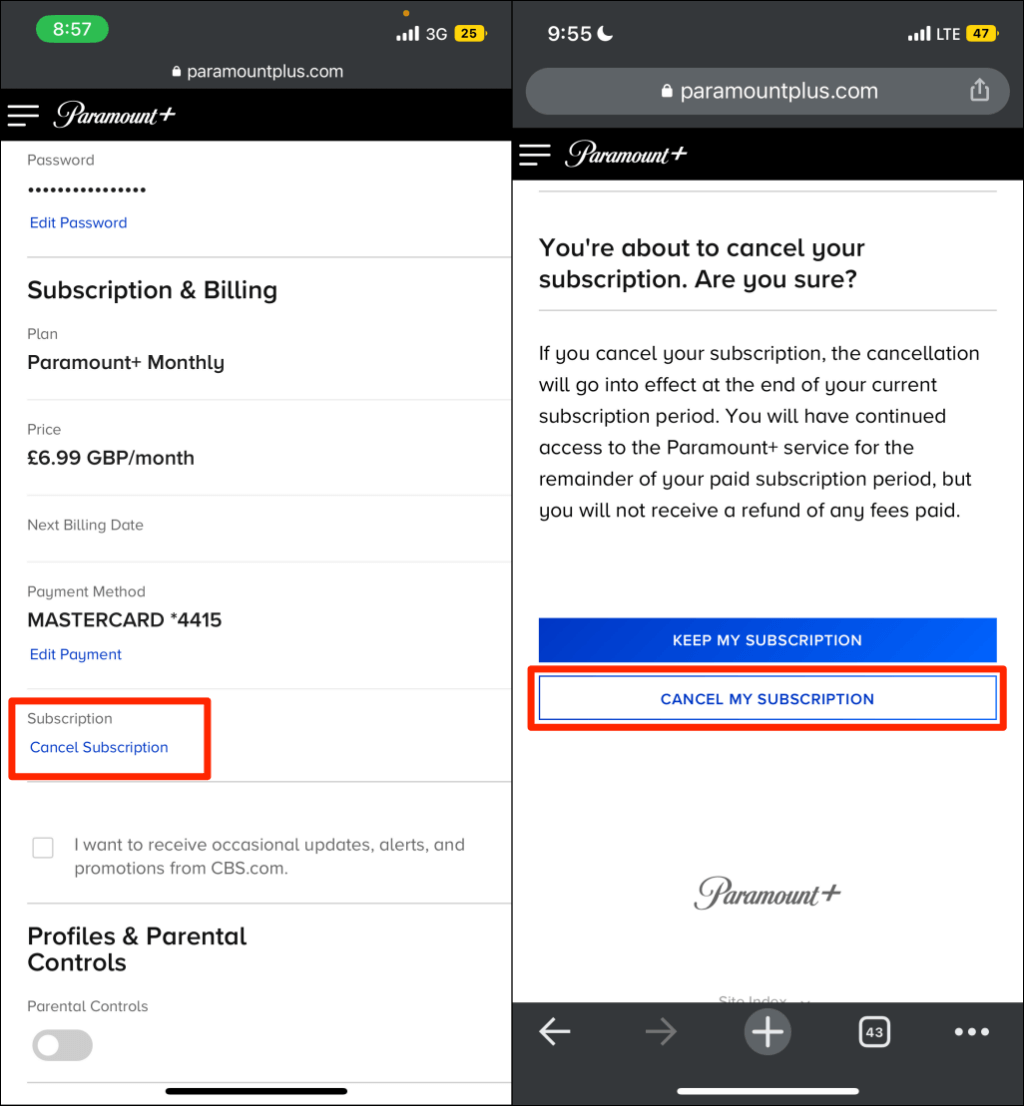
For users who signed up directly through the ParamountPlus.com website, the process is handled via standard web protocols.
- Authentication: Log in to your account. This establishes a secure session cookie.
- Account Navigation: Navigate to the “Account” section, usually found via a dropdown menu in the top right corner.
- Subscription Logic: Locate the “Subscription & Billing” tab. Here, the server retrieves your current tier and billing cycle.
- The Cancellation Trigger: Click “Cancel Subscription.” You will likely be met with a series of “retention screens”—programmatic attempts to offer discounts or highlight content to prevent churn.
- Finalization: Proceed through the prompts until you receive a confirmation code or email. From a technical standpoint, ensure your account status changes to “Canceled” or “Expires on [Date]” to verify the database has updated your record.
Managing Subscriptions on iOS and Android
Mobile ecosystems handle subscriptions through system-level settings rather than individual apps.
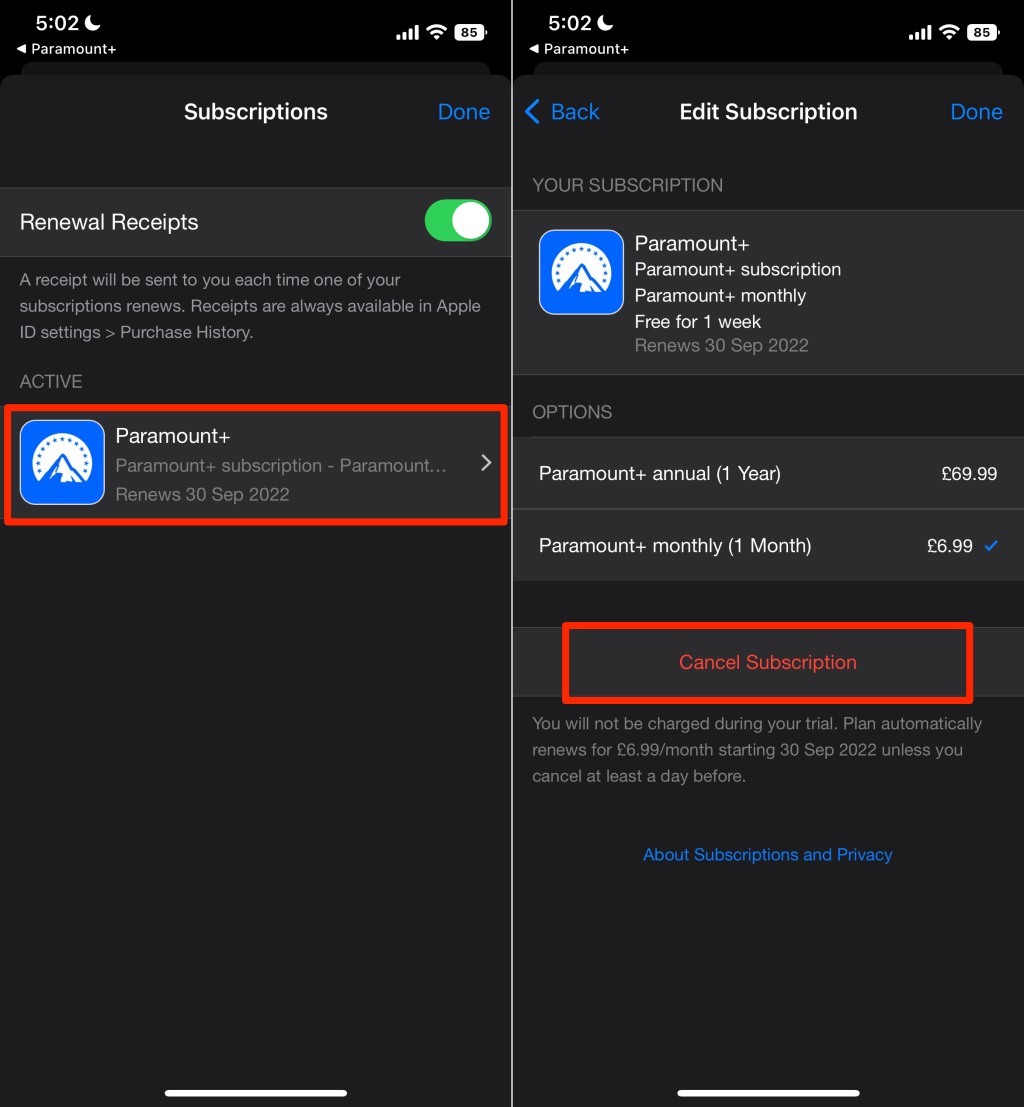
- On iOS: You must access the Media & Purchases section of your Apple ID settings. This is because Apple uses a centralized entitlement system to manage app permissions. Once you toggle the “Cancel” button, Apple’s servers send an automated notification to Paramount’s API to update your access status at the end of the billing period.
- On Android: The process is mirrored within the Google Play Store. Navigate to “Payments & Subscriptions” and then “Subscriptions.” Google’s interface allows you to manage the “Pause” or “Cancel” states of the app’s billing logic.
Revoking Access through Third-Party Aggregators
Many users access Paramount Plus as a “Channel” within Amazon Prime Video, Roku, or Apple TV. This creates a technical layer where one software platform acts as a wrapper for another.
- Amazon Prime: You must navigate to “Manage Your Prime Video Channels.” Here, you are essentially revoking the digital “handshake” between Amazon’s billing engine and the Paramount content library.
- Roku: Cancellation can be done via the Roku website or directly on the device UI by highlighting the app, pressing the star (*) button, and selecting “Manage Subscription.” This sends a command to Roku’s proprietary billing OS to cease the recurring charge.
Troubleshooting Digital Barriers and Retention Loops
The process of leaving a digital service is often complicated by “Dark Patterns”—design choices intended to trick or frustrate users into staying. Understanding these from a UI/UX perspective can help you stay focused on your goal.
Overcoming “Dark Patterns” in Cancellation Flows
Many streaming services employ multi-stage cancellation flows. You might click “Cancel,” but the software then presents a “Wait! Don’t Go” screen, followed by a “Special Offer” screen, followed by a survey. Technically, your cancellation is not processed until the very last “Confirm” button is clicked. If you close the browser window prematurely, the state-change in the database is never triggered, and you will be billed again. Always wait for the final confirmation screen and save a screenshot of the “Canceled” status.
Dealing with Cache and Sync Issues
Occasionally, a technical glitch may occur where you cancel your subscription, but the app continues to show you as “Active,” or vice versa. This is often a caching issue. Apps store “session data” locally to speed up load times. If you have canceled but the app still functions, try logging out and back in. This forces the app to ping the server for an updated “entitlement check,” ensuring that your local device reflects the true state of your account in Paramount’s cloud database.
Securing Your Digital Footprint Post-Cancellation
Canceling a recurring payment is only one part of the digital offboarding process. In an age where data is a commodity, managing what happens to your information after you leave a platform is a key aspect of digital security and hygiene.
Data Retention Policies and Account Deletion
Canceling a subscription stops the billing, but it does not delete your account. Paramount (and its parent company, Paramount Global) will retain your viewing habits, email address, and device metadata in their data warehouses. If you wish to completely sever ties, you must request an account deletion. This is often a separate technical request, sometimes requiring you to navigate to a “Privacy” or “Data Rights” portal to exercise your rights under regulations like the GDPR or CCPA.
Reviewing Third-Party App Permissions
If you used “Sign in with Google” or “Sign in with Apple” to create your Paramount Plus account, a persistent digital link exists between those services. Even after cancellation, it is a best practice to go into your Google or Apple security settings and remove Paramount Plus from your “Linked Apps” list. This revokes the app’s ability to refresh your data or access your profile in the background, minimizing your attack surface and keeping your digital footprint lean.
Conclusion: The Importance of Technical Literacy in the Subscription Age
The ability to fluidly manage, cancel, and secure digital subscriptions is a fundamental component of modern technical literacy. As streaming platforms like Paramount Plus continue to evolve their software architectures and billing models, users must remain vigilant. By understanding the underlying mechanics—from API handshakes between platforms to the UI hurdles of cancellation flows—you regain control over your digital life and your hardware.
Whether you are consolidating your apps to improve device performance or simply rotating subscriptions to access different content libraries, following a systematic, technical approach ensures that “canceling” truly means “canceled.” Always verify through official channels, monitor your digital statements, and don’t be afraid to dive into the settings menus to ensure your software environment remains exactly as you intend it to be.
aViewFromTheCave is a participant in the Amazon Services LLC Associates Program, an affiliate advertising program designed to provide a means for sites to earn advertising fees by advertising and linking to Amazon.com. Amazon, the Amazon logo, AmazonSupply, and the AmazonSupply logo are trademarks of Amazon.com, Inc. or its affiliates. As an Amazon Associate we earn affiliate commissions from qualifying purchases.