
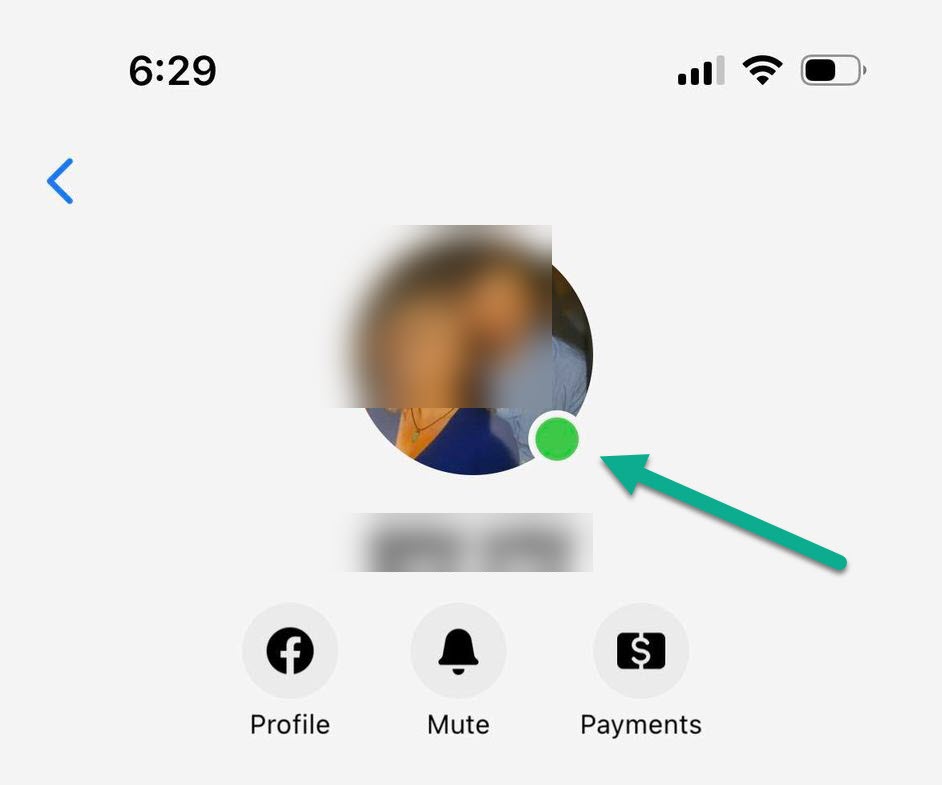
In the landscape of modern social media, the most subtle visual cues often carry the most significant weight in how we interact with technology. Among these, few symbols are as ubiquitous or as misunderstood as the small green dot that appears next to a user’s profile picture on Facebook and Messenger. While it may seem like a simple design choice, the green dot is a sophisticated piece of interface engineering designed to facilitate real-time communication. For many, it is a signal of availability; for others, it is a point of privacy concern. Understanding what this indicator means from a technical and functional perspective is essential for navigating the digital ecosystem of the Meta platforms.

The Mechanics of the Green Dot: Real-Time Presence and Activity Status
At its core, the green dot serves as a “Presence Indicator.” This is a feature of the software’s architecture designed to inform users about the current connectivity state of their contacts. When you see a green dot next to a name, it signifies that the user is “Active Now.” However, the technical definition of “Active” is more nuanced than it appears on the surface.
How the Algorithm Detects Activity
Facebook’s backend systems use a variety of signals to determine whether a user should be tagged with the green dot. The primary trigger is direct interaction with the application. If a user is actively scrolling through their newsfeed, typing a message in Messenger, or interacting with a post, the app sends a heartbeat signal to Facebook’s servers. These servers then update the user’s status across the network in near real-time.
The technology behind this is often based on persistent connections, such as WebSockets or the MQTT (Message Queuing Telemetry Transport) protocol. These protocols allow for two-way communication between the client (your phone or computer) and the server with very low latency. When the app is moved to the foreground of a smartphone or an active tab in a browser, the “Active Now” status is triggered.
Differences Between Messenger and the Main Facebook Feed
One common point of confusion is why the green dot appears in some places but not others. Facebook operates as a multi-app ecosystem. The presence indicator in the main Facebook app is generally tied to general browsing and social interaction. In contrast, the green dot in the Messenger app is specifically tuned for communication readiness.
Technically, these two instances of the green dot are synced, but they can occasionally show discrepancies due to how background processes are handled by different operating systems. For instance, if you have Messenger open on a desktop but are using a different app on your mobile device, the system must reconcile these two data points to decide whether to show you as “Active.” Generally, any activity on any Meta-owned platform (excluding WhatsApp and Instagram, which have their own independent presence systems) will trigger the indicator across the Facebook suite.
Managing Your Digital Visibility: Privacy and Control Settings
As digital security and personal privacy become paramount, the ability to control one’s “Active Status” has become a critical feature of the Facebook user interface. The green dot is not just a tool for observers; it is a setting that can be manipulated by the user to manage their digital boundaries.
Turning Off Active Status on Desktop and Mobile
Facebook allows users to disable their active status, which essentially hides the green dot from their friends and contacts. However, this is a reciprocal feature: if you choose to hide your active status, you will also be unable to see the active status of others. From a software design perspective, this creates a “fair use” ecosystem, preventing “ghosting”—the act of monitoring others’ activity while remaining invisible yourself.
To manage this in the mobile app, users navigate through the “Settings & Privacy” menu to find the “Active Status” toggle. On a desktop, the setting is located within the Messenger interface under the three-dot menu icon. It is important to note that because of the way Facebook syncs data across devices, a user must often turn off the status on every device they use (phone, tablet, and computer) to ensure they are truly hidden from the presence indicator system.
The “Last Active” Timestamp vs. The Green Dot
When the green dot disappears, it is often replaced by a “Last Active” timestamp (e.g., “Active 5m ago”). This is a different data point tracked by the system. While the green dot signifies a live connection, the timestamp represents the last time the server received a heartbeat signal from the client.
From a technical standpoint, the “Last Active” status is a stored variable in the user’s profile database. When you log off, the system records the current UTC time and displays the difference between that time and the viewer’s current time. For users concerned with digital security, managing this timestamp is just as important as managing the green dot, as it provides a pattern of behavior that could be used to track a person’s daily routine.

The Psychological and Technical Implications of Constant Connectivity
The green dot represents more than just a line of code; it represents a fundamental shift in how we perceive availability. In the early days of the internet, being “online” was a conscious choice made at a desktop computer. Today, with smartphones, we are perpetually connected, leading to technical and social friction.
The Pressure of Instant Response
The presence of the green dot often creates a psychological expectation of an immediate reply. When a sender sees that a recipient is “Active Now,” they are more likely to expect a response within seconds. This “real-time pressure” is a deliberate UX (User Experience) design choice intended to increase engagement on the platform. By showing who is online, Facebook facilitates more frequent and faster conversations, thereby increasing the time spent within the app.
However, this can lead to “notification fatigue.” From a technical perspective, the constant polling of servers to update presence indicators consumes battery life and data. App developers must balance the “freshness” of the green dot data with the efficiency of the device’s hardware.
Digital Boundaries in a Professional and Personal Context
For many users, the green dot blurs the lines between professional and personal life. As Facebook expanded its “Workplace” features and became a tool for professional networking, the green dot became a liability for those trying to maintain a work-life balance. Seeing a colleague “Active” late at night or during a holiday can lead to unintended social consequences.
This has led to a rise in “Digital Wellbeing” tools within operating systems like iOS and Android. These tools allow users to kill background processes or silence notifications, which indirectly affects the green dot. If an OS suspends the Facebook app’s background activity to save power, the green dot may disappear even if the user still has the app open in their recent tasks.
Technical Nuances: Why the Green Dot Isn’t Always Accurate
One of the most frequent complaints from users is that the green dot shows them as “Active” when they are not even using their device. This discrepancy is usually not a bug, but rather a result of how modern operating systems and cloud architectures interact.
Background App Refresh and Syncing Delays
On mobile devices, “Background App Refresh” is a feature that allows apps to check for updates and new content even when they aren’t being used. If Facebook or Messenger triggers a background refresh to download new messages or feed updates, the server may interpret this brief connection as “Activity.” Consequently, a green dot might appear next to your name for a few minutes while your phone is sitting on a nightstand.
Furthermore, there is the issue of “Session Persistence.” When you close a tab on a web browser without logging out, the session may remain active on Facebook’s server for a predetermined “timeout” period (usually between 2 and 10 minutes). During this window, the green dot will remain visible to your friends because the server hasn’t yet confirmed that the client has disconnected.
Cross-Platform Discrepancies (Desktop vs. Mobile)
Another technical hurdle is the synchronization between different platforms. A user might be active on the Facebook app on an iPad, while their phone is in another room. Because the “Active Status” is tied to the account ID rather than a specific device ID, the green dot will appear globally.
Additionally, if a user has integrated third-party apps that use the Facebook API for login or data sharing, those apps might occasionally ping Facebook’s servers, inadvertently triggering the “Active” status. These technical “ghosts in the machine” are why the green dot should be viewed as a high-probability indicator of activity rather than a definitive proof of presence.
Conclusion: The Future of Presence Technology
The green dot on Facebook is a prime example of how a small UI element can have massive implications for user behavior and technical infrastructure. It relies on complex real-time protocols and constant server-client handshakes to provide a seamless social experience. As we move toward more integrated forms of digital communication, such as the Metaverse, these presence indicators will likely become even more sophisticated, perhaps moving beyond a simple dot to more complex representations of digital “state.”
For the average user, understanding the tech behind the green dot empowers better control over their digital footprint. Whether you choose to remain visible to foster immediate connections or hide your status to reclaim your privacy, knowing that the green dot is a manageable piece of software—not an inescapable surveillance tool—is the first step toward a healthier relationship with social technology.
aViewFromTheCave is a participant in the Amazon Services LLC Associates Program, an affiliate advertising program designed to provide a means for sites to earn advertising fees by advertising and linking to Amazon.com. Amazon, the Amazon logo, AmazonSupply, and the AmazonSupply logo are trademarks of Amazon.com, Inc. or its affiliates. As an Amazon Associate we earn affiliate commissions from qualifying purchases.