
In the world of custom PC building and hardware upgrades, the relationship between the central processing unit (CPU) and the motherboard is the most critical synergy to master. Often referred to as the “brain” and the “nervous system” of the computer, these two components must be perfectly synchronized to ensure system stability, peak performance, and longevity. However, for many enthusiasts and first-time builders, determining exactly which CPUs are compatible with a specific motherboard can be a daunting task filled with technical jargon like “LGA,” “AM5,” “Chipsets,” and “TDP.”
Understanding CPU compatibility is not just about physical fit; it involves navigating the complex landscape of electrical requirements, firmware support, and architectural generations. This guide provides a deep dive into the technical nuances of motherboard-CPU pairing, offering the professional insight needed to make informed hardware decisions.
1. The Physical and Logical Foundation: Sockets and Chipsets
The first and most fundamental step in determining compatibility is understanding the two-layered gatekeeping system used by motherboard manufacturers: the physical socket and the logical chipset.
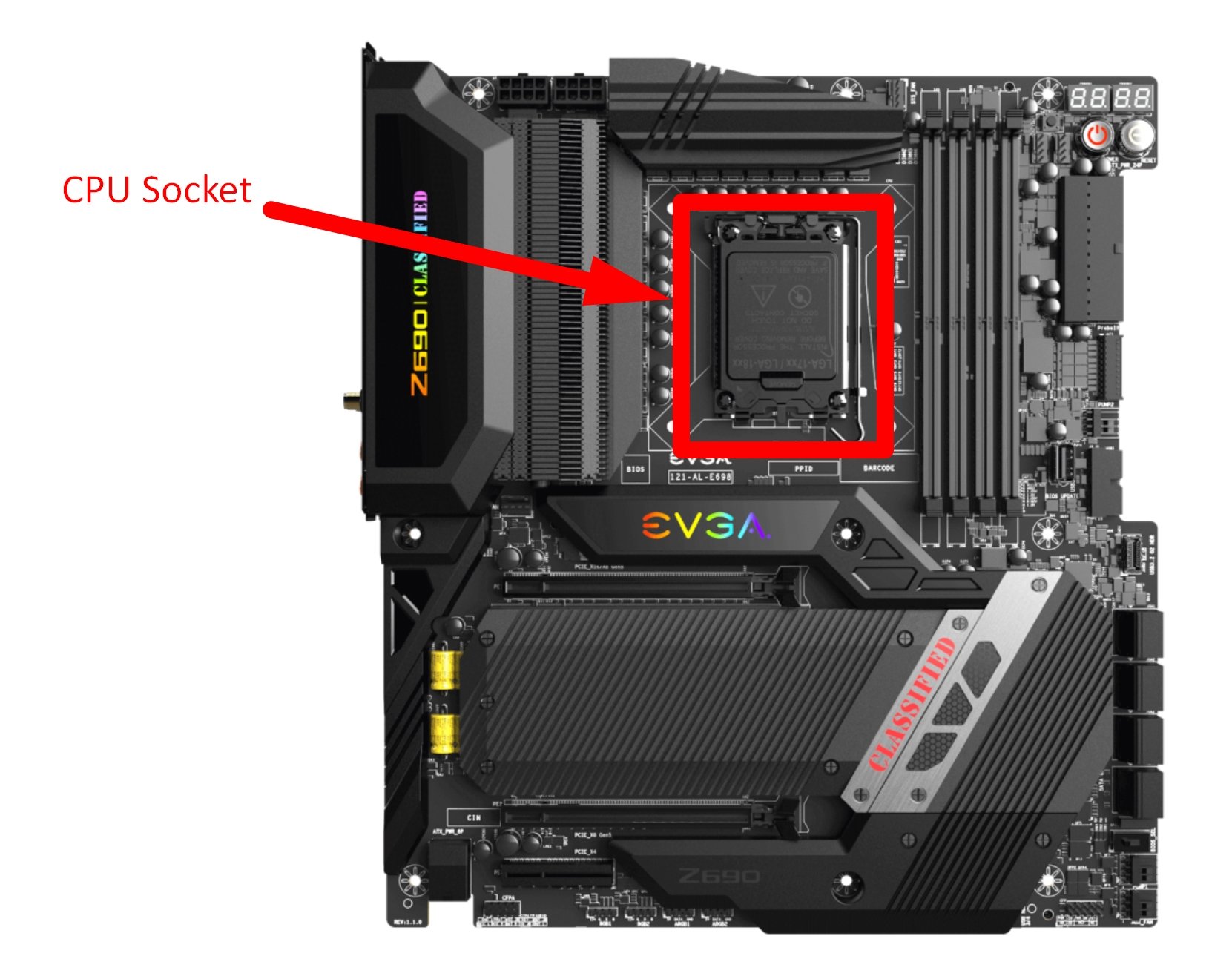
The CPU Socket: Physical Matching
The socket is the physical interface on the motherboard where the CPU is installed. If the CPU does not match the socket, it will not fit, and attempting to force it can lead to permanent hardware damage. Modern computing is currently dominated by two primary types of socket designs:
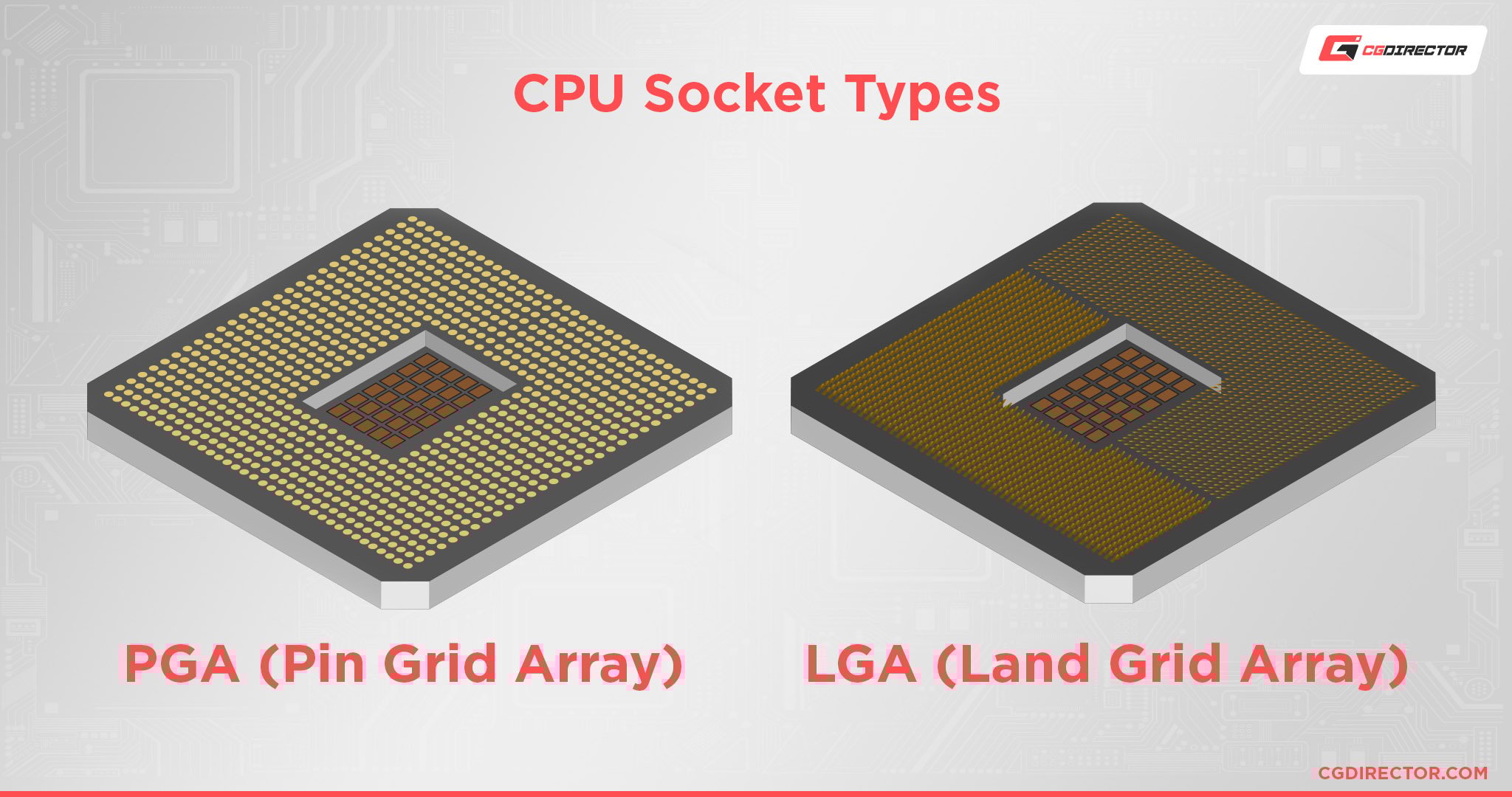
- LGA (Land Grid Array): Primarily used by Intel (and recently adopted by AMD for AM5), this design places the fragile pins on the motherboard socket itself, while the CPU has flat gold contact pads.
- PGA (Pin Grid Array): Historically favored by AMD (such as the AM4 platform), the pins are located on the underside of the CPU, which then slots into holes on the motherboard.
When identifying compatibility, you must match the specific socket name. For example, an Intel 13th Gen processor requires an LGA 1700 socket. An AMD Ryzen 7000 series processor requires an AM5 socket. Even a difference of one pin can render a pairing impossible.
The Chipset: The Logic Behind the Performance
Even if a CPU fits into a socket, the motherboard’s chipset—the silicon on the board that manages communication between the CPU, memory, and peripherals—must support that specific processor’s architecture. Chipsets are usually categorized into tiers:
- Enthusiast/Overclocking Tiers (e.g., Intel Z-Series, AMD X-Series): These support the highest power delivery and allow users to overclock their CPUs.
- Mainstream Tiers (e.g., Intel B-Series, AMD B-Series): These offer a balance of features and stability for gaming and professional work without extensive overclocking capabilities.
- Budget Tiers (e.g., Intel H-Series, AMD A-Series): Designed for basic office tasks and general media consumption, offering limited expansion.
A common mistake is pairing a high-end “unlocked” CPU with a budget chipset. While it may technically boot, the chipset may limit the CPU’s potential or lack the robust power delivery needed for heavy workloads.
2. Navigating the Major Ecosystems: Intel vs. AMD
The compatibility landscape is dictated by the release cycles of the two industry giants, Intel and AMD. Each has a distinct philosophy regarding how long a motherboard platform should last.
Intel’s Iterative Approach
Intel is known for a relatively rapid rotation of sockets and chipsets. Historically, Intel tends to support a specific socket for only two generations of processors. For example, the LGA 1200 socket supported the 10th and 11th Gen Core processors, but the move to the 12th Gen required a new LGA 1700 socket due to changes in the physical size and power requirements of the chips.
When checking compatibility for an Intel system, you must be hyper-vigilant about the “Series” of the motherboard. A Z690 motherboard (designed for 12th Gen) will support a 13th or 14th Gen CPU, but a Z590 motherboard (designed for 11th Gen) will not, despite looking similar to the untrained eye.
AMD’s Platform Longevity
AMD has gained significant market favor by maintaining socket longevity. The legendary AM4 socket supported five generations of Ryzen processors, spanning from 2017 to 2022. This allowed users to upgrade their CPU multiple times without ever changing their motherboard.
With the introduction of the AM5 platform, AMD has transitioned to the LGA design and integrated DDR5 memory support. While AM5 is a clean break from the past, AMD has committed to supporting this new platform through at least 2025. This makes AMD an attractive option for users who prioritize long-term “drop-in” upgrade paths.
3. Technical Constraints: BIOS, VRMs, and Power
Beyond the physical fit and the chipset designation, there are “invisible” factors that determine if a CPU will work reliably on a motherboard.
BIOS/UEFI Updates: The Software Bridge
One of the most frequent causes of “No POST” (Power-On Self-Test) issues in new builds is an outdated BIOS. Motherboard manufacturers often release a board before a new generation of CPUs hits the market. While the socket might be the same, the motherboard’s firmware (the BIOS or UEFI) doesn’t yet know how to communicate with the newer chip.
To resolve this, users must perform a BIOS update. Many modern mid-to-high-end motherboards feature a “BIOS Flashback” button, which allows you to update the firmware using a USB drive without needing a working CPU installed. Without this feature, you might need an older, compatible CPU just to boot the system and perform the update—a significant hurdle for many builders.
Voltage Regulator Modules (VRMs) and Thermal Limits
The VRM is the component of the motherboard responsible for converting the high voltage from your power supply into the low voltage required by the CPU. Not all VRMs are created equal.
If you attempt to pair a flagship, high-wattage processor (like an Intel Core i9-14900K) with a cheap, entry-level motherboard, the VRMs may overheat. When VRMs get too hot, they engage in “thermal throttling,” which forces the CPU to slow down to prevent the motherboard from failing. Therefore, compatibility isn’t just about “will it turn on,” but rather “can the motherboard provide enough clean power to sustain the CPU’s rated speeds.”
RAM Support: DDR4 vs. DDR5
The transition from DDR4 to DDR5 memory has added another layer to the compatibility puzzle. Some motherboards (particularly in the Intel 12th-14th Gen range) come in two versions: one that supports DDR4 and one that supports DDR5. The CPU itself may support both, but the motherboard is hard-wired for one or the other. You cannot slot DDR4 RAM into a DDR5 motherboard, so your choice of motherboard effectively dictates your memory compatibility as well.
4. How to Verify Compatibility: A Professional Workflow
To ensure 100% accuracy before making a purchase, professional system integrators follow a specific verification workflow.
Using Manufacturer Support Pages
The only “source of truth” is the motherboard manufacturer’s official website (ASUS, MSI, Gigabyte, ASRock, etc.). Every motherboard has a “Support” or “Service” section containing a CPU Support List (often called the QVL or Qualified Vendor List). This list specifies:
- Exactly which CPU models are supported.
- The minimum BIOS version required for each CPU.
- Any specific limitations regarding integrated graphics or PCIe speeds.
Leveraging Third-Party Compatibility Tools
Tools like PCPartPicker have revolutionized the building process. By adding a motherboard to your virtual “build,” the tool automatically filters out incompatible CPUs and warns you about potential BIOS conflicts or physical clearance issues with CPU coolers. While these tools are highly reliable, they should always be cross-referenced with the manufacturer’s support list for the most recent hardware releases.
Identifying Your Motherboard
If you are looking to upgrade an existing system and aren’t sure what motherboard you have, you don’t need to open the case. In Windows, you can type “msinfo32” into the search bar to open System Information. Look for the “BaseBoard Manufacturer” and “BaseBoard Product” entries. Once you have the model name, you can find the exact CPU compatibility list online.
5. Future-Proofing and Final Considerations
When selecting a CPU and motherboard combination, it is wise to look three to five years into the future. Technology moves fast, and a “compatible” system today might be a dead end tomorrow.
Scalability and PCIe Lanes
High-end CPUs and motherboards offer more PCIe lanes, which allow for faster data transfer between the CPU, the GPU, and NVMe SSDs. If you plan on adding multiple high-speed storage drives or capture cards in the future, ensure your motherboard chipset and CPU pairing can handle the required bandwidth.
Thermal Design Power (TDP)
Always check the TDP of your chosen CPU against the cooling capabilities of your case and the power delivery of your motherboard. A “compatible” CPU is useless if your system shuts down under load because the motherboard’s power phase design wasn’t built for a 250W power draw.
In conclusion, ensuring CPU and motherboard compatibility is a multifaceted process that requires attention to physical sockets, chipset logic, firmware versions, and electrical capacity. By following the manufacturer’s documentation and understanding the underlying technology of the Intel and AMD ecosystems, you can build a stable, powerful, and efficient computer that meets the demands of modern software and hardware for years to come.
aViewFromTheCave is a participant in the Amazon Services LLC Associates Program, an affiliate advertising program designed to provide a means for sites to earn advertising fees by advertising and linking to Amazon.com. Amazon, the Amazon logo, AmazonSupply, and the AmazonSupply logo are trademarks of Amazon.com, Inc. or its affiliates. As an Amazon Associate we earn affiliate commissions from qualifying purchases.