
In the fast-paced world of digital entertainment, few things are as frustrating as the gap between pressing a button and seeing your character react on screen. Whether you are navigating a high-stakes firefight in a competitive shooter or exploring a vast open-world RPG, the fluid responsiveness of your game is dictated by a single technical metric: latency.
Often referred to as “ping” or “lag” in casual conversation, latency represents the invisible backbone of the gaming experience. As the gaming industry moves toward cloud-based services and hyper-competitive e-sports, understanding the mechanics of latency is no longer just for network engineers—it is essential knowledge for any modern gamer looking to optimize their performance. This article explores the technical foundations of latency, the hardware factors that influence it, and the networking strategies required to achieve a seamless gaming experience.
The Technical Foundations: Understanding How Data Moves
To understand latency, one must first view a video game not as a static piece of software, but as a continuous cycle of data exchange. Every movement of your mouse or press of a key is a “packet” of information that must travel from your device to a server and back again.
Propagation Delay and Round-Trip Time (RTT)
At its core, latency is a measurement of time, typically expressed in milliseconds (ms). The most common form of latency discussed in gaming is “Network Latency,” or the Round-Trip Time (RTT). This is the duration it takes for a signal to be sent from your computer, reach the game server, and return with a confirmation or an update on the game state.
Propagation delay is the physical limit of this speed. Even though data travels at a significant fraction of the speed of light through fiber-optic cables, distance still matters. If you are playing on a server located in London while sitting in New York, the physical distance ensures a baseline latency that cannot be bypassed by software alone.
Packet Loss and Jitter
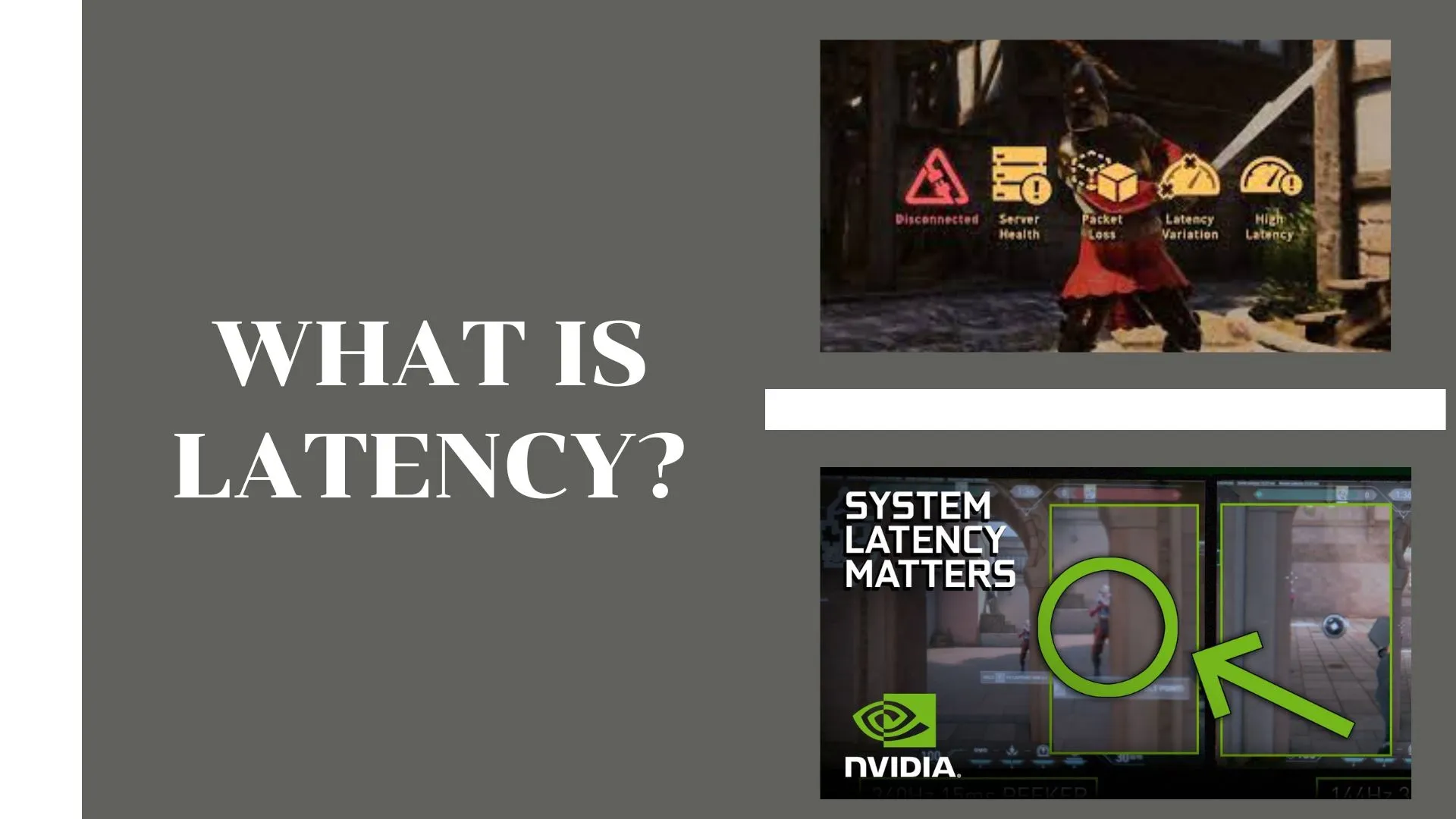
Latency is rarely a constant number; it fluctuates based on network traffic. Two critical sub-metrics often accompany latency: Jitter and Packet Loss.
- Jitter is the variance in latency over time. If your ping jumps from 30ms to 120ms and back again, you experience “stuttering,” which is often more disruptive than a high but stable latency.
- Packet Loss occurs when data units fail to reach their destination. In gaming, this results in “rubber-banding,” where your character appears to teleport back to a previous position because the server never received the update of your forward movement.
The Game State and Synchronization
Modern games use complex algorithms to mask latency, such as “client-side prediction” and “interpolation.” When latency occurs, the game engine tries to guess where you or your opponents are headed based on previous data. While these tech-driven solutions make the game feel smoother, they are merely a digital “band-aid” for high latency. When the actual data finally arrives and contradicts the prediction, the visual discrepancies (lag) become apparent.
Hardware Factors: Input Lag and Processing Latency
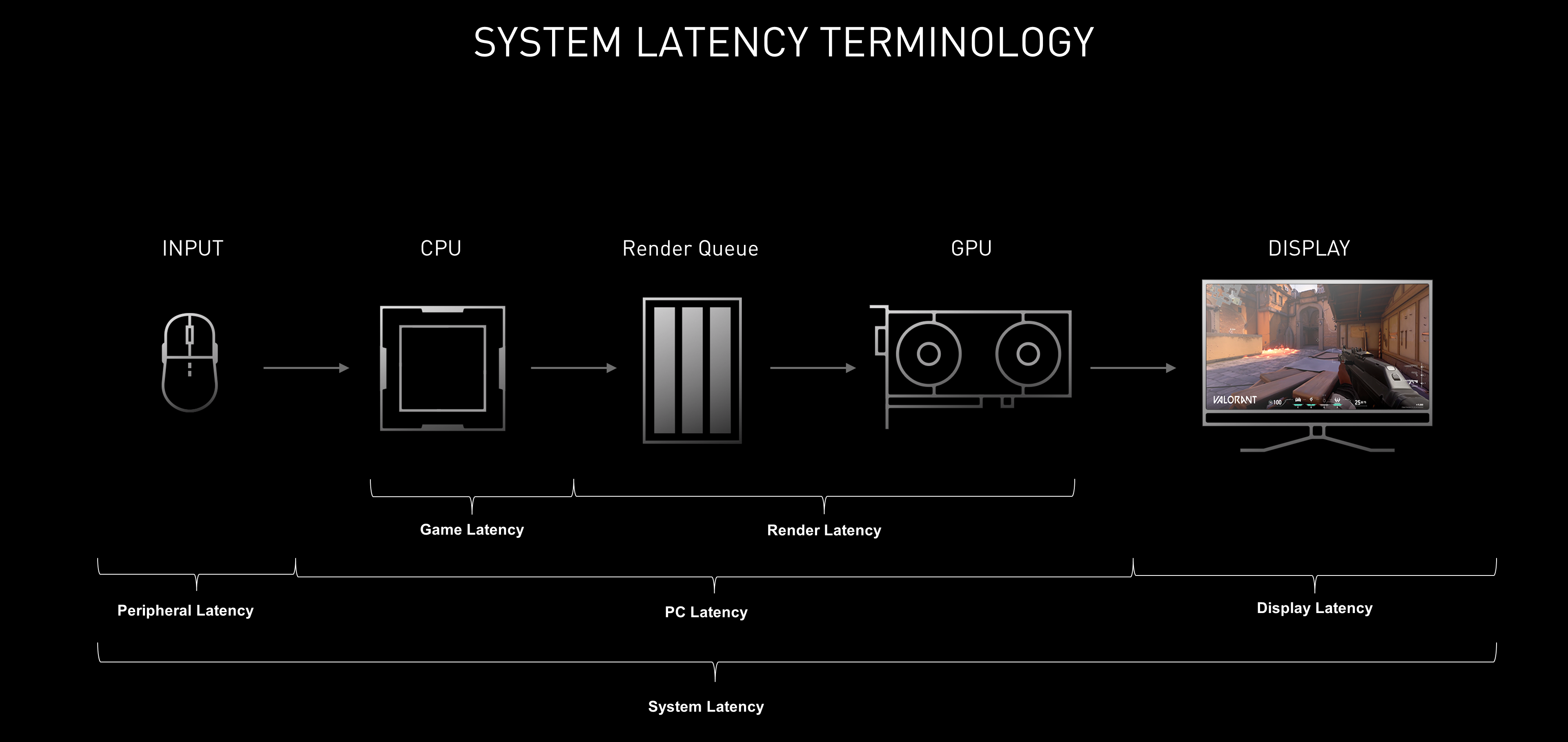
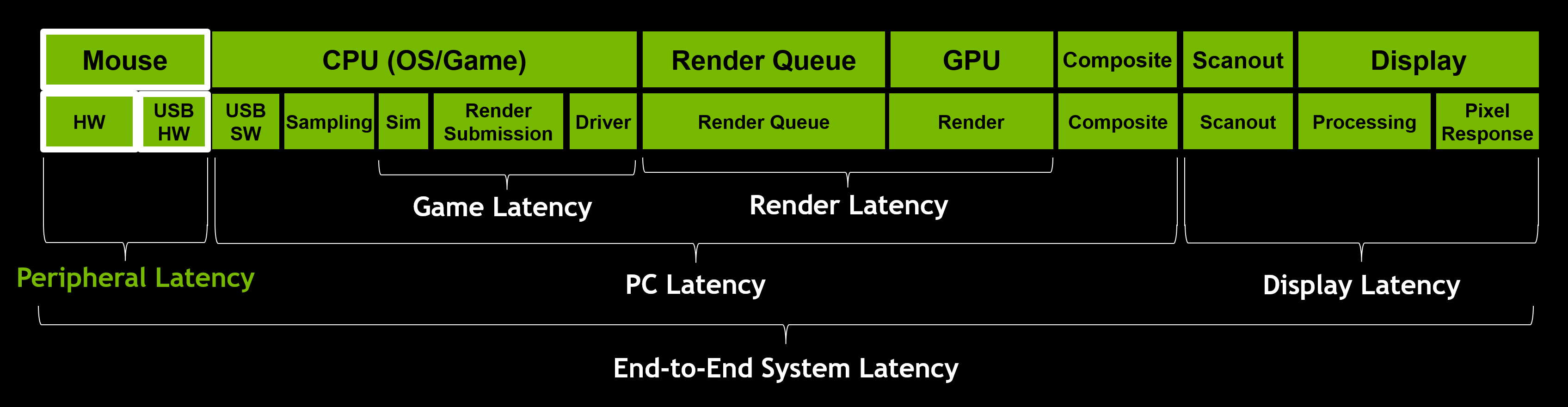
While network speed is the primary culprit behind lag, the devices sitting on your desk play a significant role in how “fast” a game feels. This is often referred to as “System Latency” or “Input-to-Display” lag.
Peripheral Polling Rates
Your mouse and keyboard are your primary interfaces with the digital world. Most standard office peripherals have a polling rate of 125Hz, meaning they report their position to the PC 125 times per second. Gaming-grade tech, however, pushes this to 1,000Hz, 4,000Hz, or even 8,000Hz. By increasing the frequency at which the computer checks for input, the initial latency between physical movement and software recognition is reduced to a fraction of a millisecond.
CPU and GPU Processing Pipeline
Once the computer receives your input, it must process that data through the game engine and render a new frame. This creates a “render queue.” If your CPU is struggling to keep up with the game’s logic or your GPU is overwhelmed by high-fidelity graphics, the time it takes to generate a frame increases.
Technologies like NVIDIA Reflex and AMD Radeon Anti-Lag were developed specifically to address this. These software-level optimizations synchronize the CPU and GPU, ensuring that the GPU doesn’t start rendering a frame until the CPU has the most up-to-date input data, effectively shortening the “render pipeline” and lowering system latency.
Display Latency and Refresh Rates
The final step in the chain is the monitor. Display latency is the time it takes for the monitor to receive a frame from the GPU and illuminate the pixels. High-refresh-rate monitors (144Hz, 240Hz, or 360Hz) significantly reduce this delay. A 60Hz monitor updates the screen every 16.6 milliseconds, whereas a 240Hz monitor updates every 4.1 milliseconds. For a competitive gamer, that 12ms difference can be the margin between a winning shot and a missed opportunity.
Networking Infrastructure: The Path to the Server
The journey of your data packet is influenced by several layers of infrastructure, starting from your bedroom and extending to the global internet backbone.
The Role of the ISP and Routing
Your Internet Service Provider (ISP) determines the path your data takes. Not all paths are equal. “Bad routing” happens when an ISP sends your data through multiple unnecessary nodes or “hops” before it reaches the game server. For example, a packet might travel from Chicago to Dallas and then back to Minneapolis instead of going directly. High-end gaming ISPs often prioritize “low-latency peering,” ensuring that gaming traffic is routed through the most direct physical paths possible.
Wired vs. Wireless Connections
In the tech community, the debate between Ethernet and Wi-Fi is largely settled: for low latency, wired is king. Wi-Fi signals are subject to electromagnetic interference from other devices, walls, and even microwave ovens. This interference causes “retries,” where the router has to resend data, leading to spikes in jitter. An Ethernet cable provides a dedicated, shielded pathway for data, ensuring the lowest possible latency and the highest stability.
The Impact of Modern Network Standards
The introduction of Wi-Fi 6 and Wi-Fi 6E has improved wireless gaming by using technologies like OFDMA (Orthogonal Frequency-Division Multiple Access), which allows the router to handle multiple devices more efficiently. However, even with these advancements, the overhead of wireless encryption and signal conversion means that a physical Cat6 or Cat7 cable remains the gold standard for anyone serious about minimizing latency.
Strategies for Reducing Latency and Improving Performance
Reducing latency is an exercise in “trimming the fat” from every stage of the data’s journey. By optimizing your software and hardware settings, you can reclaim precious milliseconds.
Optimizing Network Settings (QoS and DNS)
One of the most effective software-level tweaks is enabling Quality of Service (QoS) on your router. QoS allows you to prioritize gaming traffic over other types of data, such as Netflix streaming or large file downloads. This ensures that even if someone else in your household is using the bandwidth, your gaming packets are “moved to the front of the line.”
Additionally, while changing your DNS (Domain Name System) to providers like Cloudflare (1.1.1.1) or Google (8.8.8.8) won’t lower your in-game ping directly, it can improve the speed at which your game client connects to matchmaking services and resolves server addresses.
Software Tweaks and “Game Modes”
Modern operating systems like Windows 11 include a “Game Mode” that suppresses background processes and Windows Updates while a game is running. This reduces the load on the CPU, ensuring that the processor can focus entirely on the game’s input/output cycle. Furthermore, players should disable “Full-screen Optimization” and ensure their GPU drivers are updated, as manufacturers frequently release patches that optimize the data pipeline for new titles.
The Future: 5G, Fiber, and Edge Computing
The landscape of latency is changing with the rollout of 5G and widespread fiber-optic internet. Fiber offers symmetrical upload and download speeds with significantly lower propagation delay than traditional copper cables.
Perhaps the most exciting trend is “Edge Computing.” Instead of hosting a game on one massive server in a central city, game developers are increasingly using “edge nodes”—smaller servers located closer to the users. By bringing the server to the player, the physical distance data must travel is minimized, potentially bringing sub-10ms latency to the masses.
Conclusion: Why Milliseconds Matter
In the tech-driven ecosystem of modern gaming, latency is the ultimate gatekeeper of quality. It is a multi-faceted challenge that involves the physics of light, the efficiency of networking hardware, and the processing power of local machines. While we may never truly achieve “zero latency” due to the laws of physics, the industry is closer than ever to a perfectly responsive digital experience.
By understanding the components of latency—from the polling rate of a mouse to the routing protocols of an ISP—gamers can take control of their tech stack. Whether through upgrading to a high-refresh-rate monitor, switching to a wired connection, or utilizing low-latency software optimizations, reducing the gap between action and reaction is the surest way to elevate your gaming performance. In a world where victory is decided in a heartbeat, every millisecond counts.
aViewFromTheCave is a participant in the Amazon Services LLC Associates Program, an affiliate advertising program designed to provide a means for sites to earn advertising fees by advertising and linking to Amazon.com. Amazon, the Amazon logo, AmazonSupply, and the AmazonSupply logo are trademarks of Amazon.com, Inc. or its affiliates. As an Amazon Associate we earn affiliate commissions from qualifying purchases.