
In the landscape of consumer-grade manufacturing, few devices have bridged the gap between industrial capability and desktop accessibility as effectively as the Cricut smart cutting machine. While often categorized as a hobbyist tool, the Cricut is, at its core, a sophisticated piece of Computer Numerical Control (CNC) hardware. It represents a significant advancement in desktop fabrication technology, utilizing complex software-hardware integration to manipulate materials with a level of precision once reserved for high-end manufacturing plants.
Understanding what you can make with a Cricut requires looking past the physical projects and examining the technological infrastructure that powers them. From the “Smart Tool” system to the cloud-based Design Space software, the Cricut ecosystem is a masterclass in modern tech integration.

1. The Architecture of Desktop CNC: Hardware Engineering
At its fundamental level, a Cricut is a high-precision robot. Unlike traditional printers that deposit ink, the Cricut uses a coordinate system (X and Y axes) to move a carriage and a drive roller with mathematical accuracy.
The Adaptive Tool System
The hallmark of the “Tech” behind the Cricut Maker series is the Adaptive Tool System. This technology allows the machine to control the direction of the blade and the amount of pressure applied at any given millisecond. This isn’t just a simple “up and down” motion; the system utilizes a sophisticated gear mechanism that allows the tool to rotate 360 degrees. This permits the machine to cut through materials ranging from delicate tissue paper to 2.4mm balsa wood. By intelligently managing “downward force”—up to 4 kilograms in the higher-end models—the hardware can execute complex patterns that would be impossible via manual methods.
Sensors and Calibration
Modern Cricut machines, such as the Explore 3 and Maker 3, are equipped with optical sensors. These sensors serve two primary functions: “Print Then Cut” calibration and material detection. Through the “Print Then Cut” feature, the machine uses its sensors to locate pre-printed registration marks on a page. The onboard processor then calculates the offset and skew of the paper to ensure that the digital cut path aligns perfectly with the printed image. Furthermore, the sensors detect the presence of “Smart Materials,” adjusting the drive rollers to accommodate matless cutting, a significant leap in consumer-level automation.
2. The Software Engine: Cricut Design Space and Vector Processing
Hardware is only as capable as the software that directs it. The Cricut ecosystem relies on “Design Space,” a proprietary CAD (Computer-Aided Design) lite software that handles the heavy lifting of vector processing.
Cloud-Based Workflows and Cross-Platform Syncing
Design Space operates primarily as a cloud-based application, which represents a modern shift in how we approach digital fabrication. Users can start a design on an iPad using touch-based gestures and finish it on a high-powered desktop PC. The synchronization of “Project” files across the cloud ensures that the heavy computational tasks—such as “welding” complex vector paths or “flattening” multi-layer designs—are handled efficiently. This cloud integration also allows for a vast library of digital assets (SVG, PNG, and JPG) to be stored and accessed instantly, mimicking the “Software as a Service” (SaaS) models seen in professional design suites.
Vector Conversion and Rasterization
The tech behind “what you can make” relies heavily on the software’s ability to interpret vector data. When a user uploads an image, Design Space’s algorithms analyze the pixels to identify “paths.” These paths are then converted into G-code-like instructions that tell the machine’s motors exactly where to move. For tech-savvy users, the ability to import custom SVG (Scalable Vector Graphics) files means the Cricut can be used in tandem with professional software like Adobe Illustrator or Inkscape. This transforms the device from a simple craft tool into a peripheral for professional-grade digital design.
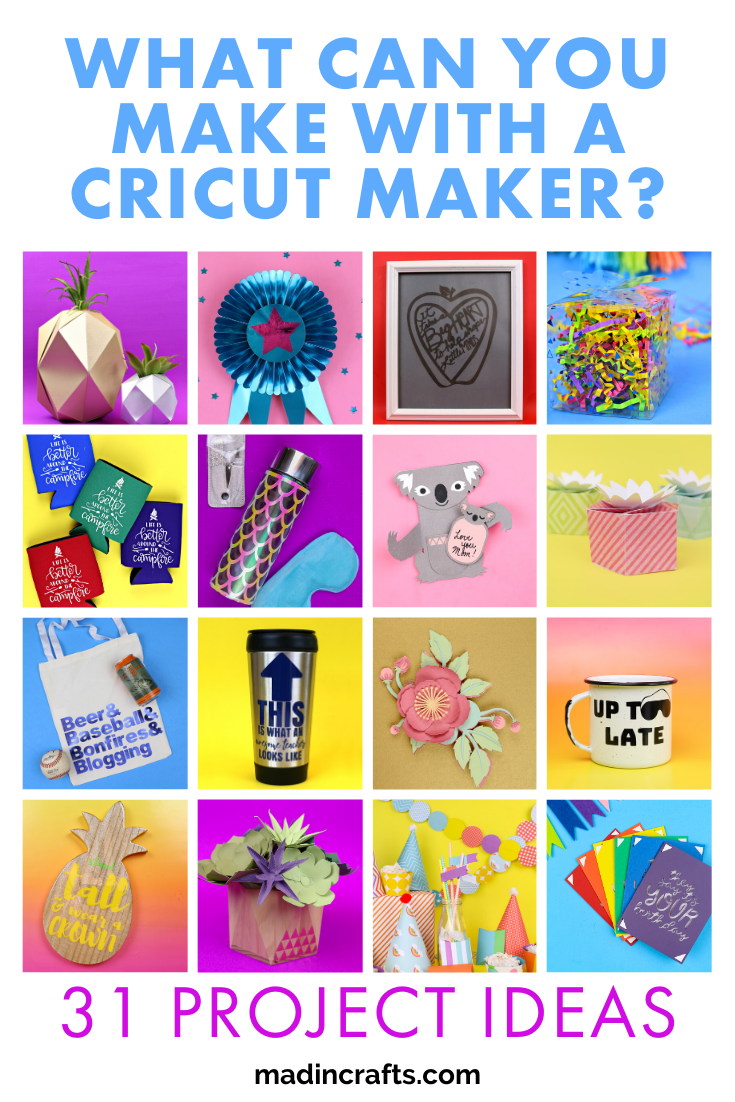
3. Materials Science: Digital Precision on Physical Surfaces
The versatility of the Cricut is a result of how its technology interacts with various material properties. The machine doesn’t just “cut”; it interprets the physical resistance of the material and adjusts its output accordingly.
Cutting Algorithms and Blade Geometry
Different materials require different “cut profiles.” The software contains a database of hundreds of material settings, each representing a unique combination of pressure, multi-cut passes, and blade type. For instance, when cutting leather, the machine uses a “Deep Point Blade” and a specific algorithm that might involve cutting the same path four times with incremental pressure to prevent snagging. Conversely, for “Infusible Ink” (a sublimation-based technology), the machine must maintain extreme precision to ensure that the carrier sheet remains intact while the ink-rich layer is sliced.
The Revolution of Smart Materials
One of the most recent technological milestones in the Cricut lineup is the development of Smart Materials. These materials are engineered with a proprietary poly-backing that is rigid enough to be fed directly into the machine without a cutting mat. This requires the machine’s hardware to have high-torque motors capable of handling longer rolls (up to 75 feet) without losing alignment. The tech here is focused on “tracking”—ensuring that over a long distance, the material doesn’t shift by even a fraction of a millimeter. This advancement allows for the creation of large-scale environmental graphics and signage that were previously only possible on industrial wide-format cutters.
4. The Internet of Things (IoT) and Wireless Connectivity
The Cricut is a prominent example of the “Internet of Things” (IoT) entering the workspace. By moving away from wired connections, the machine integrates seamlessly into a modern, wireless ecosystem.
Bluetooth LE and Data Transmission
Cricut machines utilize Bluetooth Low Energy (LE) to communicate with host devices. This isn’t just for convenience; it allows for a continuous stream of data between the software and the machine’s internal buffer. When a complex design with thousands of nodes is sent to the cutter, the data is broken down into manageable packets. The machine’s firmware processes these packets in real-time, ensuring smooth motion without the “stuttering” often seen in older, buffer-limited hardware.
Firmware Updates and Evolving Capabilities
Perhaps the most “tech-forward” aspect of the Cricut is that its capabilities are not static. Through over-the-air (OTA) firmware updates, the machine’s internal logic can be optimized. An update might improve the speed of the tool carriage or refine the sensor’s sensitivity for “Print Then Cut” on reflective surfaces. This means the “what you can make” list is constantly expanding as the engineers at Cricut refine the software-to-hardware communication protocols.
5. The Future of Consumer Manufacturing: Democratizing Tech
The existence of the Cricut points toward a future where “personal fabrication” is as common as personal computing. By simplifying the interface between complex vector math and physical output, this technology democratizes manufacturing.
Micro-Manufacturing and Prototyping
For tech developers and engineers, the Cricut serves as a rapid prototyping tool. It can be used to cut gaskets, create flexible circuits using conductive copper tape, or fabricate housing components for electronics. The precision of the machine allows for tolerances that are sufficient for functional engineering prototypes. This crossover from “crafting” to “engineering” is where the true power of the technology lies.

The Ecosystem of Integration
Looking forward, the integration of AI within Design Space—such as automated layout optimization (nesting) to reduce material waste—represents the next frontier. As machine learning algorithms become more prevalent, we can expect the software to suggest optimal cut settings based on sensor feedback or even automatically repair “broken” vector paths uploaded by users.
In conclusion, when asking “what can you make with a Cricut,” the answer is limited only by the user’s ability to leverage its sophisticated technological stack. It is a device that occupies the intersection of mechanical engineering, software development, and materials science. Whether you are using it to cut intricate vinyl decals, prototype a mechanical part, or automate a small-scale production line, you are engaging with a high-tech ecosystem designed to turn digital data into physical reality with surgical precision. The Cricut is not merely a tool for makers; it is a gateway to the future of localized, digital manufacturing.
aViewFromTheCave is a participant in the Amazon Services LLC Associates Program, an affiliate advertising program designed to provide a means for sites to earn advertising fees by advertising and linking to Amazon.com. Amazon, the Amazon logo, AmazonSupply, and the AmazonSupply logo are trademarks of Amazon.com, Inc. or its affiliates. As an Amazon Associate we earn affiliate commissions from qualifying purchases.