
In the evolving landscape of audio engineering and live sound production, the hardware used to bridge the gap between raw sound and high-fidelity output has become increasingly sophisticated. Among the emerging tools for content creators, musicians, and sound technicians is the NXG audio mixer series. For many users, particularly those transitioning from basic plug-and-play interfaces to more professional setups, certain technical terminologies and visual cues can be confusing. Two of the most common queries regarding these devices involve the concept of “Line” levels and the specific meaning behind “Blue” LED indicators.
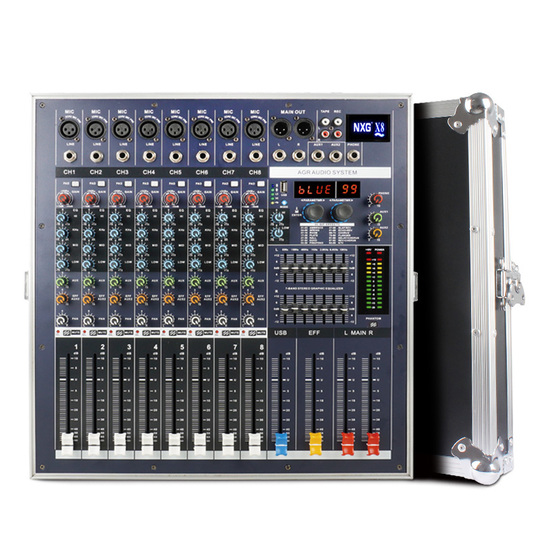
This article explores the technical architecture of the NXG audio mixer, decoding the science behind signal processing and the user interface designs that define modern audio technology.
Decoding Audio Signal Levels: The Significance of “Line” Input
In the realm of audio technology, signal level is everything. When a user sees a “Line” designation on an NXG mixer, they are looking at one of the four primary levels of audio signals: Mic, Instrument, Line, and Speaker. Understanding why “Line” is the standard for high-quality audio routing is essential for any technical setup.
Mic vs. Line Level: What’s the Difference?
The distinction between Mic level and Line level is fundamentally a matter of voltage. A microphone produces a very weak electrical signal, often measured in millivolts. Because this signal is so quiet, it requires a preamplifier (preamp) to boost it to a usable level.
In contrast, “Line” level is the highest-level signals before amplification to speakers. It is the standard strength for signal processing equipment. On an NXG mixer, the “Line” input is designed to receive signals from devices that already have their own internal power or pre-amplification, such as synthesizers, drum machines, or external media players. Plugging a Line-level device into a Mic-level input without padding the signal can lead to immediate distortion and potential damage to the mixer’s sensitive circuitry.
How Line Level Optimizes Audio Quality
The “Line” setting on an NXG mixer serves a critical technical purpose: maximizing the signal-to-noise ratio. By utilizing Line level, the mixer can process audio with minimal interference from the “noise floor”—the inherent hiss present in all electronic circuits.
Professional audio gear typically operates at a “Professional Line Level” of +4 dBu, while consumer electronics operate at -10 dBV. The NXG series is engineered to handle these variances, ensuring that the internal components maintain a clean, transparent path for the audio data. When you select the “Line” option, you are essentially telling the mixer’s internal architecture to bypass the high-gain preamp stage, preserving the integrity of the source audio.
Navigating the Interface: What Does the Blue Light Mean?
Modern audio hardware utilizes visual feedback to communicate system status to the operator. On the NXG audio mixer, the color-coded LED system is a vital component of the user experience. While red often signifies “clipping” (distortion) and green signifies “signal presence,” the blue LED is a multi-functional indicator that varies depending on the specific model and mode of operation.
Power Indicators and System Readiness
In most standard configurations of NXG hardware, a steady blue light serves as the primary Power Status indicator. Unlike the harsh red lights of older analog gear, modern tech utilizes blue LEDs to signify that the internal power supply is stable and the digital-to-analog converters (DACs) are initialized.
From a technical standpoint, this blue light indicates that the “rail voltage” within the mixer has reached its required threshold. If this light flickers or fails to engage, it points to a potential issue with the power source or the internal transformer, providing an immediate diagnostic tool for the technician.
Bluetooth Connectivity and Pairing Status
As the NXG mixer caters to a modern “hybrid” workflow, many models include integrated Bluetooth modules for wireless audio playback. In this context, the “Blue” light takes on a more literal meaning.
When the blue LED is flashing, the mixer’s wireless chipset is in “Discovery Mode,” broadcasting its SSID to nearby devices. Once a stable handshake is established between the mixer and the source (such as a smartphone or laptop), the light typically turns solid blue. This visual cue is essential for troubleshooters; a flashing blue light during a live event tells the technician that the wireless link has been severed, allowing for rapid intervention.
Signal Peak and Digital Link Status
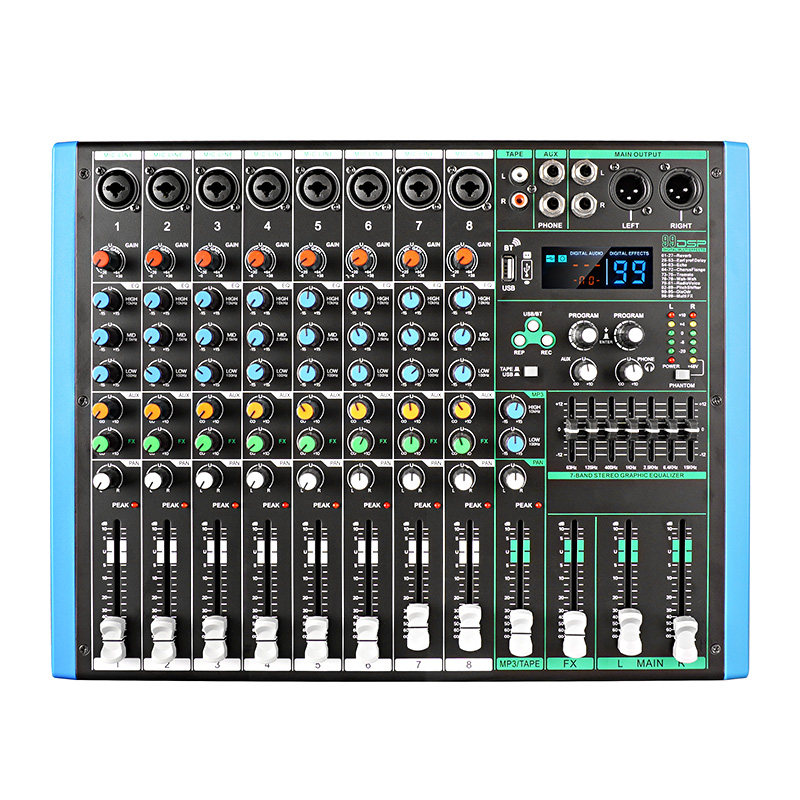
In some advanced digital iterations of the NXG line, blue LEDs are used to distinguish between analog signal processing and digital “link” modes. When the mixer is used as a USB audio interface, a blue indicator may signify that a successful “Sync” has been achieved with the host computer’s Digital Audio Workstation (DAW). This ensures that the sample rate of the hardware matches the software, preventing the digital “pops” and “clicks” that occur when two devices are out of sync.
Technical Specifications of the NXG Mixer Series
To understand the “Line” and “Blue” indicators fully, one must look at the internal components that make the NXG series a staple in the tech-heavy audio market. These devices are not merely volume knobs; they are sophisticated signal processors.
Integrated Preamps and Circuitry
The heart of the NXG mixer lies in its preamplification stage. Even when set to “Line,” the internal circuitry must maintain a flat frequency response. The tech inside these mixers often utilizes Low-Noise Integrated Circuits (ICs) that ensure a wide dynamic range.
The “Line” input on these devices is usually “balanced.” Balanced audio uses three conductors to carry two copies of the same signal with reversed polarity. This tech allows the mixer to cancel out electromagnetic interference (EMI) that might be picked up over long cable runs. This is why the distinction of “Line” is so important; it implies a professional-grade connection capable of rejecting the “hum” found in complex tech environments.
Digital vs. Analog Signal Processing
The NXG series often features a hybrid architecture. While the inputs (Line/Mic) are analog, the “Blue” light often represents the digital side of the house. Inside the mixer, an Analog-to-Digital Converter (ADC) translates the continuous voltage of the “Line” signal into binary data.
This digital conversion allows for high-tech features such as onboard Effects Processing (DSP). When the blue light signifies that the DSP is active, the mixer is utilizing a specialized microprocessor to calculate echoes, reverbs, or EQ curves in real-time with near-zero latency.
Optimizing Your Workflow with Professional Audio Standards
Knowing what the “Line” input and “Blue” lights mean is the first step toward mastering the technology. However, applying this knowledge to a professional workflow is where the value truly lies.
Gain Staging for Maximum Headroom
“Gain Staging” is the process of managing the signal levels at each stage of a system to prevent noise and distortion. When using an NXG mixer, the technician must ensure that the “Line” input is not being overdriven by the source device.
The goal is to keep the signal in the “sweet spot”—high enough to stay above the noise floor but low enough to leave “headroom” for unexpected peaks. If the blue power light is on, but you are seeing red “Peak” lights next to your faders, the “Line” input is being overwhelmed. The professional approach is to reduce the output of the source device and use the mixer’s high-quality circuitry to balance the levels.
Troubleshooting Common LED Alerts
In a high-pressure environment, the ability to read the mixer’s “language” is crucial. If the blue light on your NXG mixer is dim or fluctuating, it often indicates “voltage sag.” This can happen when the mixer is plugged into a power strip shared with high-draw tech, like stage lights or power amplifiers.
Furthermore, if the blue “Link” light fails to appear when connected to a computer via USB, it indicates a driver conflict or a faulty cable. By treating the blue LED as a diagnostic dashboard rather than just a decorative light, users can leverage the full technological potential of their NXG hardware.
The Future of Compact Mixing Technology
The NXG audio mixer represents a broader trend in technology: the democratization of high-end audio features. Features that were once reserved for massive studio consoles—like dedicated Line-level switching and sophisticated LED status monitoring—are now available in compact, affordable units.
As we move toward more integrated setups, the “Blue” light may eventually represent even more complex functions, such as cloud-syncing for settings or AI-assisted gain leveling. For now, understanding the fundamental tech behind the “Line” input and the visual feedback of the blue LED ensures that creators can produce professional, broadcast-quality audio with confidence.
By mastering these technical nuances, users transform from casual operators into skilled technicians, capable of navigating the intricacies of modern sound reinforcement and digital recording. The NXG mixer is a powerful tool, provided one understands the science behind the signals and the lights.
aViewFromTheCave is a participant in the Amazon Services LLC Associates Program, an affiliate advertising program designed to provide a means for sites to earn advertising fees by advertising and linking to Amazon.com. Amazon, the Amazon logo, AmazonSupply, and the AmazonSupply logo are trademarks of Amazon.com, Inc. or its affiliates. As an Amazon Associate we earn affiliate commissions from qualifying purchases.