
In the rapidly evolving landscape of social media, small user interface (UI) elements often carry significant weight in how we interact with our digital circles. Snapchat, a pioneer in ephemeral messaging and augmented reality, frequently introduces subtle updates to its platform to enhance user engagement. One such feature that has sparked curiosity among its millions of daily active users is the elusive “green dot” appearing on profiles.
Far from being a mere aesthetic choice, the green dot serves as a critical data point within the app’s ecosystem. This article explores the technical nuances of the green dot, its role in the broader context of digital presence, and the privacy implications it carries for users navigating the modern social web.

Decoding the Green Dot: The Mechanics of Activity Indicators
At its core, the green dot on Snapchat is an “Activity Indicator.” While Snapchat has historically prioritized privacy through its “Ghost Mode” and ephemeral content, the introduction of the green dot aligns it more closely with other instant messaging giants like WhatsApp and Instagram. However, the technical implementation on Snapchat has its own unique logic.
What the Green Dot Represents
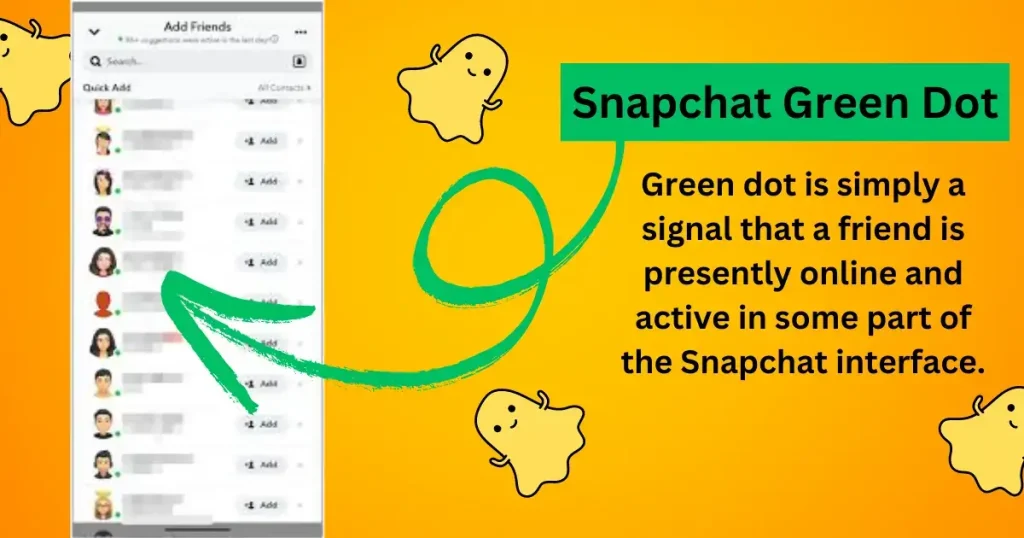
The green dot specifically indicates that a user has been active on the platform very recently. Unlike the “Last Seen” timestamp found on other apps, the green dot is a real-time or near-real-time status symbol. When you see a green dot next to a friend’s name in your “Quick Add” list or on their profile, it signifies that they have recently opened the app to send a Snap, view a Story, or interact with the Map.
It is important to note that the green dot does not necessarily mean the user is looking at your specific chat or profile at that exact second; rather, it indicates general activity within the Snapchat application.
Activity Status vs. Ghost Mode
The visibility of the green dot is intrinsically tied to a user’s Snap Map settings. If a user has enabled “Ghost Mode,” their location is hidden, and their activity status—including the green dot—is typically suppressed. This technical synergy ensures that users who wish to remain “invisible” on the map are not inadvertently “outed” by a status indicator in the chat or search menus. The logic behind this is to provide a cohesive privacy experience where a user’s desire for anonymity is respected across different layers of the UI.
The Evolution of Presence Features in Modern Social Media Architecture
To understand why a tech giant like Snap Inc. would implement such a feature, we must look at the psychological and technical motivations behind presence indicators in software design. The green dot is a tool designed to reduce “interaction friction.”
Why Snap Inc. Introduced Activity Indicators
From a software engineering and product growth perspective, activity indicators serve to increase the “liquidity” of communication. When a user sees a green dot, they are more likely to initiate a conversation because they have a higher expectation of a prompt reply. This decreases the psychological barrier to sending a message, as the sender feels they aren’t “shouting into the void.”
For Snapchat, this feature is a vital component of its retention strategy. By highlighting which users are currently online, the app fosters a sense of a “live” community, encouraging users to stay within the ecosystem longer to engage in real-time back-and-forth exchanges.
Comparing Snapchat’s System to Instagram and WhatsApp
While Instagram uses a similar green dot in its Direct Messaging (DM) tab, Snapchat’s version is more integrated with its “Quick Add” and “Friends” discovery features. In the broader tech landscape, these indicators are known as “Presence Protocols.” They rely on constant pings between the client-side app and the central server.
When you open Snapchat, the app sends a packet of data to the server indicating an “active session.” The server then updates your status across your friends’ devices. This requires a highly scalable backend architecture capable of handling millions of status updates per second without causing latency in the actual messaging service.
Privacy and Security: Managing Your Digital Footprint
As with any feature that broadcasts a user’s behavior, the green dot raises significant questions regarding digital privacy and the right to “unplug.” In an era where digital burnout is a recognized phenomenon, the pressure to be “always-on” can be exacerbated by features like the activity indicator.
How to Disable the Activity Indicator
For users who value their privacy or wish to browse their Snaps without the pressure of immediate social reciprocation, disabling the green dot is a straightforward technical process.
- Navigate to Settings: Open the Snapchat app and tap on your Bitmoji or profile icon.
- Access Privacy Controls: Tap the gear icon to enter the “Settings” menu.
- Manage Activity Status: Scroll down to the “Privacy Controls” section and look for “Activity Status.”
- Toggle Off: You can switch off “Show Activity Status.”
Once disabled, the green dot will no longer appear on your profile for others. However, in line with the “reciprocity principle” common in tech (similar to Read Receipts), disabling your own status often prevents you from seeing the activity status of your friends.
The Impact on User Privacy and Mental Health
From a digital security standpoint, the green dot provides “metadata” about your habits. It can reveal when you wake up, when you go to sleep, and how frequently you check your phone. For most, this is harmless, but for individuals concerned about digital stalking or over-monitoring by others, it is a feature that requires careful management.
Furthermore, the “gamification” of presence can lead to social anxiety. The technical design of these features often ignores the nuance of human interaction—someone might be “active” on the app to check a work-related message or a quick update, but not be emotionally available for a social conversation.
Technical Troubleshooting and Common Misconceptions
Not everything you see on a digital interface is a 100% accurate reflection of reality. The green dot, while automated, is subject to the limitations of mobile operating systems and background data processing.
Why the Green Dot Might Be Inaccurate
One of the most common tech support queries regarding Snapchat is why the green dot remains active when a user claims they are not using the app. This usually boils down to “Background App Refresh.”
On both iOS and Android, apps often stay “alive” in the background for several minutes after they are closed to finish uploading content or fetching updates. If Snapchat’s process hasn’t been fully terminated by the operating system’s memory management, the server may still perceive the session as active, keeping the green dot illuminated for 5 to 10 minutes after the user has put their phone down.
The Difference Between the Green Dot and the Blue Camera Icon
Users often confuse the green dot with the blue camera icon or the “Typing…” notification. Technically, these are triggered by different actions:
- Green Dot: General app activity (server-side session).
- Blue Camera/Dot in Chat: Specifically indicates the user is currently inside the chat window with you (active socket connection).
- Typing Notification: Triggered by keyboard input within a text field.
Understanding these distinctions helps users better interpret the “digital body language” of their contacts.
The Future of Real-Time Interaction in Messaging Apps
The green dot is likely just the beginning of more sophisticated presence features. As AI and machine learning become more integrated into social media software, we may see “Contextual Presence.”
AI and Contextual Presence
The next iteration of the activity indicator might not be a simple binary (online/offline). We are moving toward a tech landscape where AI could predict when a user is “likely to respond” based on past behavior, or provide a “Focus Mode” status that automatically mutes indicators when the user is driving or at work.
Snapchat is already experimenting with My AI, its integrated chatbot. In the future, your activity status might be managed by an AI layer that filters your visibility based on who is looking, your current location, and your calendar events, providing a more intelligent approach to digital connectivity.

Conclusion: Balancing Connectivity with Boundaries
The green dot on Snapchat is a testament to the platform’s shift toward high-frequency, real-time interaction. It is a powerful tool for maintaining social ties, but it requires a tech-literate approach to manage effectively. By understanding the mechanics behind the indicator—from server pings to background refresh cycles—users can take control of their digital presence.
Ultimately, the goal of these software features should be to enhance human connection, not to mandate it. Whether you choose to leave the green dot on to signal availability or toggle it off to reclaim your digital anonymity, being informed about the underlying technology allows you to navigate the Snapchat ecosystem with confidence and intent.
aViewFromTheCave is a participant in the Amazon Services LLC Associates Program, an affiliate advertising program designed to provide a means for sites to earn advertising fees by advertising and linking to Amazon.com. Amazon, the Amazon logo, AmazonSupply, and the AmazonSupply logo are trademarks of Amazon.com, Inc. or its affiliates. As an Amazon Associate we earn affiliate commissions from qualifying purchases.