
In the rapidly evolving landscape of financial technology, the transition from physical leather wallets to digital ecosystems is nearly complete. At the forefront of this revolution is Google Pay, a multifaceted payment platform and digital wallet developed by Google. It serves as a bridge between traditional banking and modern mobile convenience, allowing users to power transactions through their smartphones, tablets, and watches. Whether you are navigating a grocery store checkout or splitting a dinner bill with friends, understanding the technical nuances of Google Pay is essential for anyone looking to streamline their digital life.

The Technical Foundations: Setting Up Your Google Pay Ecosystem
Before engaging in contactless transactions, a user must first configure the software environment on their device. Google Pay is not merely an app; it is an integrated service that leverages the Near Field Communication (NFC) hardware found in modern mobile devices.
Device Compatibility and Software Requirements
To use Google Pay for in-store purchases, your device must be equipped with an NFC chip. On the software side, Android devices generally require version 7.0 (Nougat) or higher, though for the best security features, being on the latest OS version is recommended. For iOS users, Google Pay functions primarily as a peer-to-peer (P2P) payment tool and a hub for loyalty cards, as Apple restricts the NFC chip to its proprietary Apple Pay service.
Integrating Payment Methods
The initial setup involves the “tokenization” of your financial instruments. When you add a credit or debit card, the app does not store your actual card number on the device. Instead, it contacts the issuing bank to request a “token”—a unique, encrypted digital alias for your card. To add a card, you can use the device’s camera to scan the physical card or enter the details manually. This process includes entering the CVV and verifying the billing address associated with the account.
Verification and Authentication Protocols
Security is hardcoded into the setup process. Once card details are entered, most banks require a secondary verification step. This usually involves a One-Time Password (OTP) sent via SMS or email, or a quick verification through the bank’s own mobile app. This multi-factor authentication ensures that the person adding the card to the digital wallet is the legitimate owner.
Navigating the Interface: Core Functionality and Usage
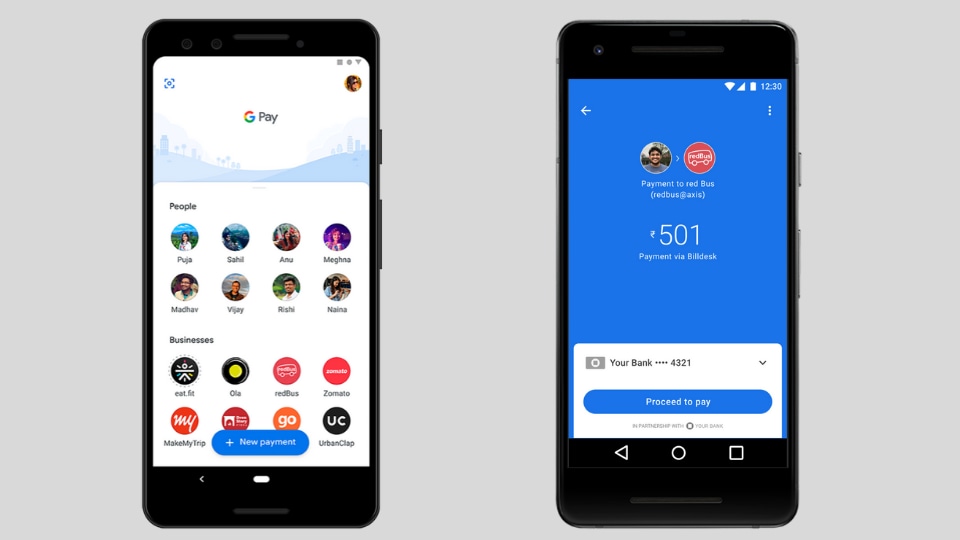
Once the setup is complete, the user interface (UI) of Google Pay provides a streamlined dashboard for managing various types of transactions. The app is designed to prioritize speed, ensuring that the technology does not become a bottleneck during the payment process.
Executing Contactless In-Store Payments
The hallmark of Google Pay is the “Tap to Pay” feature. This utilizes NFC technology to create a short-range wireless connection (usually within 4 centimeters) between the smartphone and the Point of Sale (POS) terminal. To pay, you simply wake your phone (and in most cases, unlock it using biometrics or a PIN) and hold the back of the device near the contactless symbol on the terminal. A blue checkmark appears on the screen once the cryptographic handshake is complete, signaling a successful transaction.
Peer-to-Peer (P2P) Transfers and Group Payments
Beyond physical retail, Google Pay functions as a powerful P2P engine. Users can send and request money using just an email address or phone number. The technical backend utilizes the Automated Clearing House (ACH) network or instant debit rails to move funds. One of the more advanced software features is the “Group” function, which allows users to create a collective tab. The app’s algorithm automatically calculates the split and tracks who has paid and who still owes money, sending automated reminders through the interface.
Online and In-App Transactions
Google Pay simplifies the checkout process on mobile websites and within other apps. When you see the “Buy with Google Pay” button, the software eliminates the need to manually enter shipping and billing information. The app securely passes the necessary encrypted tokens and address data to the merchant, reducing the friction that often leads to cart abandonment in e-commerce.
Beyond Payments: The Digital Organizer and Ecosystem Integration
Google Pay has expanded its scope from a simple payment utility to a comprehensive digital vault. By integrating with other software services and hardware categories, it serves as a central hub for a user’s digital identity and transit needs.
Transit and Ticketing Integration
In many major metropolitan areas, Google Pay has integrated with public transit systems. Users can save digital versions of transit cards (like London’s Oyster or Chicago’s Ventra) directly into the app. Technical “Open Loop” systems also allow users to tap their phone at a turnstile using their default credit card without needing a dedicated transit card. Furthermore, the app can automatically pull flight boarding passes and event tickets from Gmail, displaying them as notifications when the user arrives at the airport or venue.
Loyalty Programs and Digital Passes
To reduce physical clutter, Google Pay allows users to digitize loyalty cards and gift cards. This is achieved by scanning the barcode or QR code of the physical card. Using “Smart Tap” technology, some merchants can even apply loyalty points and process a payment in a single NFC tap. The app uses geofencing technology to provide “proactive notifications,” reminding the user to use a specific loyalty card when the GPS detects they are inside a relevant retail location.
Google Pay on Wearables (Wear OS)
The technology extends to the wrist via Wear OS devices. By syncing the mobile app with a smartwatch, users can perform NFC payments without even taking their phone out of their pocket. The technical architecture requires a screen lock on the watch (PIN, pattern, or password) for security. If the watch detects it has been removed from the wrist, the payment function is immediately disabled until the security code is re-entered.
Security Architecture: How Google Protects Your Data
In the realm of digital finance, security is the most critical technical component. Google Pay employs a “defense-in-depth” strategy, utilizing multiple layers of hardware and software encryption to protect sensitive financial information.
Tokenization and Virtual Account Numbers
The core of Google Pay’s security is tokenization. As mentioned previously, your actual card number is never shared with the merchant. Instead, a Virtual Account Number (VAN) is created. If a merchant’s database is ever breached, the hackers only obtain the token, which is useless outside the specific context of the Google Pay ecosystem and the individual’s device.
Biometric Security and Remote Locking
Google Pay leverages the biometric sensors of the host device—fingerprint scanners, 3D face unlocks, or iris scanners—to authorize payments. This ensures that even if a device is stolen, the digital wallet remains inaccessible. Furthermore, via Google’s “Find My Device” service, a user can remotely wipe their entire Google Pay profile and all stored cards if the hardware is lost or compromised.
Encryption and Data Privacy
All payment information is encrypted and stored on Google’s secure servers. In transit, the data is protected using Transport Layer Security (TLS). From a privacy perspective, Google Pay allows users to toggle data-sharing settings. While the app uses transaction history to provide features like spending insights, users can opt out of personalized offers and prevent their transaction data from being used for ad targeting within the broader Google ecosystem.
Troubleshooting and Optimizing the User Experience
Despite the high level of technical polish, users may occasionally encounter hurdles when using Google Pay. Understanding the “why” behind these issues can help in quick resolution.
Solving NFC and Connectivity Issues
If a “Tap to Pay” fails, the most common culprit is the physical placement of the NFC antenna. On most smartphones, the antenna is located near the top of the device or around the camera module. If the phone is held too low against the terminal, the connection may drop. Additionally, thick or metallic phone cases can interfere with the radio frequency, necessitating a thinner or non-metallic protective cover.
Managing App Permissions and Battery Optimization
Because Google Pay relies on background processes for location-based reminders and security updates, aggressive “Battery Optimization” settings on Android can sometimes put the app to sleep. To ensure seamless performance, users should set Google Pay to “Don’t Optimize” in the battery settings. Furthermore, ensuring that the app has “Nearby Devices” and “Location” permissions is vital for the automated loyalty and transit features to function correctly.

Updates and Software Hygiene
Like any sophisticated software, Google Pay receives frequent updates that include security patches and new features. Keeping the app updated via the Google Play Store is non-negotiable for maintaining security. If the app becomes unresponsive, clearing the “Cache” (but not necessarily the “Data,” which would require re-adding cards) is a standard technical fix that resolves most UI glitches and synchronization errors.
In conclusion, Google Pay is a robust technological tool that transforms the smartphone into a powerful financial instrument. By mastering its setup, understanding its operational mechanics, and leveraging its security protocols, users can navigate the modern economy with unprecedented speed and safety. As the software continues to integrate more deeply with AI and global transit infrastructures, it remains a definitive example of how mobile technology can simplify complex human activities.
aViewFromTheCave is a participant in the Amazon Services LLC Associates Program, an affiliate advertising program designed to provide a means for sites to earn advertising fees by advertising and linking to Amazon.com. Amazon, the Amazon logo, AmazonSupply, and the AmazonSupply logo are trademarks of Amazon.com, Inc. or its affiliates. As an Amazon Associate we earn affiliate commissions from qualifying purchases.