
The allure of YouTube, for many, extends beyond simply sharing ideas; it’s about crafting compelling visual narratives that resonate with millions. At the heart of this creative process lies video editing software, the digital workbench where raw footage transforms into polished content. For aspiring YouTubers and seasoned creators alike, understanding the software landscape is crucial. It’s not just about having the latest, most expensive tools, but about choosing the right ones that align with skill level, budget, and desired output. This article delves into the prevalent video editing software used by YouTubers, exploring their strengths, weaknesses, and why certain applications have become industry staples.

The Spectrum of Editing Software: From Beginner-Friendly to Professional Powerhouses
The world of video editing software is incredibly diverse, catering to a vast array of user needs. For YouTubers, this spectrum ranges from intuitive, often free, applications that allow for quick edits and social media sharing, to complex, feature-rich programs that empower professional-level productions. Understanding this gradient is the first step in selecting a tool that will facilitate, rather than hinder, the creative journey.
Entry-Level Solutions: democratizing video creation
For those just starting their YouTube journey, the barrier to entry needs to be as low as possible. This is where entry-level video editing software shines. These applications are designed with user-friendliness in mind, often featuring drag-and-drop interfaces, pre-set templates, and simplified workflows. The primary goal is to enable creators to quickly learn the fundamentals of editing – cutting, arranging clips, adding basic transitions, and incorporating simple text overlays – without being overwhelmed by technical jargon or complex menus.
iMovie: The Apple Ecosystem’s Accessible Editor
A cornerstone for many Apple users, iMovie offers a surprisingly robust set of features for a free application. Its intuitive interface makes it easy for beginners to jump in and start editing immediately. Whether on a Mac, iPhone, or iPad, iMovie provides essential tools like trimming, splitting, and merging clips, along with a decent selection of transitions, titles, and background music. The ability to easily add voiceovers and picture-in-picture effects further enhances its appeal for vloggers and tutorial creators. While it might lack the advanced color grading or multi-cam editing capabilities of professional software, iMovie serves as an excellent stepping stone, allowing creators to focus on storytelling and content quality before investing in more complex tools. Its seamless integration with other Apple devices also streamlines the workflow for those who shoot and edit on different platforms.
Windows Video Editor: A Built-in Basic Option
For Windows users, the built-in Windows Video Editor offers a similar level of accessibility. Though its feature set is more rudimentary than iMovie’s, it provides the essential tools for basic video assembly. Users can import video clips, trim them, add music, and apply simple text overlays. It’s a no-frills solution that allows for quick edits and the creation of shareable videos without requiring any additional software installation. While it won’t win awards for its sophistication, it’s a viable option for very casual YouTubers who need to piece together footage and add a soundtrack. The simplicity of Windows Video Editor can be its greatest strength, removing any intimidation factor for absolute beginners.
Mobile Editing Apps: On-the-Go Creation
The rise of smartphones has also led to a proliferation of powerful mobile editing apps. Tools like CapCut (especially popular among TikTok and Reels creators, but widely adopted by YouTubers for short-form content and quick edits), InShot, and KineMaster offer surprisingly sophisticated editing capabilities directly on a mobile device. These apps often feature timeline editing, a good selection of effects and filters, the ability to add text and stickers, and even green screen capabilities. For YouTubers who prioritize speed and convenience, or who primarily shoot content on their phones, these mobile editors are invaluable. They allow for immediate editing and uploading, crucial in today’s fast-paced social media environment. CapCut, in particular, has gained immense traction due to its extensive library of trending effects, sound effects, and its user-friendly interface, making it a go-to for many creators experimenting with new formats.
Mid-Range Solutions: Bridging the Gap for Ambitious Creators
As YouTubers gain confidence and their content becomes more complex, they often outgrow the limitations of entry-level software. This is where mid-range editors come into play. These applications offer a more robust feature set, providing greater control over the editing process, enhanced color correction tools, more advanced audio editing capabilities, and a wider array of effects and transitions. They strike a balance between professional power and user accessibility, making them ideal for creators looking to elevate their production quality without the steep learning curve and financial investment of top-tier professional software.
Filmora: User-Friendly Power for a Growing Audience
Wondershare Filmora has carved out a significant niche for itself by offering a compelling blend of powerful features and an intuitive interface. It’s a favorite among many YouTubers for its ease of use, even with its extensive capabilities. Filmora boasts a large library of royalty-free music, sound effects, and video effects, which are invaluable for creators looking to add polish without sourcing assets from multiple platforms. Its drag-and-drop functionality, coupled with advanced features like motion tracking, keyframing, and extensive color grading options, allows for sophisticated edits. The constant updates and addition of new features, often inspired by trending editing styles, keep Filmora relevant for the dynamic YouTube landscape. For creators who want to move beyond basic cuts and add visual flair, Filmora is an excellent choice. Its affordability also makes it an attractive option compared to professional-grade software.
DaVinci Resolve (Free Version): Industry-Standard Power on a Budget
While DaVinci Resolve is renowned for its professional-grade capabilities, its free version is a game-changer for YouTubers. This is an incredibly powerful, Hollywood-level software that offers comprehensive tools for editing, color correction, visual effects (Fusion), and audio post-production (Fairlight) – all within a single application. The free version unlocks a vast majority of features, making it an unparalleled option for creators who are serious about their craft and want to learn industry-standard workflows. The learning curve for DaVinci Resolve can be steeper than for Filmora, but the immense power and flexibility it offers are well worth the investment of time. Its color grading tools, in particular, are considered among the best in the industry, allowing for precise control over the visual aesthetic of a video. For YouTubers aiming for cinematic quality, learning DaVinci Resolve is a strategic move.
Professional Workflows: The Tools of the Trade for Established YouTubers
For many established YouTubers, especially those with dedicated teams or high production value content, professional-grade video editing software is not just a tool, but an essential partner in their creative output. These applications are built for speed, efficiency, and the handling of complex projects with massive amounts of footage and intricate visual effects. They offer unparalleled control, precision, and the ability to integrate with other professional software, making them the backbone of high-end video production.
Adobe Premiere Pro: The Industry Standard for Versatility and Integration
Adobe Premiere Pro is arguably the most widely used professional video editing software among YouTubers. Its dominance stems from its comprehensive feature set, seamless integration with other Adobe Creative Cloud applications like After Effects and Photoshop, and its continuous evolution to meet the demands of modern content creation. Premiere Pro offers an incredibly robust timeline for precise editing, advanced color correction and grading tools, sophisticated audio mixing capabilities, and support for a wide range of video formats and resolutions.
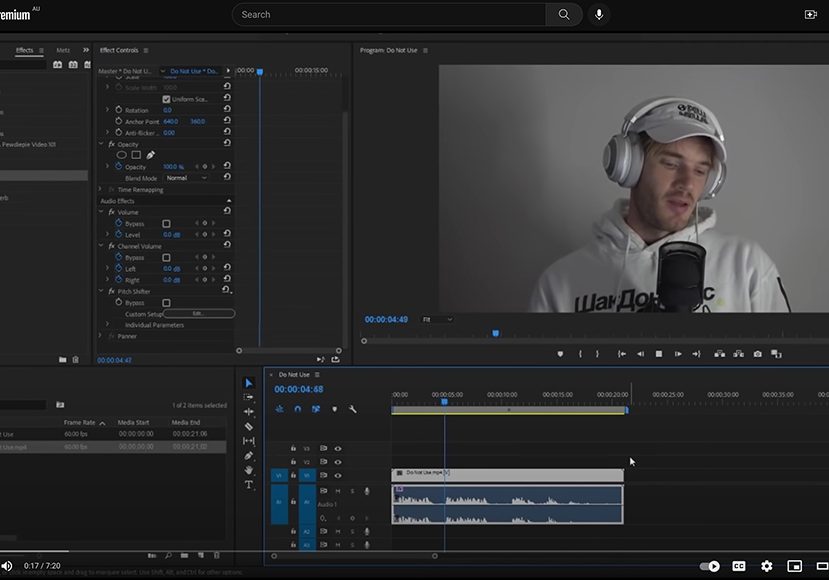
Key Features and Advantages for YouTubers:
- Intuitive Interface: Despite its power, Premiere Pro’s interface is largely intuitive for those familiar with editing concepts. Its customizable workspace allows users to tailor it to their specific needs.
- Broad Format Support: It handles virtually any video format, ensuring that footage from various cameras and devices can be imported and edited without issues.
- Integration with Creative Cloud: This is a massive advantage. Seamless workflows between Premiere Pro, After Effects for motion graphics, Photoshop for image manipulation, and Adobe Audition for audio sweetening save immense amounts of time and effort.
- Powerful Color Grading: Tools like Lumetri Color provide sophisticated control over the visual look and feel of a video, allowing for consistent branding and aesthetic.
- Extensive Plugin Ecosystem: A vast array of third-party plugins can extend Premiere Pro’s functionality even further, adding specialized effects, transitions, and workflow enhancements.
- Collaboration Tools: For larger channels with multiple editors, Premiere Pro offers features that facilitate team collaboration on projects.
Premiere Pro’s subscription-based model (part of Adobe Creative Cloud) makes it accessible through monthly or annual payments, which can be more manageable than a large upfront cost for some creators. Its consistent updates ensure that it remains at the forefront of editing technology, incorporating new codecs, features, and performance optimizations.
Final Cut Pro: Performance and Optimization on macOS
For YouTubers who exclusively use macOS, Apple’s Final Cut Pro offers a compelling alternative to Premiere Pro. Developed by Apple, it’s known for its highly optimized performance, magnetic timeline, and robust feature set that caters to professional workflows.
Key Features and Advantages for YouTubers:
- Magnetic Timeline: This innovative feature prevents clip collisions and accidental disconnections, streamlining the editing process and reducing the likelihood of errors. Clips snap into place, making for a cleaner and more organized timeline.
- Performance on Mac Hardware: Final Cut Pro is designed to leverage the full power of Apple’s hardware, often resulting in faster rendering and smoother playback, especially on M-series MacBooks.
- Optimized for ProRes: It excels at handling Apple’s own ProRes codec, which is a popular choice for professional video production.
- Robust Color Correction and Audio Tools: Similar to Premiere Pro, Final Cut Pro offers advanced tools for color grading and audio editing, allowing for professional-quality results.
- One-Time Purchase: Unlike Premiere Pro’s subscription model, Final Cut Pro is a one-time purchase, which can be a significant cost-saving advantage for many YouTubers.
- Extensive Library of Built-in Effects and Transitions: It comes with a wealth of creative assets that can quickly enhance video productions.
While Final Cut Pro’s integration with other Adobe applications isn’t as direct as Premiere Pro’s, its overall performance, user-friendly magnetic timeline, and the perpetual license make it a favorite for many Mac-based YouTubers who prioritize speed and efficiency in their editing process.
Beyond the Software: Essential Considerations for YouTube Editing
Choosing the right video editing software is a critical step, but it’s only one piece of the puzzle for successful YouTube content creation. Several other factors significantly influence the editing process and the final output, impacting both efficiency and the overall quality of the videos.
Hardware and System Requirements: The Foundation of Smooth Editing
The power and sophistication of video editing software are intrinsically linked to the hardware it runs on. Professional-grade editing applications, while incredibly capable, demand significant processing power, ample RAM, and fast storage. For YouTubers, understanding these requirements is crucial to avoid frustration and bottlenecks in their workflow.
- Processor (CPU): A powerful multi-core processor is essential for handling the complex calculations involved in video rendering, playback, and effects processing. Intel Core i7/i9 or AMD Ryzen 7/9 processors are generally recommended for demanding editing tasks.
- Graphics Card (GPU): A dedicated graphics card with sufficient VRAM (Video Random Access Memory) significantly accelerates rendering times and improves playback performance, especially for high-resolution footage and GPU-accelerated effects. NVIDIA GeForce RTX or AMD Radeon RX series cards are popular choices.
- RAM (Random Access Memory): Video editing consumes a substantial amount of RAM. 16GB is often considered the minimum for comfortable editing, while 32GB or even 64GB is highly recommended for smoother performance with 4K footage and complex timelines.
- Storage: Fast storage solutions, such as Solid State Drives (SSDs), are vital. An NVMe SSD for the operating system, editing software, and active project files dramatically reduces loading times and improves responsiveness. Larger Hard Disk Drives (HDDs) can be used for storing raw footage and archived projects.
Failing to meet the recommended system requirements can lead to choppy playback, long rendering times, and even software crashes, significantly hindering productivity and the overall editing experience. Investing in appropriate hardware is as important as selecting the right software.
Workflow and Organization: Efficiency in the Edit Bay
Even with the most powerful software and hardware, a disorganized workflow can cripple productivity. Establishing efficient practices for managing footage, organizing project files, and streamlining the editing process is paramount for YouTubers.
- Consistent Folder Structure: Implementing a standardized folder system for each project (e.g., Footage, Audio, Graphics, Projects, Exports) ensures that all assets are easily locatable.
- Metadata and Tagging: Utilizing metadata within editing software or file management systems to tag clips with keywords, descriptions, and markers can save immense time during the search for specific shots.
- Proxies: For editing high-resolution footage (like 4K or 8K) on less powerful machines, creating lower-resolution proxy files significantly improves playback performance. The editing software then uses these proxies during editing, and reverts to the original high-resolution files for final export.
- Keyboard Shortcuts: Mastering keyboard shortcuts for common editing actions dramatically speeds up the workflow. Most editing software allows for extensive customization of shortcuts.
- Template Projects: For recurring video formats, creating template projects with pre-set layouts, graphics, and audio tracks can save hours of repetitive setup.
A well-defined and organized workflow not only makes the editing process more efficient but also reduces stress and allows creators to focus more on the creative aspects of storytelling and content refinement.

Continuous Learning and Adaptation: Evolving with the YouTube Landscape
The YouTube platform and the technology that supports it are in constant flux. New editing techniques emerge, software updates introduce innovative features, and audience expectations evolve. For YouTubers, a commitment to continuous learning and adaptation is essential to remain competitive and to consistently produce engaging content.
- Exploring New Features: Regularly dedicating time to learn about and experiment with new features in your chosen editing software can unlock new creative possibilities and improve efficiency.
- Watching Tutorials and Workshops: Online platforms offer a wealth of tutorials and workshops from experienced editors and content creators, covering everything from basic editing techniques to advanced workflows.
- Staying Updated on Trends: Observing popular YouTubers and understanding the editing styles and visual effects they employ can provide inspiration and insights into current trends.
- Networking with Other Creators: Engaging with the YouTube creator community, sharing tips, and learning from others’ experiences can be invaluable for professional development.
By embracing a mindset of continuous learning and adaptation, YouTubers can ensure that their editing skills and software choices remain relevant, allowing them to consistently deliver high-quality, engaging content that resonates with their audience. The choice of video editing software is a personal journey, but understanding the options, their capabilities, and the surrounding ecosystem is the first step toward mastering the art of YouTube storytelling.
aViewFromTheCave is a participant in the Amazon Services LLC Associates Program, an affiliate advertising program designed to provide a means for sites to earn advertising fees by advertising and linking to Amazon.com. Amazon, the Amazon logo, AmazonSupply, and the AmazonSupply logo are trademarks of Amazon.com, Inc. or its affiliates. As an Amazon Associate we earn affiliate commissions from qualifying purchases.