
For businesses that manage inventory across multiple locations, transfer orders are a critical tool. They facilitate the movement of goods from one warehouse or location to another, ensuring that stock levels are optimized and customer demand is met efficiently. Within the Enterprise Resource Planning (ERP) system, Microsoft Dynamics NAV (now often referred to as Dynamics 365 Business Central), transfer orders are meticulously managed. A key aspect of this management is the accurate recording and utilization of various date fields. Understanding these date fields is not just a matter of data entry; it’s fundamental to effective supply chain planning, inventory tracking, and overall operational visibility. This article delves into the specific date fields available within NAV for transfer orders, explaining their purpose, implications, and how they contribute to a streamlined and informed inventory management process.
Understanding the Transfer Order Lifecycle and Key Dates
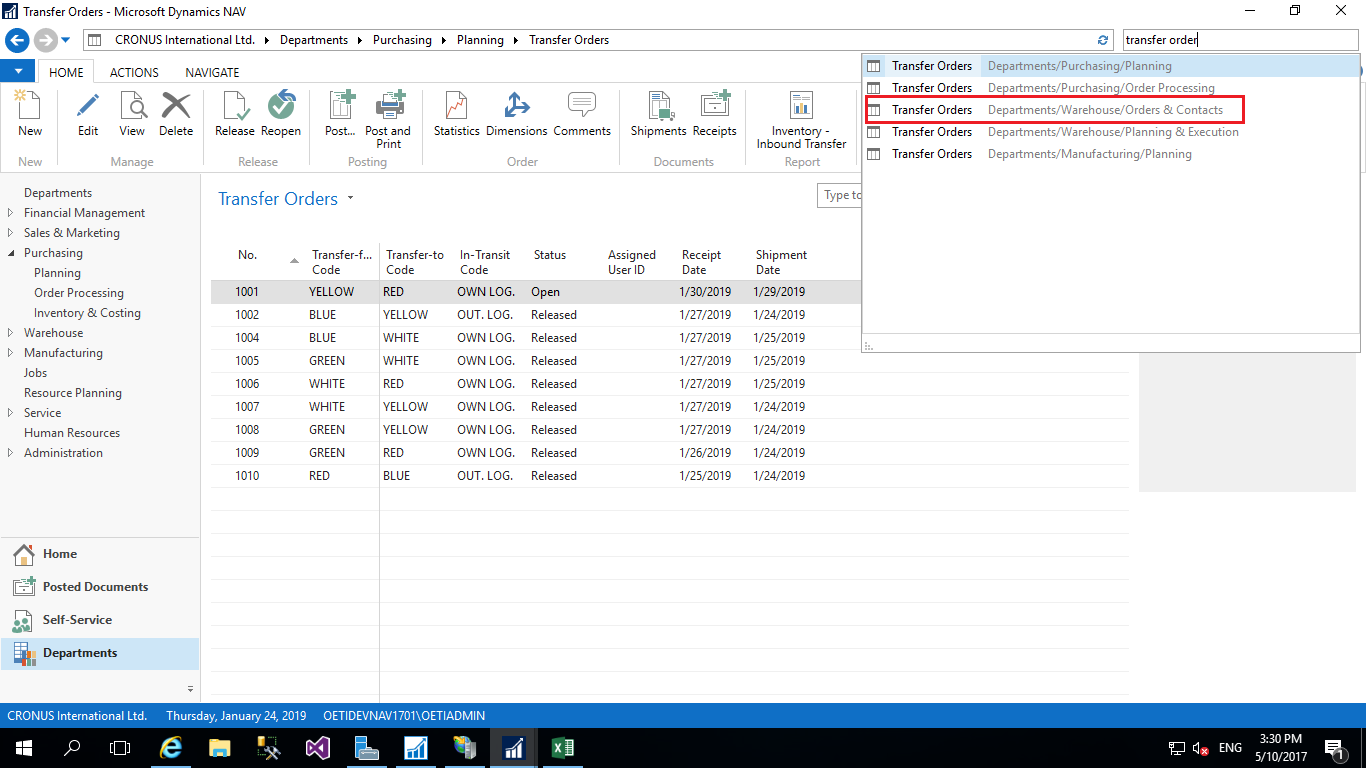
The lifecycle of a transfer order, from initiation to completion, is marked by a series of crucial dates. Each date signifies a particular stage in the process and provides valuable insights into the order’s progress, potential bottlenecks, and expected arrival times. NAV captures these dates to enable robust tracking and reporting.
Initiating the Transfer Order
The very inception of a transfer order involves setting a date that reflects when the need for the transfer was identified or when the order was formally created within the system. This initial date is important for historical record-keeping and for understanding the lead time from identification of need to action.
Order Date
The Order Date in NAV for a transfer order is the date on which the transfer order was created or entered into the system. This is the foundational date for the transfer order and serves as a reference point for all subsequent dates. It’s akin to the “creation date” for any business document.
- Purpose: It establishes the timeline of when the transfer was planned or requested. This is crucial for analyzing historical transfer patterns, identifying trends in stock movement requests, and for audit trails.
- Implications: A consistently late order date relative to the actual shipment date might indicate a backlog in the planning department or a delay in recognizing inventory needs. It also helps in calculating the age of open transfer orders.
- Usage: This date is typically auto-populated by the system when the transfer order is initiated but can be manually adjusted if necessary, though best practice is to maintain its integrity as the creation timestamp.
Planning and Scheduling the Transfer
Once an order is created, the next logical step is to plan when the transfer should occur. This involves determining when the goods should be picked, shipped, and ideally, received at the destination. NAV provides specific fields to capture these planning milestones.
Shipment Date
The Shipment Date represents the planned or actual date on which the goods are expected to leave the originating location or warehouse. This date is critical for coordinating logistics, notifying the receiving location, and managing outbound transportation.
- Purpose: To schedule the physical movement of goods. It informs the logistics team about when to prepare shipments, book carriers, and coordinate loading activities. It also sets expectations for the receiving warehouse regarding incoming inventory.
- Implications: Deviations from the planned shipment date can significantly impact delivery schedules. If the shipment date is consistently missed, it could point to issues with picking, packing, or warehouse capacity at the originating location. It also affects downstream processes like sales order fulfillment if the transferred items are intended for specific customer orders.
- Usage: This date can be a planned date initially entered by the user, and then updated to the actual shipment date once the goods have physically departed. This dual-purpose nature allows for both proactive planning and retrospective tracking.
Expected Receipt Date
The Expected Receipt Date is a projection of when the goods are anticipated to arrive at the destination warehouse. This date is vital for the receiving location to prepare for the incoming inventory, schedule receiving personnel, and allocate space.
- Purpose: To manage receiving operations effectively and to communicate expected inventory availability to the destination location. It allows for better resource planning at the receiving end and helps avoid disruptions caused by unexpected arrivals or significant delays.
- Implications: Inaccurate expected receipt dates can lead to under- or over-staffing at the receiving dock, inefficient space utilization, and potential stock-outs if expected inventory doesn’t arrive on time. It’s also crucial for downstream sales forecasting and production planning at the receiving location.
- Usage: This date is typically calculated based on the shipment date and estimated transit times, but it can also be manually adjusted based on specific carrier information or known logistical constraints. It should be regularly reviewed and updated as actual transit progresses.
Tracking the Physical Movement and Confirmation
As the transfer order moves through its physical stages, it’s imperative to record when these events actually occur. NAV provides fields to capture these definitive moments, moving beyond planning to actual execution.
Recording the Actual Transfer of Goods
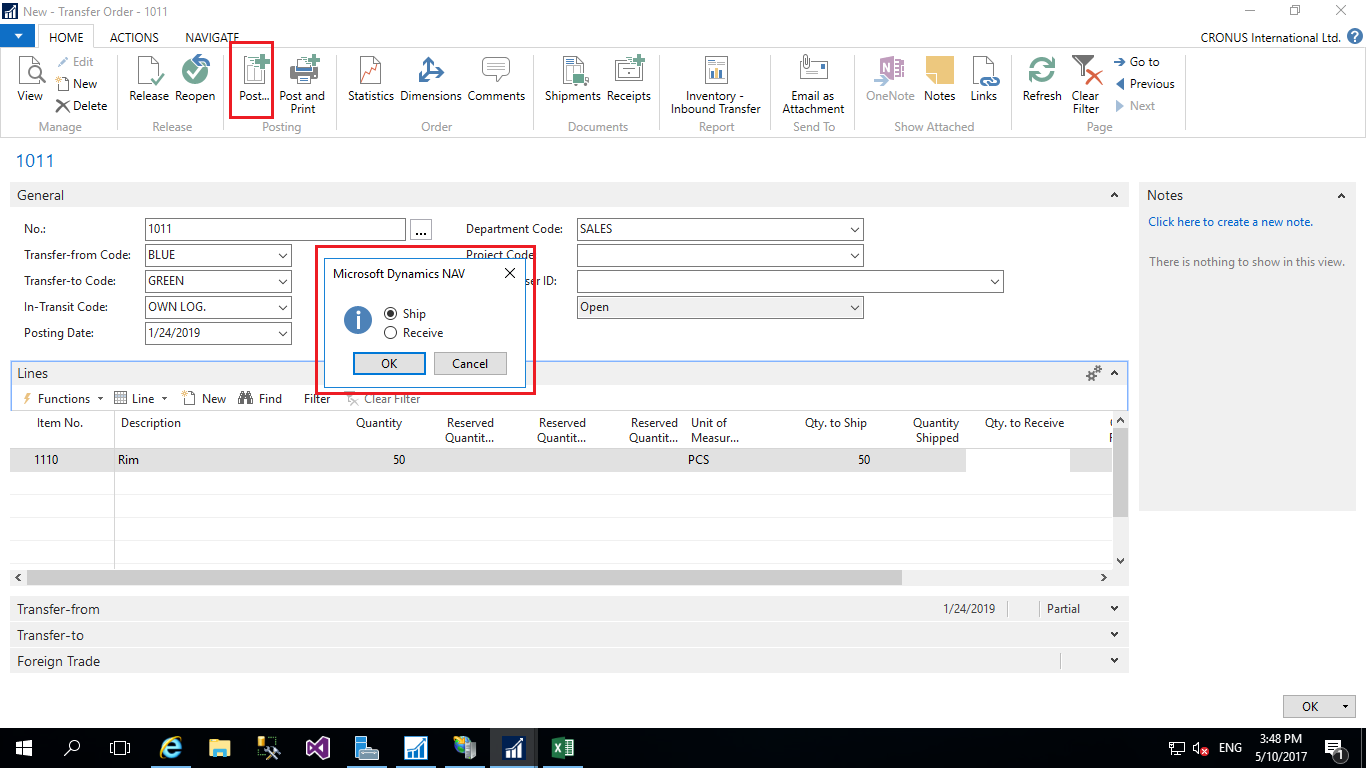
Once goods have left the originating location and arrived at the destination, it’s essential to update the system to reflect these real-world events. This accuracy is key for inventory valuation, stocktaking, and financial reporting.
Shipment Date (Actual)
While the Shipment Date can initially be a planned date, it is often updated to reflect the actual date the goods were shipped. This distinction is crucial for accurate performance analysis and for triggering subsequent system processes.
- Purpose: To record the definitive moment the inventory left the originating location. This provides a factual basis for calculating transit times and for reconciling inventory records.
- Implications: The actual shipment date is a key performance indicator (KPI) for logistics operations. Comparing it to the planned shipment date reveals operational efficiency and highlights any delays. It also affects the calculation of lead times.
- Usage: This field is updated once the physical shipment has been confirmed. Many NAV configurations can automatically update this field upon the posting of a shipment document related to the transfer order.
Receipt Date
The Receipt Date is the date on which the goods are officially received at the destination warehouse. This marks the point at which the inventory becomes available for use, sale, or further processing at the receiving location.
- Purpose: To signify the completion of the inbound transit and the acceptance of goods into the receiving location’s inventory. This is vital for updating inventory levels, triggering put-away processes, and for financial reconciliation.
- Implications: An accurate receipt date is fundamental for ensuring that inventory records are up-to-date. It impacts stock counts, availability for sales orders, and the valuation of inventory at the receiving location. Delays in recording receipt dates can lead to discrepancies during stocktakes.
- Usage: This date is typically entered when the goods are physically received and processed by the receiving team. Similar to the shipment date, it can often be automatically updated when the receiving transaction is posted in NAV.
Additional Date Fields and Their Significance
Beyond the core dates directly tied to the physical movement, NAV may offer or imply other date-related considerations that contribute to the comprehensive management of transfer orders.
Dates Influencing Reporting and Analysis
While not always explicitly labeled as “date fields” for transfer orders, certain dates within the NAV system context can influence reporting and analysis related to these orders.
Posting Date
The Posting Date is the date on which a financial transaction related to the transfer order is recorded in the general ledger. For transfer orders, this typically relates to the costing of the inventory movement.
- Purpose: To ensure that inventory costs and related financial impacts are recognized in the correct accounting period. This is essential for accurate financial reporting and for maintaining the integrity of the general ledger.
- Implications: The posting date dictates which accounting period the cost of goods being transferred falls into. This can affect profit margins reported in a given period and is critical for month-end and year-end closing processes.
- Usage: This date is usually set to the system date or the date of the transaction (shipment or receipt) but can be adjusted to align with specific accounting period requirements. It’s a critical field for accountants and financial controllers.
Document Date
The Document Date is often associated with the source document that initiated the transfer, or it could be the date of an invoice related to transportation costs. While less directly tied to the physical transfer itself, it’s part of the overall transaction record.
- Purpose: To provide a reference for the date on the underlying documentation, such as a packing slip or a carrier invoice. This aids in matching documents and verifying the accuracy of transactions.
- Implications: Ensures that all associated documentation is correctly dated and aligned with the system’s transaction dates for audit and reconciliation purposes.
- Usage: This date is pulled from the external document or can be manually entered to align with the source information.
In conclusion, the effective management of transfer orders in Microsoft Dynamics NAV hinges on a clear understanding and accurate utilization of its available date fields. From the initial Order Date to the planned Shipment Date and Expected Receipt Date, and further to the actual Shipment Date and Receipt Date, each date plays a distinct role. Furthermore, understanding associated dates like the Posting Date and Document Date ensures that the entire process, from logistical planning to financial accounting, is robust and transparent. By diligently managing these dates, businesses can achieve greater visibility into their inter-warehouse movements, optimize inventory levels, improve delivery reliability, and ultimately, enhance their overall supply chain efficiency.
aViewFromTheCave is a participant in the Amazon Services LLC Associates Program, an affiliate advertising program designed to provide a means for sites to earn advertising fees by advertising and linking to Amazon.com. Amazon, the Amazon logo, AmazonSupply, and the AmazonSupply logo are trademarks of Amazon.com, Inc. or its affiliates. As an Amazon Associate we earn affiliate commissions from qualifying purchases.