
Understanding what constitutes “good” internet speed, measured in megabits per second (Mbps), is crucial in today’s digitally saturated world. It directly impacts everything from your ability to stream high-definition video without interruption to the efficiency of your online work or the responsiveness of your online gaming. This isn’t a one-size-fits-all answer; what’s considered good internet speed is highly dependent on your individual needs and how you utilize your internet connection. This article delves into the technical aspects of internet speed, breaks down the Mbps metric, and helps you determine what speed is appropriate for your household and online activities.

Understanding the Building Blocks: Mbps and Your Internet Connection
The internet speed you pay for is typically advertised as a download and upload speed, measured in Mbps. It’s essential to grasp what these numbers represent and how they translate into real-world performance.
Megabits vs. Megabytes: A Crucial Distinction
Before we dive into specific speed recommendations, it’s vital to clarify a common point of confusion: the difference between megabits (Mb) and megabytes (MB). This distinction is fundamental to understanding download and upload speeds.
- Megabit (Mb): This is the unit used to measure data transfer rates, particularly internet speed. There are 8 megabits in 1 megabyte. When your internet provider advertises a 100 Mbps download speed, it means your connection can theoretically download 100 million bits of data per second.
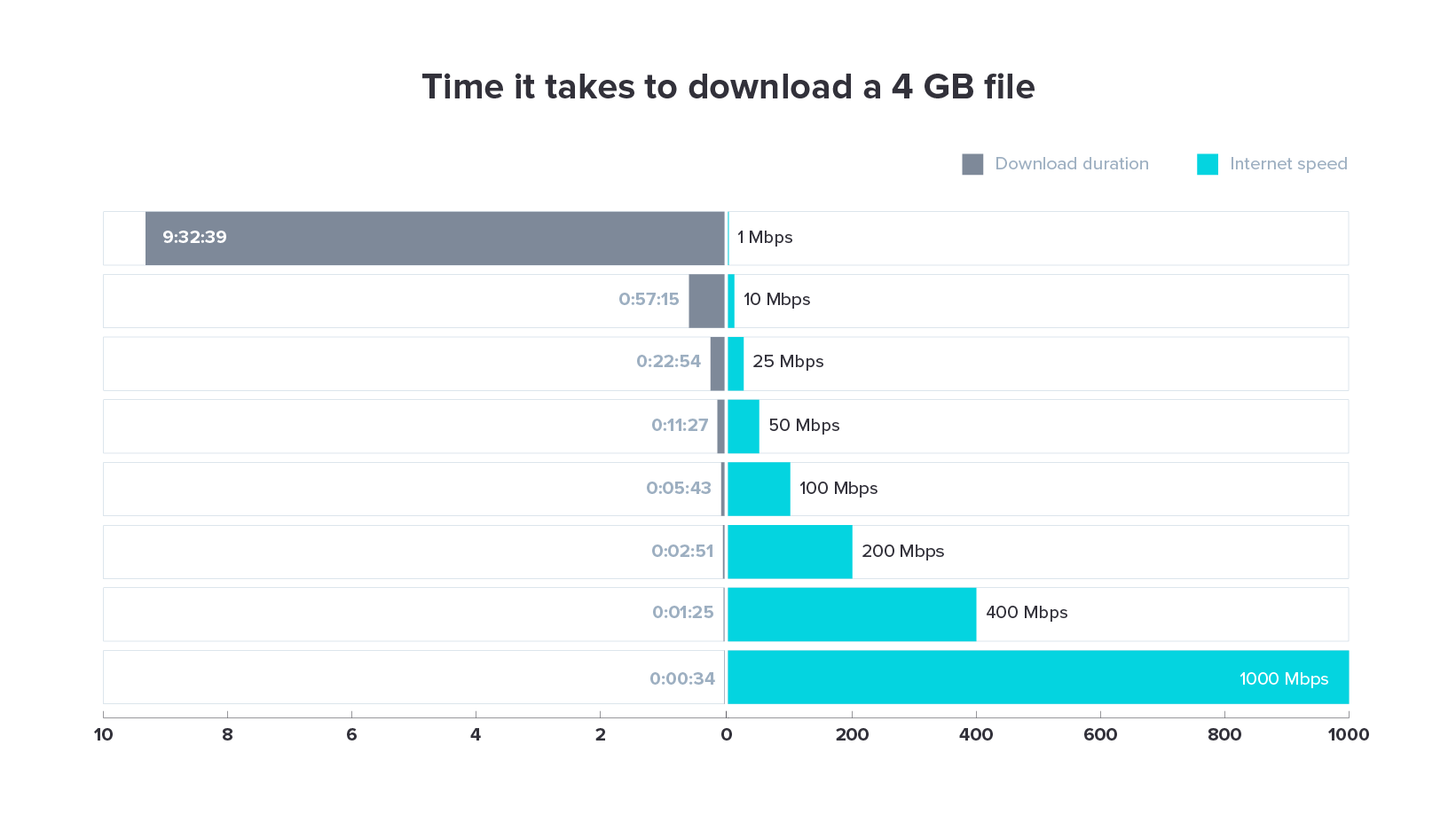
- Megabyte (MB): This is a unit of data storage. A typical high-definition movie might be several gigabytes (GB) in size, and 1 GB is equal to 1024 MB. Understanding this conversion is key when estimating how long it will take to download a file. For example, a 100 Mbps connection will take approximately 80 seconds (100 Mb / 8 bits/MB = 12.5 MB/s; 1000 MB / 12.5 MB/s = 80 seconds) to download a 10 MB file. This seemingly small distinction can lead to significant misunderstandings if not properly addressed.
Download vs. Upload Speed: Different Roles, Equal Importance
Internet speed is comprised of two primary components: download speed and upload speed. Each plays a distinct and critical role in your online experience.
- Download Speed: This is the speed at which data is transferred from the internet to your device. It’s the most commonly advertised metric and is crucial for activities like streaming videos, browsing websites, downloading files, and loading online content. The higher your download speed, the faster these tasks will be completed, and the smoother your experience will be, especially with bandwidth-intensive applications.
- Upload Speed: This is the speed at which data is transferred from your device to the internet. It’s essential for activities like sending emails with large attachments, uploading photos and videos to social media or cloud storage, participating in video conferences, and online gaming where your actions need to be sent to the game server. While often lower than download speeds, a decent upload speed is becoming increasingly important for modern internet usage.
Factors Influencing Your Actual Internet Speed
The advertised Mbps speed from your Internet Service Provider (ISP) is often the theoretical maximum. Several factors can influence the actual speed you experience:
- Your Internet Plan: The most direct determinant of your speed is the plan you subscribe to. Higher-tier plans offer faster speeds.
- Your Router and Modem: Older or less capable hardware can create a bottleneck, preventing you from reaching the speeds your plan offers. Wi-Fi technology also plays a significant role; Wi-Fi 6 (802.11ax) offers significantly faster speeds and better performance than older standards like Wi-Fi 5 (802.11ac).
- Network Congestion: Just like traffic on a highway, internet traffic can become congested, especially during peak hours. This can slow down speeds for everyone in your area.
- Number of Connected Devices: Each device on your network consumes bandwidth. The more devices actively using the internet simultaneously, the more the available bandwidth is divided, potentially leading to slower speeds for each device.
- Wi-Fi Signal Strength and Interference: The further you are from your router, the weaker the Wi-Fi signal, and thus the slower your speed. Obstructions like walls and other electronic devices can also interfere with Wi-Fi signals.
- Website/Server Limitations: Sometimes, the bottleneck isn’t your internet connection but the server you are trying to access. A slow server will result in slow loading times, regardless of your internet speed.
Gauging Your Needs: What Speeds Are Sufficient for Various Activities?
Determining “good” internet speed hinges on understanding how you use the internet. Different activities have varying bandwidth requirements.
Everyday Browsing and Email: The Baseline
For basic internet usage, such as checking emails, browsing websites, and social media, you don’t need exceptionally high speeds.
- Download Speed: 5-10 Mbps is often sufficient for these activities. This allows web pages to load reasonably quickly and emails to be sent and received without significant delay.
- Upload Speed: 1-3 Mbps is generally adequate for sending emails and basic social media posts.
However, even for these basic tasks, exceeding this baseline can significantly improve the user experience by making everything feel more instantaneous.
Streaming Video: The Bandwidth Consumer
Video streaming is one of the most bandwidth-intensive activities for most households. The quality of the stream directly impacts the required speed.
- Standard Definition (SD) Streaming: Typically requires around 3-5 Mbps download speed.
- High Definition (HD) Streaming: Requires at least 5-8 Mbps download speed per stream. For a smooth, buffer-free experience, 10-25 Mbps download is recommended, especially if multiple people are streaming in HD simultaneously.
- 4K Ultra HD (UHD) Streaming: This is where speeds become more critical. 4K content demands significantly more data, with recommendations often starting at 25 Mbps and ideally being 50 Mbps or higher for multiple 4K streams or a truly seamless experience.
If you have a household with multiple people who enjoy streaming, especially in HD or 4K, you’ll want to aim for higher download speeds to accommodate everyone’s needs without compromise.
Online Gaming: Latency and Bandwidth
Online gaming requires both sufficient bandwidth and, perhaps more importantly, low latency. Latency, often measured in milliseconds (ms), refers to the delay between your input and the server’s response. High latency (lag) can make online gaming frustrating, even with high download speeds.
- Download Speed: For most online gaming, 10-25 Mbps download speed is generally sufficient. Many games themselves don’t consume a massive amount of continuous bandwidth, but they require consistent, stable data flow.
- Upload Speed: 3-5 Mbps upload speed is often recommended, especially if you plan to stream your gameplay or engage in voice chat.
- Latency: While not directly measured in Mbps, low ping (latency) is paramount for a good gaming experience. Aim for ping times under 50 ms, with ideally under 20 ms.
A stable connection with lower latency is often more critical for gaming than raw, exceptionally high download speeds.
Video Conferencing and Remote Work: The Importance of Upload Speed
The rise of remote work and the increased reliance on video conferencing have highlighted the importance of upload speeds.
- Download Speed: For standard video conferencing, 5-10 Mbps download is usually adequate. For HD video calls, aim for 10-15 Mbps download.
- Upload Speed: This is where things get more demanding. A good quality video conference requires a stable upload stream. For basic video calls, 3-5 Mbps upload might suffice. However, for professional use, especially with multiple participants or if you’re sharing your screen frequently, 10-25 Mbps upload speed is highly recommended for a clear and consistent video and audio experience.
If your work or studies heavily involve video calls or uploading large files, prioritizing a plan with a strong upload component is crucial.
Simultaneous Usage: The Household Factor
The “good” internet speed for a single person living alone will be vastly different from a busy household with multiple occupants. The key is to consider the aggregate bandwidth demand.
- Single User: 25-50 Mbps download is generally more than enough for most single users.
- Couple/Small Family (2-3 people): 50-100 Mbps download is a good starting point, especially if streaming or gaming is common.
- Larger Family/Heavy Usage (4+ people): 100-300 Mbps or even higher download speeds are recommended to ensure everyone can use the internet concurrently without significant performance degradation.
When evaluating your household’s needs, think about all the devices that will be online and what they’ll be doing simultaneously.
How to Test Your Internet Speed and What to Do with the Results
Knowing your current internet speed is the first step to identifying if it’s “good” for your needs. Several free online tools can help you measure your connection.
Popular Speed Test Tools
These online tools are user-friendly and provide quick results:
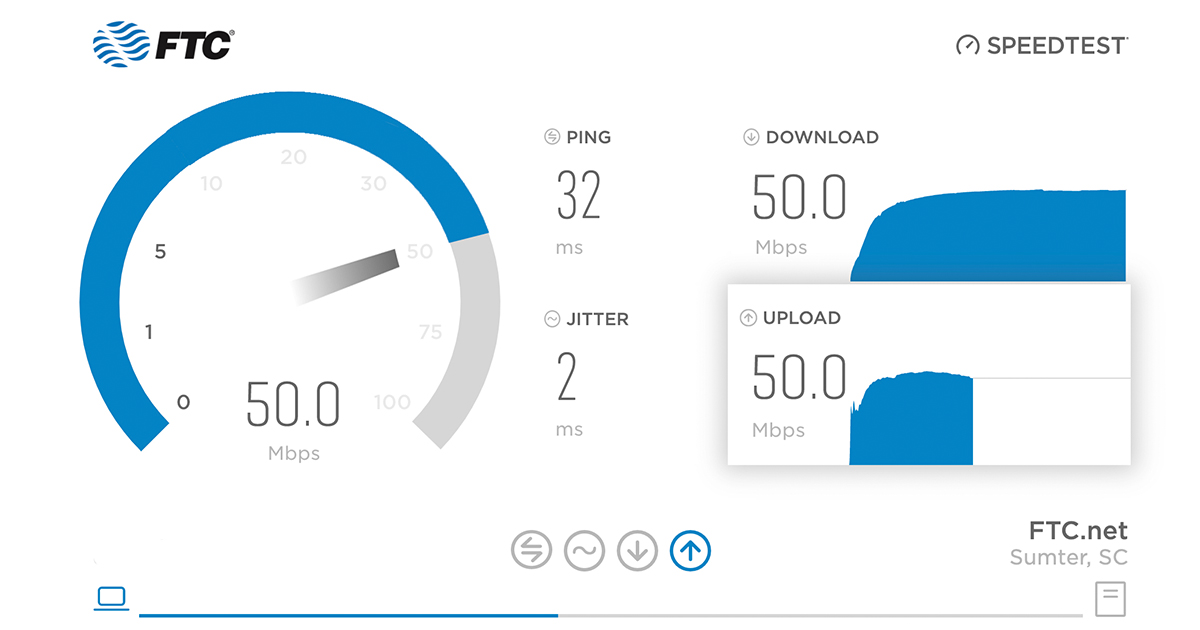
- Ookla Speedtest: One of the most popular and reliable speed testing platforms, offering both a website and mobile app. It measures download speed, upload speed, and ping (latency).
- Fast.com: Developed by Netflix, this tool is particularly useful for assessing your internet’s capability for streaming video, as it’s optimized to test the speeds required for Netflix.
- Google’s Internet Speed Test: Simply searching “internet speed test” on Google will often bring up a built-in tool that provides a quick measurement of your connection.
When performing a speed test, it’s best to do so during different times of the day and on a device connected directly to your router via an Ethernet cable for the most accurate results. Wi-Fi speeds can fluctuate more due to signal strength and interference.
Interpreting Your Speed Test Results
Once you have your speed test results, compare them against the recommended speeds for your typical activities.
- If your speeds are consistently lower than what you need: This is where you might consider upgrading your internet plan. Contact your ISP to explore available higher-speed options in your area.
- If your speeds are as advertised but still not meeting your needs: The issue might lie with your home network. Consider upgrading your router, ensuring it’s placed in a central location, and checking for potential Wi-Fi interference.
- If speeds are inconsistent or fluctuate wildly: This could indicate network congestion in your area, an issue with your ISP’s equipment, or problems within your home network. Troubleshooting steps might include restarting your modem and router, checking for firmware updates, or contacting your ISP.
Understanding Mbps for Your Specific Use Cases
To reiterate, the definition of “good” internet speed in Mbps is entirely subjective and dependent on individual circumstances.
- For the casual user: A download speed of 25-50 Mbps and an upload speed of 5-10 Mbps might be perfectly adequate.
- For a household of streamers and gamers: You’ll likely want to aim for at least 100-300 Mbps download and 20-50 Mbps upload to ensure a smooth experience for everyone.
- For professionals working remotely with heavy video conferencing and large file transfers: A minimum of 100 Mbps download and 25-50 Mbps upload would be a prudent choice.
By understanding the metrics, your own usage patterns, and the tools available to measure your connection, you can make informed decisions about your internet service and ensure you’re getting the speed you need to stay connected, productive, and entertained.
aViewFromTheCave is a participant in the Amazon Services LLC Associates Program, an affiliate advertising program designed to provide a means for sites to earn advertising fees by advertising and linking to Amazon.com. Amazon, the Amazon logo, AmazonSupply, and the AmazonSupply logo are trademarks of Amazon.com, Inc. or its affiliates. As an Amazon Associate we earn affiliate commissions from qualifying purchases.