
The term “incognito” evokes images of spies, secret agents, and clandestine operations. In the context of our digital lives, however, it refers to a fundamental feature of web browsers designed to enhance privacy and control our online footprint. While often misunderstood or oversimplified, understanding what incognito mode truly means is crucial for navigating the internet safely and effectively. It’s not a magical cloak of invisibility, but rather a specific set of functionalities that alter how your browser interacts with your local device and, to a limited extent, with websites you visit.
At its core, incognito mode, also known by various brand-specific names like “Private Browsing” (Firefox, Safari) or “InPrivate” (Microsoft Edge), is a browser setting that prevents your browsing activity from being saved on your local machine. This means that after you close all incognito windows, your browser will not retain a history of the websites you visited, the search queries you made, or the cookies it collected during that session. This distinction is paramount: incognito mode primarily affects what is stored on your device, not necessarily your online presence as a whole.
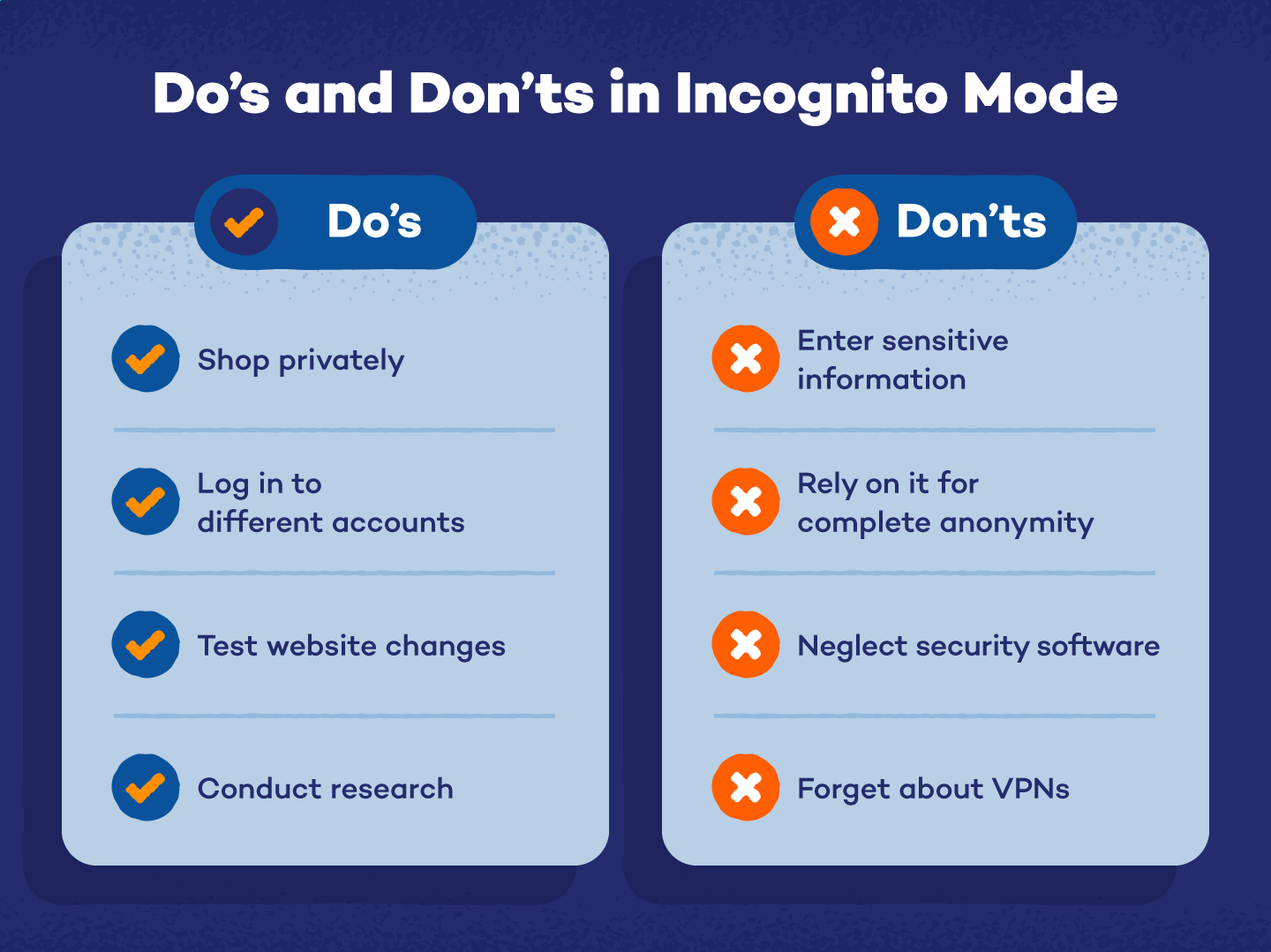
The Mechanics of Incognito Mode: What It Does and Doesn’t Do
To truly grasp the implications of incognito mode, we need to delve into its specific functionalities and limitations. It’s a nuanced feature, and distinguishing between its protective capabilities and its inherent inabilities is key to leveraging it effectively.
Local Data Exclusion
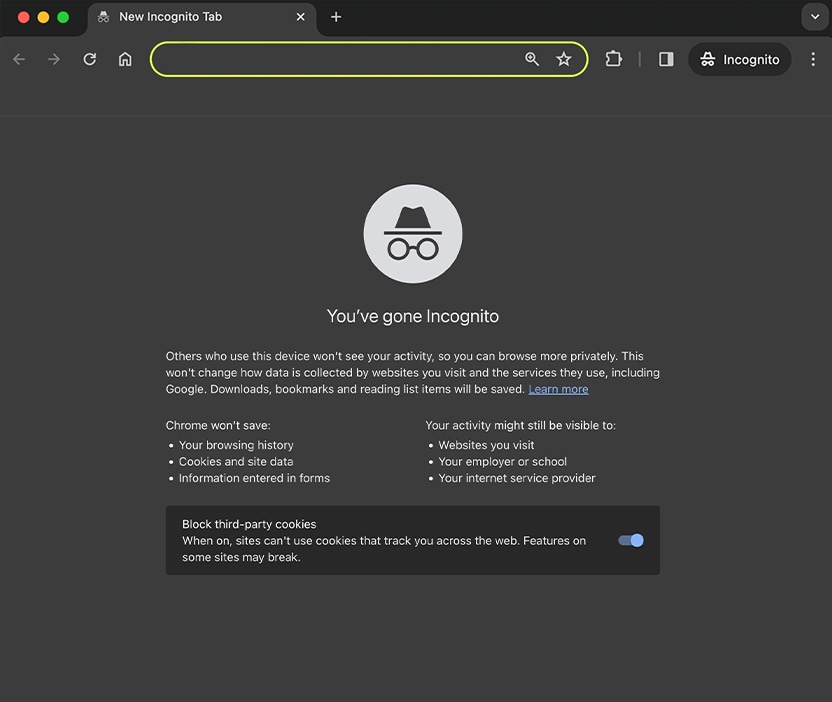
The most significant function of incognito mode is its meticulous approach to local data. When you browse in this mode, your web browser adheres to a strict policy of not saving information that could be used to track your activity on your own computer.
Browsing History Elimination
Every time you navigate to a website, your browser records this action in its history log. This log serves as a convenient reference point, allowing you to revisit previously accessed pages. In incognito mode, this history log is bypassed entirely for the duration of the session. Once all incognito windows are closed, the record of every URL you visited within that session is permanently deleted from your device’s browsing history. This is particularly useful if you’re using a shared computer or simply wish to keep your browsing habits private from others who might access your device.
Cookie Management and Session Data
Cookies are small text files that websites store on your device to remember information about you. This can include login credentials, user preferences, items in a shopping cart, and tracking data. In incognito mode, new cookies generated during a session are temporary. They are stored in a separate, ephemeral storage area and are automatically deleted when you close all incognito windows. This prevents websites from creating persistent profiles of your browsing habits across multiple sessions, offering a degree of anonymity from third-party trackers. However, it’s important to note that cookies already present on your device from regular browsing sessions may still be accessible to websites you visit in incognito mode if you log into accounts that utilize them.
Form Data and Search Queries
When you fill out forms on websites or enter search queries into search engines, your browser often saves this information for auto-completion purposes. Incognito mode also intercepts this data. Any information you type into form fields, such as usernames, addresses, or payment details, will not be saved for future auto-completion in your regular browsing profile. Similarly, your search queries will not be added to your browser’s search history. This is beneficial for maintaining privacy, especially when dealing with sensitive information or when using public computers.
The Limits of Incognito: What Your ISP and Websites Still See
Despite its privacy-enhancing features, incognito mode is not a shield against all forms of online tracking. It’s crucial to understand that its protections are primarily confined to your local device. Your internet service provider (ISP), the websites you visit, and your employer (if you’re using a work network) can still monitor your online activities.
Internet Service Provider (ISP) Visibility
Your ISP is the gateway through which your internet traffic flows. Regardless of whether you are browsing in incognito mode or not, your ISP can see the IP addresses of the websites you visit, the amount of data you consume, and the general nature of your online activity. They are required to maintain records of this information for legal and regulatory purposes. Incognito mode does not encrypt your traffic or hide your IP address from your ISP. If you require true anonymity from your ISP, you would need to use a Virtual Private Network (VPN).
Website Tracking and Server Logs
Websites themselves can still track your activity. When you visit a website, your IP address is visible to the web server hosting that site. Websites can also use techniques beyond cookies, such as browser fingerprinting (collecting unique characteristics of your browser and device), to identify and track you, even in incognito mode. If you log into an account on a website (e.g., your Google account, Facebook account, or any other service), the website will know it’s you, regardless of whether you are in incognito mode. This is because your login credentials authenticate your identity directly with the website’s servers.
Network Administrators and Employers
If you are connected to a network controlled by an employer or an educational institution, network administrators can monitor your internet activity. This is often done for security purposes, to ensure compliance with acceptable use policies, or to manage network resources. Incognito mode does not bypass these network-level monitoring systems. Therefore, any activity performed on a work or school network, even in incognito mode, can potentially be logged and reviewed by the network administrator.
Practical Applications and Use Cases for Incognito Mode
Understanding what incognito mode is naturally leads to exploring why and when one might choose to use it. Its functionalities lend themselves to a variety of practical scenarios, catering to both personal privacy and practical browsing needs.
Personal Privacy and Security
The most common impetus for using incognito mode is the desire for enhanced personal privacy. This desire stems from various motivations, from everyday convenience to protecting sensitive information.
Browsing on Shared or Public Computers
Using a public computer, such as those found in libraries, internet cafes, or at a friend’s house, presents unique privacy risks. By using incognito mode, you ensure that your browsing history, saved passwords, and any personal information you might have inadvertently entered are not left behind for the next user to find. This is a fundamental step in safeguarding your digital footprint in shared environments.
Avoiding Targeted Advertising and Price Discrimination
Online retailers and advertisers often use cookies and browsing history to track your interests and present you with targeted advertisements. Some platforms also engage in price discrimination, where prices for products or services might be subtly adjusted based on your perceived willingness to pay, often inferred from your browsing behavior. Using incognito mode can help mitigate this by preventing websites from building a persistent profile of your interests and past purchases, potentially leading to a more neutral browsing experience and a fairer pricing landscape.
Researching Sensitive Topics
For individuals researching sensitive or personal topics, such as medical conditions, financial planning, or personal legal matters, incognito mode provides an extra layer of discretion. It prevents these searches from appearing in your personal browsing history, which could be accessed by family members or others with whom you share a device. This allows for more private and uninhibited exploration of personal information.
Practical Browsing Scenarios
Beyond direct privacy concerns, incognito mode offers several practical benefits for everyday web browsing.
Logging into Multiple Accounts Simultaneously
Have you ever needed to be logged into two different accounts for the same service at the same time? For instance, logging into your personal Gmail account and your work Gmail account simultaneously. Incognito mode can be incredibly useful here. Because it isolates cookies and session data, you can log into one account in your regular browser window and another in an incognito window without them interfering with each other. This avoids the need to constantly log out and log back in.
Testing Website Appearance and Functionality for Different Users
For web developers, designers, or anyone managing a website, incognito mode is an invaluable tool for testing. By clearing cookies and session data, it allows them to see how a website appears to a first-time visitor or a user with no prior interaction history. This helps in identifying any display issues, ensuring that default settings are applied correctly, and simulating a clean user experience.
Comparing Prices and Deals Without Persistent Tracking
When shopping online, it’s common to compare prices across different retailers. If you repeatedly visit the same product page on a retailer’s site, some may eventually increase prices, anticipating your interest. Using incognito mode for price comparison shopping can help you obtain a more objective view of current pricing, free from the influence of your previous visits and browsing patterns.
Beyond Incognito: Exploring Advanced Privacy Tools
While incognito mode is a valuable tool for enhancing local privacy, it’s important to recognize its limitations. For users seeking a more robust and comprehensive approach to online privacy and anonymity, a suite of other tools and practices can be employed. Understanding these alternatives allows for a more informed and secure browsing experience in an increasingly interconnected world.
Virtual Private Networks (VPNs)
A Virtual Private Network (VPN) offers a significantly higher level of privacy and security than incognito mode. When you connect to a VPN, your internet traffic is routed through an encrypted tunnel to a remote server operated by the VPN provider.
Encrypting Your Internet Traffic
The primary function of a VPN is to encrypt your internet connection. This means that all data sent and received from your device is scrambled, making it unreadable to anyone who might intercept it, including your ISP, hackers on public Wi-Fi, or government surveillance. This encryption provides a strong barrier against snooping.
Masking Your IP Address
When you use a VPN, your real IP address is replaced with the IP address of the VPN server you are connected to. This makes it much harder for websites and online services to track your location and identify your browsing activity back to your specific device or person. It effectively masks your digital identity from the external world.
Accessing Geo-Restricted Content
By connecting to VPN servers in different geographical locations, you can bypass geo-restrictions and access content that might otherwise be unavailable in your region. This is useful for streaming services, news websites, and other online platforms that limit access based on location.
The Tor Browser: For Deep Anonymity
For those who require the highest level of anonymity, the Tor Browser offers a specialized solution. Tor, which stands for “The Onion Router,” is a network designed to anonymize internet traffic by bouncing it through a series of volunteer-operated relays.
Layered Encryption (Onion Routing)
Tor uses a technique called “onion routing,” where data is encrypted in multiple layers, like the layers of an onion. Each relay in the Tor network decrypts one layer of encryption to know where to send the data next, but not the original sender or the final destination. This makes it extremely difficult to trace the origin or destination of the traffic.
Circumventing Censorship and Surveillance
The anonymity provided by Tor makes it a powerful tool for journalists, activists, whistleblowers, and individuals living in countries with strict internet censorship or surveillance. It allows them to communicate and access information freely without fear of reprisal.
Performance Considerations
While Tor offers exceptional anonymity, it often comes at the cost of speed. The multiple layers of encryption and routing through various relays can significantly slow down your internet connection. Therefore, it’s typically used for specific situations where anonymity is paramount, rather than for everyday browsing.
Best Practices for Digital Privacy
Beyond specific tools, adopting sound digital hygiene practices is essential for maintaining privacy online. These habits, combined with the judicious use of incognito mode and other privacy tools, create a more secure and private digital life.
Strong and Unique Passwords
Using strong, unique passwords for all your online accounts is a fundamental security measure. Password managers can help you generate and store complex passwords, reducing the risk of account compromise through weak or reused credentials.
Enabling Two-Factor Authentication (2FA)
Two-factor authentication adds an extra layer of security to your accounts by requiring a second form of verification, such as a code from your phone, in addition to your password. This significantly reduces the risk of unauthorized access even if your password is stolen.
Being Mindful of Social Media Sharing
Social media platforms are designed to share information. Be conscious of what personal data you share publicly, as it can be used by marketers, data brokers, or even malicious actors. Regularly review your privacy settings on these platforms to control who can see your information.

Regularly Updating Software
Software updates often include security patches that fix vulnerabilities exploited by hackers. Keeping your operating system, web browsers, and other applications up to date is crucial for protecting your devices from malware and cyber threats.
In conclusion, incognito mode is a valuable browser feature that offers a significant improvement in local privacy by preventing the saving of browsing history, cookies, and form data on your device. However, it’s vital to understand its limitations and recognize that it does not provide complete online anonymity. By combining incognito mode with other privacy-enhancing tools like VPNs and the Tor Browser, and by adopting strong digital hygiene practices, individuals can significantly enhance their control over their online footprint and navigate the digital world with greater security and peace of mind.
aViewFromTheCave is a participant in the Amazon Services LLC Associates Program, an affiliate advertising program designed to provide a means for sites to earn advertising fees by advertising and linking to Amazon.com. Amazon, the Amazon logo, AmazonSupply, and the AmazonSupply logo are trademarks of Amazon.com, Inc. or its affiliates. As an Amazon Associate we earn affiliate commissions from qualifying purchases.